Gaming

Home Gaming Page 48

Everything new in the free Grounded 2 winter update

0
Everything new in the free Grounded 2 winter update


The big Grounded 2 winter update is just around the corner, and Obsidian gave an in-depth look at what to expect during a recent interview with YouTuber Jake Lucky. There’s a whole new region to get to grips with in the upcoming, free update (which Obsidian hasn’t announced a release date for yet), along with a wheelbarrow-full of new enemies and, of course, plenty of gear to craft from their sad, dead remains. And there’s also brand-new buggy to help cart you around and deal with all those threats.

Here’s what to expect from the Grounded 2 winter update when it goes live.

Welcome to the Garden


Image: Obsidian Entertainment via Gaming Interviews

The big new addition in Grounded 2’s winter update is a new region in the park — the Garden. Obsidian called the Garden the start of Grounded 2 and said the Picnic area, which is the starting zone, more of a tutorial meant to ease folks into the sequel by blending elements of the original Grounded. The Garden, however, they say is wholly unique, so expect more of a challenge from the bugs you find there, beyond even the praying mantis in the first zone.

A giant greenhouse seems to be the Garden’s centerpiece, complete with rows of exotic-looking plants and, probably, resources galore. It looks like the exterior is also going to play an important role. Obsidian said verticality is the guiding principle behind the Garden area, and if you look closely at the greenhouse from outside, you’ll see one of the roof panels is open, creating a conveniently horizontal platform for tiny humans to walk on.

In keeping with the garden theme, you’ll find vegetables popping up out of the ground, including carrots and potatoes, but also pumpkins. Obsidian said you can go inside pumpkins to collect resources, but while pumpkin seeds and the stringy insides seem like very Grounded-themed possibilities, the team didn’t say what those resources are or what you’ll use them for.

There’s also a scarecrow with a conspicuously placed power switch on its shoulder, so you can probably expect more trash-can style climbing there, too.

Fresh enemies, weapons, and armor
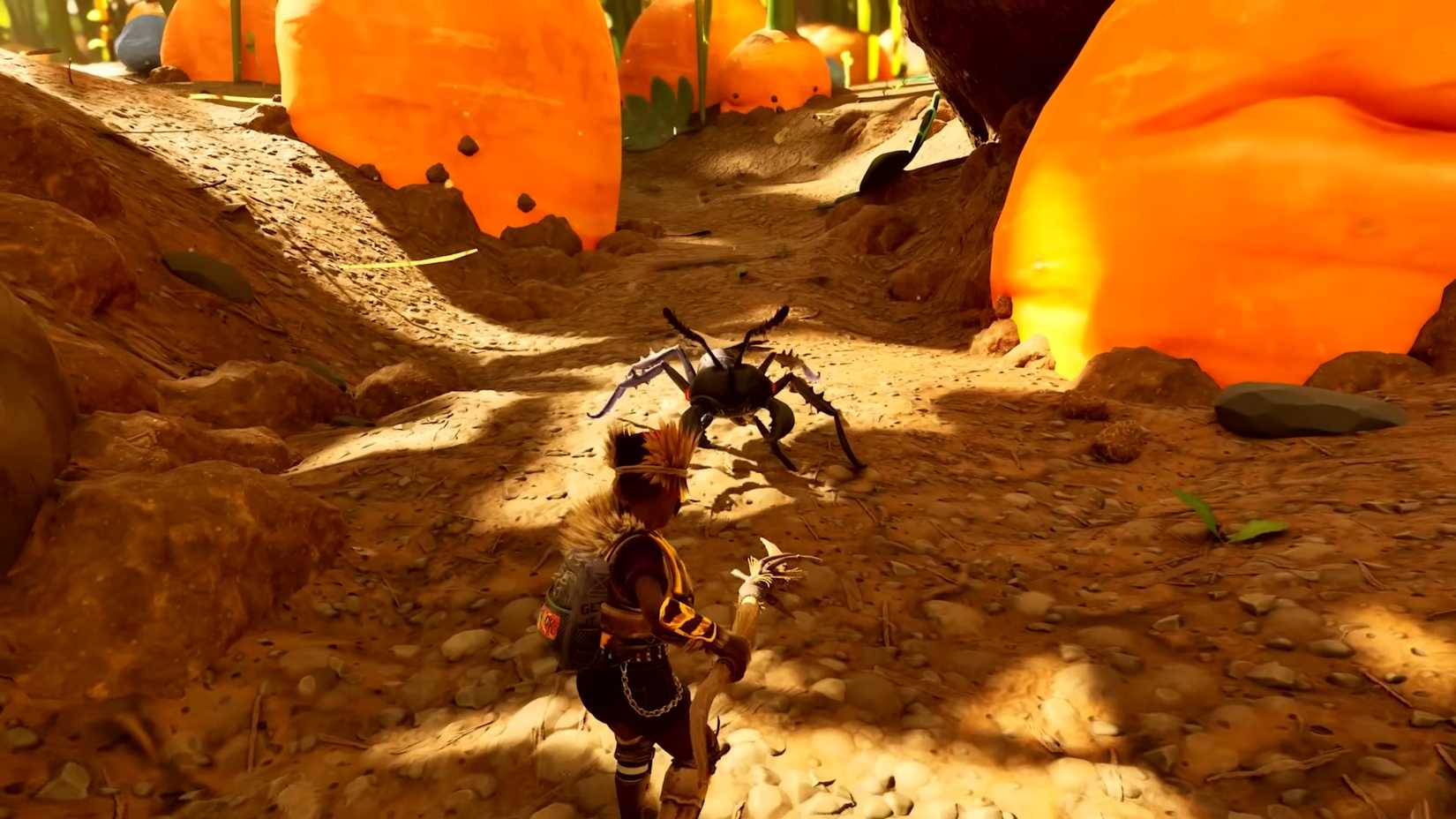
A Black Soldier Ant in Grounded 2
Image: Obsidian Entertainment via Gaming Interviews

New territory means new foes to contend with, and there’s a lot of ’em roaming around Grounded 2’s Garden. Some are totally new, a few, like the earwig, were cut from the original Grounded, and a handful return from the first game:

Earwig (ranged and melee)

Black Soldier Ant and Black Worker Ant

Wasp Drone and Wasp

Wooly Aphid

Cricket

Firefly

Rust Beetle

Potato Bug

Obsidian said the goal with these new enemies is to lean into patterns of attack unique to the bug in question. So, instead of generic thrusts and bites you face down from ants and larva in the Picnic area, you can expect unique battle strategies, such as the cricket relying on high-powered kicks and blocking projectiles with its legs.

Each new bug drops parts you can craft armor with, along with some new weapons. There’s also a set of weapons and armor that don’t seem tied to specific bug types:

Earwig armor and Earwig dual daggers

Black Ant sword, shield, and armor

Sour Mage armor and staff

Potato Bug armor

Wasp armor

Cricket armor and Cricket greatbow

Introducing the Ladybuggy
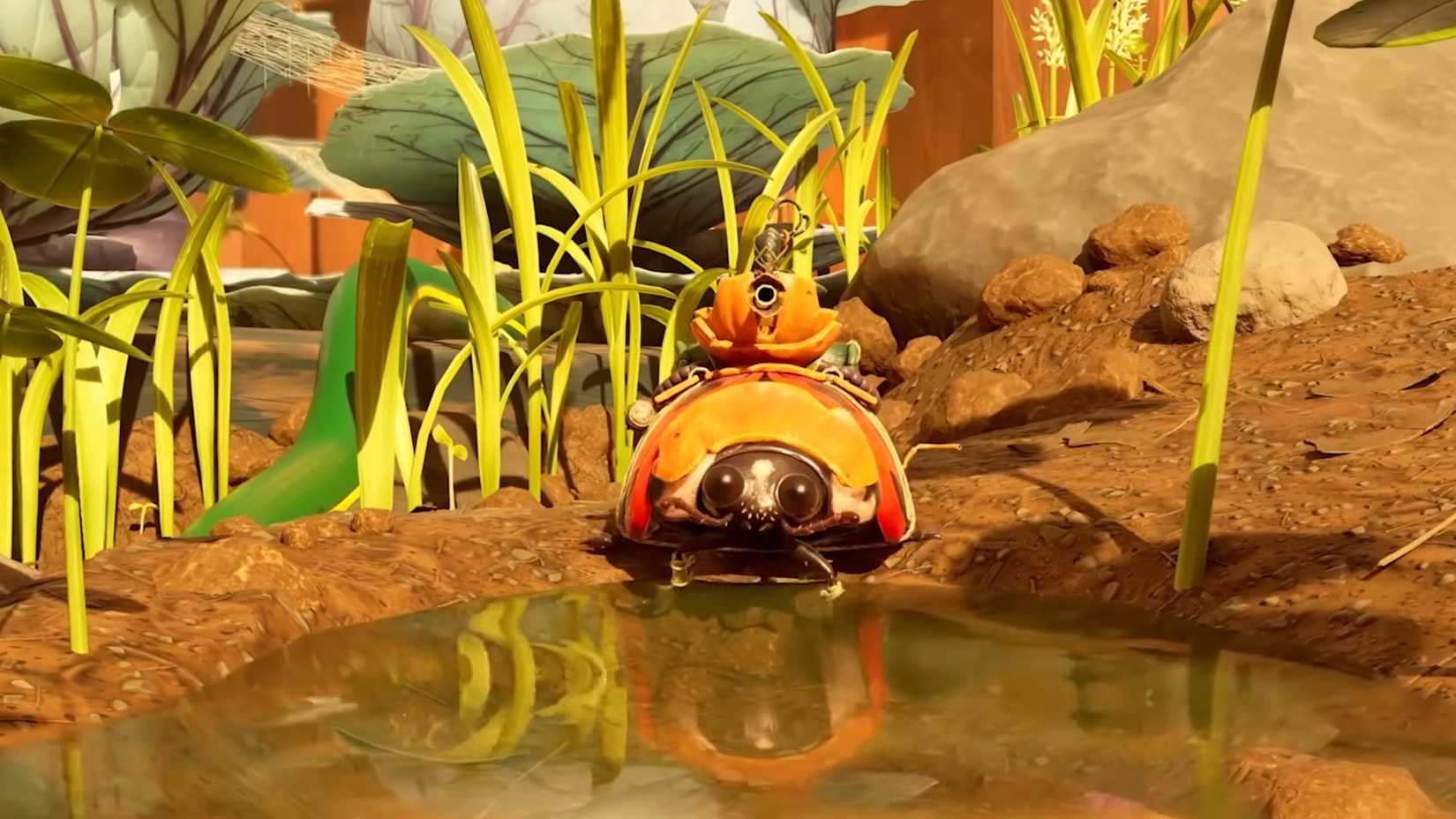
A Ladybuggy in Grounded 2
Image: Obsidian Entertainment via Gaming Interviews

The winter update includes a new buggy, the Ladybuggy, so you can finally trot around the park on the back of one of these docile spotted tanks. Acquiring a Ladybuggy means getting an egg first, like with Grounded 2’s other buggies, but Obsidian didn’t outline just what that quest will entail. Once you do have one, you’ll get the benefit of its bulk in a crushing charge attack, along with a water cannon to target airborne enemies.


Source link

Amazon-Exclusive Bluey Gnome Plush Bundle For Switch Is Nearly 50% Off

0
Amazon-Exclusive Bluey Gnome Plush Bundle For Switch Is Nearly 50% Off


Bluey fans can save big on an adorable Amazon-exclusive edition of the official video game based on the animated series. Bluey: The Videogame – Gnome Plush Bundle for Nintendo Switch is on sale for only $27 (was $50). The bundle launched October 17, so it’s probably not surprising that Amazon’s current price is the best yet. The standard physical edition of Bluey: The Videogame for Switch is on sale for $18 (was $40) at Amazon, so you’re only paying $9 more for the bundle edition.

The two exclusive Gnome plushies

Fans can also preorder the upcoming console version of Bluey’s Quest for the Gold Pen ahead of its June 25 launch. The Zelda-like adventure game released on iOS in December and just launched on Android January 10. The mobile version is free-to-try and costs $15 to unlock the full game. It earned a 7/10 in our Bluey’s Quest for the Gold Pen review. The Nintendo Switch 2 physical edition comes with the full game on the card, but it retails for $50, which is 10 bucks higher than versions for the original Switch, PS5, PS4, and Xbox.

For more Bluey deals, check out the Lego and Duplo Bluey playsets at Amazon. Released last June, the lineup includes models of the Heeler family’s home, a buildable playground, and more. The 382-piece Bluey’s Family House playset is on sale for $60 (was $70), and the Duplo version of the house is discounted to $62.50 (was $70). You can also save 10% on the 133-piece Bluey’s Beach & Family Car Trip.

If you don’t yet own the Bluey TV series on Blu-ray or DVD, all three seasons of the show are available for budget-friendly prices at Amazon. Bluey Seasons 1-3 on Blu-ray is discounted to $30 (was $50). Alternatively, you can buy the Seasons 1-3 box set on DVD for $25.29 (was $45). Each season of Bluey is also sold separately on DVD for $10 (was $20) each.

Sign up for GameSpot’s Weekly Deals Newsletter:


Source link

The Sims 4 gets a bunch of free items inspired by Coach that you can use right now

0
The Sims 4 gets a bunch of free items inspired by Coach that you can use right now


The Sims 4’s first update of the year is here, though it may not be quite what you might have expected. The game’s latest patch mainly centres around a collaboration with Coach, the luxury fashion brand.

This obviously isn’t the game’s first collaboration with a known brand, though this one does include a lot of free items and accessories that anyone can make use of, even if they don’t care about Coach.

Manage cookie settings

The Coach Collection brings nine new items to The Sims 4. They range from clothes and accessories you can use with Create a Sim, to decoration items available in Build Buy. There’s also The Carriage House, a new Gallery household where you can find three new roommates.

There’s a nice bit of variety in the options available, some casual and others more practical for your Sims to wear. Then there’s The Bag Room, which can also be grabbed from the Gallery. The room simply serves as a way for you to show off your Coach bags and trunks collection.

Watch on YouTube

In case you missed it, The Sims’ development team recently shared an update on some of what we can expect in 2026, both for The Sims 4 as well as other projects currently in the works. It even included further confirmation, if any was needed, that Project Rene is a dedicated mobile off-shoot, and not — as many had long believed — The Sims 5.

The blog post also included a statement about EA’s imminent change of ownership, which many fear could alter the series’ inclusive and diverse nature, and the decisions made by its various teams.


Source link

Arc Raiders Sells 12 Million, Nerfs Trigger ‘Nade And Kettle

0
Arc Raiders Sells 12 Million, Nerfs Trigger ‘Nade And Kettle


It had been teased by Arc Raiders developers Embark over the holidays, and now it has come to pass: the much demanded nerfing of both the Kettle gun and the Trigger ‘Nade grenade are here, along with removing another misused exploit.

The January Update, numbered 1.11.0, adds a new cosmetic set called Abyss, and is also accompanied by the news that Arc Raiders has sold over 12 million copies. Apparently the game was preparing a 10 million player giveaway, a Gilded Pickaxe Raider Tool, when the game sold an extra two million over the holidays. Hoo boy, I bet Embark are glad it picked a $40 price point instead of the original plan to be free-to-play.

Update 1.11.0’s Changes

The Kettle assault rifle wasn’t ordinarily overpowered for the regular user, but rather the sorts who just ought to have their gaming machines taken away from them: the likes who use third-party software. According to Embark’s patch notes, the maximum fire rate for the Kettle has been reduced from 600 to 450, which sounds like a big drop until you learn that 600 was only possible using macros by cheating scumbags.

The Trigger ‘Nade’s nerfage is a bit more significant. The throwable device, designed to be used as a sticky grenade when fighting drones and stompy bots in the game’s PvE, became a favorite of PvP players who realized it could be used for mid-air detonation. So Embark has rejigged it such that “damage falloff has been rebalanced to concentrate the damage closer to the center of the explosion, and deal less damage further away.” In other words, to ensure it still remains useful as a sticky explosive, but less effective for “trigger-in-air” attacks. There’s also been a huge increase in the delay before it explodes, going from 0.7 seconds to 1.5 seconds, “giving players more time to react and making it harder to time the detonation in the air.”

An exploit which Embark doesn’t detail, which was allowing players to keep key cards after they’d been used to unlock a special location, has been fixed. That’s not a great loss unless someone was ludicrously farming the high-level loot for peculiar reasons, and keeps those moments a bit more of a rare treat. The studio has also lowered the frequency of lightning in Stella Montis night raids, with the intention of “making flashlights and listening more relevant.” I’m still far too scared to do night raids.

There’s still no separate section for grenades and throwable weapons in the inventory, though. They’re still mixed in with bandages, door blockers and, um, musical recorders, despite there being so much empty space for sections on the left of the inventory screen. Surely I’m not the only person who finds this an intolerable act of grotesque awfulness?

Arc Raiders also rolled out a quick hotfix this past weekend that removed access to the in-game console that was never supposed to be there. This means PC players can no longer remove all the game’s fogging for ridiculous sight advantages, as Embark begins the tricky path to trying to crack down on a recent swell of cheating within the game.


Source link

I Am Future: Cozy Apocalypse Survival Review | TheXboxHub

0
I Am Future: Cozy Apocalypse Survival Review | TheXboxHub


A Guide To The End Of The World

There is always something about the future that scares the life out of us. I don’t blame anyone for feeling that way, because if stories from films and games are anything to go by, that future is not going to be pretty. Usually, either robots have killed us all and turned us into batteries, or everything has been completely destroyed by war and the world is now run by apes and vampires. 

So, the idea of a “Cozy Apocalypse Survival” game is a bit of an oxymoron to me. But this is exactly what I Am Future hopes to be. So, let’s make a cup of cocoa and enjoy the end of the world as we know it.

A screenshot from I Am Future on Xbox Series X|S, showing the growth allowed on top of buildings
Are you ready to rebuild humanity in I Am Future?

Rebuilding Humanity

For fans of games like Stardew Valley, this story puts you in the shoes of either a red-headed man or woman who wakes up on the roof of a large building. You soon find out that the rest of the world is flooded, and you seem to be the only one left standing. There are the remnants of some kind of homestead on the roof, and there is a talking fridge who tells you about how the world got here… but from a fridge’s point of view. It is up to you to start slowly building the world back up and discovering the secrets it holds.

I liked the setup of I Am Future: Cozy Apocalypse Survival; it was great discovering bits of the story and piecing together what happened to the world as progress was made. You meet all sorts of mechanical characters, which opens up more answers and more areas beyond your rooftop. At one point, you can even send drones out for expeditions to find other bits of the drowned world, such as a submerged aeroplane containing a celebrity from the past.

The Rooftop Renovation Loop

The main draw of the game comes in the title, with ‘cozy’ and ‘survival’ being the keywords. You can adjust your difficulty levels at the start to determine how you want to play, but basically your protagonist needs to eat and rest, but the first thing they need to do is collect and clean items from the rooftop to clear some room. The gameplay loop involves gathering things like wood and plastics to build more items – such as a fireplace and a workbench. But to do what? That’s right: to build even more things.

As you discover more of the rooftop, you get more quests telling you what you need to do, such as to “build a bridge” across the roof. This takes a long time, as you need other items and upgrades to get the materials required. Other quests and demands are much quicker and easier to achieve. Soon enough, you are building a hammer attachment for your arm, as well as a saw and a metal screwdriver, allowing you to get more items and break down additional materials.

I Am Future on Xbox screenshot, showing a world full of opportunityI Am Future on Xbox screenshot, showing a world full of opportunity
You’ll want to get to work – and utilise all the tools available

Satisfying Disassembly and Robotic Legions

Before long, you are fishing, utilising different bait types, as well as cooking up a variety of recipes over a fire. And there are a couple of well-designed, addictive mechanics that I enjoyed which make I Am Future: Cozy Apocalypse Survival stand out from the rest of the games in the genre. You get to dismantle objects like kettles or microwaves, which involves taking them apart in detail, all so you can get to the next element, like the coil. You rotate the object and work out what you need to unscrew next, which is very satisfying. 

Another mechanic involves unlocking the ability to get an army of robots to do your bidding – such as going on the aforementioned expeditions, sorting out the crops you are growing, or defending you from evil plants that try to take over the rooftop while you sleep.

Visually, I Am Future: Cozy Apocalypse Survival has a lovely aesthetic with a colourful world; even the decay looks good. Plant life fills the environments, both good and bad, making the “end times” not a horrid place to spend some hours. The soundtrack also features a mix of easy-listening, breezy tracks that are ideal for slowly building up the world piece by piece. 

A cozy screenshot from I Am Future on Xbox, showing a man playing a guitar, sitting around an open campfireA cozy screenshot from I Am Future on Xbox, showing a man playing a guitar, sitting around an open campfire
Who knew the end of days could be so cozy

Whimsical Charm at the End of Days

At first, as is often the case with these type of games, I Am Future: Cozy Apocalypse Survival can feel a bit overwhelming. There are so many jobs to do, you are hungry, and you don’t know how to get food. But very soon, once you have unlocked a bunch of stuff, things become easier. Resources are abundant, and that is when the ‘cozy’ side really kicks in and you can relax. 

There is an interesting story full of whimsical charm to enjoy in I Am Future: Cozy Apocalypse Survival. Who knew that the end of the world could be so relaxing?

I Am Future Takes Cozy Survival To The End Of The World – https://www.thexboxhub.com/i-am-future-takes-cozy-survival-to-the-end-of-the-world/

Buy from the Xbox Store – https://www.xbox.com/en-gb/games/store/i-am-future-cozy-apocalypse-survival/9n8h6cz6bn6b


Source link

How to Cook Scarlet Bouquet Salad in Disney Dreamlight Valley

0
How to Cook Scarlet Bouquet Salad in Disney Dreamlight Valley


Scarlet Bouquet Salad is one of the 1-star Appetizer Meals added with the Wishblossom Ranch expansion. Players can make this meal for themselves to restore energy or gift it to villagers to increase their Friendship Level. However, this recipe is exclusive to the owners of the expansion. In this guide, we will tell you how to cook Scarlet Bouquet Salad in Disney Dreamlight Valley.

Required Ingredients to Cook Scarlet Bouquet Salad in Disney Dreamlight Valley

Players can make a Scarlet Bouquet Salad Appetizer meal with the following ingredients.

Scarlet Kale is a vegetable-type ingredient that players can acquire from growing the Scarlet Kale Seeds. Goofy sells the Scarlet Kale Seeds at his caravan in the Wishblossom Mountains. It costs 15 Star Coins for 1 Scarlet Kale Seed, and it takes 10 minutes to grow. Moreover, it takes 9 minutes to grow if you plant the seeds in the Wishing Alps biome.

How to Cook Scarlet Bouquet Salad in Disney Dreamlight Valley

After gathering all the ingredients for the Scarlet Bouquet Salad, go to any Cooking Station to begin preparing them. Find any cooking station in the Valley, Eternity Isle, Storybook Vale, or Wishblossom Mountains, and interact with it. Then, add the ingredients to the Cooking Pot one at a time and select the “Start Cooking” option to make the Scarlet Bouquet Salad Appetizer Meal. Cooking will consume 1 Coal Ore. When you make the Scarlet Bouquet Salad for the first time, you’ll learn the recipe. Afterward, you’ll be able to autofill the ingredients when making Scarlet Bouquet Salad again.

Use of Scarlet Bouquet Salad

Players can choose to eat the Scarlet Bouquet Salad to restore 160 Energy. Moreover, they can gift it to another villager to increase their Friendship Level. It gives 220 Friendship Points.Lastly, they can sell it to Goofy for 34 Star Coins.


Source link

Hytale pre-orders have been so strong development is secured for two years

0
Hytale pre-orders have been so strong development is secured for two years


Hytale arrives in very Early Access tomorrow with Native Linux support, and the future of it is looking incredible bright thanks to strong pre-orders.

Speaking on X/Twitter, Hypixel co-founder Simon Collins-Laflamme mentioned:

Pleased to announce that we have officially secured the next two years of development costs through pre-purchases. Combined with my personal commitment of ten years, we are looking very strong for the future ❤️

Thank you all for the support.

Hytale is saved.We are almost home.

In a previous post, they also mentioned they’re expecting to see over 1 million players at the Early Access release, and they’ve put up the launcher ready for people to download on the official site. For Linux, it comes as a Flatpak package and seems to load up just fine. Not really a good stress-test though, we’ll see how their servers actually handle people downloading and logging in. I’m expecting a few fires, even AAA games fall over at release.

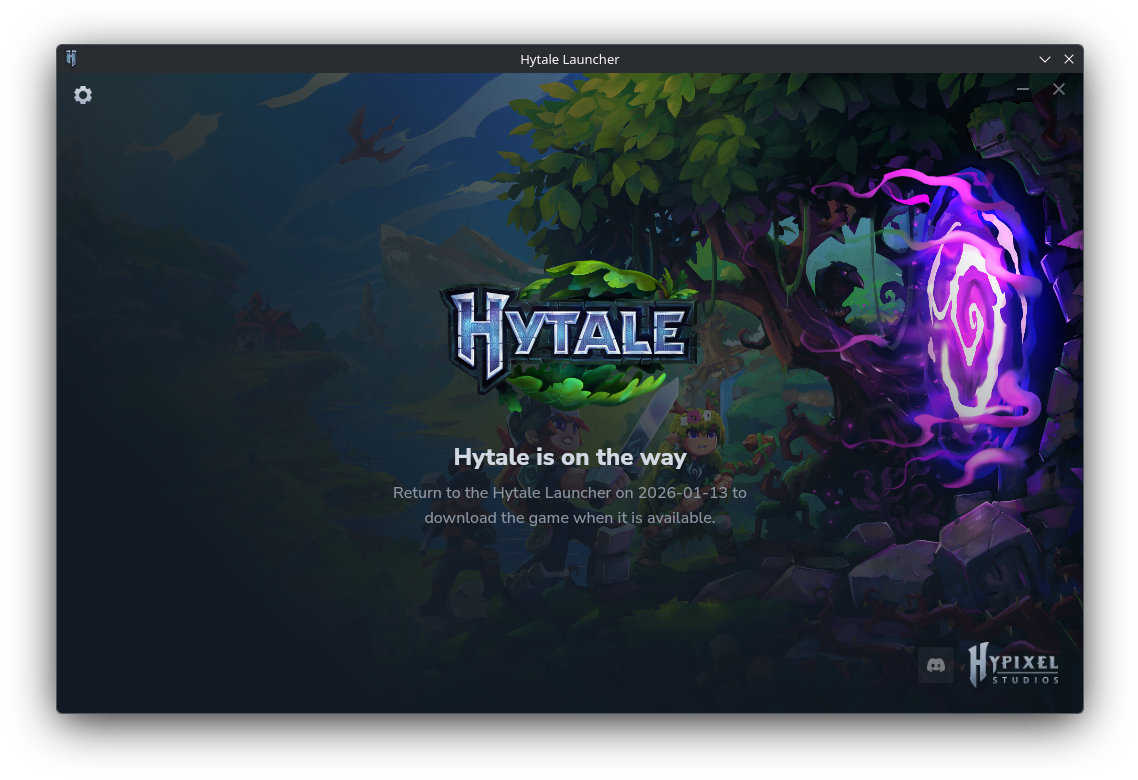
Here’s how the launcher looks right now anyway:

I have a copy secured and ready for testing tomorrow. Fingers crossed it works well enough on Linux.

That’s really great news. After being cancelled by Riot and then acquired back to be an indie game again, I hope it continues to see success.

A day ago they also put up another new video to go over some creative tools:

And a pretty cool gothic castle showcase too:

HytalePlatform: Native Linux

Official links:

Article taken from GamingOnLinux.com.


Source link

Our Most Wanted Games of 2026 – #5 Resident Evil Requiem | TheSixthAxis

0
Our Most Wanted Games of 2026 – #5 Resident Evil Requiem | TheSixthAxis


Any game series is going to need to adapt and reinvent itself after a few entries, but few have been quite so transformative as Resident Evil. Through its many sequels and spin-offs, this horror series always keeps you on your toes and the edge of your seat.

A big part of horror is building up the anticipation and the scares, to not reveal everything about the monstrosities that are terrifying our protagonists. Capcom took that to heart for the Resident Evil Requiem’s announcement as well.

At its reveal, there was plenty of mystery about the new leading lady that Capcom had featured. Grace Ashcroft might be an FBI agent, but she’s more of a desk-bound analyst than a field agent. A cruel twist of fate sees her assigned to investigate the Renwood Hotel, the same hotel in which her mother was murdered, dragging her back to Resident Evil’s original stomping ground of Raccoon City.

There’s good reason for this, because as Director Koshi Nakanishi said, “We always thought about making Leon the protagonist, but making a horror game based around him is difficult. He wouldn’t jump at something like a bucket falling. No one wants to see Leon scared by every little thing, so he’s actually quite a bad match for horror.”

So Grace is put front and centre, facing off against horrors and monstrosities that she’s got no chance of overcoming, forcing her to evade and hide instead. This was the scene for our hands on preview in the middle of last year, as I guided Grace through dark hallways, looking to reach puddles of light, to keep my noise to a minimum for fear of the hulking beast that was stalking me.

Further Reading: RE Requiem Preview – first person frights, third person delights

But then comes the twist because… well, why not have Leon in the game too?

Leon will be featured in Resident Evil Requiem, his story intertwined with Grace’s, letting her handle all the tense psychological horror, while Leon will be handling all the gory action. How nice of him.

One of the great things for Resident Evil Requiem is that, where previous games have made the choice for you, Requiem can be played in both first person and third person from day one – Village added this choice through DLC. The game also looks to push a new generation of the RE Engine that has powered so many of Capcom’s games over the past decade.

Thankfully the wait for this one isn’t too long. Resident Evil Requiem is launching on 27th February 2026 for PS5, Xbox Series X|S and PC.


Source link

Ghosts’n Goblins (Arcade version) has been released for the Commodore plus/4 (64kB) and it’s glorious!

0
Ghosts’n Goblins (Arcade version) has been released for the Commodore plus/4 (64kB) and it’s glorious!


In 1985 Capcom released one of the coolest Arcade games ever to grace the gaming scene, and that game was the incredible Ghosts’n Goblins which appeared on lots of different systems. It is a game that if you haven’t played it, you are seriously missing out! So as a shout out to that awesome game of which I have played a lot, we have just found out through Facebook that an Arcade like version of Ghosts’n Goblins has arrived on the Plus/4, and it’s glorious!

Original

Arcade Plus/4

Here’s the latest from the plus/4 world website about the game developed by Tamas Sasvari, Steve Day, Carl Mason, and Csaba Pankaczy. “If you believe that the 1986 16K release of Ghosts ‘n Goblins didn’t do justice to the original game, you had a long 40 years to wait. In 2026, TCFS is here to make us proud: Ghosts’N Goblins Arcade Version is now available for Commodore Plus/4. Guide Arthur though 7 levels to save Princess Prin-Prin. A side scrolling platformer.”

“Ghosts’N Goblins Arcade Version is a technical marvel on all levels. It’s hard to believe your eyes! From the advanced sprite engine running at solid, high frame rates, to the seamless fastloaders, the wonderful graphics with enhanced TED colors, and the soundtrack, this is as good as Commodore Plus/4 games get. While many individuals contributed their decades-old knowledge and talent, the real hero is TCFS himself, who is responsible for most of what you’re seeing”


Source link

StarRupture: How to Get the Stabilizer Blueprint

0
StarRupture: How to Get the Stabilizer Blueprint


StarRupture has a ton of places to explore, from underground living caves to abandoned outposts. Each of these will house something you’ll probably end up needing at some point, so you may want to check them out when you get a chance.

Exploration is important because it’s the main way to get Data Points, which you’ll need to unlock various other recipes. If you’re still working your way up to needing this blueprint, there’s no rush, so take your time and improve your setup.

Once you need the Stabilizer blueprint, you can come back to this guide and get right to it. It isn’t particularly hidden, but it is entirely possible to walk around aimlessly while searching for it in this survival game.

Related

10 Best Drop-in/Drop-Out Co-op Games

Leaving in the middle of the session doesn’t feel so awkward now.

Where to Find the Stabilizer Blueprint

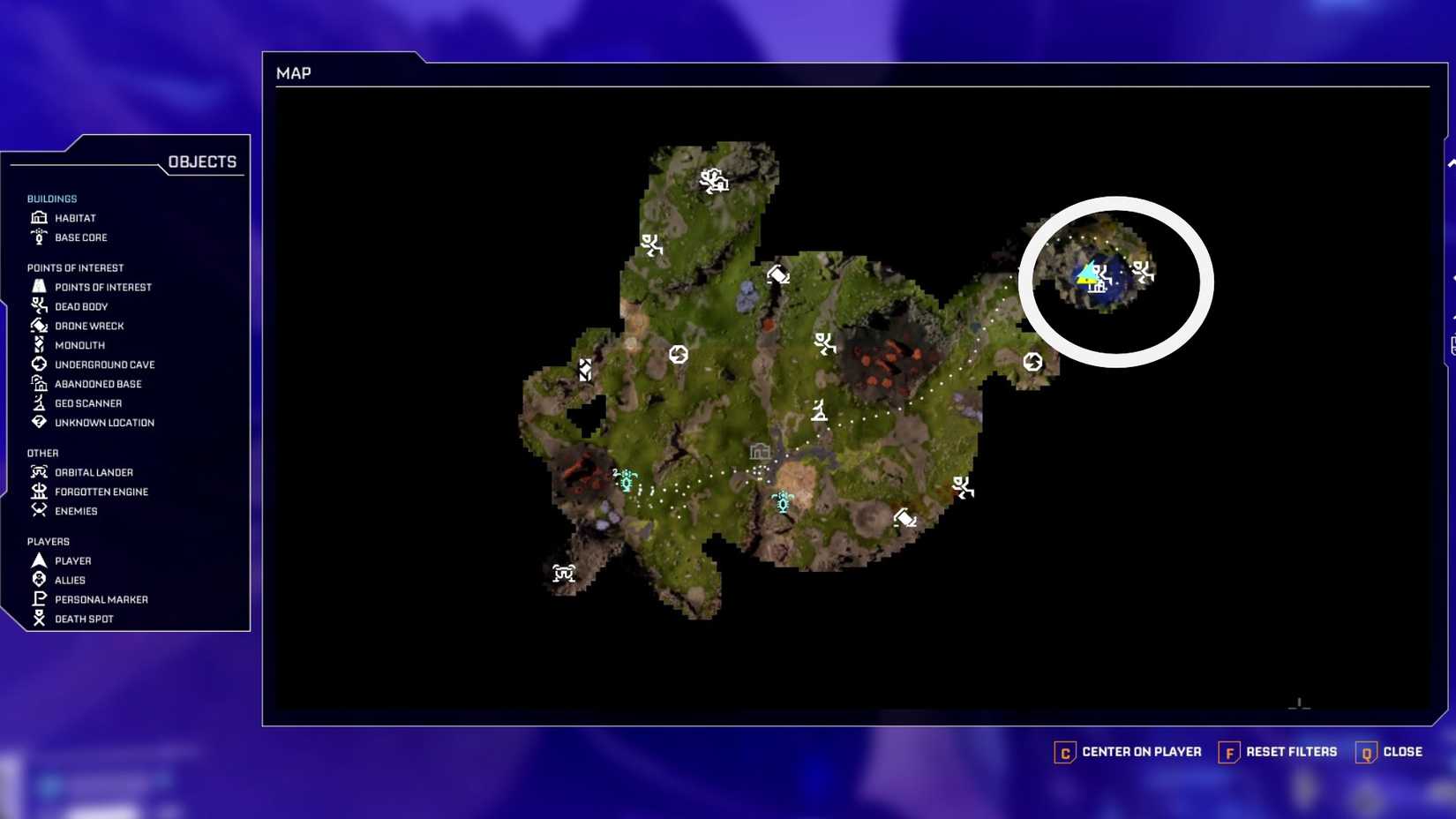
StarRupture Stabilizer Blueprint Location

If you head towards the massive, broken-down engine in the distance, you’ll come across an abandoned facility packed into the rocks. As you begin to crest over the hill just past the calcium, wolfram, and titanium deposits, the facility should be on your right.

You’ll want to be careful if you’re not going out after a wave occurs. There are a ton of enemies that spawn at this location, so you’ll want to make sure you have the right weapons and ammo.

The assault rifle is a great weapon to keep the smaller Vermin at bay when they spawn in large numbers.

StarRupture Drinks Water Survival Pack and hydrobulb

Related

StarRupture: How to Get and Drink Water

You need to know how to get and drink water in StarRupture if you want to survive more than a day.

Finding the Container

While getting to the container isn’t incredibly difficult, you could easily miss it if you don’t look around carefully. As you walk past the hill, you’ll see a large pipe that should lead to a set of stairs covered in some blue gunk.

Follow those stairs up, and you’ll reach a broken-down building followed by another set of stairs. If you’ve got the space, it’s worth doing some investigating to grab whatever loot might be in the containers in the broken-down building.

Jump up the stairs and head towards the tower on your right. You’ll need to do a little parkour here to reach the top of the tower, but if you’re careful, it shouldn’t be too bad.

When you reach the top of the tower, you’ll be greeted by a dead body you can loot and the container just past it. Grab everything from the body and then hit the container to snag the blueprint.

You can jump past the solar panels and take the rocks back down to where you came from for a faster way back.

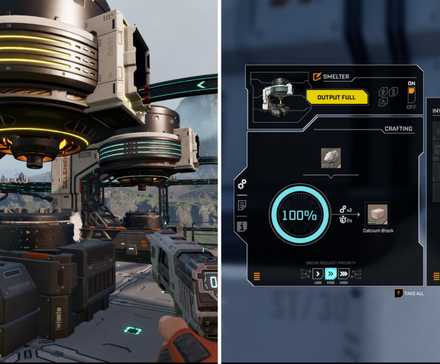
StarRupture Smelter Overview and Crafting Menu

Related

StarRupture: How to Use the Smelter

The Smelter is where crafting materials begins in StarRupture.

The Stabilizer Recipe

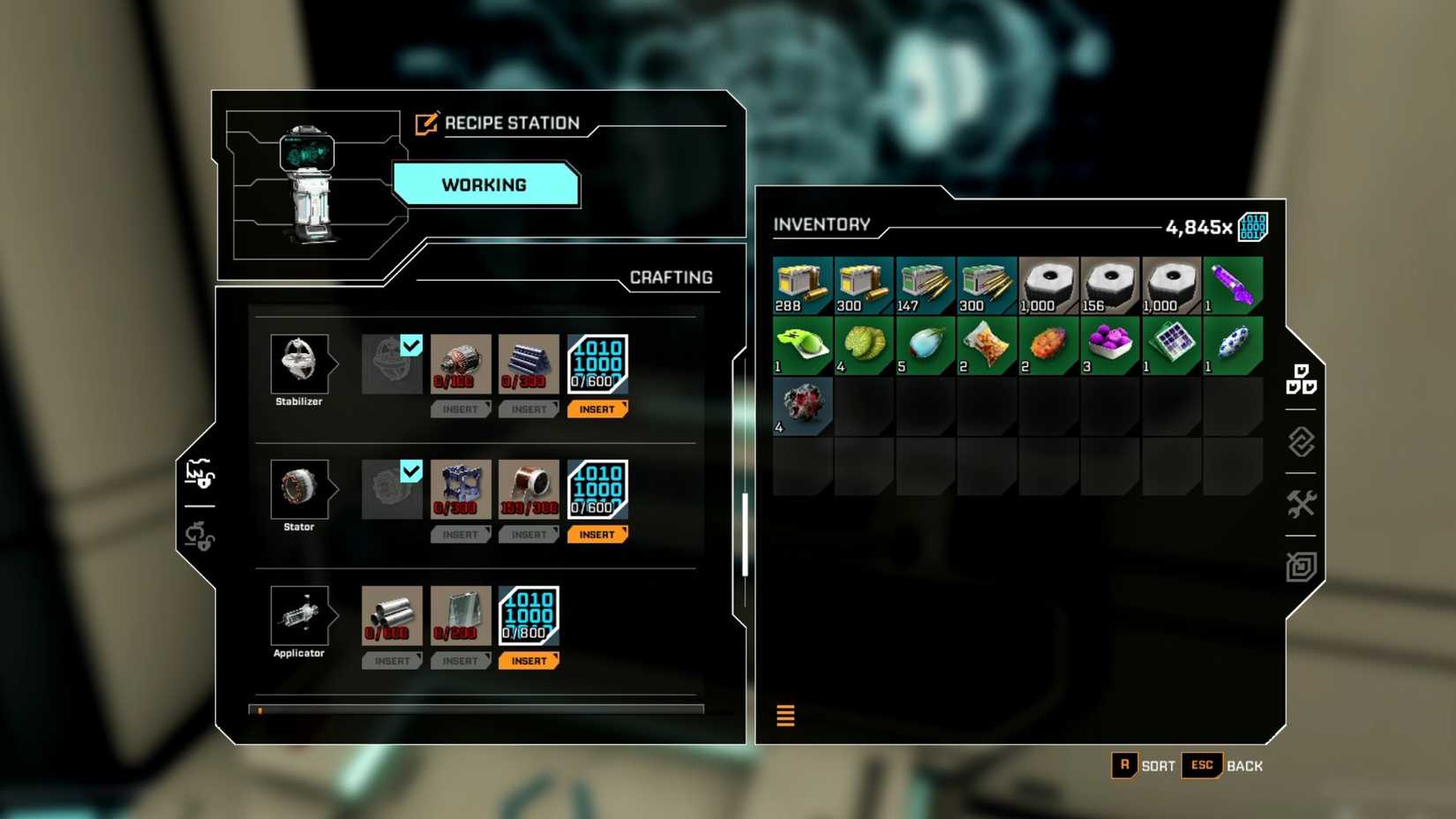
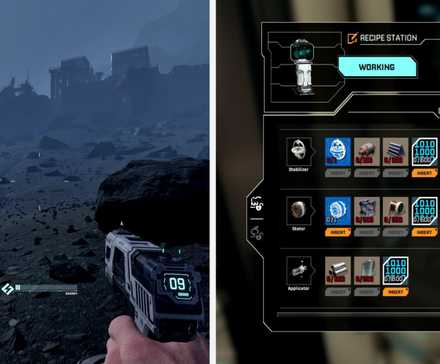
StarRupture Stabilizer Blueprint Recipe

Once you’ve made it back to one of your bases, you can drop the blueprint into the Recipe Station to get that taken care of. You’ll need a few more things before this one is finished, but hopefully, while you were gone, most of those items are built up enough that you don’t have to wait too long.

Stabilizer Recipe

Stabilizer Blueprint

Rotor x100

Titanium Rod x300

Data Point x600

StarRupture Stator Blueprint Feature Image

Next

StarRupture: How to Get Stator Blueprint

A truly hidden treasure.

starrupture-cover.jpg

Systems

PC-1

Released

January 6, 2026

Developer(s)

Creepy Jar

Publisher(s)

Creepy Jar

Multiplayer

Online Co-Op

Number of Players

Single-player


Source link

Popular Posts

My Favorites

Chinese Open-Source AI DeepSeek R1 Matches OpenAI’s o1 at 98% Lower...

0
Chinese AI researchers have achieved what many thought was light years away: A free, open-source AI model that can match or exceed the...

Fortnite is bringing