Bold and the Beautiful has Steffy Forrester as a tyrant these days. She even clapped back at Eric Forrester, as he dared question her about the motives behind her moves at FC on the CBS soap. The man who created Forrester Creations was ignored by his granddaughter when it came to getting answers.
A while back, B&B fans saw Eric go through a tough time when he felt unappreciated at FC. This caused him to take matters into his own hands, by starting up his legacy line and setting up a designer competition with his son. Now the climate is ripe for him to get involved again.
Bold and the Beautiful: Steffy Forrester Takes on Diabolical Attitude?
Bold and the Beautiful fans watch as Steffy Forrester (Jacqueline MacInnes Wood) acts more like a dictator than a co-CEO these days. When Eric Forrester (John McCook) attempted to talk about his concerns with Steffy, she shut him right down.
Steffy ordered Katie Logan (Heather Tom) to write a press release about Hope Logan (Annika Noelle) leaving FC. This week, on Bold and Beautiful, Eric Forrester voiced his opinion that this was moving too fast. But Steffy ignored him. She turned to Katie as if Eric wasn’t even in the room and instructed the Logan sister to send a copy to Hope.
B&B | CBS
Eric is reminded that he turned the company over to Ridge Forrester (Thorsten Kaye) and Steffy to run. So, his hands are tied, or are they? This week, Bold and the Beautiful dropped hints that he will likely step in as his granddaughter continues her out-of-control behaviors.
B&B Spoilers: Eric Forrester Fumes – Ridge Forrester Tip-Toes
Bold and the Beautiful had Ridge Forrester tip-toeing around his daughter. He visited Finn to get some answers, but John Finnegan (Tanner Novlan) wasn’t much help.
He stood behind his wife firing her stepsister, thinking Hope deserved it. His advice… Hope was warned. The doctor thinks the Logan daughter lusts after him.
So, he believes that her slipping into lingerie that day was part of her plan to seduce him. But Bold and the Beautiful fans wonder how he could think that after what she said when he first walked into the design room that day.
Hope said she’d been waiting for him, but she thought it was Carter Walton (Lawrence Saint-Victor) who walked in, not Finn. She hadn’t seen Finn in weeks and had no way of knowing he was coming.
So, does Finn think the lingerie-clad Hope ducked behind that screen and remained there for days until Finn happened by? That makes no sense to Bold and the Beautiful viewers, and fans think it shouldn’t make sense to Finn.
Bold and the Beautiful: Eric’s Secret Cleanup on Steffy’s Mess?
Bold and the Beautiful fans see just how peeved Eric Forrester is over the firing of Hope Logan. On the other side of town, Carter and Hope conspire to take Steffy and Ridge down.
Carter’s ploy only works if Steffy Forrester and her father sign papers without reading them. They usually don’t look at the documents before signing them. But with all the suspicions around Carter these days, someone might want to.
So, what if that someone is Eric Forrester? He has been hanging around the office these days. Maybe he spots the documents on the desk, already signed by his son and granddaughter? Would he put a stop to it? Or would he let the COO have a chance to clean up Steffy’s mess?
B&B: Eric Gives the Green Light to Sideline Steffy?
Bold and the Beautiful could have Eric Forrester see the LLC under Carter’s name. If he did, he might question his COO before doing anything else. Then Carter would probably tell Eric he sees the company headed downhill, with Steffy using it as her private playground of vendettas.
Or, Eric might turn a blind eye to it, and let his COO run with it, pretending he doesn’t know. Either way, Eric can silently sit back and watch Carter pull FC out of the massive dilemma Steffy caused.
Of course, there are a few other ways this could go. Ridge or Steffy Forrester could decide to look over the document before signing. Maybe their concern over Carter’s strange behavior prompts them to look carefully. Or… the COO’s ploy could work and chaos ensues on the CBS soap.
Head back to Soap Dirt for the latest Bold and the Beautiful spoilers.
It’s that time of year again. The Game of the Year nominees have been announced, and as if on cue, every gamer with a keyboard nearby has taken to the internet to voice their opinion. The topics of discussion are always different, but the divisive nature of the conversations remains a constant.
Related
10 Best Co-op JRPGs To Play With Friends
JRPGs so good it would be a shame not to share the experience with a pal.
We’ve already been subjected to such lines of questioning as ‘How the heck does a DLC get nominated’ and ‘How can a decades-old story be nominated for best narrative?’
All fair questions, and we aren’t about to go spouting any definitive answers right now. But, what we are going to do, is give our opinions on who deserves to take the W.
The Dualshockers staff have all had their say, and ahead of the awards ceremony, we are going to give you a rundown of our collective picks, and who knows, we might just predict the results in a few weeks’ time. Only time will tell.
For clarity, while I’ll be writing up each of our picks, these selections have been made via an internal vote with all DS staff. So, even if I don’t agree, I’ll be voicing the opinion of the masses. Plus, we will only be covering select categories for brevity’s sake.
1 Game of the Year
Metaphor Re:Fantazio
Nominees
Developer
Astro Bot
Team Asobi
Balatro
LocalThunk
Black Myth: Wukong
Game Science
Elden Ring: Shadow of the Erdtree
From Software
Final Fantasy VII: Rebirth
Square Enix
Metaphor: ReFantazio
ATLUS
Let’s get the big one out of the way early. Dualshockers pick, and prediction for GOTY in 2024 is Metaphor: ReFantazio. It was a close-run thing with fellow JRPG stalwart Final Fantasy VII: Rebirth, but on this occasion, the new ATLUS IP won out.
It’s easy to see why, as Metaphor essentially takes the Persona formula and tweaks it ever slightly to offer a more traditional fantasy RPG with a job/archetype system, a world abundant with magic and dragons, and a rebellious plot against the monarchy that fuels the action at each and every turn.
It changes enough to stand on its own two feet but maintains the same level of style that Persona offers with slick animations, excellent turn-based combat, and a roster of characters you can get to know through bonds.
It’s essentially ATLUS offering a Persona game that caters to the JRPG purists out there, and it works a treat. It’s our game of the year, and we wouldn’t be surprised to see this franchise in a future GOTY line-up in the near future.
2 Best Game Direction
Black Myth: Wukong
Nominees
Developer
Astro Bot
Team Asobi
Balatro
LocalThunk
Black Myth: Wukong
Game Science
Elden Ring: Shadow of the Erdtree
From Software
Final Fantasy VII: Rebirth
Square Enix
Metaphor: ReFantazio
ATLUS
We move on to Game Direction, the category that rewards the game with the most innovative and unique game design, and considering most of the games listed are more of the same from existing franchises, there were really only two logical choices, and when weighing up Balatro and Black Myth Wukong, the latter snagged the win.
Black Myth Wukong deserves a lot of credit for taking an age-old story in the form of Journey to the West and crafting a fantastical adventure that brings life to that tale.
From the incredible semi-open world design to the staggering production value on offer, every chapter of this rich narrative feels like a larger-than-life treat for players.
Not to mention, the game walks the tightrope between Souls-Like and Hack-and-Slasher expertly, offering a game that is much less punishing than a Souls game, but equally, one that demands near-perfection and mechanical mastery.
It’s a magical, frenetic, and enthralling adventure, and most importantly, it feels like something we have never seen before. Making it the perfect fit for this award.
Systems
Released August 20, 2024
Developer(s) Game Science
Publisher(s) Game Science
Engine Unreal Engine 5
ESRB M For Mature 17+ // Blood, Violence
How Long To Beat 39 hours
PS Plus Availability N/A
Steam Deck Compatibility Unknown
OpenCritic Rating Strong
Expand
3 Best Ongoing Game
Helldivers 2
Nominees
Developer
Helldivers 2
Arrowhead Games
Destiny 2
Bungie
Diablo 4
Activision/Blizzard
Fortnite
Epic Games
FFXIV
Square Enix
In yet another call with just one vote separating the winners, we have decided that the best ongoing live-service game of the bunch this year is Helldivers 2.
It’s well documented on Dualshockers that this game has seen some lofty heights and devastating lows, but despite this concurrent player count rollercoaster, Helldivers remains a very popular title and one that deserves a lot of praise.
The developer/fan relationship may have taken a hit this year, but what can’t be disputed is how engaging and unique the PvE format this game offers is.
Being able to hop in with your squad and fight back against the seemingly never-ending horde of Terminids in the name of super-democracy is an absolute blast. Quite literally, as this is about the most bombastic combat you’ll likely witness in gaming today.
It’s a game that is still trying to mend its reputation and claw back its tight grip on the market it established in February. But, when we look at everything Helldivers 2 has given us, you can’t help but nod and say, this one deserves its flowers.
Systems
Franchise Helldivers
Released February 8, 2024
Developer(s) Arrowhead Game Studios
Publisher(s) Sony
Multiplayer Online Co-Op
Engine bitsquid
ESRB M For Mature 17+ Due To Blood and Gore, Intense Violence
Metascore 83
Platforms That Support Crossplay PC & PS5
Number of Players 1-4
PS Plus Availability N/A
OpenCritic Rating Strong
Cross-Platform Play PC & PS5
Expand
4 Best Art Direction
Metaphor: ReFantazio
Nominees
Developer
Astro Bot
Team Asobi
Neva
Nomada Studio
Black Myth: Wukong
Game Science
Elden Ring: Shadow of the Erdtree
From Software
Metaphor: ReFantazio
ATLUS
When a new flagship ATLUS game hits the digital shelves, you can pretty much guarantee that this award is heading their way, and according to the DS staff, that seems to be the case this year, too.
Again, it is easy to see why, as while the game does rely on a slightly dated engine, it hardly ever proves to be an issue thanks to the beauty of the world you inhabit, the slick nature of the animations and action, and those menus. You just have to love those incredibly designed menus.
Related
Best Games Like Metaphor ReFantazio
From Persona 5 Royal to Fire Emblem Three Houses, these titles are great picks for Metaphor ReFantazio fans.
Undoubtedly, a few of the other options available offer higher fidelity and hyperrealistic visuals. But sometimes, no matter how amazing your game looks, it’s the game that shoots for style points that wins the day.
5 Best Mobile Game
Balatro
Nominees
Developer
AFK Journey
Farlight
Balatro
LocalThunk
Wurthering Waves
Kuro Games
Pokemon TCG Pocket
DENA. Co
Zenless Zone Zero
HoYoverse
Speaking as someone who had their free time ripped away from them courtesy of Balatro’s addictive and innovative gameplay loop, knowing that this game is available on mobile is a danger to every gamer’s productivity. But, rest assured, I am here for it.
Balatro is a game format that was always destined to head to mobile devices thanks to the lack of time-critical decisions, the simplistic visuals and inputs, and of course, the addictive gameplay that suits short gameplay sessions perfectly.
It’s just the perfect game to take with you on the go to fill some time on a long commute, or to play as you stall for time in the bathroom until the end of your shift.
It’s not often we have a mobile game amongst the GOTY nominees, and that speaks volumes about this poker roguelike’s quality. It’s the ultimate ‘Numbers go brrr’ game, and we reckon it will win this category at a canter.
6 Best Narrative
Metaphor: ReFantazio
Nominees
Developer
Senua’s Saga: Hellblade 2
Ninja Theory
Like A Dragon: Infinite Wealth
Ryu Ga Gokotu Studio
Silent Hill 2 Remake
Bloober Team
Final Fantasy VII: Rebirth
Square Enix
Metaphor: ReFantazio
ATLUS
Surprise, Surprise. It seems that Metaphor has sewn up the best narrative category, beating out some brilliant narrative-driven epics. But, yet again, you can’t help but feel it’s warranted.
Much like other ATLUS titles, Metaphor is a slow burn that takes its time sewing the seeds in the early hours of the game. Establishing lore, giving you a sense of the grand world you find yourself in, and deepening your bond with the core characters, all before you even set foot in the game’s opening dungeon.
This decision, along with many others, culminates in ensuring that Metaphor’s storyline is one of the best fantasy JRPG offerings of this modern era.
With plenty of twists and turns, monumental battles, and heartbreaking moments, Metaphor is every bit as narratively polished as any game this year has blessed us with. And, in our eyes, it’s just that one step above the competition.
7 Best Music and Score
Final Fantasy VII: Rebirth
Nominees
Developer
Astro Bot
Team Asobi
Silent Hill 2 Remake
Bloober Team
Stellar Blade
Shift Up
Final Fantasy VII: Rebirth
Square Enix
Metaphor: ReFantazio
ATLUS
Metaphor may have stolen the show to this point, but it’s time for Final Fantasy VII: Rebirth to get its moment in the spotlight because, without such stiff JRPG competition, it would have likely cleaned up.
However, when it comes to musical offerings in video games, to go up against Nobuo Uematsu is a pretty foolish endeavor, as you’re always fighting a losing battle.
Yet again, Nobuo Uematsu has crafted an iconic Final Fantasy soundtrack with some standout tracks like No Promises To Keep, among many, many others. Serving as the sweet melodies that accompany you on this middle portion of the FFVII modern trilogy.
Uematsu is someone who manages to craft fantasy soundscapes with such ease, and we feel that this award is a formality waiting to happen.
Systems
Released February 29, 2024
Engine Unreal Engine 4
ESRB Teen (T)
Number of Players 1
How Long To Beat 40 Hours
Expand
8 Best Video Game Adaption
Fallout
Nominees
Fallout
Arcane
Like a Dragon: Yakuza
Tomb Raider: The Legend of Lara Croft
Knuckles
We have had quite a few strong video game adaptions this year and, admittedly, some absolute stinkers in equal measure. But of all those listed, the standout by some distance is Fallout.
I admit, I was pretty skeptical that this Amazon original would be able to do the rich lore and gritty atmosphere of Fallout justice. But I was pleasantly surprised to find that this series absolutely nailed it.
Offering a wonderful blend of new ideas alongside loving nods to the source material, the Fallout adaption is proof that gaming adaptions can be done well, and can offer fan service in abundance while doing it.
With a second series in the works, we can’t wait to see what the future of the series has in store. But we do know one thing based on the closing scenes. We are heading to New Vegas!
9 Best Multiplayer
Helldivers 2
Nominees
Developer
Super Mario Party Jamboree
Nintendo
Call of Duty: Black Ops 6
Treyarch/Infinity Ward
Warhammer 40K: Space Marine 2
Saber Interactive
Tekken 8
Bandai Namco
Helldivers 2
Arrowhead Studios
To avoid repeating myself too much, in a year with pretty by-the-books multiplayer options occupying the spaces this year, the obvious choice is Helldivers 2.
Obviously, you have tried and tested models of Call of Duty’s boots-on-the-ground multiplayer, and Mario’s buddies are returning for another board game adjacent to Mario Party Romp. But in terms of pure innovation, Helldivers 2 takes the cake.
It’s a non-competitive cooperative experience that gives everyone a clear, common, and ludicrous goal to achieve.
And as Helldivers 2 fans will know, the community have a habit of beating the odds and rising to the occasion. So, in short, Helldivers wins this one by a landslide, even with its troubles this year.
10 Best Independent Game
Balatro
Nominees
Developer
Animal Well
Billy Basso
Neva
Nomada Studios
Balatro
LocalThunk
UFO 50
Mossmouth
Lorelai & The Laser Eyes
Simogo
While I have to admit that I’m personally a little sad to see the amazing Metroidbrainia, Animal Well, miss out on the Dualshockers popular vote, you can’t deny that Balatro is a worthy winner of best indie of the year.
It’s a game that caters to casual players, offering low-stakes, easy-breezy gameplay. But, thanks to the depth of systems, the variety of Jokers, and tactical meta-builds on offer, the game offers oodles of replayability and challenge for anyone who seeks it out.
It’s essentially a game that keeps on giving, providing hundreds of hours of fun with a gameplay loop that somehow never gets old. I would love to see new Jokers in the future, but as it is right now, it’s a stroke of genius and well worth checking out if you haven’t already.
11 Most Anticipated
Grand Theft Auto VI
Nominees
Developer
Death Stranding 2: On The Beach
Kojima Productions
Ghost of Yotei
Sucker Punch
Monster Hunter: Wilds
Capcom
GTA VI
Rockstar
Metroid Prime 4: Beyond
Retro Studios
Who saw this one coming, eh?
Yes, obviously, Grand Theft Auto VI won this category, and so it should, as after over a decade of rumors, leaks, and endless GTA Online updates, everyone has reached a fever pitch, and we need a new GTA game in our lives.
We want to go to Rockstar’s zany re-imagining of Miami and catch some rays or shoot some alligators, depending on what mood we are in.
We are obviously excited to see Kojima’s next wonderfully weird title and see the follow-up to Ghost of Tsushima, but in the grand scheme of things, there is only one winner here.
12 Best RPG
Elden Ring: Shadow of the Erdtree
Nominees
Developer
Dragon’s Dogma 2
Team Asobi
Like A Dragon: Infinite Wealth
Ryu Ga Gotoku
Elden Ring: Shadow of the Erdtree
From Software
Final Fantasy VII: Rebirth
Square Enix
Metaphor: ReFantazio
ATLUS
In a shocking turn of events, when voting under the umbrella of best RPG, the DS staff have decided that Metaphor may be the Game of the Year, but from an RPG purist standpoint, Elden Ring’s Shadow of the Erdtree DLC reigns supreme. Which, when you think about it, is a pretty fair shout.
Shadow of the Erdtree offers the same level of polish and quality that Elden Ring did back in 2021, offering a wealth of challenging bosses, terrific lore to uncover, a series of locations that reward exploration tenfold, and of course, with the addition of more items and weapons, the possibility for new builds expanded exponentially.
It’s an RPG with a lot more depth of systems when compared to Metaphor in truth, as it feels like a more accessible version of Persona by all accounts. So, for that reason, I see why Shadow of the Erdtree has won out here.
13 Best Action/Adventure
Astro Bot
Nominees
Developer
Astro Bot
Team Asobi
The Legend of Zelda: Echoes of Wisdom
Nintendo
Silent Hill 2 Remake
Bloober Team
Prince of Persia: Lost Crown
Ubisoft
Star Wars: Outlaws
Ubisoft
I was genuinely afraid that I wouldn’t get the chance to gush over Astro Bot, but thankfully, the team has come through, predicting this one will take home the action/adventure category.
Astro Bot truly is the new champion paving the way for the return of the mascot platformer. Sure, it’s mainly doing so with the help of a lot of nostalgia, but you have to give credit where it’s due. This is about as polished as a platformer can get.
The movement is slick and seamless, the power-ups are cathartic and satisfying, the level design is clever and varied, and the graphical detail on show is something to behold.
Essentially, if you liked the tech demo that was Astro’s Playroom, this is more of the same, but bigger and better. Which, in our eyes, is a recipe for success.
Systems
Released September 6, 2024
Developer(s) Team Asobi
Engine Proprietary Engine
ESRB E10+ For Everyone 10+ Due To Crude Humor, Fantasy Violence
PS Plus Availability N/A
OpenCritic Rating Mighty
Expand
14 Best Action
Black Myth: Wukong
Nominees
Developer
Helldivers 2
Arrowhead Studios
Call of Duty: Black Ops 6
Treyarch/Infinity Ward
Black Myth: Wukong
Game Science
Warhammer 40K: Space Marine 2
Saber Interactive
Stellar Blade
Shift Up
When it comes to all-out action, it was a landslide victory for the monkey king in the Dualshockers camp. Which really should come as no surprise.
Black Myth: Wukong is a game that succeeds on a lot of fronts in terms of visual excellence, world design, narrative, and even light RPG elements. However, the standout feature is the combat.
The game offers a format that is a stone’s throw away from an all-out boss rush, and the game is better for it. It forces the player to analyze and adapt their approach for each and every opponent, and one false move could be your downfall.
It’s this constant pursuit of perfection that makes the action of Black Myth: Wukong so engaging, and why we see it as a worthy winner of this category.
15 Best Fighting Game
Dragon Ball: Sparking! Zero
Nominees
Developer
Dragon Ball: Sparking! Zero
Spike Chunsoft
Granblue Fantasy: Versus Rising
Arc System Works
Tekken 8
Bandai Namco
Marvel vs Capcom Collection
Capcom
MultiVersus
Player First Games
While I can’t pretend to be a huge fighting game fan, as I was one of those scrubby guys who spammed crouch kicks and hoped for the best. Even I couldn’t escape the immense hype around the latest Dragon Ball fighter.
This one felt like the spiritual successor to Budokai Tenkaichi 3, giving players a wealth of characters to unlock and master, loads of story beats to play through to evoke nostalgia for the anime we know and love.
Plus, the game implements a series of unique systems to make fights as bombastic and action-packed as possible.
The hype has died down significantly since launch, but even still, this one had all eyes on it for quite some time, and as a fighting game, that’s an achievement worthy of this accolade.
16 Best Accessibility
Dragon Age: The Veilguard
Nominees
Developer
Dragon Age: The Veilguard
BioWare
Diablo 4
Activision/Blizzard
Prince of Persia: Lost Crown
Ubisoft
Star Wars: Outlaws
Ubisoft
Call of Duty: Black Ops 6
Treyarch/Infinity Ward
When it comes to accessibility in gaming, we are getting closer to the ultimate goal of making games available for as many people as humanly possible through inclusive design, and while all games listed were worthy winners this year, Dragon Age: The Veilguard is our pick of the bunch.
While too divisive to be nominated for any other award, credit has to go to Bioware for implementing a wonderful accessibility toolkit to help everyone and anyone enjoy their new RPG.
With robust subtitle options, a fully customizable HUD, colorblind functionality, great input re-mapping options, and so much more, the game provides an excellent set of options to make sure all players can get the most out of this fantasy epic.
If you want to see what we thought of Dragon Age: The Veilguard’s divisive RPG experience, check out our review.
17 Best Family Game
Astro Bot
Nominees
Developer
Astro Bot
Team Asobi
The Plucky Squire
Devolver Digital
Princess Peach: Showtime
Nintendo
Super Mario Party: Jamboree
Nintendo
The Legend of Zelda: Echoes of Wisdom
Nintendo
For the record, my vote was The Plucky Squire, thanks to its wholesome, kid-friendly vibes. But if you’re looking for immense quality, along with those wholesome vibes, it’s hard to argue against Astro Bot.
The game provides a jaunty and jovial tone throughout the entire run, offering a wealth of worlds with silly animations and easy-to-picking-up mechanics that even little kids could easily grasp with little to no adult input.
Like the mascot platformers that came before and effectively raised me as a child, Astro Bot is one of hopefully a slew of new platformers to come that will do the same for this generation, too.
And while I’m definitely too old for all this stuff, I’ll be playing each and every one of them, happy as a clam.
18 Best Sim/Strategy Game
Unicorn Overlord & Frostpunk 2
Nominees
Developer
Frostpunk 2
11 Bit Studios
Unicorn Overlord
ATLUS
Manor Lords
Slavic Magic
Age of Mythology: Retold
World’s Edge
Kunitsu-Gami Path of the Goddess
Capcom
We almost made it to the end of this list without a tie. Almost.
Despite ample votes, the DS staff were unable to decide between the two clear frontrunners for this award, Frostpunk 2 and Unicorn Overlord.
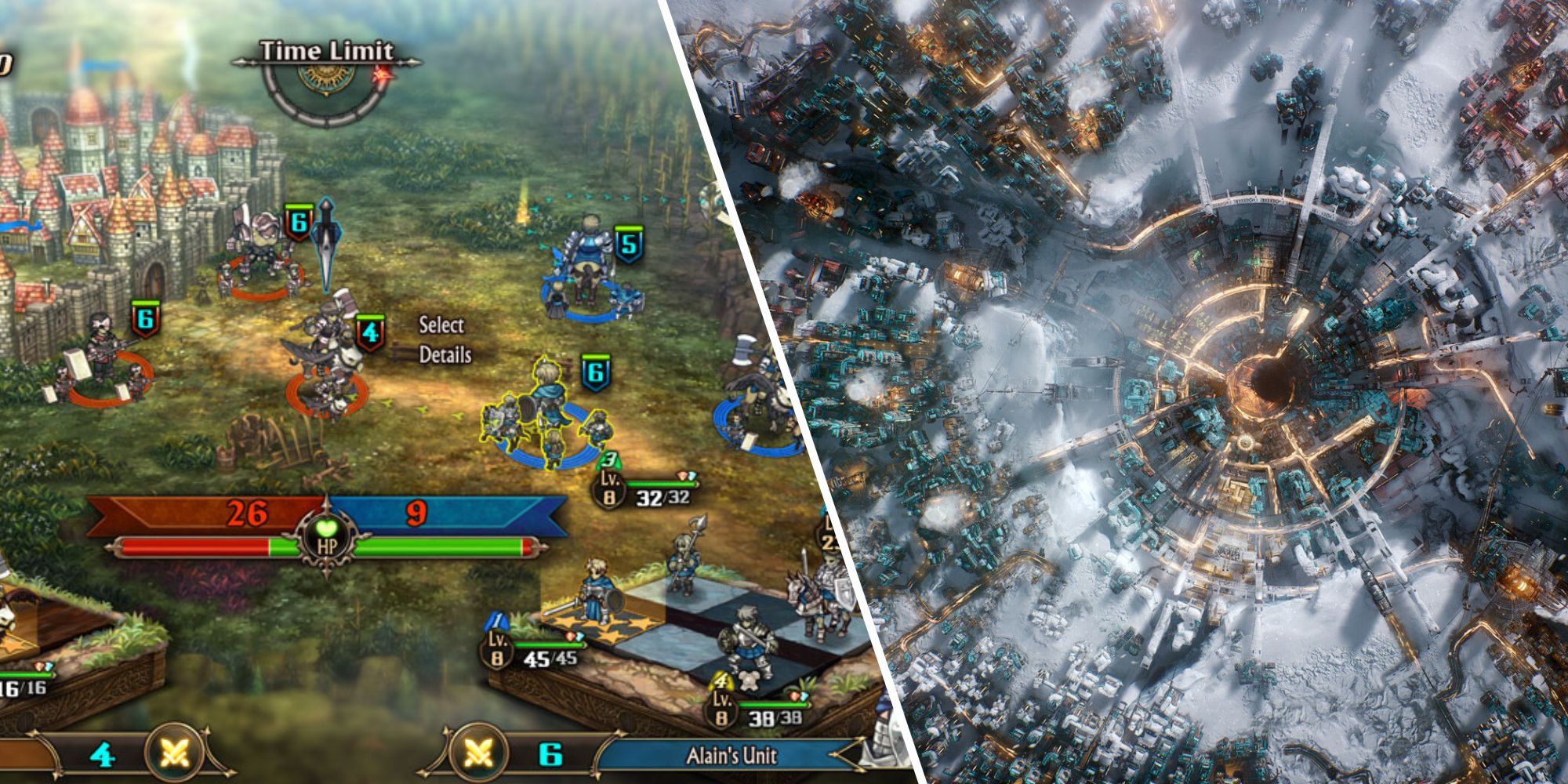
Unicorn Overlord is yet another homerun from ATLUS this year, offering a much more tactical RPG for players to enjoy, whereas Frostpunk 2 is a sequel offering expanded and refined gameplay akin to the celebrated original title.
I understand the stalemate here, as both are incredible games that are just oozing class and quality.
If it were my choice alone, I would probably say that Frostpunk 2 just edges it, as it offers a much more gritty and unforgiving experience, but you guys feel free to draw your own conclusions.
19 Best Sports/Racing Game
WWE 2K24
Nominees
Developer
WWE 2K24
2K
F124
Codemasters
EAFC 2025
EA
NBA 2K25
2K
Topspin 2K25
2K
Our final entry sees us head to the wacky world of world wrestling entertainment, and fresh off the back of the Vince McMahon documentary, it seems that the DS crew has the most love for this year’s WWE title.
To give credit where it’s due, this is the first WWE game in a while that feels like a refined and enjoyable experience, and considering that we had all but expected the series to die back in 2019 after the comically bad WWE 2K20, this is a sparkling return to form.
The in-ring action feels fluid and satisfying, and the story beats when playing through campaigns is enjoyable and slapstick, as you would want and expect. Plus, with the addition of Wrestlemania Showcase matches, this really feels like a love letter to the fans.
It seems that wrestling is back in vogue, and by extension, so are wrestling games.
NEXT
10 Most Underrated Open World Games
Open world games are the norm when it comes to today’s Triple A experiences, but what about the unknowns that do just as well with this formula?
Tamra Judge and her husband, Eddie Judge, have nothing but well wishes for their podcast cohosts Teddi Mellencamp and Edwin Arroyave amid the Real Housewives of Beverly Hills alums’ ongoing divorce.
“I cannot really share too much. This is Teddi and Edwin’s life and they’ve been married for a long time and they have four kids and I just wish her and Edwin well,” Tamra, 57, exclusively told Us Weekly at the 11th Annual American Reality Television Awards on Monday, November 18. “I hope that they get to work it out — however and whatever that looks like to them. I know that they’re both amazing people.”
She noted: “Edwin and Eddie have a podcast together. Eddie really loves Edwin and enjoys the [“The Eds”] podcast. I just want the best for both of them.
Eddie, 51, told Us that he doesn’t know “anything” about how Arroyave, 47, is handling his split from Mellencamp, 43, as they have yet to discuss it together. “We’ve had a blast doing the iHeartRadio podcast. We’re recording one this Thursday. We do it once a month. It’s up to him [if he wants to talk].”
Related: Teddi Mellencamp Looks Forlorn Saying Goodbye to Husband After Split
Teddi Mellencamp looked forlorn while saying goodbye to estranged husband Edwin Arroyave after news broke of her affair with her horse trainer, Simon Schroeder. During the intimate moment outside of their family home in Los Angeles on Wednesday, November 13, Mellencamp, 43, stood with her eyes downcast and her hand on a large suitcase as […]
Eddie went on to tell Us that he doesn’t “want to put any pressure” on Arroyave to speak out about the divorce, rather, “I want him to prioritize his life so I don’t want this to be a burden on him.” He added: “So, if we talk about it, great. If we don’t, great.” (Tamra and Mellencamp cohost their own iHeartRadio podcast, “Two Ts in a Pod.”)
Earlier this month, Mellencamp announced that she was filing for divorce from Arroyave after 13 years of marriage. “Making a public statement is not something I wanted to do but in an effort to protect my family from undue speculation and rumors, I felt being open, honest and vulnerable was the best path forward,” she wrote in a November 2 Instagram statement.
The estranged spouses wed in 2011 and share kids Slate, 12, Cruz, 10, and Dove, 4. Arroyave welcomed his eldest child, daughter Isabella, during a previous relationship.
Jeff Kravitz/Getty Images for MTV
In Mellencamp’s November 1 divorce filing, obtained by Us, she cited “irreconcilable differences” as the reason for their split and listed their date of separation as October 20. However, Arroyave listed their date of separation as November 1 in his own divorce docs, filed on November 8. Additionally, Arroyave is requesting that the court enforce their prenup and is seeking joint physical and legal custody of their children. Mellencamp, meanwhile, requested sole custody of their kids.
A source recently revealed to Us that Mellencamp had an affair with her horse trainer, Simon Schroeder, months before her and Arroyave’s split. Noting that the fling has since died out, the insider claimed that both Mellencamp and Arroyave were unfaithful during their marriage.
“Teddi and Edwin had been working on the problems of their marriage, despite his past indiscretions,” the source shared. “They stayed in the marriage for the sake of the kids.”
Mellencamp briefly addressed the affair news during the Thursday, November 14, episode of “Two Ts in a Pod,” stating, “I’m not going to confirm or deny anything. But there’s many people involved.”
Thank You!
You have successfully subscribed.
She continued: “I once again, say the same statement I said before: The kids, they’re the priority. For the time being that’s all I’m going to discuss on this.”
The 11th Annual American Reality Television Awards will premiere on Roku Channel, Pluto TV and Xumo Friday, November 29.
The 2024 celebrity bingo card just got really WEIRD!
There’s no question that Prince Harry is the rebel of the British Royal Family. But he’s just taken things to a whole new level!
SPOILER ALERT: The video we’re about to share includes Prince Harry cursing, getting a neck tattoo, and generally speaking, being a very naughty boy.
All for a good cause – and with Jelly Roll!
Prince Harry lets superstar Jelly Roll give him a neck tattoo all in the name of charity (Invictus Games Youtube)
Prince Harry Asks For A Tattoo On His “Ass” In Honor Of The Invictus Games
It’s a tale as old as time, really. Or at least, a tale as old as social media.
See, Prince Harry needed a big way to announce that country music superstar Jelly Roll will be headlining the closing ceremony of the upcoming Invictus Games in Vancouver.
Taking to Instagram, the former beloved brother of Prince William, shared a clip of himself arriving at East Side Ink, a tattoo parlor in New York City, to meet up with Jelly Roll.
The celebrity haute welcomed the Prince with style in the video, but Harry is all about business.
“Is he going to be here any time soon?” Harry asks as he sits in a tattoo chair, and no sooner than that, the Grammy winner strolls in, ready to get down to business.
That business being giving Prince Harry a tattoo, and a special one at that.
“Do you know I could not believe it when they called me and told me Prince Harry wanted to get a tattoo today? They wanted me to give him his first tattoo? This is the coolest thing ever!” Jelly Roll says as he pulls up alongside the young royal.
They have a friendly back and forth about the whole thing, before Harry admits he’d rather be inked somewhere no one can see.
“I was thinking the lower back or on my ass,” says Harry, but Jelly Roll’s not having it.
“Nobody wants to see your ass, Harry!” Jelly Roll laughed. “No, that’s the place where no one is going to see it,” Harry countered. “This is for the world!” Jelly Roll exclaimed, pointing to his own neck, and got to work.
Is The Ink Real Though?
When Jelly Roll was finished, he left Prince Harry inked with an enormous tat of his iconic “I Am Jelly Roll” icon.
“Is that your name? Does that say Jelly Roll? You put your name on my neck?!” Harry said. “Wait, wait, wait, wait!”
“I’ll see you in Vancouver!” the star called as he left the room. “I’ll be there, I appreciate you!”
“Oh, s–,” Harry said, as the video cuts to black.
Now, for any of you out there who are sure this is all a stunt – you’re 1000% right.
The video launched just after Prince Harry appeared at the Grey Cup in Vancouver on Nov. 17 and at the Seaforth Armoury on Nov. 18 to launch the Invictus Games Vancouver Whistler 2025 School Program — with no neck tattoo in sight.
Still, it was fun to watch him be all kinds of badass for a bit, right?
Prince Harry and Meghan Markle appear in a video for the Archewell Foundation. (The Archewell Foundation)
Invictus Games 2025: Will Meghan Markle Be There?
The Invictus Games Vancouver Whistler 2025 will kick off on Feb. 16, 2025. More performances are set to be announced as we get closer to the event.
But the real question on the mind of Prince Harry fans is if his wife will be joining him at the big event. In years past, she’s rarely missed it, even attending when she was pregnant.
But just before this video dropped at those two previously mentioned events to launch the games, Meghan, like that neck tattoo, was nowhere in sight.
It comes at a time when the pair have been seen more frequent apart than together. Harry has traveled to New York, the UK, South Africa and Lesotho in recent months, while Meghan was spotted out dancing in Los Angeles with friends, sans her husband.
Should fans be worried about a divorce on the horizon? That has been the gossip for a few months, but nothing recently has been reported suggesting that there’s trouble in paradise.
The wife of Danny Jones has shared a heartwarming video of their son watching the McFly star on I’m A Celebrity – and he only had one question.
Sunday (November 17) marked the beginning of this year’s I’m A Celebrity… Get Me Out Of Here! And as it has quickly been hailed as the ‘best season in years,’ it’s all down to the personalities in camp.
In his opening video, Danny made it clear his reasoning for going in to the jungle was to prove to his six-year-old son that he could do anything he wanted.
Danny and his wife, Georgia, had their son, Cooper, back in 2018. Cooper got to stay up late and watch his dad take part in the first trial of the series during the launch show.
In an emotional video posted on Instagram, Georgia and Cooper were sitting on their sofa watching the show.
Danny Jones looked concerned before taking on the first trial (Credit: ITV)
Danny Jones wife and son
While they were evidently enjoying the whole thing, once the trial began, Cooper began to worry about his dad.
Cooper looked at his mum and asked: “Is my daddy going to be okay?”
Georgia quickly realised their son was concerned, and made sure he knew that his dad was “always going to be okay”.
The family then went on to continue enjoying Danny’s time on the show. But fans found Cooper’s question quite emotional.
Danny’s sister commented: “Awww. My heart just imploded at him asking ‘is my daddy going to be okay?’”
Is my daddy going to be okay?
A fan wrote: “Cooper is such a kind soul.”
“An amazing response from you Georgia. I got tears in my eyes watching this clip,” a third penned.
Danny Jones during the first I’m A Celeb trial (Credit: ITV)
Danny’s wife uploaded the video after the McFly star already became a firm favourite with viewers. In just one episode it’s possible that Danny delivered the most iconic moment of the series.
From the second he was announced in the line-up, McFly fans knew he was going to bring the entertainment. And from the second he entered, he wanted everyone to know he was doing it for his son.
Danny isn’t the first member of McFly to head down under, as back in 2011, Dougie Poynter became King of the Jungle.
Read more: I’m A Celeb viewers spot ‘huge change’ to show’s format
I’m A Celebrity continues tonight (November 19) from 9pm on ITV1 and ITVX.
Are you enjoying watching Danny? Tell us on our Facebook page @EntertainmentDailyFix.
The Folio Society has partnered with Alan Lee, a principal concept artist for The Lord of the Rings and The Hobbit films, to produce a beautifully illustrated version of J.R.R. Tolkien’s seminal work, The Hobbit. This deluxe version of The Hobbit contains 28 original color illustrations by Lee, and it’s currently available to purchase from The Folio Society for $850. There are only 1,000 of these books available.
The initial run of The Lord of the Rings printed by the Folio Society only lasted for 36 hours, so you’ll want to move fast if you want to make this copy a part of your collection.
In addition to the various illustrations sprinkled throughout its pages, The Folio Society’s version of The Hobbit features numerous fancy features you might expect from a book that costs $850, such as a quarter-bound leather cover, silvered page edges, and a slipcase that holds a foldout map case containing a copy of Thror’s Map and a Map of the Wilderland. Alan Lee has signed each copy of the book for the initial run.
If you’re shy of a dragon’s hoard or two and would prefer a Tolkien print that’s slightly more budget-conscious, its worth noting that The Folio Society has already produced luxurious versions of The Silmarillion, The Lord of the Rings, and naturally, The Hobbit. These prints feature black & white, woodcut-style illustrations throughout, and cover art you won’t find anywhere else.
As Microsoft Ignite 2024 kicks off with its keynote, there is a lot of anticipation and excitement in the air. This year’s event is going to be an evolution of modern work, bringing together innovations and pivotal updates that will redefine how organizations and employees harness the power of artificial intelligence (AI). It is no surprise that this year’s Ignite is full of Copilot and AI and these continue to transform the workplace landscape.
Unfortunately I wasn’t able to make it on-site, so I will join 200 000 other online attendees who has registered to Ignite. I do have a missing out for not being one of 14 000 people on site at Chicago. Perhaps (🤞) next year. What is good, that most of the content (>800 sessions, demos and labs) is available online live & on-demand, so if you haven’t registered to Ignite.. do so here!
Again, it is not a surprise that Copilot Agents and Microsoft 365 Copilot are prominently included in Ignite 2024. New capabilities leap us forward in AI-driven task automation and collaboration. Agents are designed to streamline mundane tasks and intricate business processes, enabling teams to focus on more strategic and creative endeavors. From the Employee Self-Service Agent, which expedites HR and IT tasks, to the Project Manager Agent, which automates project planning and execution, these innovations underscore Copilot’s role as a transformative tool for modern enterprises.
The Facilitator Agent, operating within Teams, exemplifies how AI can enhance real-time collaboration by capturing key points during meetings and summarizing essential information in chats. This results in improving communication efficiency. Similarly, the Interpreter Agent facilitates seamless multilingual meetings, promoting inclusivity and global collaboration. Keep reading this article, there is a full chapter about Copilot Agents.
We will see some name changes like Copilot Lab switching to Copilot Prompt Gallery and Azure AI Studio becoming Azure AI Foundry Portal. We can expect names and even brandings change faster than they did before. We are moving to the future with the speed of AI.
The integration of Copilot into various facets of Microsoft 365 has resulted in a new era of intelligent work environments. By leveraging AI to take on repetitive tasks and facilitate communication, employees can redirect their focus towards innovation and key tasks and projects. This shift not only boosts productivity but also enhances job satisfaction as teams are freed from the shackles of mundane and/or tedious tasks.
Organizations, on the other hand, stand to benefit from the enhanced efficiency and new opportunities that AI-powered tools bring to the table. The ability to quickly generate insights from meetings, automate project management, and improve real-time collaboration positions businesses to thrive in an increasingly competitive and fast-paced digital landscape.
The future of work is being reshaped by the relentless march of AI and innovative technology. Copilot stands at the forefront of this transformation, opening a door into a world where AI not only assists but actively enhances the way we work, collaborate, and innovate.
Now, let’s jump to announcements, keep on reading!
Out of the Box Copilot Agents Microsoft 365 Copilot Microsoft 365 Copilot Actions enhance task delegation Enhanced Meeting Efficiency in Teams: Analyze screen-shared content Summarize content of files shared in Teams chat Copilot Pages PowerPoint Enhancements Microsoft 365 Copilot in Excel Outlook Meeting Management Organizing Notes in OneNote Microsoft Places Copilot Prompt Gallery Copilot Studio Announcements Enhancements in Copilot Studio Copilot Analytics Microsoft Teams Transcription for Multilingual Meetings Intelligent Meeting Recap Translation Active meeting protection notifications of sensitive screenshared contentMeeting sensitivity upgrade notification based on shared fileModerated meetings in TeamsEmail verification for external (anonymous) participants to join Teams meetingsNew admin policy to prevent bots from joining Teams meetingsSupport for 50k attendees in a Town HallDVR capabilities for Town Hall on desktop and webLoop workspace in a channel Integration of Storyline in Microsoft Teams Teams on iPadTeams Rooms and Devices: Speaker recognitionMicrosoft MeshName pronunciationSkin tone setting for emojis and reactionsAI Announcements Azure AI Foundry Azure AI Foundry SDK Azure AI Foundry Portal AI Agent Service Risk and safety evaluations for image content Azure AI Content Understanding Fine-Tuning in Azure OpenAI Service Integration with Weights & Biases Latest updates to AI Speech ServiceCustom Avatar updatesMore images and info from Microsoft Ignite 2024 keynoteMore Information
Microsoft Ignite 2024 brought exciting announcements regarding the evolution of Copilot agents within the Microsoft 365 ecosystem. These agents are designed to streamline tasks and enhance productivity by taking on specialized roles within various applications.
Microsoft introduced an array of enhancements to its Copilot Agents, aiming to boost the way teams collaborate and automate repetitive tasks. These agents are integrated into Microsoft 365 apps like Teams, Planner, BizChat, and SharePoint, offering a seamless experience that streamlines tasks and enhances productivity by taking on specialized roles within various applications.
Out of the box agents in Microsoft 365 Copilot include:
Agents in SharePoint: These agents empower employees to gain insights faster and make informed decisions based on specific SharePoint content. Users can create and personalize agents for specific files, folders, or sites, and share them across emails, meetings, and chats. Agents in SharePoint follow existing SharePoint user permissions and sensitivity labels to help prevent the oversharing of sensitive information. These agents are now generally available. I wrote about how to create and use Agents in SharePoint earlier, what’s different now is that besides being GA, you will share these agents to chats (and emails and meetings), set agent approved and when you click on agent file in the document library it will open the agent for using. The UI has gotten some minor changes also, utilizing … menu for tasks regarding the agent, while dropdown is for selecting an agent or creating a new one.
Employee Self-Service Agent: This Microsoft 365 Copilot Business Chat (BizChat) agent answers common workplace policy questions and handles HR and IT tasks, such as retrieving benefits and payroll information, starting a leave of absence, requesting new IT equipment, and assisting with Microsoft 365 products and services. This kind of agents (or bots) were envisioned already years ago, but perhaps now these will be attracting more attention from businesses. It is currently in private preview. I will update you with details about this agent here later, as this will require some level of integration.
Facilitator Agent: Added and operating within Teams meetings and chats, this agent takes real-time notes and shares summaries of key information. In meetings, it allows co-authoring and seamless collaboration. In chats, it provides summaries of essential information.
Facilitator agent is currently in preview: These new agentic capabilities for the Facilitator in meetings and chats are starting to roll out today in public preview for customers worldwide and are available on desktop (Windows/Mac), web, and iOS/Android (consumption only).
The Facilitator Agent enhances productivity by capturing key points during discussions, ensuring that nothing important is missed. It’s ability to summarize key points in chats means that team members can quickly catch up on conversations without having to wade through lengthy messages. By offering these features, the Agent aims to improve communication efficiency and ensure that all relevant information is easily accessible.
Interpreter Agent: The Interpreter agent facilitates real-time interpretation during Teams meetings in up to nine languages, allowing each participant to communicate in their preferred language. Additionally, the Interpreter can simulate the user’s personal voice to enhance inclusivity. This agent is expected to be available in preview early next year. This is something we have been waiting for in Teams meetings since live translated captions became available! Starting with just 9 ( Chinese (Mandarin), English, French, German, Italian, Japanese, Korean, Portuguese (Brazil), and Spanish.) languages during preview phase beginning early 2025, but I guess it will be gaining more languages by the end of 2025.
Project Manager Agent: This agent is designed to automate project management within Planner. It handles various aspects such as plan creation and task execution. The agent can generate a new plan from scratch or utilize a pre-configured template. It manages the entire project by assigning tasks, tracking progress, sending reminders and notifications, and providing status reports. Additionally, it can perform tasks including content creation.
For teams that prefer to see their brainstorming and ideation visually, users can access Microsoft Whiteboard within Planner. Users can use sticky notes on Whiteboard to jot down ideas and tasks, and once the session is complete, these sticky notes can be converted into tasks and are updated within the plan by the Project Manager. This conversion process takes the text from each sticky note and creates a corresponding task with the same text as the task title. This feature is particularly useful for teams that rely on visual collaboration and need a seamless way to transition from ideation to execution.
Project Manager agent is currently in preview. New agentic capabilities for the Project manager agent are starting to roll out today in public preview for customers in North America and will continue through the first half of 2025 for other regions. These capabilities are available in the Planner app via Teams desktop and Teams web.
We saw early announcements regarding Project Manager and Facilitator agents during Build 2024, so it is great to see them taking off now!
Blog: Learn more about this news on the Microsoft 365 blog
Microsoft 365 Copilot is transforming the landscape of workplace productivity – faster than ever – by enhancing the efficiency and effectiveness of routine tasks. The latest updates to Microsoft 365 Copilot underscore its growing capabilities and the promise of even greater productivity enhancements.
Microsoft 365 Copilot Actions enhance task delegation
With Microsoft 365 Copilot Actions, users can efficiently delegate tasks to Copilot. This includes requesting status updates or agenda items from team members, compiling weekly reports, or scheduling a daily email to summarize important emails and chats. These customizable prompt templates can be automated, utilized on demand, or triggered by specific events to collect information and present it in specified formats, such as emails or Word documents. Copilot Actions are currently in private preview.
Enhanced Meeting Efficiency in Teams: Analyze screen-shared content
Users will be able to enhance their meetings with Microsoft 365 Copilot in Teams by leveraging its new capability to analyze content presented in Teams for valuable insights. Copilot’s ability to interpret any content shared on screen will help ensure that no meeting details are missed. Copilot already analyzes spoken words and chat messages, and the inclusion of onscreen content will provide users with a comprehensive view of meetings.
Users can request Copilot to summarize screen-shared content (e.g., “What are the major action items from this slide?”), consolidate insights across both the conversation and presentation (e.g., “Which strategies were most frequently recommended?”), and draft new content based on the entire meeting (e.g., “Convert the points discussed into a project plan”).
Analyzing screen-shared content will be in preview in early 2025.
💡 Copilot can now reason over up to 8 hours of continuous meeting content.
Summarize content of files shared in Teams chat
Microsoft 365 Copilot in Microsoft Teams is about to make life easier. There will be a quick file summary shared in a Teams chat without breaking your flow of work. When someone shares a file in a chat, you won’t always have time to dive into it right away. But with the new summaries in 1:1 and group chats, Copilot in Teams will give you the main points, so you don’t even need to open the file. AI respects all the file’s security policies, making sure only the right people see the summary, keeping the original file’s sensitivity label intact.
Copilot file summaries will be available in preview in early 2025 with Microsoft 365 Copilot in Teams for both mobile and desktop clients.
Copilot Pages
Copilot Pages will introduce new features to enhance content creation. Copilot Pages serves as a dynamic and persistent canvas, designed for collaborative AI usage within Microsoft 365 Copilot and Microsoft Copilot when accessed through a Microsoft Entra account. This platform enables users to transform insightful Copilot responses into enduring content with an editable and shareable Page, allowing seamless collaboration with colleagues. With these features, Copilot Pages jump forward in usability and usefulness big time!
New features, generally available in early 2025, include:
Rich artifacts: Pages will now support additional content types, including code, interactive charts, tables, diagrams, and mathematical expressions derived from enterprise or web data. By integrating this enriched content into Pages, users can further edit and refine their work with Copilot, as well as facilitate collaborative efforts through sharing.
Multi-Page support: Users will have the ability to add content to Copilot Pages in various ways. They can create multiple new Pages during a single chat session or incorporate content from several chat sessions into a single Page. To continue developing a topic, individuals may add to Pages created in previous Copilot conversations. For example, in a project where team members are brainstorming ideas for a marketing campaign, they can create separate Pages for each aspect of the campaign, such as social media strategy, content creation, and budget planning. This allows them to organize their thoughts clearly and revisit any Page whenever they need to add new information or refine existing ideas. Additionally, by compiling insights from multiple chat sessions into one cohesive Page, the team can ensure that all contributions are considered and integrated into the final plan.
Ground on Page content: Copilot chat prompts will be grounded on the Page content as the page is updated, making subsequent Copilot responses more relevant. For instance, if a project manager is using Copilot Pages to organize a product launch plan, each update to the Page will refine the Copilot’s future suggestions. This ensures that as more details are added, such as timelines and marketing strategies, the Copilot can provide increasingly targeted advice and assistance.
Pages available on mobile: Users will be able to continue working with Copilot and colleagues while on the go (commuting, traveling, cafe, .. ), with the ability to view, edit and share Pages on mobile. This will be very useful!
PowerPoint Enhancements
New Microsoft 365 Copilot in PowerPoint features will help users create better presentations in just minutes that are ready to share with global colleagues. These updates will include:
Narrative Builder Based on a File: Starting from a template with a prompt and a referenced document, Copilot’s Narrative Builder will soon integrate insights from the file into a cohesive and engaging narrative. This includes branded designs from templates, speaker notes, and built-in transitions and animations. Users will receive a high-quality first draft of slides that are both informative and nearly presentation-ready. This feature will be generally available with Copilot in PowerPoint beginning in January.
Presentation translation: Translation can often be a time-consuming and costly process, even for quick versions intended for internal training or team meetings. Copilot will translate an entire PowerPoint presentation into one of 40 languages while maintaining the overall design of each slide. This feature will conserve both time and financial resources and promote inclusivity. Presentation translation will be generally available with Copilot in PowerPoint on the web starting in December, and for desktop and Mac applications beginning in January 2025.
Organizational Image Support: Copilot will utilize images stored in asset libraries, including SharePoint Organization Asset Library and Templafy. Users will be able to create presentations with seamlessly integrated organizational images, thereby saving time and ensuring brand consistency. This feature will be generally available with Microsoft 365 Copilot in the first quarter of 2025.
Enhancements to PowerPoint Template support: this doesn’t seem to be a Copilot improvement, but more a blog post with instructions, tips and Starter Template to make PowerPoint template more understandable to Copilot. Today, Copilot looks at the layouts and their names in your template to choose the best fit for slide content. Read the blog post to learn more.
Blog: Learn more about this news
Microsoft 365 Copilot in Excel
New start experience
Microsoft 365 Copilot in Excel’s new start experience will assist users of all skill levels in creating spreadsheets tailored for their tasks. Whether creating a project budget, inventory tracker, or sales report, building a spreadsheet from scratch to meet specific needs can be complex and time-consuming. Users will be able to instruct Copilot on what they need to create, and Copilot will suggest and refine a template with headers, formulas, and visuals to aid their start. This feature is expected to be generally available by the end of the year with Microsoft 365 Copilot in Excel.
Copilot in Excel with Python is generally available in US (EN-US) for Windows.
Pull in data from the graph and search the web
Copilot in Excel can reference Word, Excel, PowerPoint, and PDF files from your organizational data. For instance, it is possible to ask Copilot in Excel to list the announcements from a newsletter drafted in Word. Copilot will respond with a list which you can insert into a new spreadsheet or copy and paste into your existing table. This means that you can stay in the flow of your work as you gather organizational information too. For example, you can ask Copilot for all the employees who report to a specific manager and insert this list into a spreadsheet.
It is also possible to search the web directly within Copilot in Excel to find public information like dates, statistics, and more without disrupting your workflow. For instance, look up a table of countries and their exchange rates. Easily copy and paste info into your table.
Blog: Learn more about Excel news
Outlook Meeting Management
Updates to Microsoft 365 Copilot in Outlook will streamline the process of scheduling meetings and maintaining attendee focus. Users can request Copilot to prioritize mailbox, schedule focus time or one-on-one meetings, and Copilot will identify the best available time for both participants. Additionally, it will assist users in drafting an agenda by using meeting goals as prompts – for example, “The goal of this meeting is to finalize the marketing strategy and assign tasks.” Copilot will then create an agenda to help keep the meeting organized. These updates are expected to be available by the end of November with Microsoft 365 Copilot in Outlook.
Organizing Notes in OneNote
Copilot in OneNote will have the capability to organize ideas from a combination of typed, handwritten, and voice notes on pages within a single section. Users can instruct Copilot to organize their current section, including specific details, such as the number and type of groups. Copilot will then provide a preview of the proposed organization. Users can interact with Copilot to refine the structure and apply the changes to update their section.
For example, a team leader could use Copilot to categorize meeting notes by priority and deadlines, helping to streamline project management and task delegation. Another example would be an executive using Copilot to organize strategic planning documents by department, ensuring all relevant information is easily accessible for decision-making processes.
This feature is in preview.
Microsoft Places
Microsoft Places is now generally available, offering AI-powered location insights for Teams and Outlook through Microsoft 365 Copilot. It helps employees optimize in-office days for better in-person connections and provides admins with data on hybrid work patterns and space usage for informed decisions.
Key features include:
Recommended in-office day with Copilot: Copilot offers guidance on optimal in-office days by analyzing scheduled in-person meetings, team recommendations, and collaborators’ planned attendance according to the unified calendar’s Places card.
Managed Booking with Copilot: Copilot will handle room reservations for both single and recurring meetings, accommodating any changes, updates, and conflicts to ensure that the appropriate space is reserved for meetings and participants.
Workplace presence: This feature lets employees update their status to “office” or a specific location, helping coordinate in-person meetings. For example, if an employee updates their status to indicate they are working from the Helsinki HQ office, colleagues in the same location can easily arrange face-to-face meetings. With permission, coworkers can see each other’s locations to maximize connections.
Places finder: This updated booking system for rooms and desks includes images, floorplans, and technology details for easier filtering.
Space analytics: This enables administrators to compare planned occupancy and usage with actual data across their workplace to make more informed decisions about space management and decisions. For example, if a company notices that certain conference rooms are consistently underutilized, they can reassign spaces for other purposes (or reduce office costs, if possible). As we are in the hybrid work world, understanding how and when spaces are used becomes even more crucial. This data-driven approach helps ensure that the office environment is optimized for flexibility and productivity, catering to the dynamic needs of a hybrid workforce. It also enables better allocation of resources, reduces wasted space, and creates a more efficient and cost-effective workplace.
Blog: Learn more about this news
The Copilot Prompt Gallery (previously known as Copilot Lab) has introduced new features aimed at enhancing AI adoption. The Copilot Prompt Gallery will facilitate AI users in the workplace to share their successful prompts and draw inspiration from others. The newly introduced innovations include:
Agent prompt support: Users can discover organization-provided prompts for agents that are tailored to specific roles, functions, and tasks. Later this year, users will have the capability to save and share these prompts to inspire their colleagues. This is now generally available in Microsoft 365 Copilot.
Trending prompt lists: New and trending prompt lists will ensure users stay informed about the latest and most popular prompts within their organization. Users will have the option to like prompts, thereby influencing prompt leaderboards. This feature will be generally available early next year in Microsoft 365 Copilot.
Blog: Learn more about these news on the Microsoft 365 blog
Microsoft Ignite 2024 announced a series of features and enhancements designed to empower users and developers alike. Let’s look at various updates for the overview of what’s to come.
Copilot Studio agents are using GPT-4o and semantic index is used when searching for information in SharePoint.
Improving answer rate, first check unanswered questions.
Copilot Studio analyzes the agent and suggests that can help with unanswered questions.
With the new data source added, testing agent with the question that was earlier unanswered returns an answer (as the information was found from that SharePoint knowledge source)
It is possible to prioritize and manage sources
In Analytics, it is possible to see how knowledge sources perform
Autonomous Agentic Capabilities: One of the standout features is the Autonomous Agentic Capabilities, which enable agents to take desired actions on behalf of users without constant prompts. These agents act in response to events, such as receiving an email, thereby streamlining workflows, and enhancing productivity. These are currently in preview and represent a significant leap towards more intuitive and responsive digital assistants. It was announced already in October that autonomous agents will become to public preview in Ignite, check out the video about these agents to understand them better.
The key to autonomous agents, is to describe instructions in detail using natural language.
Agent resolves real time in which order to execute actions, based on instructions, knowledge sources and actions.
Agent Library: The Agent Library is another notable addition, offering templates for common agent scenarios. This library allows users to customize agents to meet their needs, as there are examples for leave management, sales order processing, or deal acceleration. By providing a head start with pre-built templates, the Agent Library simplifies the creation of tailored solutions. Agent Library is now in preview.
Microsoft Agent SDK: now in preview with initial set of capabilities, equips developers with the tools to build full-stack, multichannel agents using services from Azure AI, Semantic Kernel, and Copilot Studio. This SDK allows the creation of agents that can be deployed across multiple channels, including Microsoft Teams, Microsoft 365 Copilot, the web, and third-party messaging platforms. By integrating with the Copilot Trust Layer, developers can build agents that are grounded in Microsoft 365 data, enhancing their reliability and utility. Expect more features to be added to Agent SDK as time goes on.
Azure AI Foundry Integrations will align Copilot Studio and Azure AI Foundry more closely, addressing key feature requests such as adding custom search indices as a knowledge source via Azure AI Search and incorporating user-supplied models through the Azure AI model catalog. With these updates, agents developed in Microsoft Copilot Studio will have access to over 1,800 AI models from the Azure catalog, enabling the use of industry-specific fine-tuned models and providing Azure AI Search support for large enterprises. The bring-your-own-knowledge feature is currently in preview, while the bring-your-own-model feature is in private preview.
Using custom model O1 for finance.
The model is called with the prompt and data.
Copilot Studio will be available pay-as-you-go in Azure in December 1st 2024. Pay with standard Azure subscription, billed based on consumption, no need to assign new users
Enhancements in Copilot Studio
Copilot Studio itself has received several enhancements aimed at improving the user experience and expanding its capabilities:
Image Upload: Users will have the capability to upload images to Copilot, allowing the agents to analyze the image and engage in Q&A. Leveraging the GPT-4o foundation model, the image upload feature will provide enhanced context to data, applicable to customer service, sales, and other areas. This functionality will streamline processes by eliminating the need for manual data translation from images and consolidating information into a single platform. This feature is currently in preview.
Build voice-enabled agents in Copilot Studio: Organizations can integrate voice experiences into apps and websites to engage with customers. By creating and deploying voice-enabled agents, organizations can offer quicker responses to employee and customer inquiries. This feature is currently in private preview.
Single multi-modal agent for both voice and text responses.
Advanced Knowledge Tuning in Copilot Studio: Users can address unresolved questions by aligning instructions to rectify knowledge gaps at the root of each unanswered query. Users can continually integrate new sources of information, including documents and databases, to enhance answer accuracy and evolve the agent progressively. Advanced Knowledge Tuning is currently in preview.
The updates and features add advancement in the capabilities of digital assistants / agents. With features ranging from autonomous actions to voice to advanced knowledge tuning, these innovations are set to transform the way teams and organizations interact with technology. As these features move from preview to general availability, they promise to deliver great experiences across various applications and industries.
Blog: Learn more about this news
New Copilot Analytics will provide business impact measurement capabilities ranging from standard experiences for leaders to customizable reporting for detailed analysis. Copilot Analytics is part of the Copilot Control System, which includes data protection, management controls, and reporting to help IT adopt and measure the business value of Copilot and agents.
It is also good to be aware that Viva Insights will be included in Microsoft 365 Copilot at no additional charge, starting early 2025.
Copilot Analytics will include:
Copilot dashboard: An out-of-the-box dashboard covering Copilot readiness, adoption, impact, and learning categories. Dashboard is generally available.
Microsoft 365 admin center reporting: Reporting tools for IT professionals highlighting adoption and usage trends with related suggested actions, are now generally available.
Viva Insights: A measurement toolset across productivity and business outcomes, with customizable report templates such as the new Copilot Business Impact Report, in preview, for analyzing Copilot usage against business KPIs across various departments. Viva Insights will be included in Microsoft 365 Copilot at no additional charge as part of the new Copilot Analytics starting early 2025.
Despite Copilot “stealing” the show, there were some updates announced for Microsoft Teams, aimed at enhancing collaboration and productivity for global teams. These updates focus on breaking down language barriers and improving user engagement. It is important to remember that Microsoft 365 Copilot brings capabilities directly to Teams and thus keeps Teams in the center of modern and future work tools.
Transcription for Multilingual Meetings
Meeting transcription will soon support multilingual meetings, allowing participants to select one of the 51 spoken languages and one of the 31 translation languages. This feature will enable the meeting transcript to capture the discussion regardless of the languages spoken: you can have multiple spoken languages used in the meeting. Live translated captions, recaps and transcripts will support translation for multilingual meetings.
This capability is expected to be available next year on Teams desktop, web, and mobile apps.
Intelligent Meeting Recap Translation
Users will get an intelligent meeting recap automatically generated in the selected translation language. They can also change the translation language of the recap from the Recap tab.
This capability will be available next year on Teams desktop, web, and mobile apps.
Intelligent recap for calls from chat and ‘Meet now’ meetings: Generally available in December 2024
Active meeting protection notifications of sensitive screenshared content
AI is powering entirely new screensharing protections. When a presenter is screen sharing content, active meeting protection automatically detects some types of information that are potentially sensitive, such as social security numbers and credit card numbers, and alerts both the presenter and the meeting organizer to prevent unintentional sharing. This capability will be available for users with a Teams Premium license.
Public preview in early 2025
Meeting sensitivity upgrade notification based on shared file
For Microsoft 365 E5 and Premium customers, we’re making it easier to leverage sensitivity labels from Microsoft Purview Information Protection to help set the right protection settings to meetings. A meeting sensitivity upgrade can now be triggered when an attendee shares a file in a Teams meeting chat or during a live share that has a higher sensitivity setting. The meeting’s settings can be upgraded either automatically or via a recommendation to the organizer, to inherit the same sensitivity setting as the file shared in the meeting.
Generally available in early 2025
Moderated meetings in Teams
Some organizations in regulated industries such as financial services are subject to restrictions around which employees can meet or communicate with each other. Moderated meetings gives organizations with Information Barrier (IB) tenants the option to allow users with conflicting policies to join the same meeting in the presence of an approved moderator. For meetings set up with this new feature, the organizer and co-organizers can only let in attendees after the approved moderator has joined the meeting. This capability will be available for users with a Teams Premium license.
Generally available in early 2025
Email verification for external (anonymous) participants to join Teams meetings
Microsoft Teams enhances the security and trustworthiness of your meetings with a new feature: email verification for external (anonymous) participants. This allows meeting organizers with a Teams Premium license to require external participants to verify their email addresses with a one-time passcode (OTP) before joining the meeting. Once verified, participants will appear in the meeting with an ‘email-verified’ label, offering a more reliable way for organizers to manage external participants.
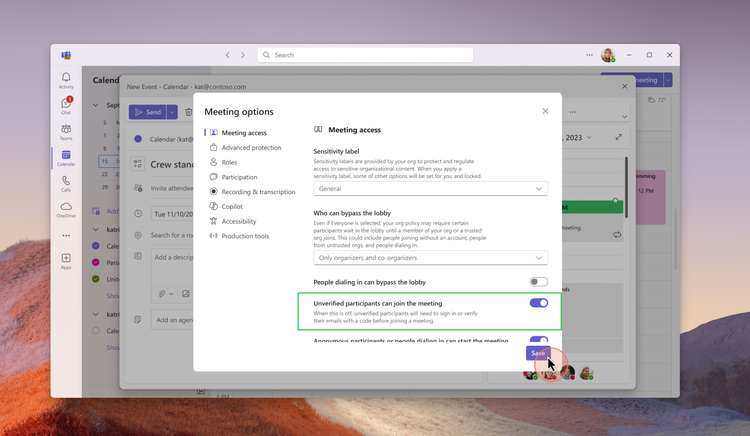
Meeting Organizer Controls: When scheduling meetings, meeting organizers will now have a new meeting option labelled ‘Unverified participants can join the meeting’ that will be set to default on for the cases where the admin had enabled unverified joins as shown in the screen below:
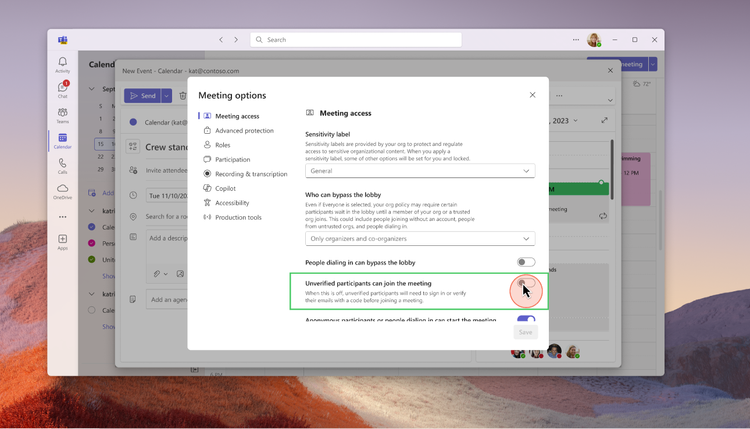
Organizers can choose to require participants to verify themselves by turning off this meeting option as shown in the screenshot below:
This enhancement ensures that email-verified users enjoy a better in-meeting experience compared to unverified participants.
Participant Experience: When organizers choose to disallow unverified participants from joining meetings, participants will be required to authenticate themselves upon attempting to join the meeting. If they possess a work account, school account, or personal Microsoft account, they can use these credentials for authentication. Participants without any of these Microsoft accounts will need to verify by entering their email address, which will receive a one-time passcode for verification.
Participants who verify the same email address that the meeting invitation was sent to will be allowed to join the meeting directly if the ‘lobby bypass’ setting permits invited participants. Conversely, participants verifying with a different email address will be placed in the lobby and labeled as ‘Email verified’.
Generally available in early 2025
For more information, see the article in the Microsoft tech blog.
New admin policy to prevent bots from joining Teams meetings
A new policy in Teams admin center that allows admins to block unwanted bots from joining meetings. The policy consists of two parts for optimal meeting security. First, admins can use the ‘External Access’ setting in Teams admin center to block known bot domains. Second, admins can enable a CAPTCHA-based human verification test and apply it to anonymous and non-federated users. Once set, any anonymous user that attempts to join the meeting will be required to pass the CAPTCHA test before proceeding. Learn more here.
Generally available now
Support for 50k attendees in a Town Hall
Organizers of town hall instances can now reach a wider audience in a single event with the expanded ability to host a maximum of 50,000 simultaneous attendees. This increase serves as a significant jump from the previous attendee cap of 20,000 for organizers with a Teams Premium license. The quality and stability of town halls will remain constant up to this new limit, providing high-quality and reliable content to participants. For events with more than 20,000 concurrent attendees, streaming chat and reactions are disabled for all attendees. Organizations can get support for audiences up to 50,000 concurrent attendees by reaching out to the Microsoft 365 Live Event Assistance Program (LEAP) for assistance.
Generally available in December 2024
DVR capabilities for Town Hall on desktop and web
Digital Video Recording (DVR) functionality in town halls now enables event attendees to interact with an instance of a live streaming town hall in the same way they would a recorded piece of content, when viewing via desktop or web. This makes it easier to digest the content being presented, giving viewers the ability to pause and move forward or back within a town hall, navigate to any previously-streamed timestamp, and interact in other ways that make viewing a town hall more convenient. This feature is available for all town halls regardless of license assigned to the organizers.
Public preview in December 2024
Loop workspace in a channel
Channels in Microsoft Teams streamline collaboration by bringing people, content, and apps together and helping to organize them by project or topic. You will be able to add a Loop workspace tab to standard channels enabling your team to brainstorm, co-create, collect, and organize content—together in real-time. Everyone in the Team gets access to the Loop workspace, even as Team membership changes, and the workspace adheres to the governance, lifecycle, and compliance standards set by the Microsoft 365 Group backing the team. To get started, click the plus sign (+) at the top of the channel and select Loop from the app list.
Generally available in early 2025.
Integration of Storyline in Microsoft Teams
Storyline (from Viva Engage) in Microsoft Teams will simplify the ways that leaders and employees share and connect with colleagues across the company, increasing visibility and engagement. The Storyline integration will enable employees to follow updates from leadership, discover content, contribute ideas, and express themselves—all within Teams.
This new integration will be available in preview early next year.
Copilot within Engage can help to find knowledge, summarize community content, and catch up on important conversations. Copilot in Viva Engage will soon be able to summarize community engagement. Over time, there will be more Copilot skills into Engage including predictive analytics, image creation, and best practices for leadership communications. Copilot in Viva Engage experiences are available to Viva suite and Viva Communications and Communities customers.
Teams on iPad
iPad multi-window support: Available now in private preview
Teams now supports multiple windows on iPad. Effortlessly organize your split view experience with the Teams windows to easily navigate across meetings, chats, and more.
Enhancements to iPad Teams calendar: Available now in public previewUpdated iPad Teams calendar to leverage the iPad’s form factor and make the scheduling process more seamless for iPad users. Users will now enjoy a default 5-day work week view, with options to switch to agenda, day, and 7-day week views. Enhanced features include a join button for easy access to upcoming meetings, synced category colors from the desktop, and the ability to reschedule events by simply dragging and dropping.
Teams Rooms and Devices: Speaker recognition
Generally available for Teams BYOD rooms in early 2025
You can get intelligent recaps and maximum value from Copilot in any Teams meeting no matter where you meet. Participants in any meeting space who have securely enrolled their voice via Teams Settings, can be recognized by their voice and attributed in meeting transcripts with cloud-based speaker recognition, whether it has a Teams Rooms system deployed or not. Speaker recognition in a bring your own device (BYOD) room requires a Teams Premium license for the meeting host. This works even on just laptop microphones. Learn more about speaker recognition and voice profiles.
Dual display enhancements on Teams Rooms on Android: Generally available now
Now you can enjoy an enhanced meeting experience in Teams Rooms on Android with dual display rooms that show up to 18 videos (3×3 on each screen) when no content is shared. This creates a consistent experience across Windows and Android-based Teams Rooms. Additionally, admins can remotely switch screens in dual display mode using device settings and the Teams admin center, resolving front-of-room display issues without needing physical intervention. Learn more about this release.
Microsoft Mesh
Host and attendee interaction visibility for multi-room Mesh events: Generally available now
Mesh event attendees can now see raised hands and reactions from attendees in other rooms during large, multi-room Mesh events. This creates a greater sense of audience feedback as a whole across all rooms in a Mesh event, and increases total audience engagement. Additionally, event hosts will now be able to move between all rooms in a multi-room Mesh event.
New collaborative Project Studio environment in Microsoft Mesh: Generally available now
The Project Studio environment is a new space for immersive meetings and Mesh events. This space has been designed for synchronous teamwork and productivity for small groups to collaborate on content. Collaboration tools like whiteboards will be added to the environment as they become available.
Microsoft Mesh app on Meta Quest supports hand interactions: Generally available now
Microsoft Mesh app users on Meta Quest 2, 3, and Pro headsets can now use their hands to use the app, move around in event environments, and interact with objects. Motion controllers continue to be supported, and users can switch between using controllers or their hands while using the app.
Microsoft Mesh app on Meta Quest supports hand interactions: Generally available now
Microsoft Mesh app users on Meta Quest 2, 3, and Pro headsets can now use their hands to use the app, move around in event environments, and interact with objects. Motion controllers continue to be supported, and users can switch between using controllers or their hands while using the app.
Name pronunciation
You can record and share the correct pronunciation of your name, fostering inclusivity and ensuring colleagues pronounce names accurately. Simply open your profile card to make a recording. This recording will be accessible on your profile card to individuals at your workplace or school using Microsoft 365. With a single click, you can listen to your colleagues’ name pronunciations.
Available now in public preview, generally available in early 2025
Skin tone setting for emojis and reactions
The new skin tone setting for emojis and reactions in Teams lets you personalize your digital interactions by selecting a skin tone that best represents you. In your settings, you can choose from a range of skin tones. Once selected, this will be consistently applied across chat, channels and meetings as well as on various clients, allowing you to express yourself more authentically in conversations.
Generally available now
There are even more news related to Microsoft Teams. Check them out from Microsoft’s article.
The Microsoft Ignite 2024 had also a myriad of announcements and updates in the realm of AI. Azure AI Foundry represents a significant step forward in AI development, providing a more streamlined and integrated approach to building and managing AI applications. By bringing together a wide array of tools and capabilities, it empowers organizations to harness the full potential of AI in a secure and efficient manner.
Azure AI Foundry
Azure AI Foundry will be a unified platform where organizations can design, customize, and manage AI applications and agents at scale. The platform integrates existing Azure AI models (1800+), tools, and safety solutions with new capabilities, making it easier and more cost-effective to develop and deploy AI solutions.
Azure AI Foundry SDK
The Azure AI Foundry SDK, now in preview, provides a unified toolchain for customizing, testing, deploying, and managing AI applications and agents with enterprise-grade control and customization. This SDK includes a comprehensive library of models and tools, which simplifies the coding experience and enhances productivity for developers. By offering pre-built app templates and easy integration with Azure AI, the SDK enables faster development and deployment of AI applications.
Azure AI Foundry Portal
Formerly known as Azure AI Studio, the Azure AI Foundry portal provides a comprehensive visual user interface that helps developers discover and evaluate AI models, services, and tools. The portal includes a new management center that brings essential subscription information and controls into a centralized experience. This helps cross-functional teams manage and optimize AI applications at scale, including resource utilization, access privileges, and connected resources.
AI Agent Service
Launching next month in preview, the Azure AI Agent Service will enable developers to orchestrate, deploy, and scale enterprise-ready agents to automate business processes. With features such as bring-your-own storage (BYOS) and private networking, the service ensures data privacy and compliance, offering robust protection for sensitive data.
Risk and safety evaluations for image content
Risk and safety evaluations for image content will assist users in assessing the frequency and severity of harmful content in their app’s AI-generated outputs. These evaluations will enhance existing text-based evaluation capabilities in Azure AI to cover a wider range of interactions with GenAI, such as text inputs that produce image outputs, image and text inputs that produce text outputs, and images containing text (e.g., memes) as inputs that produce text and/or image outputs. These evaluations will help organizations understand potential risks and implement targeted mitigations, such as modifying multimodal content filters with Azure AI Content Safety, adjusting grounding data sources, or updating their system messages before deploying an app to production. This update will be available in preview next month in the Azure Foundry portal and the Azure AI Foundry SDK.
For example, these evaluations will be useful when developing educational apps that use AI to generate visual aids for learning material, ensuring that no inappropriate or harmful images are shown to students or employees. They will also be beneficial for experiences that need to filter out harmful memes or graphic content automatically while providing safe user experiences. Additionally, companies creating marketing campaigns using AI-generated images can utilize these evaluations to avoid distributing potentially offensive or unintended imagery in their advertisements.
Azure AI Content Understanding
Azure AI Content Understanding, a new AI service in preview, will help developers build and deploy multimodal AI applications. This service leverages generative AI to extract information from unstructured data such as documents, images, videos, and audio, converting them into customizable structured outputs. By offering pre-built templates and a streamlined workflow, it reduces the complexity and cost of building AI solutions.
Fine-Tuning in Azure OpenAI Service
Developers and data scientists can now customize models for business needs with new fine-tuning options in Azure OpenAI Service. This includes support for fine-tuning GPT-4o and GPT-4o mini models on Provisioned and Global Standard deployments, enabling more tailored AI solutions. Additionally, multimodal fine-tuning for GPT-4o with vision is now generally available, further enhancing the customization capabilities for developers.
Integration with Weights & Biases
The integration of Azure OpenAI Service with Weights & Biases brings a comprehensive suite of tools for tracking, evaluating, and optimizing models. This collaboration empowers organizations to build powerful and tailored AI applications, enhancing the overall AI development experience.
Azure AI Content Understanding – Post Call Analytics, Public Preview
Fast Transcription API, General Availability
Realtime Speech Translation, General Availability. Realtime speech translation is now generally available, enabling multilingual speech-to-speech translation for 76 input languages. It includes significant latency improvements to deliver translation results in less than 5 seconds of the initial utterance. Enhanced latency is supported for language pairs with English (en-US) as the output language and will be extended to other output languages by the end of 2024.Learn more at aka.ms/azure-speech-translation
Video Translation API, Public Preview
Context-aware, highly expressive HD voices, Public Preview
During the past few months, Microsoft has made a few updates to the text to speech avatar service.
More sample code: JS code sample is added to GitHub for live chats with real-time avatar.
Gestures added to live chats: Now avatars are more engaging with natural gestures added to conversations. Try it with the live chat avatar tool.
More regions: East US2 is added to the supported regions for text to speech avatar bringing the total number of supported Azure service regions to seven: Southeast Asia, North Europe, West Europe, Sweden Central, South Central US, East US 2, and West US 2.
Lower price: Further reduced the cost for avatar synthesis in live chat scenarios. With that, now the public price for real-time avatar synthesis has been reduced. With standard avatars, real-time synthesis price is reduced from $1 per minute to $0.5 per minute (taking effect in December), and for custom avatars, the real-time synthesis price is reduced from $1 per minute to $0.6 per minute. Check more details on the pricing page (choose one of the supported Azure service regions).
And finally news about self-service avatar creation: A self-service custom avatar portal will be released very soon. With this portal, customers will be able to upload their own video data and create custom avatars by themselves. This update will largely reduce the time to market for customers’ avatars, which are currently built through Microsoft’s engineering support.
You should also check latest updates to the Azure AI Speech Service post.
New formula to calculate performance
What’s new for Microsoft 365 and Copilot admins
Most of pictures in the blog post are from Microsoft materials and from Ignite keynote and sessions.
If you’ve played the 1980’s hit game of Tetris then you’ll be pleased to know that as of this morning, we have been informed that you can now download Wei-ju Wu’s WIP Commodore Amiga game of Tetra Zone. As in the words of the creator “a modern take on the best known arcade puzzle game of all time for classic Amiga computers (title changed for trademark/copyright reasons)”. To coincide with this news, Saberman has provided a gameplay video showing this early build.
Dev Notes : “The first version of this game was written for the AmiGameJam 2024 under the theme “The Sequel that Never Was” One of my goals was to learn game development on a classic Amiga system using modern tools and methods. I wrote a game development framework named RATR0 which implements the techniques described in my Youtube tutorial series “Amiga Hardware Programming in C”; Tetra Zone is written on top of this framework”.
Min. System requirements:
Amiga OCS (e.g. 1000, 500, 2000) NTSC and PAL 512 KB Chip RAM, 512KB Fast RAM or higherKickstart/Workbench 1.3
After an inspiring week at Barcelona’s Gallery Week, where he immersed himself in over 30 galleries showcasing diverse styles and perspectives, artist Alexis Olin (@darklunni/@alexisolinart) is now ready to take the leap into hosting his own exhibition. This passion project, featuring his new abstract collection, “The Result of Habits,” explores the ways human routines shape our lives—and he’s inviting his supporters to be a part of the journey.
To fund the exhibition and bring this collection to life, Alexis is hosting a raffle fundraiser with a range of exciting rewards, including his original acrylic paintings, limited-edition prints, and exclusive branded merchandise.
Barcelona: A Catalyst for Creativity
Barcelona’s Gallery Week wasn’t just an event—it was a turning point for Alexis. Experiencing the vibrant art scene firsthand left him inspired to share his own artistic voice in a similar setting. The new collection, “The Result of Habits,” reflects on the patterns and behaviors that shape our existence, blending abstract visuals with profound commentary on humanity.
“My time in Barcelona showed me the power of art to connect with people in physical spaces,” Alexis shares. “I want to create an experience that sparks those same emotions.”
Raffle Details: Support Art, Win Big
To make this dream a reality, Alexis has launched a raffle on OpenSea, giving participants the chance to win exclusive pieces from his collection while supporting his first gallery exhibition.
How the Raffle Works
Tickets: 50 digital tickets are available for €100 (Ξ0.03) each on the Base blockchain.
Grand Prize: An original acrylic painting from the “The Result of Habits” collection.
NFT Transformation: Each ticket will later transform into a unique NFT featuring elements from the collection, making every entry a collectible.
Reward Tiers
Every ticket guarantees a reward, and the more you buy, the greater the benefits:
1 Ticket: A Limited Edition Giclée Print.
2 Tickets: A Giclée Print and a T-shirt featuring Alexis’s artwork (delivered by Métrique).
3 Tickets: A Giclée Print, T-shirt, and Hoodie from Métrique.
4+ Tickets: A bonus—a small physical painting featuring elements from the collection.
For an extraordinary option, Special Ticket #51 (€5000) includes:
An original painting (150×150 cm or multiple smaller pieces totaling €5000).
A digital NFT copy on Foundation.
Giclée Print, branded apparel, and a signed vinyl record by dOP with custom cover art painted by Alexis.
Why Participate?
This is more than a raffle—it’s a chance to help an emerging artist realize his dream of showcasing his work in a gallery. By purchasing a ticket, you’re:
Empowering Creativity: Supporting Alexis in bringing “The Result of Habits” to a physical exhibition.
Owning Unique Art: Gaining access to original paintings, limited-edition prints, and NFTs.
Joining a Vision: Becoming part of Alexis’s creative universe as he takes this bold step forward.
Join Alexis on This Journey
Inspired by the energy of Barcelona’s art scene, Alexis Olin is determined to bring his unique voice to the gallery stage. Your participation in his raffle helps make this vision possible while giving you the chance to own exclusive art and collectibles.
Get Involved:
Alexis Olin, also known as Darklunni, is a Ukrainian artist, photographer, and founder of the Métrique clothing brand. His journey in the arts spans decades and mediums, from comics and graphic novels to fine art, photography, and NFTs. Drawing inspiration from his extensive travels, particularly to France, Alexis blends traditional and contemporary elements in his work, creating a unique intersection of painting, photography, digital art, and fashion.
Recently, Alexis’s inspiring week in Barcelona’s Gallery Week, where he explored over 30 galleries, has fueled his ambition to launch a new gallery exhibition showcasing his abstract collection, “The Result of Habits.” This collection reflects on the habits that define human life, presented through his signature abstract, layered visuals.
A Life Inspired by Art
From Comics to Fine Art
Alexis’s roots in art began in the 1990s with comics and graphic novels, where his work gained recognition in Ukraine’s cult magazines like Extreme, K9, and Moloko. His fascination with the Franco-Belgian School of graphic novels and Renaissance art shaped his aesthetic, while his editorial role at the magazine K9 connected him deeply with the Ukrainian art community.
His career expanded internationally when he began exhibiting paintings and illustrations, with notable appearances at festivals and galleries in France, Spain, and Italy.
Métrique: Fashion as Art
The founding of Métrique, Alexis’s clothing brand, represents his vision to take art beyond gallery walls. By transferring his paintings and illustrations onto fabrics, Alexis creates wearable art, allowing his work to reach a broader audience.
Embracing NFTs and Digital Art
Since 2021, Alexis has embraced the NFT space, showcasing his works on platforms like SuperRare, Foundation, Nifty Gateway, and OpenSea. His approach combines traditional fine art techniques with the digital tools of blockchain technology, making his art accessible to global audiences.
His ongoing series, Nephel’s Dream, has been exhibited at notable Web3 events such as the Non Fungible Conference in Lisbon, ETH Barcelona, and NFT Factory Paris. This seamless integration of physical and digital art is a testament to Alexis’s innovative vision.
TLDR
After a transformative experience at Barcelona’s Gallery Week, Alexis Olin is hosting a raffle to fund his first exhibition, featuring his abstract collection, “The Result of Habits.” Tickets (€100/Ξ0.03) are available on OpenSea, with rewards like original paintings, NFTs, and branded apparel. Support his journey and be part of this creative milestone.
As the cryptocurrency landscape continues to evolve, investors are perpetually on the lookout for the next big opportunity. One promising avenue in 2024 is crypto presales, where projects are available before official launch. These presales can be a strategic entry point, offering tokens at a discount, and potentially reaping significant returns if the project succeeds. In this post, we will explore some of the top crypto presales in 2024 that have the potential to grow tenfold or more.
Understanding Crypto Presales
Before diving into specific presales, it’s crucial to understand what crypto presales are. Essentially, a presale is a fundraising event in which blockchain startups sell their tokens to early investors before they become available to the general public. This early-phase fundraising provides startups with the much-needed capital to develop their projects.
Benefits of Investing in Crypto Presales:
Access to tokens at a discounted rate compared to post-launch pricesOpportunity to choose projects with innovative solutions and advanced technologyPotential for significant returns on investment if the project succeeds
Top 2024 Crypto Presales to Watch
Let’s explore some promising projects with the potential for substantial growth:
1. Project X: The Future of Decentralized Finance
Project X aims to transform the decentralized finance (DeFi) sector with its innovative platform, which offers new features and improved security. Its focus on creating a more user-friendly DeFi experience has garnered considerable attention from early investors. The team behind Project X comprises seasoned blockchain developers and financial experts.
Objective: Simplify and secure DeFi transactionsUnique Selling Point: User-friendly interface with enhanced security featuresGrowth Potential: High, given the expanding DeFi market
2. GreenToken: Revolutionizing Green Energy Investment
With an increasing emphasis on sustainable solutions, GreenToken aims to revolutionize the way individuals can invest in green energy projects. This blockchain-based platform offers transparency and easy access to a variety of green projects worldwide.
Objective: Enhance investment in green energy projectsUnique Selling Point: Democratize investment opportunities in sustainable energyGrowth Potential: Significant, as sustainability becomes more important globally
3. MetaVerseSpace: Pioneering Virtual Real Estate
The metaverse continues to capture interest, and MetaVerseSpace is at the forefront of virtual real estate. By offering a platform for users to buy, sell, and develop virtual land, this project has already attracted a strong community of early adopters excited about the possibilities within digital landscapes.
Objective: Facilitate virtual real estate transactions in the metaverseUnique Selling Point: Comprehensive platform for virtual land and real estateGrowth Potential: Immense, with increasing interest and investment in metaverse spaces
How to Assess a Crypto Presale
When considering which crypto presales to invest in, it’s important to conduct thorough research. Here are some factors to consider:
Project Fundamentals: Analyze the project’s whitepaper, roadmap, and team credentials.Technology and Innovation: Assess what makes the project stand out in the marketplace.Community Engagement: A strong, active community can be an indicator of future success.Market Opportunity: Understand the industry and scope where the project operates.
Conclusion: The Lucrative Potential of Crypto Presales
Crypto presales in 2024 present exciting opportunities for savvy investors ready to explore innovative projects with substantial growth potential. While investing in presales carries inherent risks, thorough research and strategic selection can help mitigate these risks, paving the way for potentially rewarding experiences.
The projects outlined above are just a glimpse of the emerging technologies and solutions coming our way. Each of these presales embodies significant potential, aligning with evolving market trends and technological advancements. By staying informed and strategic, investors can position themselves advantageously in the ever-evolving world of cryptocurrency.
“`
About Web3Wire Web3Wire – Information, news, press releases, events and research articles about Web3, Metaverse, Blockchain, Artificial Intelligence, Cryptocurrencies, Decentralized Finance, NFTs and Gaming. Visit Web3Wire for Web3 News and Events, Block3Wire for the latest Blockchain news and Meta3Wire to stay updated with Metaverse News.
10Following teasers shared earlier this week, Doodles and McDonald’s have revealed new details about their collaboration, which includes customized cups and digital collectibles. In...