Published: November 22, 2024 at 8:39 am Updated: November 22, 2024 at 8:39 am
by Ana
Edited and fact-checked:
November 22, 2024 at 8:39 am
To improve your local-language experience, sometimes we employ an auto-translation plugin. Please note auto-translation may not be accurate, so read original article for precise information.
In Brief
MetaHub Finance simplifies blockchain integration in Web3 by enabling users to transition from Web2 and interact with decentralized ecosystems.
With its deflationary MEN token concept and MetaID system, MetaHub Finance is rewriting the Web3 field by providing people all around the world with a simplified way to integrate blockchain into their lives. In this interview, James Ross Croyle, CEO of MetaHub Finance, discusses how the platform makes it easier for users to go from Web2 to Web3 while allowing them to earn, stake, and interact with decentralized ecosystems.
How did your journey into crypto start?
I got into crypto back in 2017. It was pure curiosity—I saw my colleagues making money from something called digital assets, and I thought, “What is this stuff?” I had no idea how they were doing it, but I decided to try it out. I bought a little Bitcoin, a little Ethereum, and I started playing a blockchain game called CryptoKitties. It was one of the first blockchain-based games using smart contracts. I thought it was fascinating, but then I lost my seed phrase. That meant I lost eight CryptoKitties and $100 worth of Ethereum. It was a harsh lesson. After that, I still held onto my Bitcoin and Ethereum on an exchange but didn’t do much with them for a while.
In 2020, I started advising a Web3 startup that aimed to help creators monetize their work on platforms like Instagram. By 2021, I was fully immersed in Web3 and gaming. I even built a gaming guild from scratch with 300 players participating in games like Axie Infinity and Pegaxy, a blockchain-based horse racing game. At the time, I was working for Microsoft in Southeast Asia, and I quickly became the Web3 person everyone turned to with questions about crypto and DeFi.
Eventually, I decided I needed a full-time role in Web3, and the timing worked out since Microsoft was laying people off. I joined Crypto Global United in a leadership role and later became the CEO of MetaHub Finance.
What was the motivation behind creating MetaHub?
MetaHub was born from a desire to create a platform where anyone could engage and earn, regardless of their background. Some people might only have time and knowledge, while others may bring financial resources. We cater to both.
For example, we have “hunters,” who are like questers. They participate in tasks and earn rewards. You’ve probably heard of platforms like QuestN or Galaxy that do similar things. On the other side, we have the “meta-minters,” who stake tokens to earn dividends or other rewards.
The idea is to create an inclusive ecosystem. Hunters can earn small amounts of money by completing quests, and stakers can earn through staking and participating in the MEN token economy. We wanted a platform where anyone with internet connectivity could be part of the Web3 revolution.
How does MetaHub bridge the gap between Web2 and Web3?
The key is accessibility. We want people to be able to join MetaHub without needing extensive Web3 knowledge. For instance, someone might hear about MetaHub from a friend and get introduced to it through our affiliate systems. From there, they can access training videos to learn how to set up wallets like MetaMask and complete quests.
Our decentralized identity system, MetaID, plays a crucial role. When users log in with a self-custody wallet, they automatically receive a MetaID in the form of a soulbound token on Polygon. This MetaID serves as their digital identity in the ecosystem, tracking their activities while maintaining privacy. It’s seamless and doesn’t require users to understand the technical details.
What benefits do users gain by becoming meta-citizens?
Meta-citizenship comes with several advantages. For starters, meta-citizens have access to a supportive community. Our Telegram group is very active, and we provide training for newcomers at no cost. This collaborative approach helps users, whether they’re setting up a wallet for the first time or exploring advanced features.
Meta-citizens also receive a soulbound token as part of their MetaID, which tracks their activities and engagement. This ID becomes increasingly valuable as users progress in the ecosystem. For instance, higher-ranked citizens might get early access to features or invitations to exclusive partner events. It’s like a leveling-up system that rewards active and engaged members.
How does MetaID improve upon traditional digital identity systems? Why is it essential in the Web3 context?
Traditional digital identity systems, like those used by Facebook or Google, require users to share personal information, often without transparency or control. MetaID, by contrast, is entirely decentralized and tied to a user’s wallet.
As soon as a user logs in with a self-custody wallet like MetaMask, they receive a MetaID, which acts as their digital passport within our ecosystem. It tracks their activities—such as completed quests, staking history, and referral levels—without compromising privacy.
This decentralized identity also integrates deeply with our affiliate system. Affiliates can earn rewards across 20 levels of referrals, and the MetaID ensures accurate tracking without exposing sensitive data. Over time, the MetaID will evolve to include more functionalities, further enhancing its role in the Web3 space.
Can you elaborate on the roadmap for MetaHub’s growth?
Over the past couple of years, we’ve been building the foundation for MetaHub. Initially, we focused on facilitating peer-to-peer (P2P) transactions for MEN tokens, ensuring users could cash out seamlessly. Now, we’re rolling out more advanced features.
One exciting development is Custom Quests, which is currently in beta. These quests go beyond simple tasks like joining a Telegram group. For example, a game studio could create quests requiring players to download their game, log in, complete certain objectives, and even defeat specific bosses. Everything is tracked through APIs and webhooks, ensuring real engagement.
We’re also introducing the MetaHub card, a crypto-compatible MasterCard. It allows users to spend crypto directly, making it easier to off-ramp into the traditional financial system. Looking further ahead, we plan to launch a decentralized project analysis hub around 2025. This will leverage our partnerships to provide valuable insights and resources for the Web3 community.
How does MetaHub integrate DeFi tools into its ecosystem?
DeFi is a core part of MetaHub, especially on the meta-minting side. Users can stake MEN tokens, provide liquidity, or participate in advanced DeFi mechanisms like Liquid Staking Derivatives (LSD) and LSD-Fi.
Our MEN token follows a deflationary model, which includes burning tokens during certain transactions and halving events to control supply. The token’s value is further supported by its utility in staking, rewards, and governance. For example, NFT holders earn dividends from transaction taxes, adding another layer of incentive.
What is unique about MetaHub’s deflationary token model, and how does it work?
Our MEN token follows a carefully designed deflationary model. It’s capped at a total supply of 700 million, and tokens are only mined as they are needed—such as when rewards are claimed or transactions occur.
We also incorporate burning mechanisms. For example, certain transactions trigger token burns, permanently reducing the circulating supply. Additionally, like Bitcoin, we have halving events. These occur as we hit milestones in token mining, gradually slowing down production and ensuring long-term scarcity.
One unique feature is tied to NFTs in our ecosystem. NFT holders are entitled to 30% of transaction tax revenue, distributed every 28 days. However, there’s a catch: if they fail to claim their rewards within a 24-hour window, the unclaimed dividends are locked in the contract and become unavailable—adding another deflationary layer.
How do MetaHub’s strategic partnerships across generative AI and Web3 domains impact affiliate marketing for decentralized platforms?
Generative AI and Web3 are both reshaping the affiliate marketing landscape. One of our advisors, Val Bercovici, is a global leader in AI and cybersecurity, and his insights have been invaluable as we explore new possibilities.
For example, generative AI can enhance content creation and optimize campaigns for affiliates, while Web3 ensures transparency and decentralization. We’re also looking into agentic workflows, where bots act as task agents under human supervision. These bots could perform repetitive tasks, like aggregating data or analyzing trends, freeing up affiliates to focus on strategy.
This blend of AI and Web3 has the potential to make affiliate marketing more efficient, scalable, and accessible to a global audience.
What’s your perspective on the future of Web3?
The future of Web3 lies in reducing friction. Right now, tools like wallets and seed phrases are too complex for mainstream users. To onboard the next billion people, we need intuitive solutions like biometrics or simplified authentication methods.
Ultimately, Web3 is about decentralization, democratization, and user empowerment. I believe the term “Web3” itself might fade away as these technologies become seamlessly integrated into our daily lives. We’ll just call it “the web,” with everything connected and accessible to everyone.
Disclaimer
In line with the Trust Project guidelines, please note that the information provided on this page is not intended to be and should not be interpreted as legal, tax, investment, financial, or any other form of advice. It is important to only invest what you can afford to lose and to seek independent financial advice if you have any doubts. For further information, we suggest referring to the terms and conditions as well as the help and support pages provided by the issuer or advertiser. MetaversePost is committed to accurate, unbiased reporting, but market conditions are subject to change without notice.
About The Author
Victoria is a writer on a variety of technology topics including Web3.0, AI and cryptocurrencies. Her extensive experience allows her to write insightful articles for the wider audience.
More articles
Victoria d’Este
Victoria is a writer on a variety of technology topics including Web3.0, AI and cryptocurrencies. Her extensive experience allows her to write insightful articles for the wider audience.
Bitcoin (BTC) Sets New Records , Bitcoin (BTC), which has been setting new records daily in recent times, continued its upward trend today. BTC surged above $99,000 last night, moving closer to the significant milestone of $100,000.
Recently, Bitcoin has featured prominently in many of our news updates, and today was no different. BTC achieved a new all-time high (ATH) by surpassing $99,000 last night, with the new ATH recorded at $99,314. As of the time of writing, BTC is trading at $98,921, nearing the psychological target of $100,000. We will see what unfolds as we approach the $100,000 mark.
Ethereum (ETH) Joins the Movement
Looking at the broader market, it’s evident that we are seeing a vibrant environment once again. Ethereum (ETH), in particular, has shown renewed momentum. ETH, which began trading at $3,400, has seen an increase of over 8% in the past 24 hours.
Altcoins Also on the Rise
Other altcoins are also experiencing positive movement. Notably, Solana (SOL) and Ripple (XRP) have emerged as shining stars over the last 24 hours. SOL rallied more than 8%, reaching $261, while Ripple (XRP) climbed approximately 26% to $1.40.
You May Also Like
Follow us on TWITTER (X) and be instantly informed about the latest developments…
OpenAI has released a new update for the GPT-4o model, enhancing the capabilities of ChatGPT and bringing it to life in a whole new way. This update significantly increases the capacity of artificial intelligence to generate text while also improving its performance with uploaded documents.
OpenAI, a leading name in the artificial intelligence industry, has introduced this new update for its generative AI, ChatGPT. The update for the “GPT-4o” model aims to boost the performance of the AI significantly. According to OpenAI’s statement, ChatGPT‘s writing capacity has been enhanced, making it more convenient for users who create written content. Additionally, GPT-4o will now handle uploaded documents more effectively.
OpenAI’s statement reads:
GPT-4o has undergone an update.
The model’s creative writing skills have been elevated to a higher level. We have improved its writing capabilities to enhance relevance and readability, making the outputs more natural, engaging, and tailor-made for user needs.
It has also improved its ability to work with uploaded files. The model now provides deeper insights and more comprehensive answers.
You May Also Like
Follow us on TWITTER (X) and be instantly informed about the latest developments…
Published: November 21, 2024 at 9:37 am Updated: November 21, 2024 at 9:37 am
by Ana
Edited and fact-checked:
November 21, 2024 at 9:37 am
To improve your local-language experience, sometimes we employ an auto-translation plugin. Please note auto-translation may not be accurate, so read original article for precise information.
In Brief
Bitfinex released its latest market analysis report, highlighting a major shift in the markets last week, with Bitcoin’s price surging to a new all-time high.
Bitfinex released its latest market analysis report, highlighting a major shift in Bitcoin markets last week. The price surged to a new all-time high (ATH), currently trading above the $97,000 mark, which pushed its market capitalization to $1.8 trillion. With this rise, Bitcoin has surpassed silver and is now the eighth largest asset in the world by market cap.
This new ATH followed a remarkable 39.5% surge within just nine days, marking the largest 9-day increase since January 2021. The rally is one of the most notable short-term capital inflows into any asset class in history, signaling that investor interest in Bitcoin is approaching levels typically seen with mainstream assets.
Bitcoin exchange-traded funds (ETFs) traded in the US have amassed $84 billion in assets under management, now representing 66% of the total assets of gold ETFs. While recent investor enthusiasm has cooled slightly, with approximately $640 million in net outflows over the final two trading days of the week, Bitfinex remains optimistic about Bitcoin’s long-term outlook. With institutional investment increasing and ETFs gaining market share, Bitcoin’s trajectory is poised for further growth, which could impact capital allocation strategies in the years ahead, according to the firm.
US Economy Shows Resilience Amid Inflationary Pressures And Rising Fiscal Concerns
These developments unfold against a backdrop of a resilient US economy but also emerging challenges, particularly regarding inflation. In October, inflation increased, driven by higher shelter costs and used car prices, although this was partially mitigated by falling energy prices.
The labor market remains strong, characterized by low layoff rates and rising wages, which have supported consumer spending. October’s retail sales exceeded expectations, benefiting from steady wage growth and household wealth, indicating ongoing economic momentum.
However, fiscal policies, such as proposed tariffs and increased government spending, have raised concerns about potential inflationary pressures. These factors complicate the Federal Reserve’s ability to pursue rate cuts. As markets adjust to these changes, the economic outlook remains optimistic but presents a delicate balance.
Disclaimer
In line with the Trust Project guidelines, please note that the information provided on this page is not intended to be and should not be interpreted as legal, tax, investment, financial, or any other form of advice. It is important to only invest what you can afford to lose and to seek independent financial advice if you have any doubts. For further information, we suggest referring to the terms and conditions as well as the help and support pages provided by the issuer or advertiser. MetaversePost is committed to accurate, unbiased reporting, but market conditions are subject to change without notice.
About The Author
Alisa, a dedicated journalist at the MPost, specializes in cryptocurrency, zero-knowledge proofs, investments, and the expansive realm of Web3. With a keen eye for emerging trends and technologies, she delivers comprehensive coverage to inform and engage readers in the ever-evolving landscape of digital finance.
More articles
Alisa Davidson
Alisa, a dedicated journalist at the MPost, specializes in cryptocurrency, zero-knowledge proofs, investments, and the expansive realm of Web3. With a keen eye for emerging trends and technologies, she delivers comprehensive coverage to inform and engage readers in the ever-evolving landscape of digital finance.
OpenAI recently introduced its ChatGPT teacher guide and launched a free online course designed to help educators integrate AI-powered tools into their classrooms. While this initiative offers valuable insights into the pedagogical applications of artificial intelligence, it has also raised significant concerns about privacy and security.
The Purpose of OpenAI’s Teacher Guide and Online Course
The course, developed in collaboration with Common Sense Media, aims to provide educators with a foundational understanding of artificial intelligence and strategies for using AI tools effectively in educational settings. Many participants have reported gaining new ideas and learning practical strategies from the program.
Despite its benefits, the course has not been without criticism, particularly regarding its perceived lack of emphasis on data privacy and security.
Key Concerns Raised by Educators
Several educators have voiced concerns about the course’s comprehensiveness, particularly in addressing critical issues:
Privacy Issues: Lance Warwick, a lecturer at the University of Illinois, criticized the course for failing to delve deeply into how teachers’ and students’ data might be handled.
Transparency: Sin à Tres Souhaits from the University of Arizona pointed out that the program does not adequately explain the extent to which OpenAI could access or influence the course content.
Practical Guidance: Educators have also expressed uncertainty about how to responsibly implement AI tools in ways that safeguard student data and comply with privacy regulations.
OpenAI’s Response
In response to these concerns, OpenAI has emphasized its commitment to offering ongoing training to help educators use AI tools responsibly. The company states that it is working to address privacy concerns and provide clearer guidance for teachers.
The Role of AI in Education: A Complex Issue
While OpenAI’s initiative has the potential to transform education technology, the controversy highlights the challenges of integrating AI into classrooms. Questions surrounding data security, ethical use, and transparency remain barriers to widespread adoption.
OpenAI’s AI course for educators is a step forward in promoting the use of artificial intelligence in education, but it has also sparked critical discussions about privacy and security. Addressing these concerns will be essential to building trust and ensuring that AI tools can be used effectively and responsibly in educational environments.
You May Also Like
Follow us on TWITTER (X) and be instantly informed about the latest developments…
Do you remember the Metaverse lands that captured everyone’s imagination just a few years ago? The concept, once hailed as the gateway to virtual worlds, sparked a massive frenzy between 2021 and 2022. But where does the hype stand today? Let’s explore the current state of owning property in virtual worlds.
The Golden Era of Metaverse Real Estate
The Metaverse gained significant traction when it promised to revolutionize digital interaction, offering users the chance to own virtual property. The trend reached its peak when Facebook rebranded as Meta, signaling a commitment to this emerging technology. Investors, eager to avoid future regrets, poured millions of dollars into platforms like Decentraland and The Sandbox.
During the height of the Metaverse craze, virtual land prices soared. Properties in projects like Decentraland, The Sandbox, and Otherside experienced unprecedented demand:
Plots in Decentraland and The Sandbox climbed to prices as high as $15,000.
Land in Otherside reached values of 5 ETH.
Some investors reportedly paid millions of dollars for prime digital real estate.
At the time, the Metaverse was heralded as the “technology of the future,” and many believed these investments would yield substantial returns. The fervor created a speculative market, peaking in early 2022 alongside the broader crypto market boom.
The Decline of the Metaverse Land Market
The speculative bubble burst almost as quickly as it formed. Several factors contributed to the downfall of Metaverse real estate:
Crypto Market Collapse: The sharp decline in cryptocurrencies during 2022 significantly impacted Metaverse land values. The overly inflated prices of digital assets plummeted in the wake of reduced demand.
Technological Limitations: Metaverse platforms failed to deliver the technological advancements and user experiences investors had anticipated. The lack of infrastructure and meaningful adoption drove users away.
Decreasing Interest: The initial excitement around the Metaverse dwindled as platforms struggled to maintain engagement. This rapid loss of interest led to a collapse in virtual land prices, with values declining by almost 90%.
The Current State of Virtual Land Investment
Today, the appeal of owning Metaverse land as an investment tool has significantly diminished. While the idea of buying property in digital universes, hosting events, or setting up virtual businesses remains enticing, the market has largely failed to meet expectations. Investors who once believed in the Metaverse’s potential have been left disappointed.
The Metaverse land craze, which once promised a slice of the “world of the future,” has seen a dramatic fall from grace. Although the concept of virtual real estate still holds potential, the current reality is sobering. Prices have plummeted, and interest has waned, leaving investors questioning whether the dream of owning property in virtual worlds will ever fully materialize.
For now, the Metaverse remains a compelling idea, but one that needs substantial technological and adoption advancements to regain its former allure.
You May Also Like
Follow us on TWITTER (X) and be instantly informed about the latest developments…
The cryptocurrency market continues its rapid ascent, with Bitcoin, the leading cryptocurrency, reaching an all-time high of $94,000 yesterday evening. The surge in the market began with the US elections and shows no signs of slowing down.
Bitcoin Surges to New Heights
According to CoinMarketCap data, Bitcoin peaked at $94,020 before stabilizing around $92,500 following profit-taking at the higher levels. This bullish momentum has significantly impacted the total cryptocurrency market cap, which now exceeds $3 trillion, marking a new milestone.
Trump’s Media Company Eyeing the Crypto Market
The recent rally was fueled by speculation that Donald Trump’s media company may soon enter the cryptocurrency space. Reports from the Financial Times suggest that Trump Media and Technology Group, the operator of Truth Social, is close to acquiring Bakkt, a cryptocurrency company backed by the NYSE-owned Intercontinental Exchange.
With Trump expected to take a crypto-friendly stance in his anticipated second term, the market is optimistic about further growth and adoption.
Bitcoin ETF Trading Boosts Market Confidence
Adding to the market’s momentum, Bitcoin ETF options began trading on Nasdaq yesterday, generating approximately $2 billion in trading volume on the first day. The approval of Spot Bitcoin ETFs earlier this year has significantly enhanced institutional interest, driving market confidence.
Fear and Greed Index Shows “Extreme Greed”
The Fear and Greed Index, a tool that measures investor sentiment in the cryptocurrency market, surged to 90, indicating “extreme greed.” This reflects the growing optimism and robust demand in the market, as investors continue to pour funds into cryptocurrencies.
Key Highlights:
Bitcoin’s Record Surge: Reached $94,000, stabilizing at $92,500.
Market Cap Milestone: The total crypto market cap surpassed $3 trillion.
Trump’s Crypto Moves: Speculation around Trump Media acquiring Bakkt.
Investor Sentiment: The Fear and Greed Index hits 90, signaling bullish trends.
The cryptocurrency market remains on an upward trajectory, with Bitcoin leading the way as institutional interest and market adoption continue to grow.
You May Also Like
Follow us on TWITTER (X) and be instantly informed about the latest developments…
Published: November 20, 2024 at 2:05 am Updated: November 20, 2024 at 2:05 am
by Ana
Edited and fact-checked:
November 20, 2024 at 2:05 am
To improve your local-language experience, sometimes we employ an auto-translation plugin. Please note auto-translation may not be accurate, so read original article for precise information.
In Brief
MetaMask has released its v12.6 extension, introducing Gas Station for token swaps without requiring ETH for gas fees, and Chain Permission controls that provide users with control over account and network permissions.
Self-custodial cryptocurrency wallet MetaMask announced the release of extension v12.6, introducing a new feature that allows users to swap tokens without needing ETH to cover gas fees.
The update introduces the Gas Station feature, which becomes accessible when users enable Smart Transactions with MetaMask Swaps. This functionality simplifies and accelerates transactions by incorporating network fees directly into the quotes users receive. Furthermore, users are not restricted to a single liquidity source for their Swaps. Instead, the platform continues to aggregate data from a wide range of providers, including decentralized exchange aggregators, market makers, and decentralized exchanges (DEXs), ensuring competitive pricing and minimal network fees.
Currently, the Gas Station feature is available on the MetaMask Extension via the Ethereum mainnet, with plans to expand to mobile devices in the near future. In order to use it, the swap value must cover the cost of gas and include supported assets such as USDT, USDC, DAI, ETH, wETH, wBTC, wstETH, and wSOL.
Chain Permission Controls Enable More Granular Account And Network Management
Another update includes the ability for users to sign transactions on any permitted network without the need to manually approve network switches. This enhancement is made possible through the Chain Permission controls, which provide users with more detailed control over account and network permissions.
Permissions are granted to each decentralized application (dApp) at the time of connection, offering users flexibility and oversight. When a user connects to a dApp, the account in use and all default-enabled networks automatically gain permission for that dApp. However, users can modify these permissions either during the initial connection process or afterward through the All Permissions section. For those managing their own infrastructure, such as home stakers, the update also allows users to review and adjust their chosen RPC URLs as needed.
This feature not only enhances MetaMask‘s usability but also strengthens its security framework. By enabling users to limit dApp permissions, it reduces potential exposure to security risks while maintaining a seamless user experience.
MetaMask is a free digital wallet tailored for managing ETH and Ethereum-based tokens, acting as a gateway to the Ethereum blockchain. It allows users to perform a range of functions, including buying, sending, receiving, and swapping cryptocurrencies and NFTs. Additionally, it offers support for adding custom networks, extending its usability beyond the Ethereum ecosystem.
Disclaimer
In line with the Trust Project guidelines, please note that the information provided on this page is not intended to be and should not be interpreted as legal, tax, investment, financial, or any other form of advice. It is important to only invest what you can afford to lose and to seek independent financial advice if you have any doubts. For further information, we suggest referring to the terms and conditions as well as the help and support pages provided by the issuer or advertiser. MetaversePost is committed to accurate, unbiased reporting, but market conditions are subject to change without notice.
About The Author
Alisa, a dedicated journalist at the MPost, specializes in cryptocurrency, zero-knowledge proofs, investments, and the expansive realm of Web3. With a keen eye for emerging trends and technologies, she delivers comprehensive coverage to inform and engage readers in the ever-evolving landscape of digital finance.
More articles
Alisa Davidson
Alisa, a dedicated journalist at the MPost, specializes in cryptocurrency, zero-knowledge proofs, investments, and the expansive realm of Web3. With a keen eye for emerging trends and technologies, she delivers comprehensive coverage to inform and engage readers in the ever-evolving landscape of digital finance.
As Microsoft Ignite 2024 kicks off with its keynote, there is a lot of anticipation and excitement in the air. This year’s event is going to be an evolution of modern work, bringing together innovations and pivotal updates that will redefine how organizations and employees harness the power of artificial intelligence (AI). It is no surprise that this year’s Ignite is full of Copilot and AI and these continue to transform the workplace landscape.
Unfortunately I wasn’t able to make it on-site, so I will join 200 000 other online attendees who has registered to Ignite. I do have a missing out for not being one of 14 000 people on site at Chicago. Perhaps (🤞) next year. What is good, that most of the content (>800 sessions, demos and labs) is available online live & on-demand, so if you haven’t registered to Ignite.. do so here!
Again, it is not a surprise that Copilot Agents and Microsoft 365 Copilot are prominently included in Ignite 2024. New capabilities leap us forward in AI-driven task automation and collaboration. Agents are designed to streamline mundane tasks and intricate business processes, enabling teams to focus on more strategic and creative endeavors. From the Employee Self-Service Agent, which expedites HR and IT tasks, to the Project Manager Agent, which automates project planning and execution, these innovations underscore Copilot’s role as a transformative tool for modern enterprises.
The Facilitator Agent, operating within Teams, exemplifies how AI can enhance real-time collaboration by capturing key points during meetings and summarizing essential information in chats. This results in improving communication efficiency. Similarly, the Interpreter Agent facilitates seamless multilingual meetings, promoting inclusivity and global collaboration. Keep reading this article, there is a full chapter about Copilot Agents.
We will see some name changes like Copilot Lab switching to Copilot Prompt Gallery and Azure AI Studio becoming Azure AI Foundry Portal. We can expect names and even brandings change faster than they did before. We are moving to the future with the speed of AI.
The integration of Copilot into various facets of Microsoft 365 has resulted in a new era of intelligent work environments. By leveraging AI to take on repetitive tasks and facilitate communication, employees can redirect their focus towards innovation and key tasks and projects. This shift not only boosts productivity but also enhances job satisfaction as teams are freed from the shackles of mundane and/or tedious tasks.
Organizations, on the other hand, stand to benefit from the enhanced efficiency and new opportunities that AI-powered tools bring to the table. The ability to quickly generate insights from meetings, automate project management, and improve real-time collaboration positions businesses to thrive in an increasingly competitive and fast-paced digital landscape.
The future of work is being reshaped by the relentless march of AI and innovative technology. Copilot stands at the forefront of this transformation, opening a door into a world where AI not only assists but actively enhances the way we work, collaborate, and innovate.
Now, let’s jump to announcements, keep on reading!
Out of the Box Copilot Agents Microsoft 365 Copilot Microsoft 365 Copilot Actions enhance task delegation Enhanced Meeting Efficiency in Teams: Analyze screen-shared content Summarize content of files shared in Teams chat Copilot Pages PowerPoint Enhancements Microsoft 365 Copilot in Excel Outlook Meeting Management Organizing Notes in OneNote Microsoft Places Copilot Prompt Gallery Copilot Studio Announcements Enhancements in Copilot Studio Copilot Analytics Microsoft Teams Transcription for Multilingual Meetings Intelligent Meeting Recap Translation Active meeting protection notifications of sensitive screenshared contentMeeting sensitivity upgrade notification based on shared fileModerated meetings in TeamsEmail verification for external (anonymous) participants to join Teams meetingsNew admin policy to prevent bots from joining Teams meetingsSupport for 50k attendees in a Town HallDVR capabilities for Town Hall on desktop and webLoop workspace in a channel Integration of Storyline in Microsoft Teams Teams on iPadTeams Rooms and Devices: Speaker recognitionMicrosoft MeshName pronunciationSkin tone setting for emojis and reactionsAI Announcements Azure AI Foundry Azure AI Foundry SDK Azure AI Foundry Portal AI Agent Service Risk and safety evaluations for image content Azure AI Content Understanding Fine-Tuning in Azure OpenAI Service Integration with Weights & Biases Latest updates to AI Speech ServiceCustom Avatar updatesMore images and info from Microsoft Ignite 2024 keynoteMore Information
Microsoft Ignite 2024 brought exciting announcements regarding the evolution of Copilot agents within the Microsoft 365 ecosystem. These agents are designed to streamline tasks and enhance productivity by taking on specialized roles within various applications.
Microsoft introduced an array of enhancements to its Copilot Agents, aiming to boost the way teams collaborate and automate repetitive tasks. These agents are integrated into Microsoft 365 apps like Teams, Planner, BizChat, and SharePoint, offering a seamless experience that streamlines tasks and enhances productivity by taking on specialized roles within various applications.
Out of the box agents in Microsoft 365 Copilot include:
Agents in SharePoint: These agents empower employees to gain insights faster and make informed decisions based on specific SharePoint content. Users can create and personalize agents for specific files, folders, or sites, and share them across emails, meetings, and chats. Agents in SharePoint follow existing SharePoint user permissions and sensitivity labels to help prevent the oversharing of sensitive information. These agents are now generally available. I wrote about how to create and use Agents in SharePoint earlier, what’s different now is that besides being GA, you will share these agents to chats (and emails and meetings), set agent approved and when you click on agent file in the document library it will open the agent for using. The UI has gotten some minor changes also, utilizing … menu for tasks regarding the agent, while dropdown is for selecting an agent or creating a new one.
Employee Self-Service Agent: This Microsoft 365 Copilot Business Chat (BizChat) agent answers common workplace policy questions and handles HR and IT tasks, such as retrieving benefits and payroll information, starting a leave of absence, requesting new IT equipment, and assisting with Microsoft 365 products and services. This kind of agents (or bots) were envisioned already years ago, but perhaps now these will be attracting more attention from businesses. It is currently in private preview. I will update you with details about this agent here later, as this will require some level of integration.
Facilitator Agent: Added and operating within Teams meetings and chats, this agent takes real-time notes and shares summaries of key information. In meetings, it allows co-authoring and seamless collaboration. In chats, it provides summaries of essential information.
Facilitator agent is currently in preview: These new agentic capabilities for the Facilitator in meetings and chats are starting to roll out today in public preview for customers worldwide and are available on desktop (Windows/Mac), web, and iOS/Android (consumption only).
The Facilitator Agent enhances productivity by capturing key points during discussions, ensuring that nothing important is missed. It’s ability to summarize key points in chats means that team members can quickly catch up on conversations without having to wade through lengthy messages. By offering these features, the Agent aims to improve communication efficiency and ensure that all relevant information is easily accessible.
Interpreter Agent: The Interpreter agent facilitates real-time interpretation during Teams meetings in up to nine languages, allowing each participant to communicate in their preferred language. Additionally, the Interpreter can simulate the user’s personal voice to enhance inclusivity. This agent is expected to be available in preview early next year. This is something we have been waiting for in Teams meetings since live translated captions became available! Starting with just 9 ( Chinese (Mandarin), English, French, German, Italian, Japanese, Korean, Portuguese (Brazil), and Spanish.) languages during preview phase beginning early 2025, but I guess it will be gaining more languages by the end of 2025.
Project Manager Agent: This agent is designed to automate project management within Planner. It handles various aspects such as plan creation and task execution. The agent can generate a new plan from scratch or utilize a pre-configured template. It manages the entire project by assigning tasks, tracking progress, sending reminders and notifications, and providing status reports. Additionally, it can perform tasks including content creation.
For teams that prefer to see their brainstorming and ideation visually, users can access Microsoft Whiteboard within Planner. Users can use sticky notes on Whiteboard to jot down ideas and tasks, and once the session is complete, these sticky notes can be converted into tasks and are updated within the plan by the Project Manager. This conversion process takes the text from each sticky note and creates a corresponding task with the same text as the task title. This feature is particularly useful for teams that rely on visual collaboration and need a seamless way to transition from ideation to execution.
Project Manager agent is currently in preview. New agentic capabilities for the Project manager agent are starting to roll out today in public preview for customers in North America and will continue through the first half of 2025 for other regions. These capabilities are available in the Planner app via Teams desktop and Teams web.
We saw early announcements regarding Project Manager and Facilitator agents during Build 2024, so it is great to see them taking off now!
Blog: Learn more about this news on the Microsoft 365 blog
Microsoft 365 Copilot is transforming the landscape of workplace productivity – faster than ever – by enhancing the efficiency and effectiveness of routine tasks. The latest updates to Microsoft 365 Copilot underscore its growing capabilities and the promise of even greater productivity enhancements.
Microsoft 365 Copilot Actions enhance task delegation
With Microsoft 365 Copilot Actions, users can efficiently delegate tasks to Copilot. This includes requesting status updates or agenda items from team members, compiling weekly reports, or scheduling a daily email to summarize important emails and chats. These customizable prompt templates can be automated, utilized on demand, or triggered by specific events to collect information and present it in specified formats, such as emails or Word documents. Copilot Actions are currently in private preview.
Enhanced Meeting Efficiency in Teams: Analyze screen-shared content
Users will be able to enhance their meetings with Microsoft 365 Copilot in Teams by leveraging its new capability to analyze content presented in Teams for valuable insights. Copilot’s ability to interpret any content shared on screen will help ensure that no meeting details are missed. Copilot already analyzes spoken words and chat messages, and the inclusion of onscreen content will provide users with a comprehensive view of meetings.
Users can request Copilot to summarize screen-shared content (e.g., “What are the major action items from this slide?”), consolidate insights across both the conversation and presentation (e.g., “Which strategies were most frequently recommended?”), and draft new content based on the entire meeting (e.g., “Convert the points discussed into a project plan”).
Analyzing screen-shared content will be in preview in early 2025.
💡 Copilot can now reason over up to 8 hours of continuous meeting content.
Summarize content of files shared in Teams chat
Microsoft 365 Copilot in Microsoft Teams is about to make life easier. There will be a quick file summary shared in a Teams chat without breaking your flow of work. When someone shares a file in a chat, you won’t always have time to dive into it right away. But with the new summaries in 1:1 and group chats, Copilot in Teams will give you the main points, so you don’t even need to open the file. AI respects all the file’s security policies, making sure only the right people see the summary, keeping the original file’s sensitivity label intact.
Copilot file summaries will be available in preview in early 2025 with Microsoft 365 Copilot in Teams for both mobile and desktop clients.
Copilot Pages
Copilot Pages will introduce new features to enhance content creation. Copilot Pages serves as a dynamic and persistent canvas, designed for collaborative AI usage within Microsoft 365 Copilot and Microsoft Copilot when accessed through a Microsoft Entra account. This platform enables users to transform insightful Copilot responses into enduring content with an editable and shareable Page, allowing seamless collaboration with colleagues. With these features, Copilot Pages jump forward in usability and usefulness big time!
New features, generally available in early 2025, include:
Rich artifacts: Pages will now support additional content types, including code, interactive charts, tables, diagrams, and mathematical expressions derived from enterprise or web data. By integrating this enriched content into Pages, users can further edit and refine their work with Copilot, as well as facilitate collaborative efforts through sharing.
Multi-Page support: Users will have the ability to add content to Copilot Pages in various ways. They can create multiple new Pages during a single chat session or incorporate content from several chat sessions into a single Page. To continue developing a topic, individuals may add to Pages created in previous Copilot conversations. For example, in a project where team members are brainstorming ideas for a marketing campaign, they can create separate Pages for each aspect of the campaign, such as social media strategy, content creation, and budget planning. This allows them to organize their thoughts clearly and revisit any Page whenever they need to add new information or refine existing ideas. Additionally, by compiling insights from multiple chat sessions into one cohesive Page, the team can ensure that all contributions are considered and integrated into the final plan.
Ground on Page content: Copilot chat prompts will be grounded on the Page content as the page is updated, making subsequent Copilot responses more relevant. For instance, if a project manager is using Copilot Pages to organize a product launch plan, each update to the Page will refine the Copilot’s future suggestions. This ensures that as more details are added, such as timelines and marketing strategies, the Copilot can provide increasingly targeted advice and assistance.
Pages available on mobile: Users will be able to continue working with Copilot and colleagues while on the go (commuting, traveling, cafe, .. ), with the ability to view, edit and share Pages on mobile. This will be very useful!
PowerPoint Enhancements
New Microsoft 365 Copilot in PowerPoint features will help users create better presentations in just minutes that are ready to share with global colleagues. These updates will include:
Narrative Builder Based on a File: Starting from a template with a prompt and a referenced document, Copilot’s Narrative Builder will soon integrate insights from the file into a cohesive and engaging narrative. This includes branded designs from templates, speaker notes, and built-in transitions and animations. Users will receive a high-quality first draft of slides that are both informative and nearly presentation-ready. This feature will be generally available with Copilot in PowerPoint beginning in January.
Presentation translation: Translation can often be a time-consuming and costly process, even for quick versions intended for internal training or team meetings. Copilot will translate an entire PowerPoint presentation into one of 40 languages while maintaining the overall design of each slide. This feature will conserve both time and financial resources and promote inclusivity. Presentation translation will be generally available with Copilot in PowerPoint on the web starting in December, and for desktop and Mac applications beginning in January 2025.
Organizational Image Support: Copilot will utilize images stored in asset libraries, including SharePoint Organization Asset Library and Templafy. Users will be able to create presentations with seamlessly integrated organizational images, thereby saving time and ensuring brand consistency. This feature will be generally available with Microsoft 365 Copilot in the first quarter of 2025.
Enhancements to PowerPoint Template support: this doesn’t seem to be a Copilot improvement, but more a blog post with instructions, tips and Starter Template to make PowerPoint template more understandable to Copilot. Today, Copilot looks at the layouts and their names in your template to choose the best fit for slide content. Read the blog post to learn more.
Blog: Learn more about this news
Microsoft 365 Copilot in Excel
New start experience
Microsoft 365 Copilot in Excel’s new start experience will assist users of all skill levels in creating spreadsheets tailored for their tasks. Whether creating a project budget, inventory tracker, or sales report, building a spreadsheet from scratch to meet specific needs can be complex and time-consuming. Users will be able to instruct Copilot on what they need to create, and Copilot will suggest and refine a template with headers, formulas, and visuals to aid their start. This feature is expected to be generally available by the end of the year with Microsoft 365 Copilot in Excel.
Copilot in Excel with Python is generally available in US (EN-US) for Windows.
Pull in data from the graph and search the web
Copilot in Excel can reference Word, Excel, PowerPoint, and PDF files from your organizational data. For instance, it is possible to ask Copilot in Excel to list the announcements from a newsletter drafted in Word. Copilot will respond with a list which you can insert into a new spreadsheet or copy and paste into your existing table. This means that you can stay in the flow of your work as you gather organizational information too. For example, you can ask Copilot for all the employees who report to a specific manager and insert this list into a spreadsheet.
It is also possible to search the web directly within Copilot in Excel to find public information like dates, statistics, and more without disrupting your workflow. For instance, look up a table of countries and their exchange rates. Easily copy and paste info into your table.
Blog: Learn more about Excel news
Outlook Meeting Management
Updates to Microsoft 365 Copilot in Outlook will streamline the process of scheduling meetings and maintaining attendee focus. Users can request Copilot to prioritize mailbox, schedule focus time or one-on-one meetings, and Copilot will identify the best available time for both participants. Additionally, it will assist users in drafting an agenda by using meeting goals as prompts – for example, “The goal of this meeting is to finalize the marketing strategy and assign tasks.” Copilot will then create an agenda to help keep the meeting organized. These updates are expected to be available by the end of November with Microsoft 365 Copilot in Outlook.
Organizing Notes in OneNote
Copilot in OneNote will have the capability to organize ideas from a combination of typed, handwritten, and voice notes on pages within a single section. Users can instruct Copilot to organize their current section, including specific details, such as the number and type of groups. Copilot will then provide a preview of the proposed organization. Users can interact with Copilot to refine the structure and apply the changes to update their section.
For example, a team leader could use Copilot to categorize meeting notes by priority and deadlines, helping to streamline project management and task delegation. Another example would be an executive using Copilot to organize strategic planning documents by department, ensuring all relevant information is easily accessible for decision-making processes.
This feature is in preview.
Microsoft Places
Microsoft Places is now generally available, offering AI-powered location insights for Teams and Outlook through Microsoft 365 Copilot. It helps employees optimize in-office days for better in-person connections and provides admins with data on hybrid work patterns and space usage for informed decisions.
Key features include:
Recommended in-office day with Copilot: Copilot offers guidance on optimal in-office days by analyzing scheduled in-person meetings, team recommendations, and collaborators’ planned attendance according to the unified calendar’s Places card.
Managed Booking with Copilot: Copilot will handle room reservations for both single and recurring meetings, accommodating any changes, updates, and conflicts to ensure that the appropriate space is reserved for meetings and participants.
Workplace presence: This feature lets employees update their status to “office” or a specific location, helping coordinate in-person meetings. For example, if an employee updates their status to indicate they are working from the Helsinki HQ office, colleagues in the same location can easily arrange face-to-face meetings. With permission, coworkers can see each other’s locations to maximize connections.
Places finder: This updated booking system for rooms and desks includes images, floorplans, and technology details for easier filtering.
Space analytics: This enables administrators to compare planned occupancy and usage with actual data across their workplace to make more informed decisions about space management and decisions. For example, if a company notices that certain conference rooms are consistently underutilized, they can reassign spaces for other purposes (or reduce office costs, if possible). As we are in the hybrid work world, understanding how and when spaces are used becomes even more crucial. This data-driven approach helps ensure that the office environment is optimized for flexibility and productivity, catering to the dynamic needs of a hybrid workforce. It also enables better allocation of resources, reduces wasted space, and creates a more efficient and cost-effective workplace.
Blog: Learn more about this news
The Copilot Prompt Gallery (previously known as Copilot Lab) has introduced new features aimed at enhancing AI adoption. The Copilot Prompt Gallery will facilitate AI users in the workplace to share their successful prompts and draw inspiration from others. The newly introduced innovations include:
Agent prompt support: Users can discover organization-provided prompts for agents that are tailored to specific roles, functions, and tasks. Later this year, users will have the capability to save and share these prompts to inspire their colleagues. This is now generally available in Microsoft 365 Copilot.
Trending prompt lists: New and trending prompt lists will ensure users stay informed about the latest and most popular prompts within their organization. Users will have the option to like prompts, thereby influencing prompt leaderboards. This feature will be generally available early next year in Microsoft 365 Copilot.
Blog: Learn more about these news on the Microsoft 365 blog
Microsoft Ignite 2024 announced a series of features and enhancements designed to empower users and developers alike. Let’s look at various updates for the overview of what’s to come.
Copilot Studio agents are using GPT-4o and semantic index is used when searching for information in SharePoint.
Improving answer rate, first check unanswered questions.
Copilot Studio analyzes the agent and suggests that can help with unanswered questions.
With the new data source added, testing agent with the question that was earlier unanswered returns an answer (as the information was found from that SharePoint knowledge source)
It is possible to prioritize and manage sources
In Analytics, it is possible to see how knowledge sources perform
Autonomous Agentic Capabilities: One of the standout features is the Autonomous Agentic Capabilities, which enable agents to take desired actions on behalf of users without constant prompts. These agents act in response to events, such as receiving an email, thereby streamlining workflows, and enhancing productivity. These are currently in preview and represent a significant leap towards more intuitive and responsive digital assistants. It was announced already in October that autonomous agents will become to public preview in Ignite, check out the video about these agents to understand them better.
The key to autonomous agents, is to describe instructions in detail using natural language.
Agent resolves real time in which order to execute actions, based on instructions, knowledge sources and actions.
Agent Library: The Agent Library is another notable addition, offering templates for common agent scenarios. This library allows users to customize agents to meet their needs, as there are examples for leave management, sales order processing, or deal acceleration. By providing a head start with pre-built templates, the Agent Library simplifies the creation of tailored solutions. Agent Library is now in preview.
Microsoft Agent SDK: now in preview with initial set of capabilities, equips developers with the tools to build full-stack, multichannel agents using services from Azure AI, Semantic Kernel, and Copilot Studio. This SDK allows the creation of agents that can be deployed across multiple channels, including Microsoft Teams, Microsoft 365 Copilot, the web, and third-party messaging platforms. By integrating with the Copilot Trust Layer, developers can build agents that are grounded in Microsoft 365 data, enhancing their reliability and utility. Expect more features to be added to Agent SDK as time goes on.
Azure AI Foundry Integrations will align Copilot Studio and Azure AI Foundry more closely, addressing key feature requests such as adding custom search indices as a knowledge source via Azure AI Search and incorporating user-supplied models through the Azure AI model catalog. With these updates, agents developed in Microsoft Copilot Studio will have access to over 1,800 AI models from the Azure catalog, enabling the use of industry-specific fine-tuned models and providing Azure AI Search support for large enterprises. The bring-your-own-knowledge feature is currently in preview, while the bring-your-own-model feature is in private preview.
Using custom model O1 for finance.
The model is called with the prompt and data.
Copilot Studio will be available pay-as-you-go in Azure in December 1st 2024. Pay with standard Azure subscription, billed based on consumption, no need to assign new users
Enhancements in Copilot Studio
Copilot Studio itself has received several enhancements aimed at improving the user experience and expanding its capabilities:
Image Upload: Users will have the capability to upload images to Copilot, allowing the agents to analyze the image and engage in Q&A. Leveraging the GPT-4o foundation model, the image upload feature will provide enhanced context to data, applicable to customer service, sales, and other areas. This functionality will streamline processes by eliminating the need for manual data translation from images and consolidating information into a single platform. This feature is currently in preview.
Build voice-enabled agents in Copilot Studio: Organizations can integrate voice experiences into apps and websites to engage with customers. By creating and deploying voice-enabled agents, organizations can offer quicker responses to employee and customer inquiries. This feature is currently in private preview.
Single multi-modal agent for both voice and text responses.
Advanced Knowledge Tuning in Copilot Studio: Users can address unresolved questions by aligning instructions to rectify knowledge gaps at the root of each unanswered query. Users can continually integrate new sources of information, including documents and databases, to enhance answer accuracy and evolve the agent progressively. Advanced Knowledge Tuning is currently in preview.
The updates and features add advancement in the capabilities of digital assistants / agents. With features ranging from autonomous actions to voice to advanced knowledge tuning, these innovations are set to transform the way teams and organizations interact with technology. As these features move from preview to general availability, they promise to deliver great experiences across various applications and industries.
Blog: Learn more about this news
New Copilot Analytics will provide business impact measurement capabilities ranging from standard experiences for leaders to customizable reporting for detailed analysis. Copilot Analytics is part of the Copilot Control System, which includes data protection, management controls, and reporting to help IT adopt and measure the business value of Copilot and agents.
It is also good to be aware that Viva Insights will be included in Microsoft 365 Copilot at no additional charge, starting early 2025.
Copilot Analytics will include:
Copilot dashboard: An out-of-the-box dashboard covering Copilot readiness, adoption, impact, and learning categories. Dashboard is generally available.
Microsoft 365 admin center reporting: Reporting tools for IT professionals highlighting adoption and usage trends with related suggested actions, are now generally available.
Viva Insights: A measurement toolset across productivity and business outcomes, with customizable report templates such as the new Copilot Business Impact Report, in preview, for analyzing Copilot usage against business KPIs across various departments. Viva Insights will be included in Microsoft 365 Copilot at no additional charge as part of the new Copilot Analytics starting early 2025.
Despite Copilot “stealing” the show, there were some updates announced for Microsoft Teams, aimed at enhancing collaboration and productivity for global teams. These updates focus on breaking down language barriers and improving user engagement. It is important to remember that Microsoft 365 Copilot brings capabilities directly to Teams and thus keeps Teams in the center of modern and future work tools.
Transcription for Multilingual Meetings
Meeting transcription will soon support multilingual meetings, allowing participants to select one of the 51 spoken languages and one of the 31 translation languages. This feature will enable the meeting transcript to capture the discussion regardless of the languages spoken: you can have multiple spoken languages used in the meeting. Live translated captions, recaps and transcripts will support translation for multilingual meetings.
This capability is expected to be available next year on Teams desktop, web, and mobile apps.
Intelligent Meeting Recap Translation
Users will get an intelligent meeting recap automatically generated in the selected translation language. They can also change the translation language of the recap from the Recap tab.
This capability will be available next year on Teams desktop, web, and mobile apps.
Intelligent recap for calls from chat and ‘Meet now’ meetings: Generally available in December 2024
Active meeting protection notifications of sensitive screenshared content
AI is powering entirely new screensharing protections. When a presenter is screen sharing content, active meeting protection automatically detects some types of information that are potentially sensitive, such as social security numbers and credit card numbers, and alerts both the presenter and the meeting organizer to prevent unintentional sharing. This capability will be available for users with a Teams Premium license.
Public preview in early 2025
Meeting sensitivity upgrade notification based on shared file
For Microsoft 365 E5 and Premium customers, we’re making it easier to leverage sensitivity labels from Microsoft Purview Information Protection to help set the right protection settings to meetings. A meeting sensitivity upgrade can now be triggered when an attendee shares a file in a Teams meeting chat or during a live share that has a higher sensitivity setting. The meeting’s settings can be upgraded either automatically or via a recommendation to the organizer, to inherit the same sensitivity setting as the file shared in the meeting.
Generally available in early 2025
Moderated meetings in Teams
Some organizations in regulated industries such as financial services are subject to restrictions around which employees can meet or communicate with each other. Moderated meetings gives organizations with Information Barrier (IB) tenants the option to allow users with conflicting policies to join the same meeting in the presence of an approved moderator. For meetings set up with this new feature, the organizer and co-organizers can only let in attendees after the approved moderator has joined the meeting. This capability will be available for users with a Teams Premium license.
Generally available in early 2025
Email verification for external (anonymous) participants to join Teams meetings
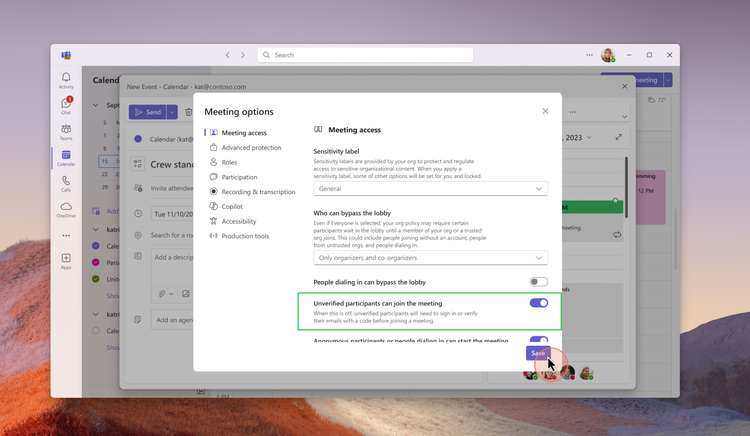
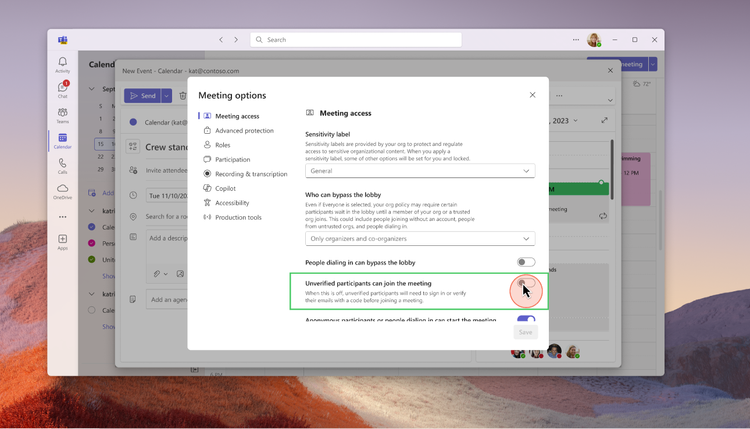
Microsoft Teams enhances the security and trustworthiness of your meetings with a new feature: email verification for external (anonymous) participants. This allows meeting organizers with a Teams Premium license to require external participants to verify their email addresses with a one-time passcode (OTP) before joining the meeting. Once verified, participants will appear in the meeting with an ‘email-verified’ label, offering a more reliable way for organizers to manage external participants.
Meeting Organizer Controls: When scheduling meetings, meeting organizers will now have a new meeting option labelled ‘Unverified participants can join the meeting’ that will be set to default on for the cases where the admin had enabled unverified joins as shown in the screen below:
Organizers can choose to require participants to verify themselves by turning off this meeting option as shown in the screenshot below:
This enhancement ensures that email-verified users enjoy a better in-meeting experience compared to unverified participants.
Participant Experience: When organizers choose to disallow unverified participants from joining meetings, participants will be required to authenticate themselves upon attempting to join the meeting. If they possess a work account, school account, or personal Microsoft account, they can use these credentials for authentication. Participants without any of these Microsoft accounts will need to verify by entering their email address, which will receive a one-time passcode for verification.
Participants who verify the same email address that the meeting invitation was sent to will be allowed to join the meeting directly if the ‘lobby bypass’ setting permits invited participants. Conversely, participants verifying with a different email address will be placed in the lobby and labeled as ‘Email verified’.
Generally available in early 2025
For more information, see the article in the Microsoft tech blog.
New admin policy to prevent bots from joining Teams meetings
A new policy in Teams admin center that allows admins to block unwanted bots from joining meetings. The policy consists of two parts for optimal meeting security. First, admins can use the ‘External Access’ setting in Teams admin center to block known bot domains. Second, admins can enable a CAPTCHA-based human verification test and apply it to anonymous and non-federated users. Once set, any anonymous user that attempts to join the meeting will be required to pass the CAPTCHA test before proceeding. Learn more here.
Generally available now
Support for 50k attendees in a Town Hall
Organizers of town hall instances can now reach a wider audience in a single event with the expanded ability to host a maximum of 50,000 simultaneous attendees. This increase serves as a significant jump from the previous attendee cap of 20,000 for organizers with a Teams Premium license. The quality and stability of town halls will remain constant up to this new limit, providing high-quality and reliable content to participants. For events with more than 20,000 concurrent attendees, streaming chat and reactions are disabled for all attendees. Organizations can get support for audiences up to 50,000 concurrent attendees by reaching out to the Microsoft 365 Live Event Assistance Program (LEAP) for assistance.
Generally available in December 2024
DVR capabilities for Town Hall on desktop and web
Digital Video Recording (DVR) functionality in town halls now enables event attendees to interact with an instance of a live streaming town hall in the same way they would a recorded piece of content, when viewing via desktop or web. This makes it easier to digest the content being presented, giving viewers the ability to pause and move forward or back within a town hall, navigate to any previously-streamed timestamp, and interact in other ways that make viewing a town hall more convenient. This feature is available for all town halls regardless of license assigned to the organizers.
Public preview in December 2024
Loop workspace in a channel
Channels in Microsoft Teams streamline collaboration by bringing people, content, and apps together and helping to organize them by project or topic. You will be able to add a Loop workspace tab to standard channels enabling your team to brainstorm, co-create, collect, and organize content—together in real-time. Everyone in the Team gets access to the Loop workspace, even as Team membership changes, and the workspace adheres to the governance, lifecycle, and compliance standards set by the Microsoft 365 Group backing the team. To get started, click the plus sign (+) at the top of the channel and select Loop from the app list.
Generally available in early 2025.
Integration of Storyline in Microsoft Teams
Storyline (from Viva Engage) in Microsoft Teams will simplify the ways that leaders and employees share and connect with colleagues across the company, increasing visibility and engagement. The Storyline integration will enable employees to follow updates from leadership, discover content, contribute ideas, and express themselves—all within Teams.
This new integration will be available in preview early next year.
Copilot within Engage can help to find knowledge, summarize community content, and catch up on important conversations. Copilot in Viva Engage will soon be able to summarize community engagement. Over time, there will be more Copilot skills into Engage including predictive analytics, image creation, and best practices for leadership communications. Copilot in Viva Engage experiences are available to Viva suite and Viva Communications and Communities customers.
Teams on iPad
iPad multi-window support: Available now in private preview
Teams now supports multiple windows on iPad. Effortlessly organize your split view experience with the Teams windows to easily navigate across meetings, chats, and more.
Enhancements to iPad Teams calendar: Available now in public previewUpdated iPad Teams calendar to leverage the iPad’s form factor and make the scheduling process more seamless for iPad users. Users will now enjoy a default 5-day work week view, with options to switch to agenda, day, and 7-day week views. Enhanced features include a join button for easy access to upcoming meetings, synced category colors from the desktop, and the ability to reschedule events by simply dragging and dropping.
Teams Rooms and Devices: Speaker recognition
Generally available for Teams BYOD rooms in early 2025
You can get intelligent recaps and maximum value from Copilot in any Teams meeting no matter where you meet. Participants in any meeting space who have securely enrolled their voice via Teams Settings, can be recognized by their voice and attributed in meeting transcripts with cloud-based speaker recognition, whether it has a Teams Rooms system deployed or not. Speaker recognition in a bring your own device (BYOD) room requires a Teams Premium license for the meeting host. This works even on just laptop microphones. Learn more about speaker recognition and voice profiles.
Dual display enhancements on Teams Rooms on Android: Generally available now
Now you can enjoy an enhanced meeting experience in Teams Rooms on Android with dual display rooms that show up to 18 videos (3×3 on each screen) when no content is shared. This creates a consistent experience across Windows and Android-based Teams Rooms. Additionally, admins can remotely switch screens in dual display mode using device settings and the Teams admin center, resolving front-of-room display issues without needing physical intervention. Learn more about this release.
Microsoft Mesh
Host and attendee interaction visibility for multi-room Mesh events: Generally available now
Mesh event attendees can now see raised hands and reactions from attendees in other rooms during large, multi-room Mesh events. This creates a greater sense of audience feedback as a whole across all rooms in a Mesh event, and increases total audience engagement. Additionally, event hosts will now be able to move between all rooms in a multi-room Mesh event.
New collaborative Project Studio environment in Microsoft Mesh: Generally available now
The Project Studio environment is a new space for immersive meetings and Mesh events. This space has been designed for synchronous teamwork and productivity for small groups to collaborate on content. Collaboration tools like whiteboards will be added to the environment as they become available.
Microsoft Mesh app on Meta Quest supports hand interactions: Generally available now
Microsoft Mesh app users on Meta Quest 2, 3, and Pro headsets can now use their hands to use the app, move around in event environments, and interact with objects. Motion controllers continue to be supported, and users can switch between using controllers or their hands while using the app.
Microsoft Mesh app on Meta Quest supports hand interactions: Generally available now
Microsoft Mesh app users on Meta Quest 2, 3, and Pro headsets can now use their hands to use the app, move around in event environments, and interact with objects. Motion controllers continue to be supported, and users can switch between using controllers or their hands while using the app.
Name pronunciation
You can record and share the correct pronunciation of your name, fostering inclusivity and ensuring colleagues pronounce names accurately. Simply open your profile card to make a recording. This recording will be accessible on your profile card to individuals at your workplace or school using Microsoft 365. With a single click, you can listen to your colleagues’ name pronunciations.
Available now in public preview, generally available in early 2025
Skin tone setting for emojis and reactions
The new skin tone setting for emojis and reactions in Teams lets you personalize your digital interactions by selecting a skin tone that best represents you. In your settings, you can choose from a range of skin tones. Once selected, this will be consistently applied across chat, channels and meetings as well as on various clients, allowing you to express yourself more authentically in conversations.
Generally available now
There are even more news related to Microsoft Teams. Check them out from Microsoft’s article.
The Microsoft Ignite 2024 had also a myriad of announcements and updates in the realm of AI. Azure AI Foundry represents a significant step forward in AI development, providing a more streamlined and integrated approach to building and managing AI applications. By bringing together a wide array of tools and capabilities, it empowers organizations to harness the full potential of AI in a secure and efficient manner.
Azure AI Foundry
Azure AI Foundry will be a unified platform where organizations can design, customize, and manage AI applications and agents at scale. The platform integrates existing Azure AI models (1800+), tools, and safety solutions with new capabilities, making it easier and more cost-effective to develop and deploy AI solutions.
Azure AI Foundry SDK
The Azure AI Foundry SDK, now in preview, provides a unified toolchain for customizing, testing, deploying, and managing AI applications and agents with enterprise-grade control and customization. This SDK includes a comprehensive library of models and tools, which simplifies the coding experience and enhances productivity for developers. By offering pre-built app templates and easy integration with Azure AI, the SDK enables faster development and deployment of AI applications.
Azure AI Foundry Portal
Formerly known as Azure AI Studio, the Azure AI Foundry portal provides a comprehensive visual user interface that helps developers discover and evaluate AI models, services, and tools. The portal includes a new management center that brings essential subscription information and controls into a centralized experience. This helps cross-functional teams manage and optimize AI applications at scale, including resource utilization, access privileges, and connected resources.
AI Agent Service
Launching next month in preview, the Azure AI Agent Service will enable developers to orchestrate, deploy, and scale enterprise-ready agents to automate business processes. With features such as bring-your-own storage (BYOS) and private networking, the service ensures data privacy and compliance, offering robust protection for sensitive data.
Risk and safety evaluations for image content
Risk and safety evaluations for image content will assist users in assessing the frequency and severity of harmful content in their app’s AI-generated outputs. These evaluations will enhance existing text-based evaluation capabilities in Azure AI to cover a wider range of interactions with GenAI, such as text inputs that produce image outputs, image and text inputs that produce text outputs, and images containing text (e.g., memes) as inputs that produce text and/or image outputs. These evaluations will help organizations understand potential risks and implement targeted mitigations, such as modifying multimodal content filters with Azure AI Content Safety, adjusting grounding data sources, or updating their system messages before deploying an app to production. This update will be available in preview next month in the Azure Foundry portal and the Azure AI Foundry SDK.
For example, these evaluations will be useful when developing educational apps that use AI to generate visual aids for learning material, ensuring that no inappropriate or harmful images are shown to students or employees. They will also be beneficial for experiences that need to filter out harmful memes or graphic content automatically while providing safe user experiences. Additionally, companies creating marketing campaigns using AI-generated images can utilize these evaluations to avoid distributing potentially offensive or unintended imagery in their advertisements.
Azure AI Content Understanding
Azure AI Content Understanding, a new AI service in preview, will help developers build and deploy multimodal AI applications. This service leverages generative AI to extract information from unstructured data such as documents, images, videos, and audio, converting them into customizable structured outputs. By offering pre-built templates and a streamlined workflow, it reduces the complexity and cost of building AI solutions.
Fine-Tuning in Azure OpenAI Service
Developers and data scientists can now customize models for business needs with new fine-tuning options in Azure OpenAI Service. This includes support for fine-tuning GPT-4o and GPT-4o mini models on Provisioned and Global Standard deployments, enabling more tailored AI solutions. Additionally, multimodal fine-tuning for GPT-4o with vision is now generally available, further enhancing the customization capabilities for developers.
Integration with Weights & Biases
The integration of Azure OpenAI Service with Weights & Biases brings a comprehensive suite of tools for tracking, evaluating, and optimizing models. This collaboration empowers organizations to build powerful and tailored AI applications, enhancing the overall AI development experience.
Azure AI Content Understanding – Post Call Analytics, Public Preview
Fast Transcription API, General Availability
Realtime Speech Translation, General Availability. Realtime speech translation is now generally available, enabling multilingual speech-to-speech translation for 76 input languages. It includes significant latency improvements to deliver translation results in less than 5 seconds of the initial utterance. Enhanced latency is supported for language pairs with English (en-US) as the output language and will be extended to other output languages by the end of 2024.Learn more at aka.ms/azure-speech-translation
Video Translation API, Public Preview
Context-aware, highly expressive HD voices, Public Preview
During the past few months, Microsoft has made a few updates to the text to speech avatar service.
More sample code: JS code sample is added to GitHub for live chats with real-time avatar.
Gestures added to live chats: Now avatars are more engaging with natural gestures added to conversations. Try it with the live chat avatar tool.
More regions: East US2 is added to the supported regions for text to speech avatar bringing the total number of supported Azure service regions to seven: Southeast Asia, North Europe, West Europe, Sweden Central, South Central US, East US 2, and West US 2.
Lower price: Further reduced the cost for avatar synthesis in live chat scenarios. With that, now the public price for real-time avatar synthesis has been reduced. With standard avatars, real-time synthesis price is reduced from $1 per minute to $0.5 per minute (taking effect in December), and for custom avatars, the real-time synthesis price is reduced from $1 per minute to $0.6 per minute. Check more details on the pricing page (choose one of the supported Azure service regions).
And finally news about self-service avatar creation: A self-service custom avatar portal will be released very soon. With this portal, customers will be able to upload their own video data and create custom avatars by themselves. This update will largely reduce the time to market for customers’ avatars, which are currently built through Microsoft’s engineering support.
You should also check latest updates to the Azure AI Speech Service post.
New formula to calculate performance
What’s new for Microsoft 365 and Copilot admins
Most of pictures in the blog post are from Microsoft materials and from Ignite keynote and sessions.
Published: November 18, 2024 at 3:00 pm Updated: November 18, 2024 at 10:56 am
To improve your local-language experience, sometimes we employ an auto-translation plugin. Please note auto-translation may not be accurate, so read original article for precise information.
The Dogecoin price is back in the spotlight as the popular meme coin rides a wave of bullish sentiment. With analysts targeting $12 as the next significant milestone, DOGE has captured the attention of traders looking for high-growth opportunities.
However, alongside this excitement, an emerging Altcoin, PropiChain (PCHAIN), has been drawing interest with projections of a 12,403% rally. Let’s explore what makes these assets appealing to investors and why PropiChain could outperform.
Dogecoin Price Gains Momentum
DOGE is capturing headlines as the top-performing crypto asset among major cryptocurrencies, fueled by the one-month 161% surge in Dogecoin price to $0.3778. This exceptional rally has propelled DOGE into the top seven cryptocurrencies by market cap, overshadowing Bitcoin’s 40% rise during the same period.
Analysts remain optimistic about DOGE’s potential, with price targets of $12 fueled by historical trends, bullish chart patterns, and political developments. Elon Musk’s influence and speculation around Donald Trump’s presidency have further heightened market confidence.
However, experts caution that DOGE’s meteoric rise will not be without dips. For instance, its 30,700% rally in 2021 saw corrections of over 50%. Investors are combining Doge with another altcoin, PropiChain, primed for a 12,403% rally.
As the crypto bull run gains momentum, DOGE and PropiChain offer significant opportunities, signaling the start of an exciting era for altcoin enthusiasts.
PropiChain: The Altcoin Set to Deliver 12,403% Returns
While the Dogecoin price climbs, PropiChain (PCHAIN) has emerged as a formidable Altcoin. It uses a mix of the latest technologies to disrupt the $300 trillion real estate industry.
PropiChain is not just another speculative token; it’s a platform designed to bring real-world value by leveraging blockchain and AI to address inefficiencies in real estate investment.
PropiChain allows smaller investors to enter a market traditionally dominated by large capital holders. Users can easily buy, sell, and trade tokenized property shares through its decentralized platform, providing unprecedented liquidity and accessibility. Let’s take a look at some of its core features:
Real Estate TokenizationPropiChain enables fractional ownership of real estate assets, making property investments accessible to a broader audience. This innovation removes barriers like high capital requirements, democratizing access to lucrative real estate markets.
AI-Driven AnalyticsPropiChain’s AI tools include automated property valuations, market analysis, and advanced filtering options, helping investors effortlessly make data-driven decisions.
Blockchain Integration and Smart ContractsPropiChain guarantees transparency and security in real estate transactions through blockchain. Smart contracts streamline processes, eliminating the need for intermediaries and reducing costs.
Metaverse ExpansionPropiChain is also exploring the metaverse, offering virtual property tours and meetings. This blend of digital and physical real estate creates exciting new investment opportunities.
Why Traders Are Eyeing PropiChain
Unlike the Dogecoin price, which depends largely on market sentiment, PropiChain offers tangible utility and high-growth potential. Its presale, priced at just $0.004 in Stage 1, presents a rare opportunity for early investors to maximize returns.
PropiChain has also been audited by BlockAudit to ensure the platform’s security and reliability. Additionally, its CoinMarketCap listing confirms its credibility in crypto, further boosting investor confidence.
PropiChain’s presale offers multiple advantages for early adopters:
Discounted Prices: Tokens are available at an entry-level price of $0.004, allowing investors to unlock significant upside potential.
First-Mover Advantage: Early participation provides priority access to the platform’s features, including tokenized real estate and AI tools.
High-Growth Potential: With projections of a 12,403% rally, PropiChain is poised to outperform many established tokens in the market.
Conclusion
As the Dogecoin price eyes $12, it’s clear that DOGE remains a top choice for traders seeking short-term gains. However, for those looking at long-term growth and utility, PropiChain (PCHAIN) stands out.
With its unique approach to real estate investment and a presale offering unmatched value, PropiChain is quickly becoming a reputable option in diversified crypto portfolios. Visit PropiChain’s official website to join the presale today and take your first step toward game-changing crypto investments.
For more information about the PropiChain Presale:
Website: https://propichain.finance/
Join Community: https://linktr.ee/propichain
Disclaimer
In line with the Trust Project guidelines, please note that the information provided on this page is not intended to be and should not be interpreted as legal, tax, investment, financial, or any other form of advice. It is important to only invest what you can afford to lose and to seek independent financial advice if you have any doubts. For further information, we suggest referring to the terms and conditions as well as the help and support pages provided by the issuer or advertiser. MetaversePost is committed to accurate, unbiased reporting, but market conditions are subject to change without notice.
About The Author
Gregory, a digital nomad hailing from Poland, is not only a financial analyst but also a valuable contributor to various online magazines. With a wealth of experience in the financial industry, his insights and expertise have earned him recognition in numerous publications. Utilising his spare time effectively, Gregory is currently dedicated to writing a book about cryptocurrency and blockchain.
More articles
Gregory, a digital nomad hailing from Poland, is not only a financial analyst but also a valuable contributor to various online magazines. With a wealth of experience in the financial industry, his insights and expertise have earned him recognition in numerous publications. Utilising his spare time effectively, Gregory is currently dedicated to writing a book about cryptocurrency and blockchain.