Gaming

Home Gaming Page 82

Valve reveal the new Steam Frame, Steam Controller and Steam Machine with SteamOS

0
Valve reveal the new Steam Frame, Steam Controller and Steam Machine with SteamOS


The day has arrived, Valve have announced a major hardware expansion with multiple devices including the new Steam Frame, Steam Controller and Steam Machine. And of course, they’re powered by SteamOS (Linux), exactly the sort of thing we cover! Massive news for Linux gaming, and shows how committed Valve are to open source and having an open platform.

“We’ve been super happy with the success of Steam Deck,” said Gabe Newell, President of Valve, “and PC gamers have continued asking for even more ways to play all the great titles in their Steam libraries. Our work over the years on other hardware and even more importantly on SteamOS has enabled Steam Controller, Steam Machine, and Steam Frame to do just that.”

Here’s what they’ve announced for 2026:


Steam Controller:


Steam Controller shares DNA with Steam Deck, with all the inputs to play all the games on Steam, wherever Steam is.
High-performance, ergonomic controller with next-generation precision magnetic thumbsticks, full-sized controls, trackpads, gyro, and grip buttons.
Steam Controller is great wherever Steam is: PC, laptop, Steam Deck, Steam Machine, Steam Frame.


Steam Machine:

Made for powerful, versatile PC gaming on a big screen; quiet and small enough to fit under your TV, on your desk, or anywhere else you want to game. (It’s a roughly 6-inch (160mm) cube!)
Runs SteamOS for the same great experience as Steam Deck
Made to work with Steam Controller, but can pair with your other favorite accessories too.


Steam Frame:

Stream ALL of your Steam games, VR and non-VR alike
Comfortable, wireless, lightweight VR designed to give you a new way to experience your entire Steam library
Full controller input for PC VR and non-VR games
It’s a PC! Steam Frame is powered by a Snapdragon® processor, and runs SteamOS for the same great experience as Steam Deck
Supports standalone play for immersive gaming anywhere


All of them will ship to the same regions as the Steam Deck (US, CA, UK, EU, AU) as well as regions covered by KOMODO: Japan, South Korea, Hong Kong, and Taiwan. No specific launch timings or pricing has been announced yet.

Steam Machine Info:

Models


512GB model and 2TB model
Steam Machine will ship in a bundle with Steam Controller and will also be available standalone

Main Specs


CPU: Semi-custom AMD Zen 4 6C / 12T


GPU: Semi-Custom AMD RDNA3 28CUs

2.45GHz max sustained clock, 110W TDP
Supports 4K gaming at 60 FPS with FSR
Ray tracing supported
Over 6x more powerful than Steam Deck


16GB DDR5 + 8GB GDDR6 VRAM
512 GB & 2 TB SSD models

micro SD card slot for expanded storage/portable catalog


Internal power supply, AC power 110-240V

I/O


DisplayPort 1.4

Up to 4K @ 240Hz or 8K@60Hz
Supports HDR, FreeSync, and daisy-chaining


HDMI 2.0

Up to 4K @ 120Hz
Supports HDR, FreeSync, and CEC


Ethernet 1 Gbps
USB-C 10 Gbps, 3.2 Gen 2
4x T ype USB-A ports

2x USB 3 in the front
2x USB 2 in the rear


2×2 Wi-Fi 6E, dedicated BT antenna
Integrated Steam Controller 2.4GHz radio

Other features


Works with other controllers, accessories, and PC peripherals
Wake with Steam Controller
Runs SteamOS

Familiar, gaming first user experience
Fast suspend / resume
Steam cloud saves, and all the other Steam features you’d expect


Customizable LED bar

Personalize with colors and animation
Reflect system status (e.g. downloads, booting, updating)


Steam Frame Info:

Lightweight, modular architecture


185g core
440g with included headstrap
(facial interface, audio, rear battery)

Main Specs


4nm Snapdragon 8 Gen 3 ARM64 processor
16GB Unified LPDDR5X RAM
Wi-Fi 7, 2×2

Dual 5Ghz/6Ghz streaming for simultaneous VR and Wi-Fi


256GB / 1TB UFS storage options

microSD card slot for extended storage


Optics


Pancake optics
2160 x 2160 LCD (per eye)
72-144Hz refresh rate (144Hz experimental)
Large FOV (up to 110 degrees)

Tracking


4x outward facing monochrome cameras for
controller & headset tracking
2x interior cameras for eye tracking
Outward IR illuminator (for dark environments)

Other features


Wireless Adapter included

Wi-Fi 6E (6Ghz)
Fast, direct, low-latency link between headset & PC


Foveated Streaming

Eye-tracking drives video stream, sending highest resolution to where you’re looking.


Audio

Dual speaker drivers (per ear), integrated into headstrap
Dual microphone array


Monochrome camera passthrough

User accessible front expansion port( 2x 2.5Gbps camera interface / Gen 4 PCIe )


Rechargeable 21.6 Wh Li-On Battery
SteamOS

Sleep / wake, cloud saves, Proton


Steam Frame Controllers


Full 6-DOF tracking and IMU support
Capacitive finger sensing
Magnetic thumbsticks (TMR) for improved
precision, responsiveness and reliability
Haptic feedback
Input parity with traditional game pad
Replaceable AA battery (40hr life)
Optional straps

Steam Controller Info:

Works with any device that runs Steam


Windows / Mac / Linux PCs
PC handhelds
iOS / Android (with Steam Link)
Steam Deck
Steam Machine
Steam Frame

Three ways to connect


Steam Controller Puck

Pre-paired, plug and play
Proprietary wireless connection
Low-latency (~8ms full end-to-end)

4ms polling rate
measured at 5m


More stable than Bluetooth
Up to 4 Steam Controllers per Puck


Bluetooth
USB tethered play

Li-ion rechargeable battery


35hr+ play time
Charge with Steam Controller Puck or USB

Magnetic thumbsticks (TMR)


Improved responsiveness and reliability
Capacitive touch

Grip sense


Quick way to activate/deactivate gyro
Assignable input

HD haptics


4x haptic motors

2x LRA haptic motors in trackpads for HD tactile feedback
2x High output LRA haptic motors in grips for HD game haptics including rumble


Full input list


ABXY, D-pad
L/R triggers, L/R bumpers
Magnetic thumbsticks (TMR)
View / Menu / Steam / QAM buttons
4x assignable grip buttons
2x trackpads with haptic feedback
Pressure sensitivity for configurable
click strength
6-axis IMU
Capacitive grip sense

Valve do note in the press details how some of the specs are subject to change, so these may not be exactly final.

As part of this, Valve will be expanding the Steam Deck Verified program. This will include new ratings for the Steam Frame and Steam Machine. They will be known as Steam Machine Verified and Steam Frame Verified.

This is what we have been waiting for and why GamingOnLinux exists. We’ve been covering Linux gaming for years before Valve even came along, and Valve have practically kept us in business with all their open source work (and especially Proton).

Unlike the original launch of the first attempt at the Steam Machine, Valve has come a seriously long way to make it viable. Proton, the tool to run Windows games on Linux, has made it click and play for tens of thousands of games. So now, it makes a lot more sense.

Absolutely amazing. Much like when Valve originally announced Proton, I feel a bit of the shakes over here from excitement. This is truly some world-changing stuff going on for Linux gaming. It’s time for the stranglehold that Microsoft have had with Windows to end.

What this also should hopefully do, is put a bit more pressure on developers to get their anti-cheat enabled for Linux, otherwise that’s still going to be quite a number of popular games that won’t be playable on any of these devices. As we’re tracking on our dedicated anti-cheat page. Especially so if the Steam Machine is priced reasonably, that could be a ridiculous amount of extra players using SteamOS Linux. Developers are going to need to pay a lot more attention to how their games run on Linux.

On top of that, it will be interesting to see if Epic Games will rethink their stance on the Epic Store and Fortnite.

We’ve opened up some new content tags for you to follow along: Steam Frame | Steam Machine. You can also join us on Discord with dedicated chat channels.

Sadly, Valve did not provide GamingOnLinux with any heads up on it, so we’re playing catch-up on all the details. There’s also currently no word on review samples like we had for the Steam Deck LCD and Steam Deck OLED, so if you want to ensure we can grab them please do support GamingOnLinux directly.

Article taken from GamingOnLinux.com.


Source link

Where Winds Meet Early Access – The free-to-play game to beat? | TheSixthAxis

0
Where Winds Meet Early Access – The free-to-play game to beat? | TheSixthAxis


Even during  one of the busiest times of the year for gaming launches, there’s always room for another title to catch your eye. When it was first revealed, Where Winds Meet immediately stood out as a free-to-play title with AAA aspirations, using Unreal Engine 5 to deliver a compelling Chinese Wuxia setting, an immense open world, and martial arts-inspired combat that’s eye-wateringly fast. On first impressions, it has the potential to be one of the winter’s biggest time sinks.

The first batch of options you’ll have gives you the expected control over the game’s difficulty and the amount of guidance you’ll have while out in the open world. It’s worth considering the immersive option, as it really cleans up the HUD, at the cost of limiting how much information you’ve immediately got to hand. You can also choose to go with a multiplayer focus or a solo-oriented adventure, with the option of joining up with other players for tougher encounters.

It’s an action-packed opening, taking control of Jiang Yun, who’s seemingly stirred up an immense hornet’s nest by killing his father. He’s also carrying a baby in a sling, though this doesn’t seem to slow down his impressive abilities in the slightest. After meeting up with a companion, you’re embroiled in a QTE-infused horse chase, with enemies coming at you from all sides, and slow-motion arrow-time bow shots to see them off.

It’s delivered with bags of style, and when you arrive at a set of ruins in the middle of nowhere, you’re greeted by The Void King, a hulking, scythe-wielding foe who immediately makes you feel outmatched.

Combat is swift and precise, with a great sense of flow. Timing is key, mixing up blocks, parries – called deflections here – and dodges to outwit and evade your opponents, before leaping in with regular sword thrusts or Mystic Arts. The timing window for deflections is pretty intuitive, but you can turn on Assist Deflection if you want a bit of slow-motion assistance, albeit at a cost to your Insight Points.

Straight away, it’s clear that it’s not intended to be as punishing as a Souls-like, though the multi-stage attacks and huge sweeping blows that The Void King punishes you with certainly give you a very real sense of danger. You’re equipped with 10 health flasks, though, and as long as you don’t think you’re invincible, you’ll probably make it through this early test unscathed.

Time passes, and it’s now that you can create your character, taking on the role of the baby from Jiang’s sling. You can draw from a pool of ready-made presets, broken up into Elegant or Realistic categories, and then alter them to fit your tastes. There’s a full suite of customisation options, from face shape to a huge array of make-up options, to bring your character to life, or you can delve into customising your character via a separate app or web portal, importing the data to save you some time.

Visually, there’s been a lot of care and attention put into Where Winds Meet, from the detailed character models through to the often-beautiful locations. There are some signs of the game’s free-to-play nature that hang around though, and the English voice dub isn’t the strongest I’ve ever heard. To be honest, I’d leave it on the native language with English subtitles to get the full effect of the game’s setting and tone, as it’s a much more authentic experience.

Once you’ve created your character, you’re assaulted by tasks, character names and locations that you’ve got no clue about. It certainly looks incredible though, and this is a world begging to be explored. There’s an initial, very frustrating, archery test to take part in, that doesn’t work how you expect it to, but you can paper over that since it’s a very small component of what’s going on in Where Winds Meet.

There’s plenty of interesting ideas at play, from learning martial arts moves from the natural wildlife – your first Mystic Art comes from mimicking a bear – to listening in on the conversations of different encampments before you put them to sword. Overall, it feels closer to an Assassin’s Creed-style open world than a Souls-like, and the regular combat is certainly more akin to that as well.

You wander the open world, drawn here and there by pockets of enemies, who are often guarding some helpful loot, while the main mission thread takes you wherever you really need to be. It’s a decidedly traditional take on the open-world, but if roaming huge maps and tootling about is for you, Where Winds Meet is staking a compelling claim for your time.

Where Winds Meet market

A lot of the Free to Play aspects seem to revolve around customisation, with the most visually exciting clothing all locked behind a cavalcade of tasks, sets and the like. It’s reminiscent of Infinity Nikki, and just as there, it’s the main action that will draw you in, with the hope that you’ll want to stump up a bit of real-world money for a cape that really speaks to you. As business models go, I can get on board with it, just as long as the game itself delivers on the promise that our early hands-on has given.

There are some rough edges, but this is still Early Access, and the clear thing about Where Winds Meet is that it doesn’t feel too dissimilar from a full-priced title. I’m interested in the world, and the combat feels really good once you’ve got a handle on the timing. I’ll certainly be delving in further when it launches here in the West on the 14th of November for PS5 and PC.


Source link

Christmas Slots: Tis Already the Season! – VideoGamer

0
Christmas Slots: Tis Already the Season! – VideoGamer


You can trust VideoGamer. Our team of gaming experts spend hours testing and reviewing the latest games, to ensure you’re reading the most comprehensive guide possible. Rest assured, all imagery and advice is unique and original. Check out how we test and review games here

I don’t want a lot for….. SHUSH Mariah, it’s only November!

Still, the 2025 festive season is shaping up to be one of the busiest yet for slot fans.

Developers are ALREADY queuing up new holiday releases that mix old-school cheer with sharp mechanics and impressive max-win ceilings.

If you’re ready to swap wrapping paper for win lines, these are the best Christmas slots to keep an eye on so far.

Santa’s Rudolf (TipTop Gaming) – Launches 12th November

This one’s pure Christmas spirit distilled into reels.

Santa’s Rudolf combines a 5×3 setup and 10 paylines with a simple but high-reward framework.

It runs at a 96% RTP and offers a maximum 10,000x win, all centered around the Rudolf Feature, where filling the screen with 15 Rudolf symbols pays 5,000x your bet.

The look hits that nostalgic sweet spot: shimmering snowflakes, candy-bright trees, Santa himself, and a big “10,000x Jackpot” banner glowing under the northern lights.

Gameplay is intuitive; just set your stake and spin, making it ideal for anyone who wants fast, festive wins without the learning curve of complicated bonus-chase games.

It’s the holiday slot equivalent of a quick eggnog shot: simple, sweet, and instantly rewarding.

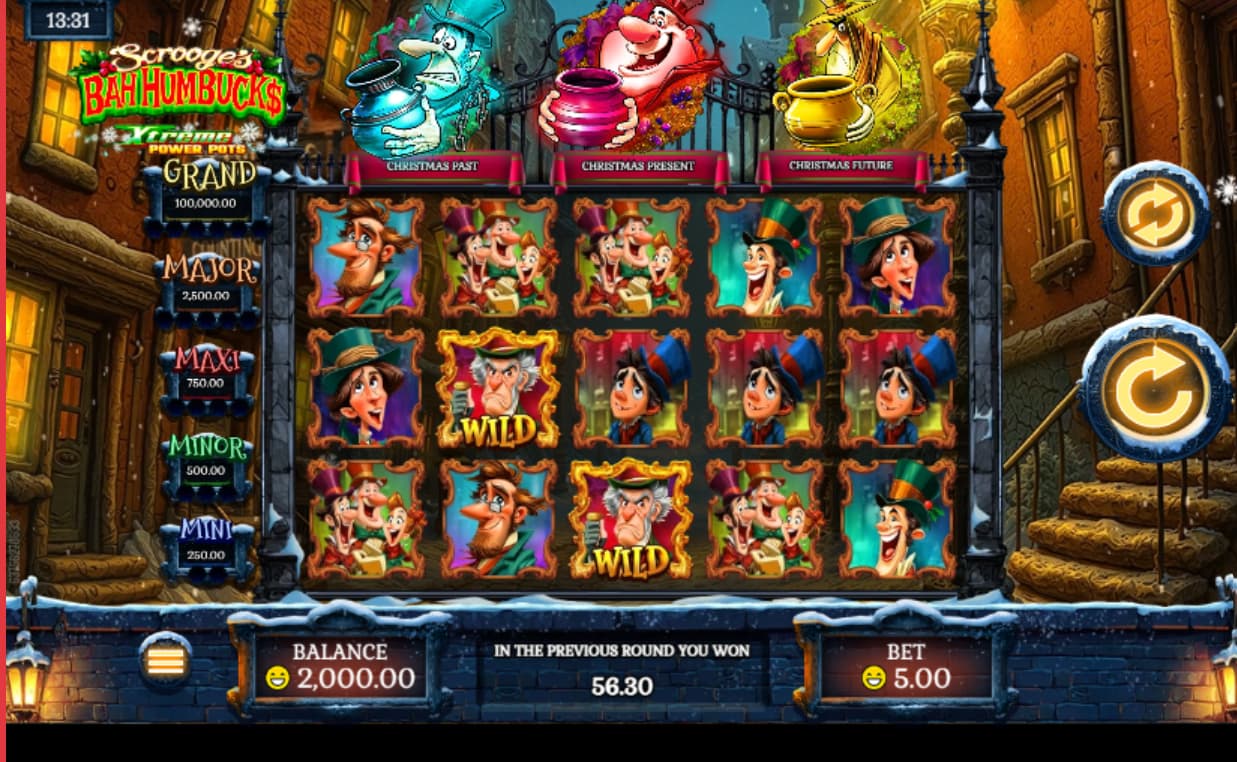
Scrooge’s Bah Humbucks Xtreme Power Pots (Rival) – Launches 26th November

Rival flips Dickens into overdrive with Scrooge’s Bah Humbucks Xtreme Power Pots, a feature-packed 50-line slot offering a massive 20,000x top win.

Themed around the ghosts of Christmas Past, Present, and Future, the game uses a Power Pots system: each colored coin that lands fills its matching ghost pot, potentially triggering stacked free-spin bonuses.

The twist: multiple pots can trigger together, combining features in a single spin.

Blue coins bring Sticky Wilds, red coins remove Royals, and gold coins deliver Turkey Jackpots, each with eight free spins to start.

Add in stacked Scrooge Wilds that can cover two reel positions and a polished London-at-night backdrop dusted with snow, and you’ve got a Christmas slot that feels more like a full feature film.

With its layered mechanics and lively cast, this one’s built for players who enjoy chaining bonuses and chasing big, theatrical wins.

Other Festive Releases Worth a Spin

Also hitting lobbies mid-November: Santa’s Vault by Push Gaming (12 November), which revives the studio’s signature hold-and-win energy with a frosty twist, and Uncrossable Rush X-Mas by Evoplay (13 November), which adds arcade-style progression to the traditional bonus hunt.

Both will expand the seasonal catalogue for players wanting variety between spins.

Why Christmas Themes Work So Well

Holiday releases consistently top engagement charts, not just for nostalgia but for design clarity.

Players instantly understand what they’re getting: comfort visuals, upbeat soundtracks, and straightforward feature cues.

That simplicity translates into more engagement and longer playtime, especially among casual spinners logging in between real-world festivities.

This Year’s Christmas Lineup

This year’s Christmas lineup blends cozy aesthetics with punchy math models.

Santa’s Rudolf is the quick-hit crowd-pleaser; Scrooge’s Bah Humbucks brings cinematic flair and feature depth; and Santa’s Vault plus Uncrossable Rush X-Mas round out the roster with experimental polish.

If your December ritual involves reels and not just carols, these festive slots promise more sparkle than tinsel.


Source link

Octopath Traveler 0 still needs to prove it deserves the name

0
Octopath Traveler 0 still needs to prove it deserves the name


The first Octopath Traveler was released in 2018, and marked the first time Square Enix used its HD-2D design aesthetic. Seven years later, and after a series of classic titles remade using the same technology, we now have a new game in the series, Octopath Traveler 0. Although most of its elements come from previous titles, giving it a familiar feel, the few changes are enough to make Octopath Traveler 0 a unique game — for better and for worse.

Octopath Traveler 0 is a curious project. Using the story and combat of Octopath Traveler: Champions of the Continent (a mobile gacha game released in 2020), Square Enix has prepared a fresh turn-based RPG. Set in the land of Orsterra, the prologue and first chapter of the three main quests — the extent of content I could play for this preview — introduce the characters and antagonists at the center of this journey. Our tale is structured around three paths: Power, Wealth, and Fame. Each is tied to a villain who is, in one way or another, responsible for the protagonist’s current situation, and for all the suffering experienced throughout the continent of Orsterra.


Image: Doki Doki Groove Works/Square Enix

Although the story is split into chapters that you can tackle in any order, depending mostly on your level, there’s a shift from the anthological structure that makes the series memorable. Instead of following eight protagonists with their own storylines, we have only one main character: the one you create at the start of the game.

The lovely art style of Octopath Traveler 0 makes creating your own character a fun but short process. Don’t expect much in terms of customization options. Besides picking their body, hairstyle, and a few other features, you must give them a name, one of three pre-established background stories, a favorite meal, and an initial set of items to carry. The shift from multiple protagonists to a single one shows that the narrative focus of Octopath Traveler 0 differs from the rest of the series. We don’t have the epic tale of common folk anymore, but the journey of a hero.

As you progress in the story, you pick one of the eight initial jobs, then unlock any of the others once you have acquired a minimum number of skills. Similar to what we see in games like Bravely Default, in Octopath Traveler 0 you can swap jobs to better meet the needs of your party based on the companions you have. This change, however, makes Octopath Traveler 0 feel less connected to the characters’ designs, and more similar to other RPGs.

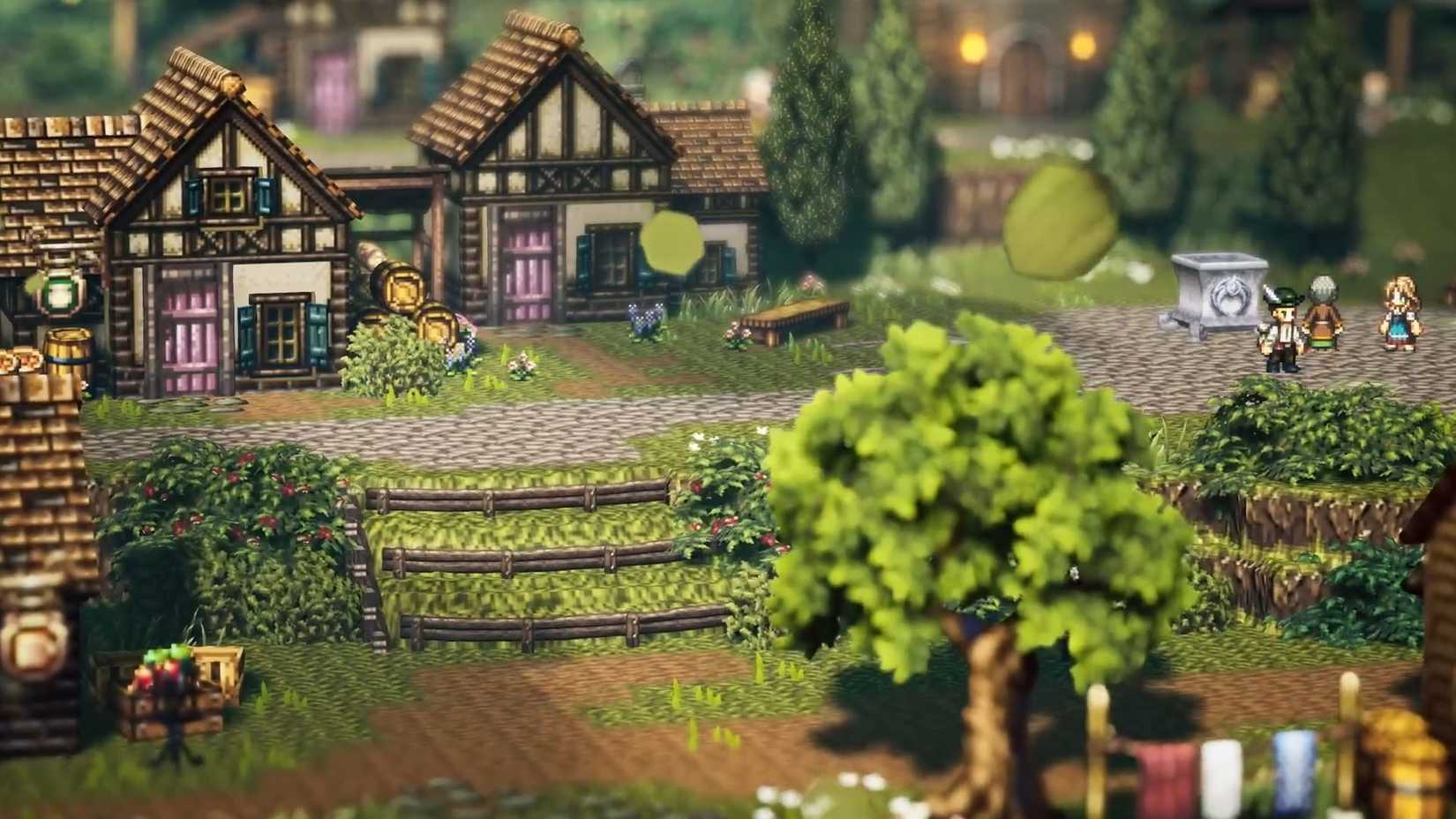
Regardless of the background you chose for your character, they will be a happy citizen of the welcoming and peaceful town of Wishvale. The prologue is meant to make you care for the place, foreshadowing the events that unfold into Octopath Traveler 0’s signature feature, the city building. Rebuilding Wishvale involves crafting houses, shops, and other facilities to bring life to the town again. All of that is made by progressing either the town’s specific quest line or the other main missions.

An official Octopath Traveler 0 screenshot showing Wishvale
Image: Doki Doki Groove Works/Square Enix

While Octopath Traveler 0’s visuals give a cozy gaming vibe, the city building isn’t well presented at the beginning of the game. It has systems with interesting potential, such as the resident skills that can go from collecting materials to reducing the cost of items sold in the town. But managing the reconstruction feels rudimentary compared to the clean and sophisticated design of other elements in the series.

Maybe, once you’ve put thirty hours into the game, the town might have become an engaging part of the experience. But in the first few hours, it is easy to forget that it even exists. To access its services and collect materials, you need to fast travel to Wishvale and talk to each character in the city. The process in itself is not a problem, but it competes for your time and attention with the main quests or the side stories, forcing you to briefly interrupt your current adventure to go check if there is lumber to collect with your neighbors.

I’m happy to say that battles in Octopath Traveler 0 feel as fulfilling and exciting as the other two titles; they don’t stray from the original design too much. Enemies have multiple weaknesses, and you need to manage your turns to break their defense while preparing for a massive hit by spending all your Boost Points, which you earn every turn. It’s a clean and engaging battle system that new players can enjoy as much as old fans. The similarities with previous Octopath Traveler games end here, though.

From the trailers and the description of certain characters’ skills, we know that you can have up to eight party members in your group, split into a front and back row. I can’t personally say whether this works well for now, because I didn’t have enough companions unlocked to form a full party by the end of the preview. However, I’m uncertain if the addition of four other characters will be beneficial to the overall experience.

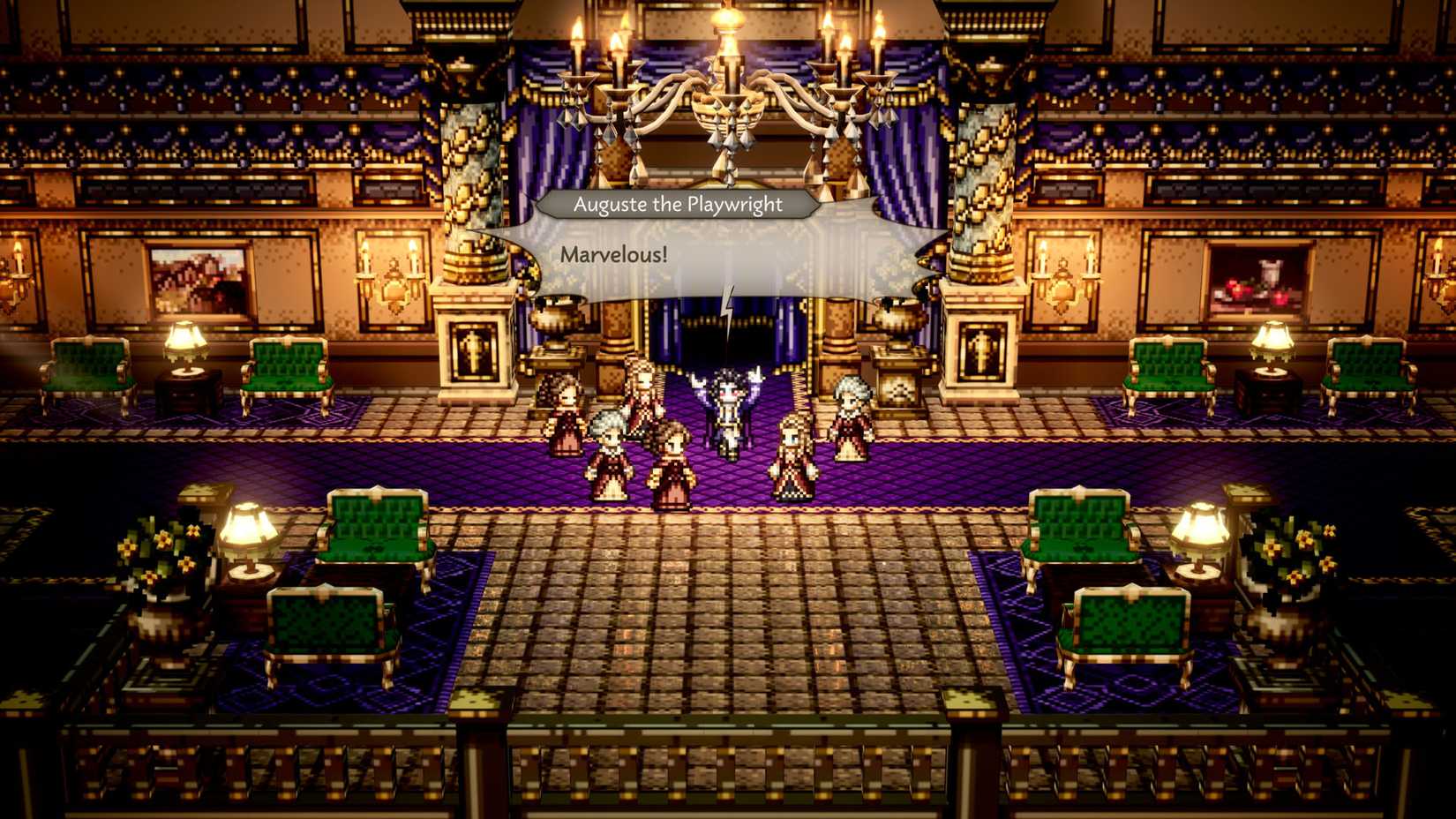
An official Octopath Traveler 0 screenshot showing one of the antagonists in the game, Auguste
Image: Doki Doki Groove Works/Square Enix

The few boss encounters I faced weren’t strategically challenging. Most were a matter of spotting the boss’s weaknesses and keeping my party’s HP full, a task that is made easier by the addition of a Final Fantasy-style summon system in Octopath Traveler 0. During battles, once a gauge is filled, you can use the protagonist’s turn to invoke a divine power tied to the ring you gain in the main story. The first ring allows you to heal all party members and, considering the lore bits shared at the beginning of the prologue, there are other rings to be found — and other deities to be summoned.

Octopath Traveler 0 is carving a unique place for itself in a peculiar series of games. In its initial hours, it’s a solid RPG with simple city management mechanics. Changes and modifications from the conventions established by the first two games are welcome, but they also risk eclipsing what makes the series special. I’ll have to wait for the full game to decide if the novelty is worth departing from series tradition.


Source link

Phasmophobia: How To Complete Nell’s Diner Easter Egg Puzzle

0
Phasmophobia: How To Complete Nell’s Diner Easter Egg Puzzle


One of Phasmophobia’s absolute best features is its surprisingly thorough investigation dynamic that is perfectly accessible to players of all calibers. The addition of Nell’s Diner in Phasmophobia’s aptly-named Nell’s Diner update, of course, brings with it plenty of more spooky mysteries and secrets to uncover. As luck would have it, there’s even a new cryptic puzzle for players to solve, in similar fashion to the one found at Point Hope.

If you’re curious and brave enough to solve this puzzle and reap the rewards, here’s how to solve the Nell’s Diner Easter egg puzzle in Phasmophobia.

How to Complete the Nell’s Diner Easter Egg Puzzle in Phasmophobia

The Nell’s Diner Easter Egg puzzle in Phasmophobia involves completing several steps at various spots around the diner itself. You need to complete each of these in order to reveal the extra spooky surprise at the end of it all and earn a secret reward.

If you’re completing this puzzle with a group, you can take turns with various steps if you wish. The game doesn’t lock one person to completing each one once they start it.

Step 1 – Shine UV Light On Note in Manager’s Office

phasmophobia-nells-diner-puzzle-step-1

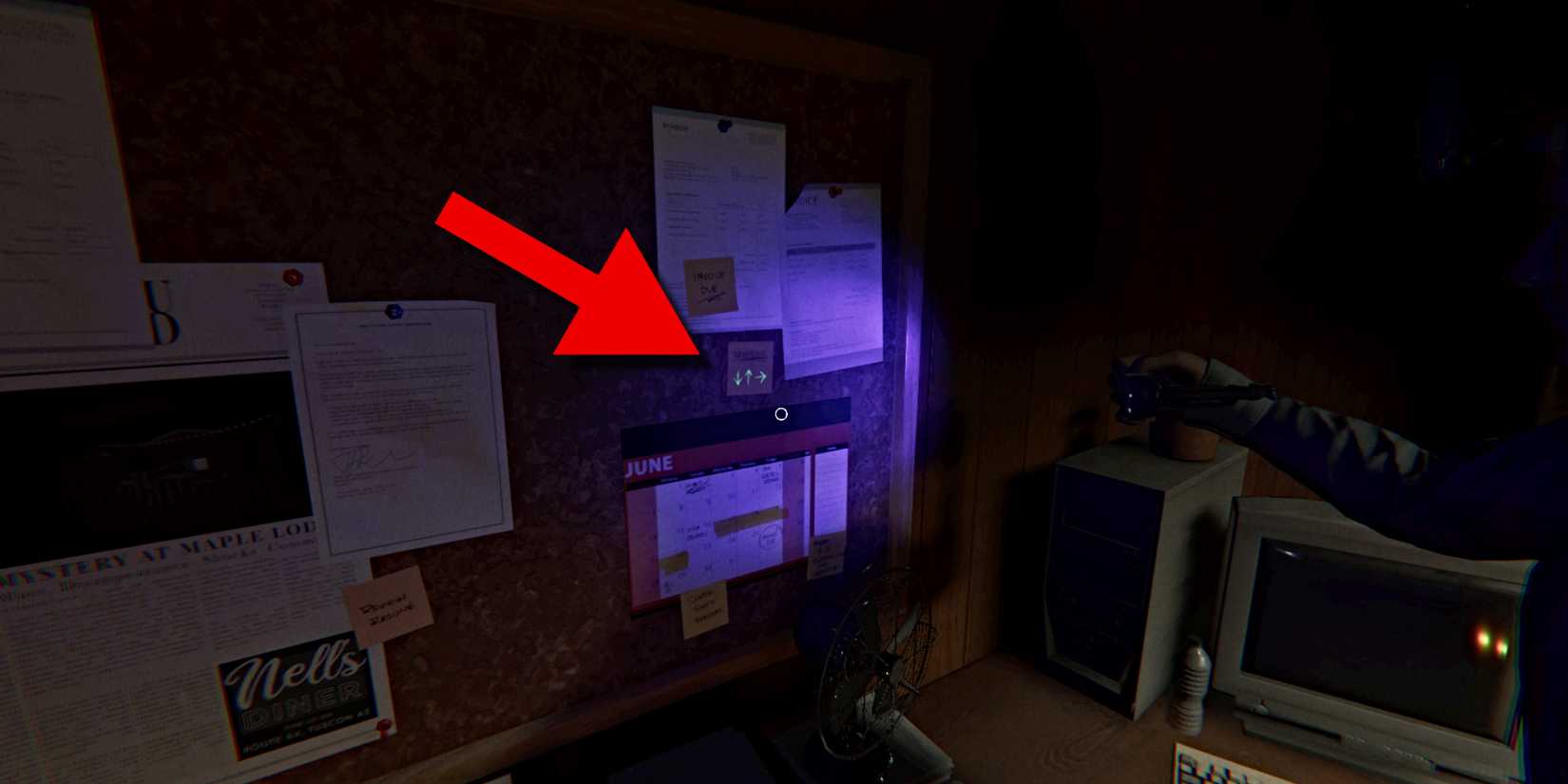
To start the puzzle, bring a UV Light with you from the van and head to the Manager’s Office in the back right side of the diner. On the wall in the back right corner of the room is a bulletin board with various flyers and notes. Turn on the UV Light and shine it on the small yellow post-it that’s labeled “Reminder”. A sequence of three arrows will be revealed in the following order: down, up, right.

Step 2 – Check Yellow Arrow Sign in Dining Area

phasmophobia-nells-diner-puzzle-step-2

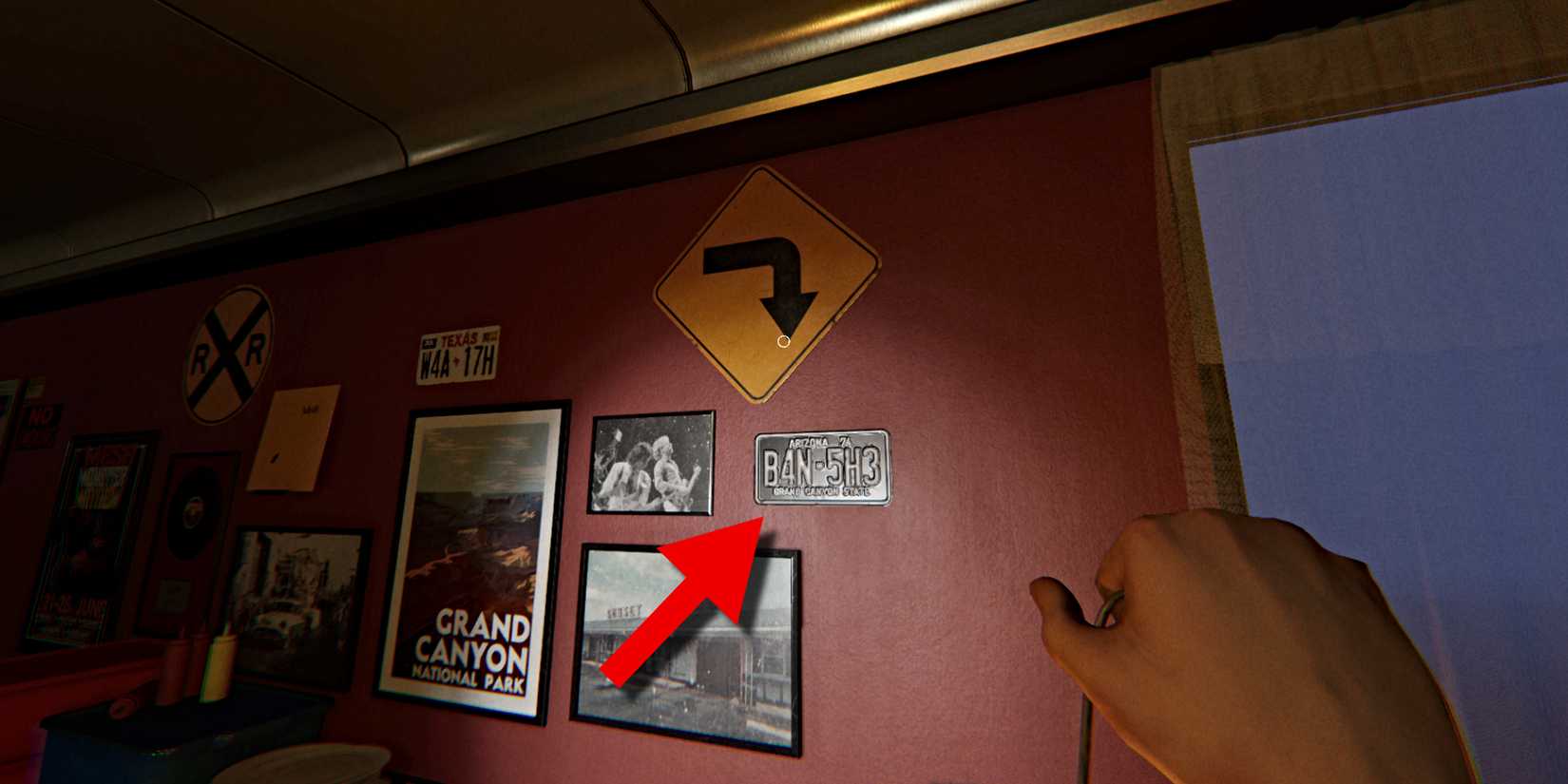
Next, head to the Dining Area at the front of the diner. On the wall to the right of the main entrance is a large yellow road sign with an arrow pointing down. Specifically, it’s pointing at the first number on the license plate directly below it – 4.

Step 3 – Check Number Under Nell’s Diner Sign Outside

phasmophobia-nells-diner-puzzle-step-3

Next, head outside to the parking lot in the front and make your way to the tall Nell’s Diner sign next to the road. Approach the barrier next to the sign and then look down at the ground. You should see an arrow pointing up at a number lying on the ground – 1.

Step 4 – Check Number At Trash Area Outside

phasmophobia-nells-diner-red-arrow-trash

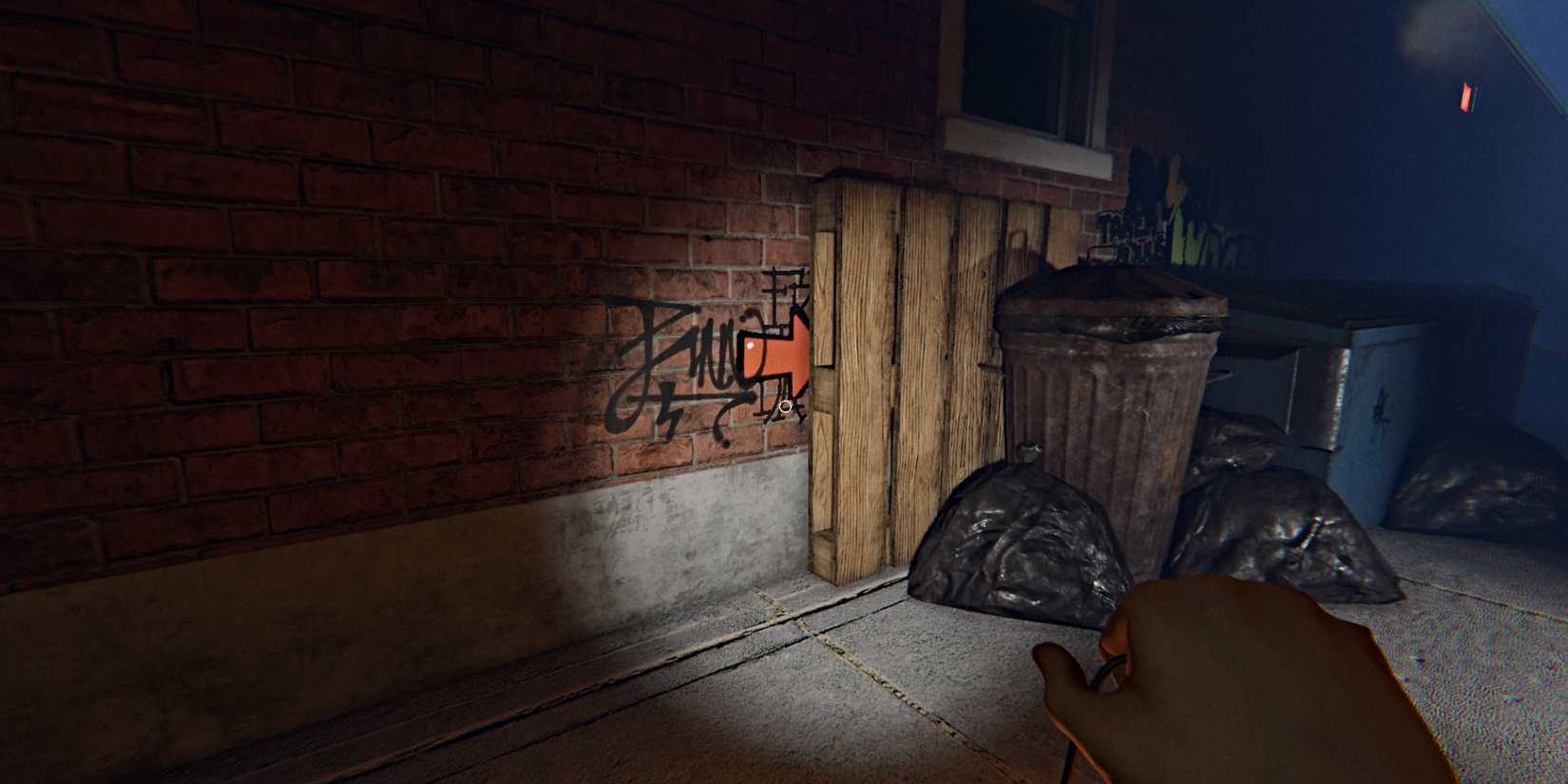
The next step is also found outside. From the Nell’s Diner sign, head around to the right side of the building, where you’ll find a lineup of dumpsters and trash cans. You should see a bright red arrow on the brick wall, partially obscured by a wooden pallet (seen above), on the far left side of the dumpsters. Notice that it’s pointing right.

phasmophobia-nells-diner-puzzle-5-graffiti

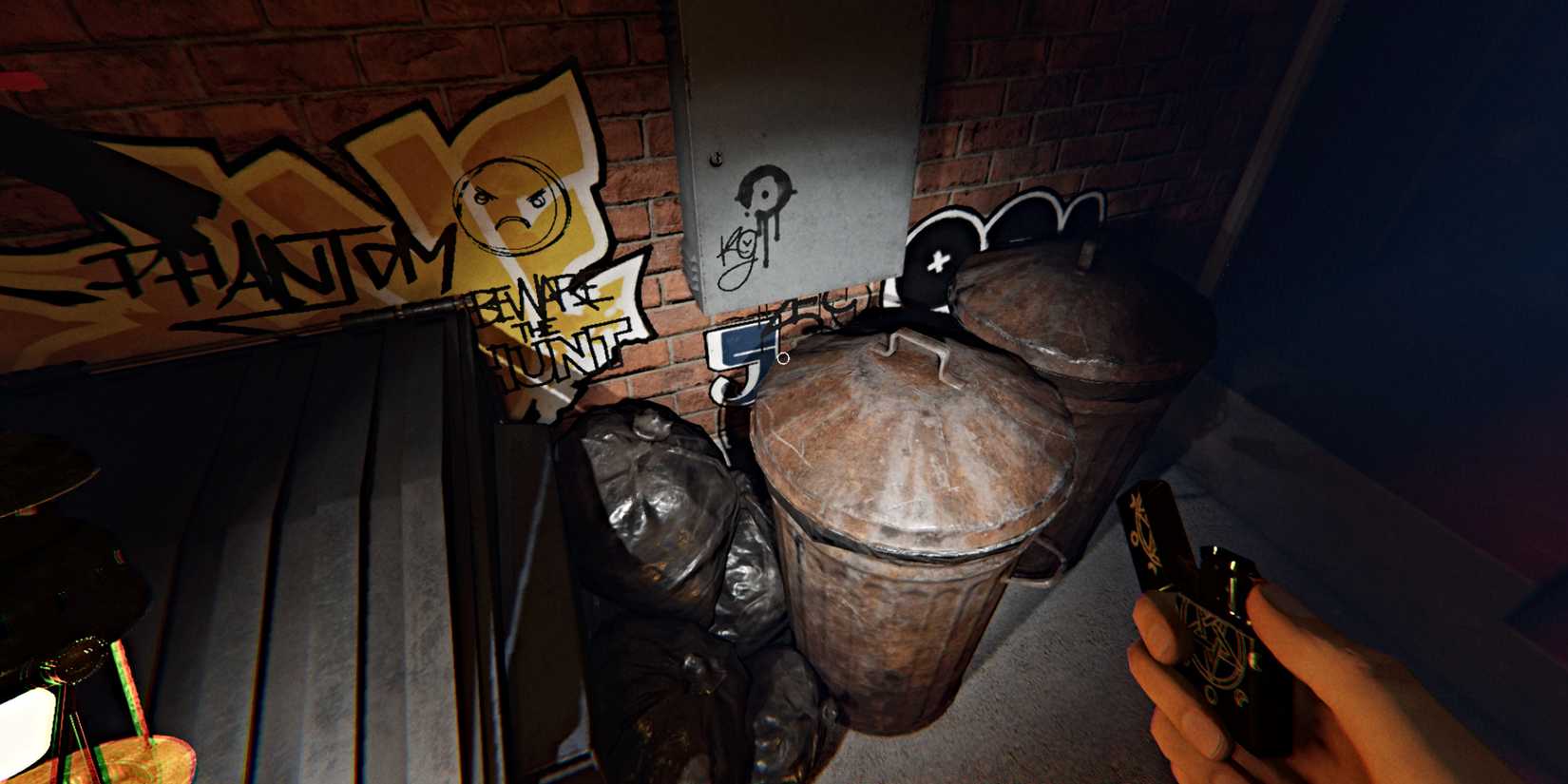
Follow that arrow to the other side of the dumpsters, and on the brick wall behind the trash cans should be a blue-colored number – 5.

Step 5 – Type the Numbers On Safe Keypad in the Manager’s Office

phasmophobia-nells-diner-safe-code-keypad

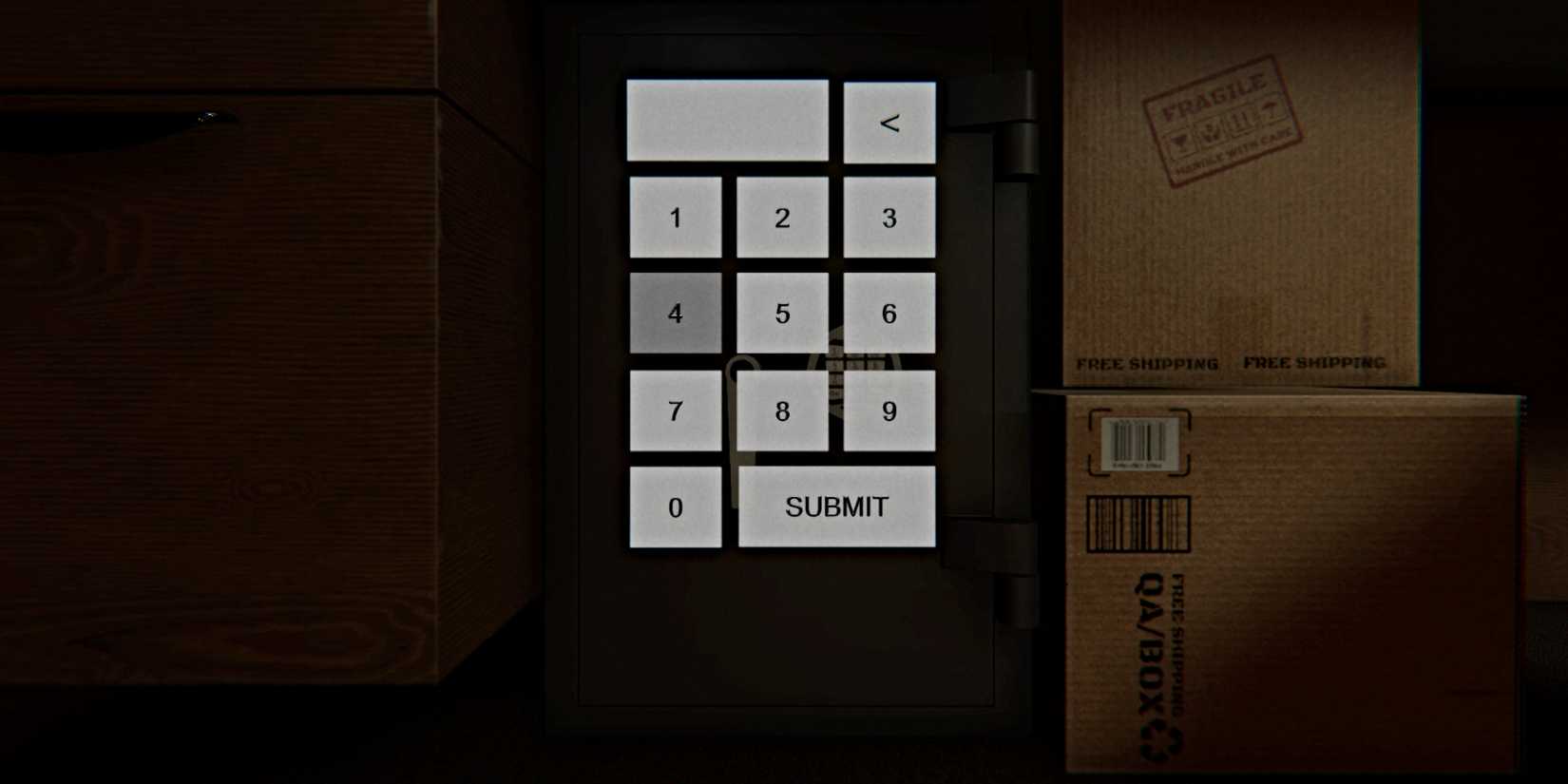
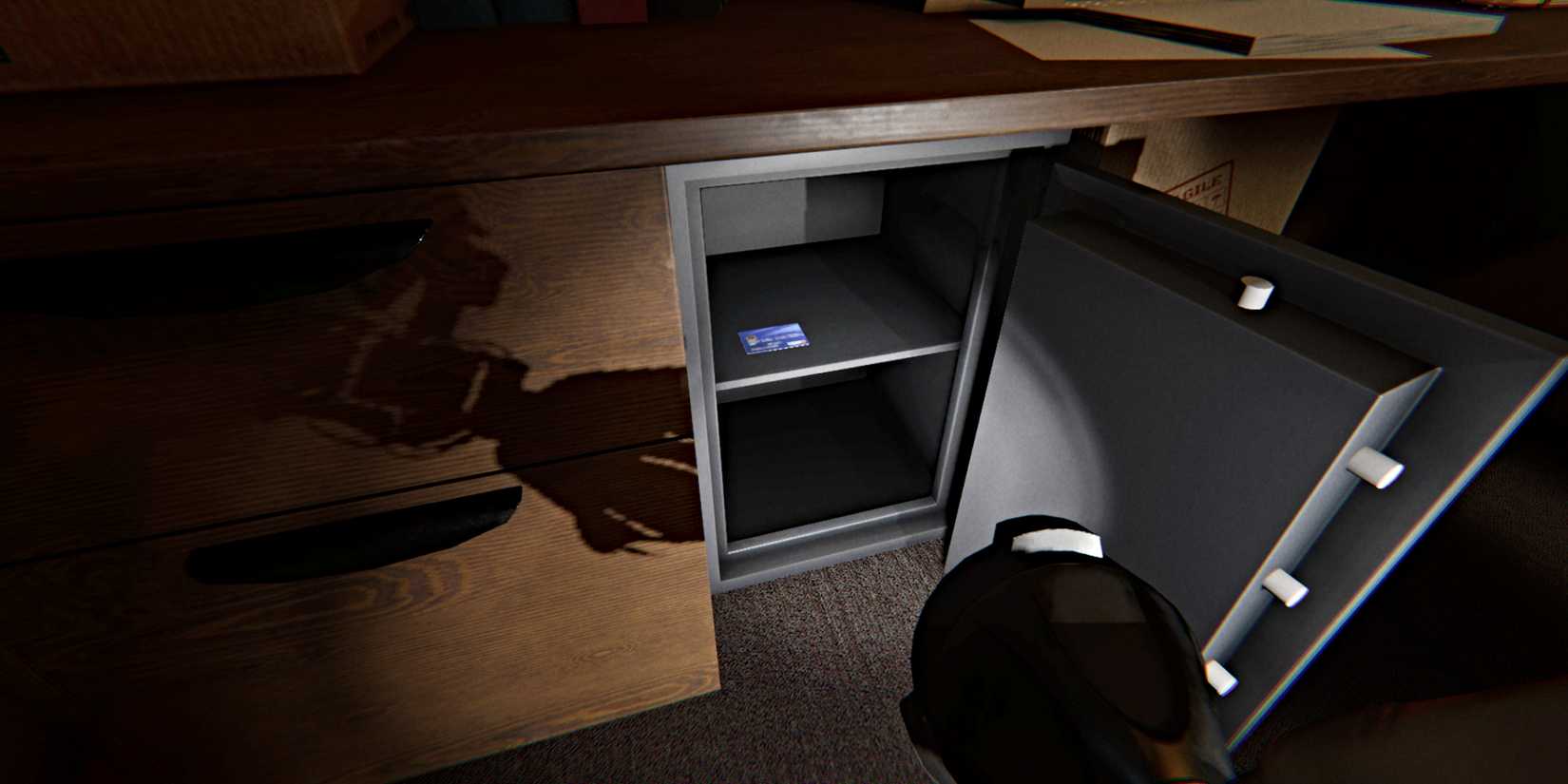
Per the set of arrows you first found with the UV Light in the Manager’s Office, you now have the code you need to get into the safe that’s in there. Return to the Manager’s Office, and the safe will be on the floor beneath the desk where the bulletin board is.

phasmophobia-nells-diner-safe-atm-card

Interact with the safe and a keypad menu will appear (as seen above). Type in the following code – 415, then hit ‘Submit’ at the bottom. This will unlock the safe, and you can then pull its door open to reveal its contents. Take the Blue ATM Card that’s inside, just like how you pick up any other interactable object in the game.

Step 5 – Use ATM Card at ATM Machine in the Hallway

phasmophobia-nells-diner-atm-machine-card

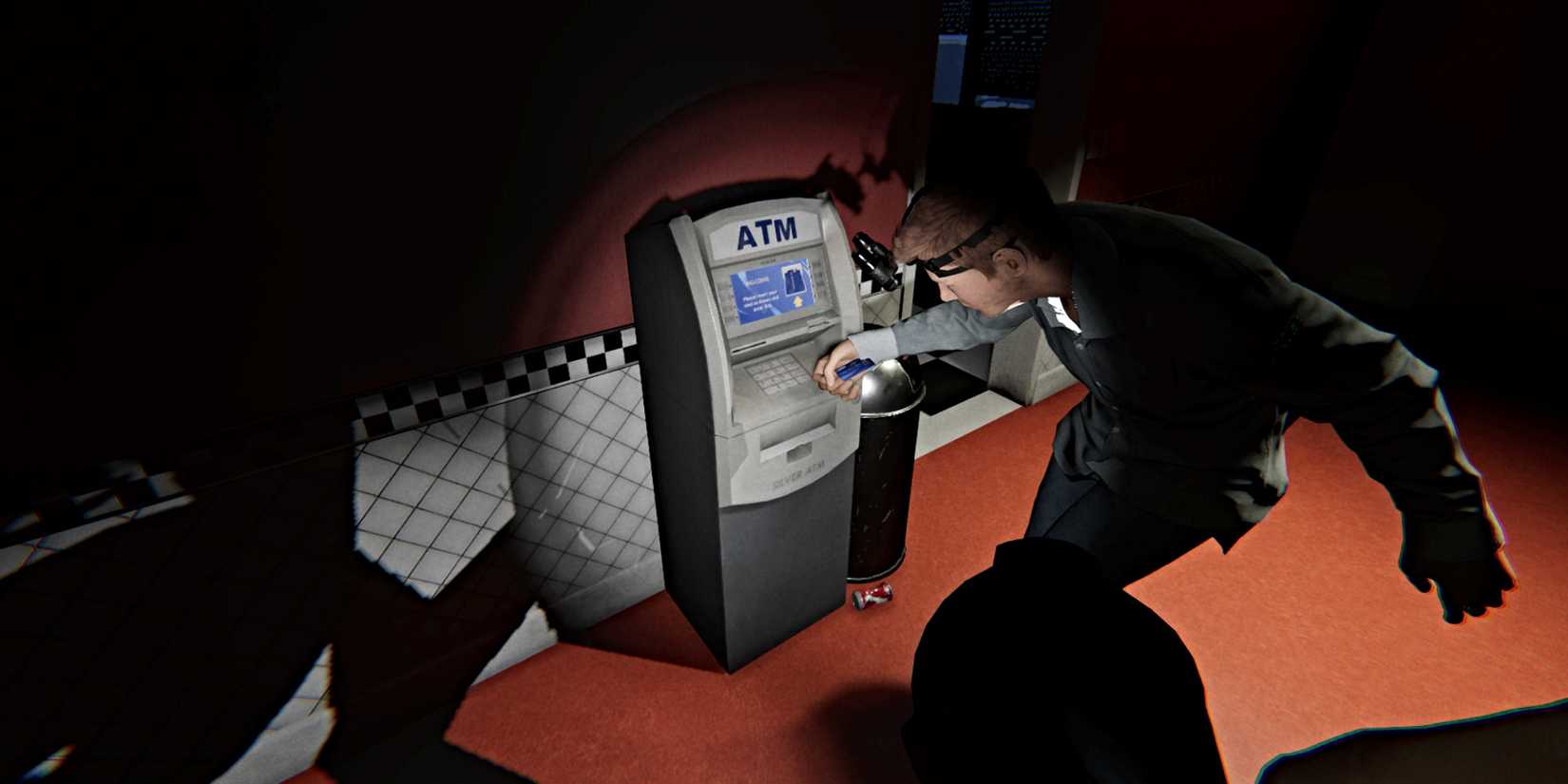
With the Blue ATM Card in hand, head to the ATM Machine that’s in the Hallway. Leave the Manager’s Office and then head right through the door at the far end to the smaller hallway where the restrooms are. The ATM Machine is near the doorway that leads to the Dining Area.

Have the Blue ATM Card equipped and then interact with the ATM Machine via the keypad just below the screen. Specifically, use the appropriate button that you use to place equipment items.

phasmophobia-nells-diner-atm-machine-money

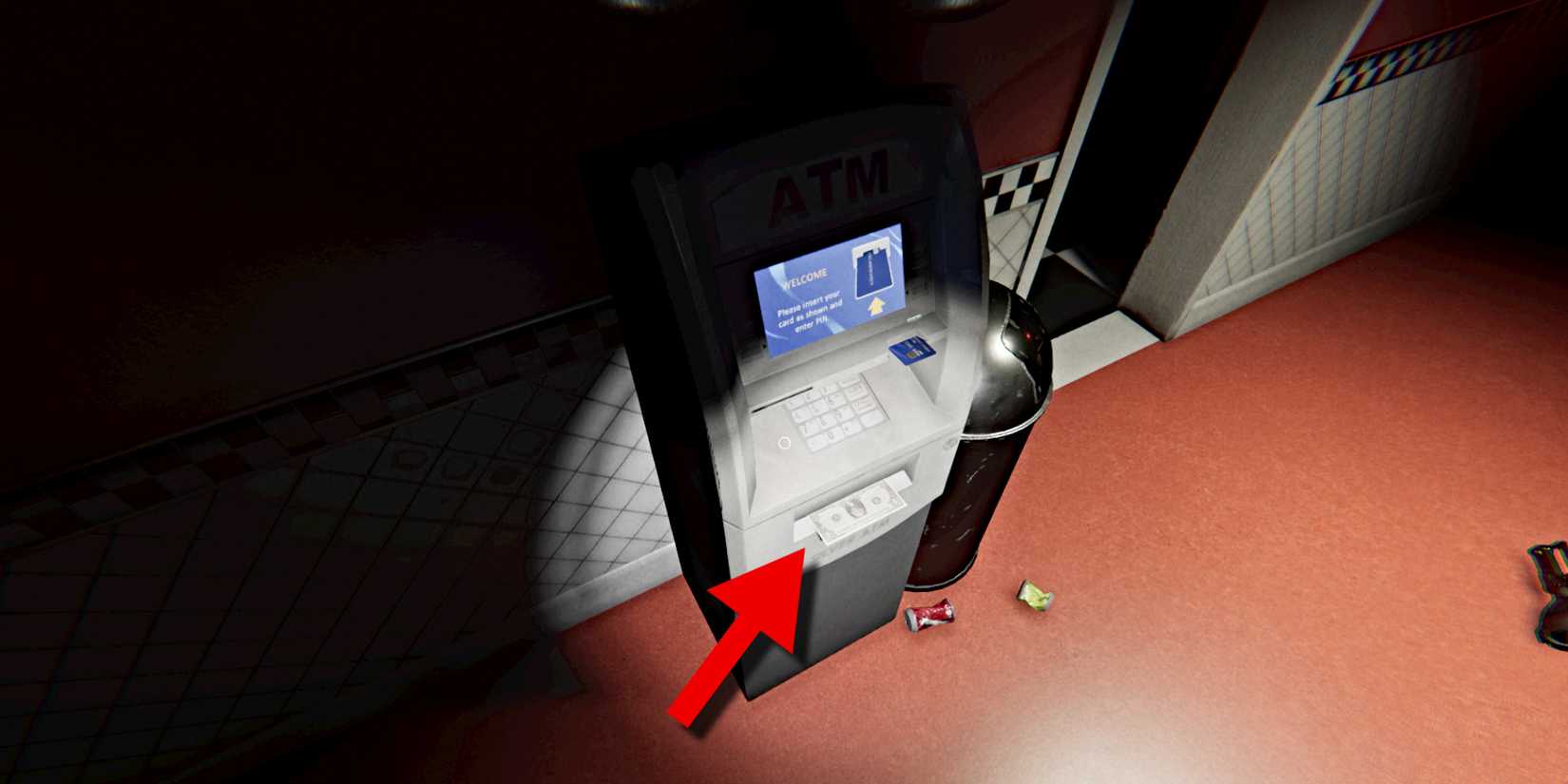
Once done, the ATM Machine will dispense a dollar from the slot at the bottom for you to take. Do so, and you can keep the Blue ATM Card if you want, but it’s no longer needed for the puzzle.

Step 6 – Put Your Dollar Into Mr. Sprinkle Vending Machine

phasmophobia-nells-diner-vending-machine

Next, go over to the drink vending machines nearby (in the same hallway), and insert your dollar into the respective cash slot in the Mr. Sprinkle vending machine (both machines reportedly work for this, but the red machine is the one I confirmed).

phasmophobia-nells-diner-coin-floor

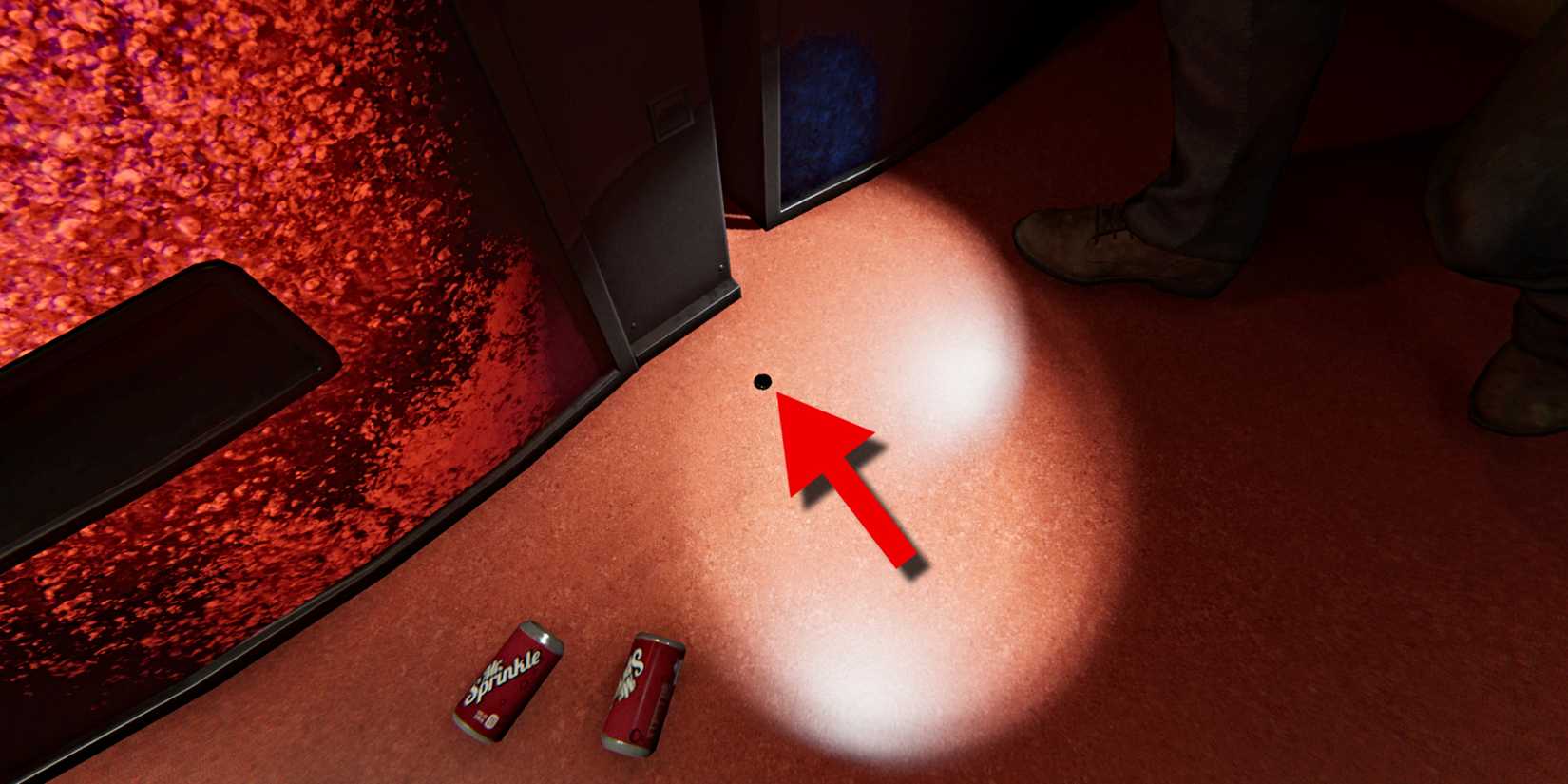
Once done, you’ll get an Arcade Coin in return that will drop onto the floor right in front of the machine. Have a flashlight handy to spot it, as it’s rather small. Just like the ATM Card and the Cash, pick it up for the next step.

Step 7 – Insert Coin in Arcade Machine in the Break Room

phasmophobia-nells-diner-puzzle-break-room-skull

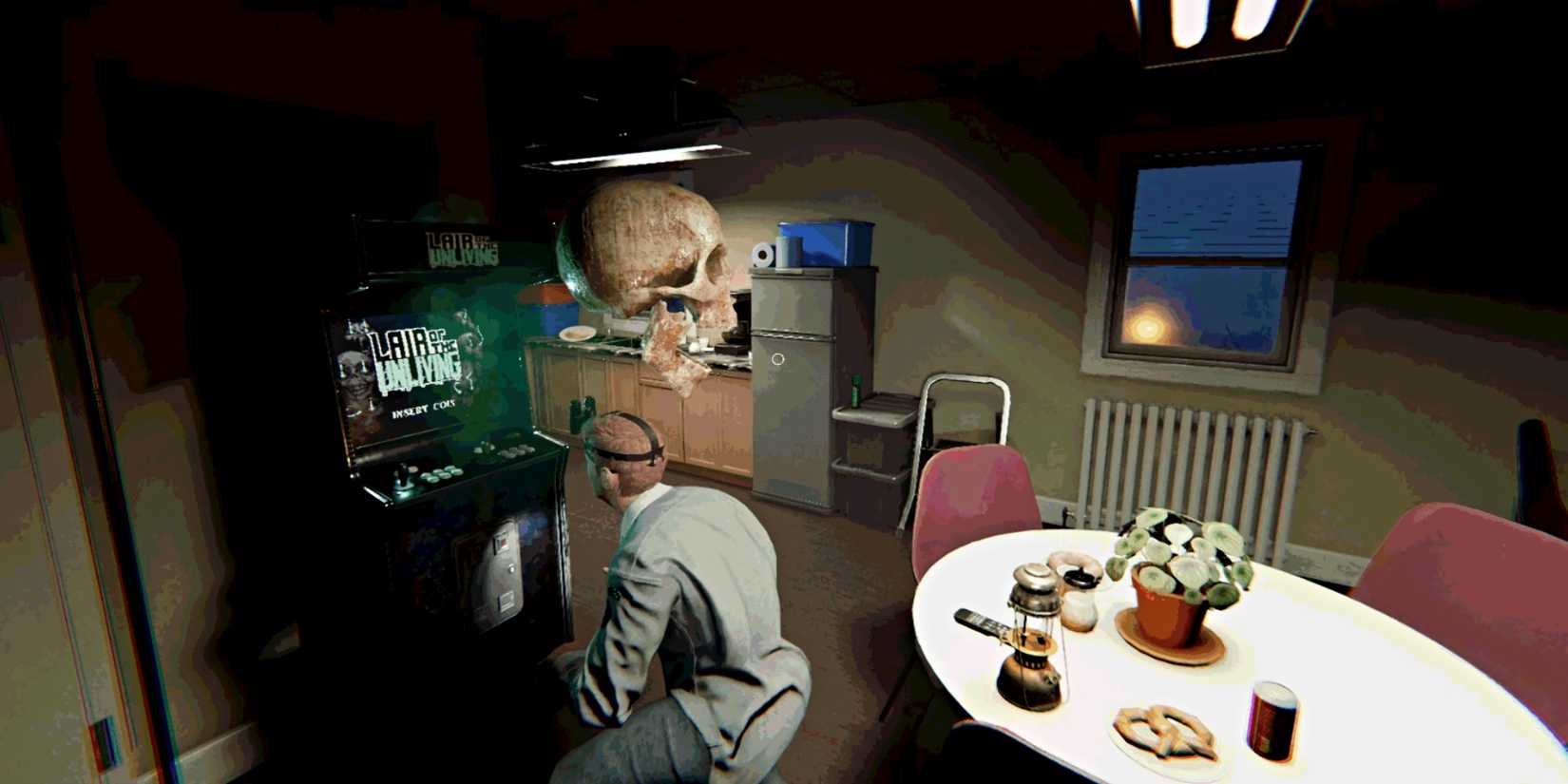
Now head back through the hallway on the left side to the Break Room. Inside there you’ll find an Arcade Machine. Insert your Arcade Coin into the machine, and it will then turn on (you should hear music playing from it). In addition, a spooky human skull will emerge from the machine (seen above) and fly out through the window behind you.

As for where that skull went, it’s time to head back outside to see the fruits of your labor.

Step 8 – Observe Skeleton Towering Over Nell’s Diner

phasmophobia-nells-diner-giant-skeleton

Go back out to the parking lot in front of the diner, and you’ll come face-to-face with a huge (and I mean HUGE) skeleton towering over the diner itself, smoke billowing from its eye sockets and eerie sound effects echoing through the air.

This effectively marks the puzzle as complete. Return to the van and conclude the contract to collect your rewards.

All Nell’s Diner Easter Egg Puzzle Rewards in Phasmophobia

phasmophobia-ghost-in-the-machine-badge-unlock

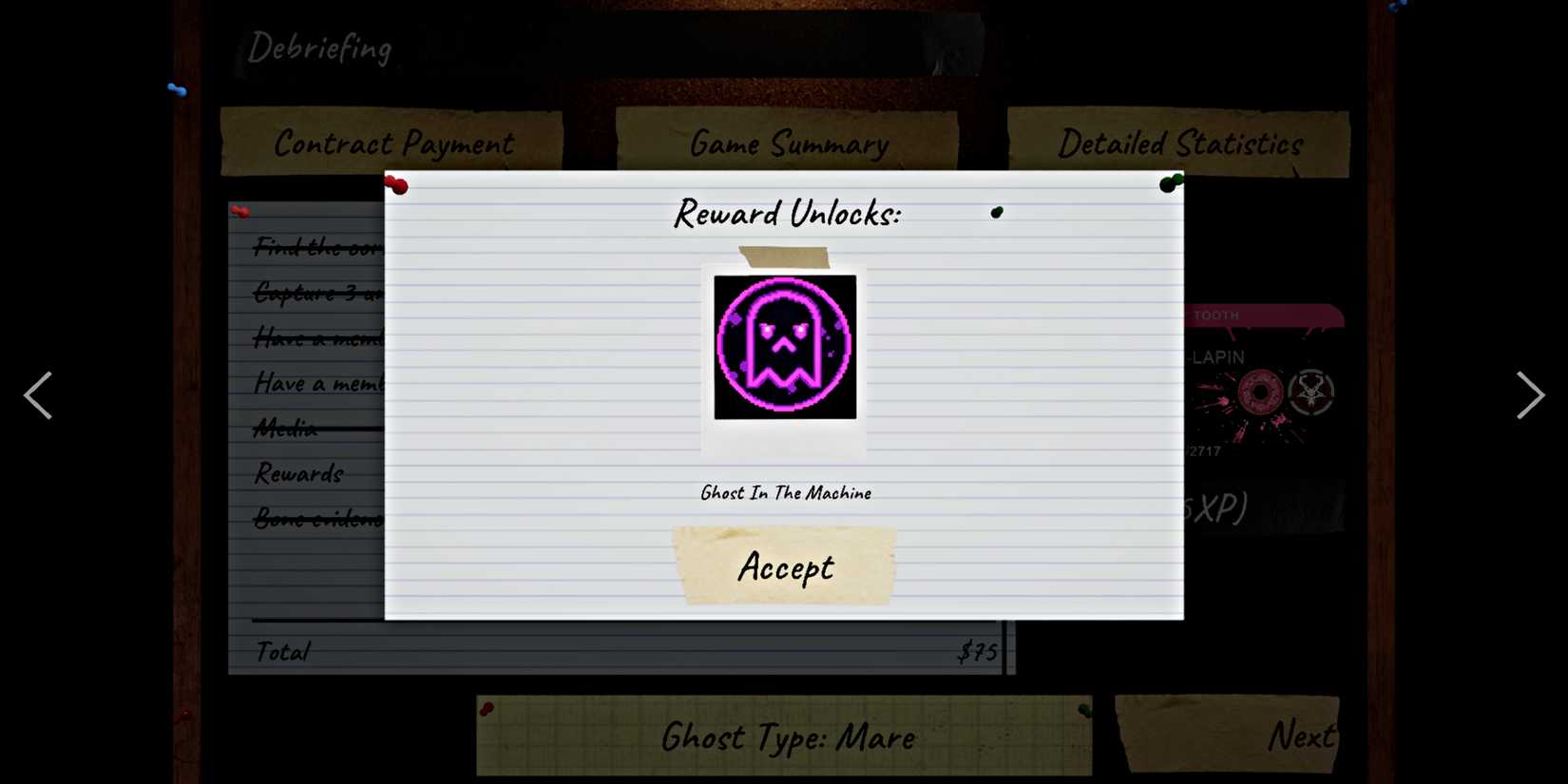
Once you return to headquarters for your Debriefing after completing the puzzle and the contract itself, you’ll receive a notification that you’ve unlocked the Ghost In The Machine ID Card and Badge for your profile.

phasmophobia-nells-diner-puzzle-ghost-in-the-machine-card

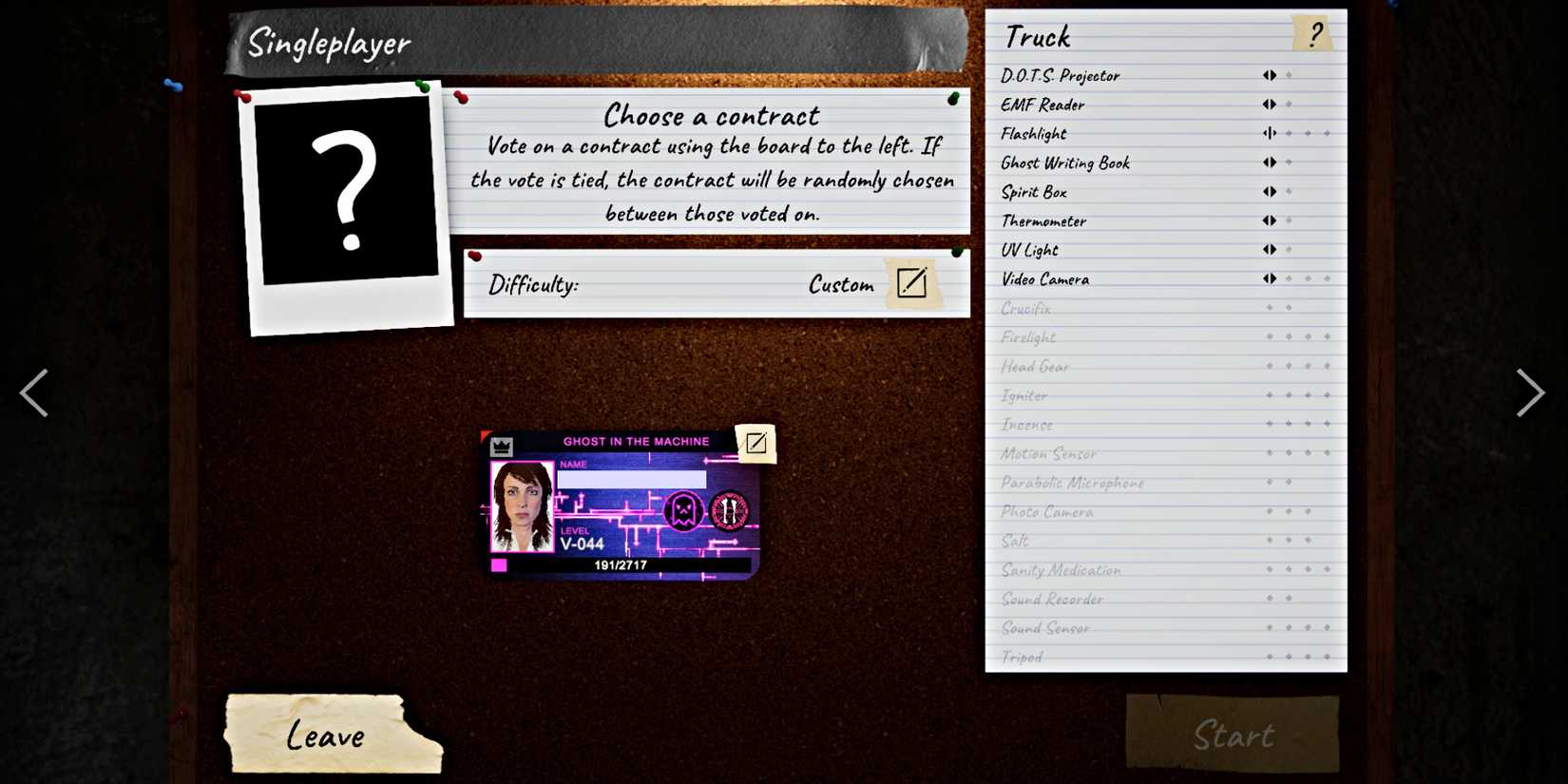
Return to the main menu, and you can now customize your character’s ID Card and Badge to this special, Pac Man-inspired look. Feel free to flex it on all your future paranormal investigations alongside any Prestige badges you have!

mixcollage-05-dec-2024-05-33-am-9262.jpg

Released

October 29, 2024

ESRB

T For Teen // Blood, Use of Drugs, Violence


Source link

Switch 2 And Switch Get New System Updates, And They Add More Than Just Stability

0
Switch 2 And Switch Get New System Updates, And They Add More Than Just Stability


Yes, there are stability improvements, but that’s not all with the new system updates rolling out for Switch 2 and Switch. The patch notes for version 21.0.0 highlight better visual clarity on the home menu for whether a game is owned physically or digitally, GameChat improvements, and a battery description alteration.

Switch 2 and the original Switch are receiving the new symbols that will “indicate whether the software is a physical or a digital version,” according to Nintendo. The icons are now red like the cartridges for physical Switch 2 games, while they’re black for physical Switch titles. However, in general, Switch 2 is seeing more changes with this update. For instance, GameChat should now ensure a game doesn’t go to sleep while talking online with a friend. Plus, the system setting language for limiting a charge on the console now says, “Stop Charging Around 80-90%.”

Want us to remember this setting for all your devices?

Sign up or Sign in now!

Please use a html5 video capable browser to watch videos.

This video has an invalid file format.

Sorry, but you can’t access this content!

Please enter your date of birth to view this video

JanuaryFebruaryMarchAprilMayJuneJulyAugustSeptemberOctoberNovemberDecember12345678910111213141516171819202122232425262728293031Year202520242023202220212020201920182017201620152014201320122011201020092008200720062005200420032002200120001999199819971996199519941993199219911990198919881987198619851984198319821981198019791978197719761975197419731972197119701969196819671966196519641963196219611960195919581957195619551954195319521951195019491948194719461945194419431942194119401939193819371936193519341933193219311930192919281927192619251924192319221921192019191918191719161915191419131912191119101909190819071906190519041903190219011900

By clicking ‘enter’, you agree to GameSpot’s
Terms of Use and
Privacy Policy

enter

Now Playing: Nintendo Switch 2 Console Review

This is the first Switch 2 system update since version 20.5.0 released in September. That only brought about “stability improvements,” something that’s expected and joked about constantly in the video game community.

Last week, Nintendo revealed that Switch 2 has sold 10 million hardware units in just four months of availability. That timeframe doesn’t include October, when a new Switch 2 bundle with Pokemon Legends: Z-A launched, so the total number is obviously higher at this point. Meanwhile, Switch has surpassed 154 million units sold, sitting just behind Nintendo DS. It’s more than likely at this point that Switch has now become Nintendo’s best-selling console ever. Overall, the company has sold over 870 million systems and 6 billion games over the past 40 years.

Later this week, there will be a Nintendo Direct for the debut trailer of The Super Mario Galaxy Movie. Pillsbury has accidentally already given us a good look at what Yoshi will look like in the upcoming sequel.

Below are the patch notes for version 21.0.0:

Switch 2

Added symbols above software icons displayed on the HOME Menu to indicate whether the software is a physical or a digital version.When multiple software downloads are in progress, there is now an option to cancel all.If a console bundle includes a software download, there will now be an icon to “Receive Software.” It will display if the system is connected to the internet. The icon will launch Nintendo eShop and you can proceed to the downloadable software.You can still receive the software by navigating to Nintendo eShop from the HOME Menu directly.When finding users to send a friend request to, the Search for Users You’ve Played With option under Add Friendnow includes people you’ve interacted with in your friends’ GameChat rooms.Added the ability to download data for a virtual game card even if the “Use Online License” setting is turned off. This option is available in the Options of a virtual game card when accessed via Virtual Game Cards from the HOME Menu.The following updates have been made for GameChat: The game will not automatically go to sleep while chatting.The option to turn off “Chat Audio Panning” has been added.Chat can continue if the console goes from TV mode (docked) to Handheld or Table mode where this scenario changes the internet from a wired connection to a wireless connection.The following updates have been made in Accessibility in System Settings: When Use Text to Speech is turned on, the description of the predictive conversion character on the Japanese keyboard is now read out loud.The upper limit of Text-to-Speech Speed was increased from 300% to 400%The following updates have been made in Audio in System Settings: The ability to change the audio mode for a wirelessly connected Nintendo Switch 2 Pro Controller was added. “Stable” or “Low Latency” can be selected.”Low Latency” will reduce audio latency when compared to “Stable” but may be more subject to interference in some wireless environments.The following updates have been made in Display in System Settings: “HDR Output” was renamed to “System Screen’s HDR Output.”Improved the screen display when using Adjust Screen Size to make it easier to adjust.The following updates have been made in Notifications in System Settings: The option “Platinum Point Notification” was renamed to “Nintendo Switch Online Notification.”The following updates have been made in System in System Settings: “Stop Charging Around 90%” was renamed and updated to “Stop Charging Around 80-90%”Thai and Polish were added to the list of options under Language. Thai and Polish will only be available in software when it supports the respective language.General system stability improvements to enhance the user’s experience.

Switch

Added symbols above software icons displayed on the HOME Menu to indicate whether the software is a physical or a digital version.Added the ability to download data for a virtual game card even if the “Use Online License” setting is turned off. This option is available in the Options of a virtual game card when accessed via Virtual Game Cards from the HOME Menu.The information regarding Save Data Cloud Backup that appears when launching certain software has been updated.The option “Platinum Point Notification Settings” was renamed to “Nintendo Switch Online Notification Settings” in the Notifications menu in System Settings.Added the ability to disable the following options when performing a system transfer from a Nintendo Switch system to a Nintendo Switch 2 system using System Transfer to Nintendo Switch 2 in System Settings. Redownload Software on Nintendo Switch 2Transfer Album DataAdded the ability to adjust the volume from the Quick Settings menu while in VR mode.General system stability improvements to enhance the user’s experience.


Source link

Battlefield 6 patch finally ends the menace of the Lock-Guided Missile, shuts down the Recon Drone Sledgehammer exploit and more

0
Battlefield 6 patch finally ends the menace of the Lock-Guided Missile, shuts down the Recon Drone Sledgehammer exploit and more


The next Battlefield 6 update is here. Having gone live just moments ago, update 1.1.1.5 is something of a midseason update, bringing a few quality of life tweaks to the game alongside some key fixes for a few of the issues that cropped up since the launch of Season 1 in late October.

This latest release is also the first to tackle some of the problems players have been running into playing Redsec battle royale, the free-to-play component that also came out recently.

Manage cookie settings

Patch 1.1.1.5 is fairly limited in scope. The biggest fix in this one comes to the Lock-Guided Missiles going through flares, and generally being annoying enough to stop players from using air vehicles altogether.

The Lock-Guided Missiles were mainly used by AA vehicles, but they could also be equipped by IFVs, which made it even more of a nightmare to pilots. It got so bad that Battlefield Studios disabled it entirely while the team worked on a proper fix.

Another exploit the patch fixes is the one that allowed players to stand on the Recon Drone and reach areas they’re not supposed to. This was done by… repeatedly hitting it with a Sledgehammer. The long-running issue of vehicles not spawning for certain teams in Conquest and Breakthrough appears to have finally been fixed, too.

Image credit: Battlefield Studios, EA.

In terms of battle royale, the patch has a few fixes that should help make the experience more consistent, as well as improve the flow of matches. One of the more interesting addresses an issue that could eliminate the entire squad instead of reviving dead teammates when using a Mobile Spawn.

Patch 1.1.1.5 also has yet more adjustments to weapon dispersion (bloom). Some of the casses it addresses include transitioning from sprint to firing in ADS, and others where it apparently scaled with player movement speed.

Read on below for the full change log:

Multiplayer

Player

Fixed an issue where dispersion would be higher than intended when going from sprint to firing in ADS.
Fixed an issue where dispersion would incorrectly scale with movement speed and always assume the player is moving at maximum movement speed for the stance.
Tuned landing animation to reduce excessive camera and weapon movement when aiming down sights, improving visual stability during and after landing. This update also resolves instances where the ADS aim could be displaced when sliding.

Vehicles

Fixed an issue where Lock-Guided Missiles did not get countered as expected when met with enemy countermeasures such as flares.

Gadgets

Fixed an exploit allowing players to ascend and access unintended areas when standing on the XFGM-6D Recon Drone by hitting it with the Sledgehammer.

Maps and Modes

Fixed an issue where vehicles did not spawn correctly in Breakthrough and Conquest.
Fixed an issue where matches sometimes would start with all sectors and objectives active at the same time.
Fixed an issue in Strikepoint on Siege of Cairo where destruction did not reset at halftime.

UI and HUD

Fixed an issue in Vehicle Customisation locked Anti-Air Vehicle presets did not display their unlock criteria as intended.

Progression

Fixed an issue where the shotgun weapon challenge “Kill 5 Enemies With a Shotgun Without Reloading” did not complete properly.
Fixed an issue where progress for the “Engineer Specialist 3” Assignment did not save correctly.

Portal

Fixed an issue where “SpawnLoot” would not spawn Ammo or Armor.
Fixed an issue where players with community creations privileges set to Block could still access user-generated Community Experiences when the party leader hosted a match.

Audio

Fixed an issue where activating the BF PRO Radio Channel through the Commorose did not play any sound.

Redsec

Player

Fixed an issue where Battle Royale (Quads) matches did not end after the last team was eliminated.
Fixed an issue where being killed immediately after a mobile respawn completed could result in the squad being eliminated instead of reviving remaining teammates.
Fixed an issue where players could become stuck in a top-down view of the map after redeploying.
Fixed an issue where players retained their Second Chance after redeploying and did not transition to the End of Round screen after their next elimination.

UI and HUD

Fixed an issue where all squad members displayed the same highlighted stat on the Squad Placement screen.

Progression

Fixed an issue where the “Battle Royal Master Challenge 4” did not track progress correctly.


Source link

Ghost of Yotei Review – Same Sword, Sharper Edge

0
Ghost of Yotei Review – Same Sword, Sharper Edge


Countless other reviews have said exactly the same thing: Ghost of Yotei is a safe sequel. It’s just more Ghost of Tsushima. It’s such a rote, generic piece of analysis, isn’t it? Pah. I pity those fools who lack my ability to write…er, good. And yet…well, it’s completely true. Ghost of Yotei really is a safe sequel, and it really is just more of the same, albeit improved in almost every way.

That also means I can bust out the other cliche of reviewing a game: if you liked Ghost of Tsushima, you’ll love Ghost of Yotei! And if you either didn’t love Ghost of Tsushima or had your fill the first time, it’s probably best you bugger off, isn’t it?

Set a few hundred years after the events of the first game, Ghost of Yotei is a sequel that can be played and enjoyed by people who never wielded a katana against the Mongol hordes in Ghost of Tsushima. There are, of course, some links to the previous game, but they are minimal. That gives new protagonist Atsu space to shine, free from the shadow of Jin Saikei, but sadly not free from the shadow of her own traumatic childhood.

You see, little Atsu lived with her parents and brother in a simple, peaceful setting. Her father worked a forge and had quite the reputation for making beautiful swords, and her mother was a talented musician. All is well, until it isn’t. The Yotei Six come to visit, led by Lord Saito, who had some sort of grudge against Atsu’s father. Death and destruction. Atsu left pinned by a blade through her shoulder to a burning tree. A quest for revenge.

Atsu returns to her homeland sixteen years after that night having fought in numerous battles, ready to seek out the Six and claim her vengeance. The rest of the night’s horrific events will unfold through a series of cutscenes as Atsu hunts down the members of the Yotei Six one by one and earns her bloody revenge, becoming what is known as an Onryo in the process.

It’s a solid tale of revenge, of becoming lost in the pursuit, of being able to let go, of the ultimate cost of violence – but one that tends to smack itself off all the standard revenge-tale branches as it falls out of the burning tree. You’ll see pretty much every single one of them coming from a mile away. When you think of a revenge tale, Ghost of Yotei hits all the standard points you think of first and has nothing to say about them that’s new or bold or interesting.

That would not have mattered if the execution of those beats and the writing were of the highest caliber, but that isn’t the case. It’s not bad. Not at all. The writing is solid, and it’s all backed up with plenty of visual oomph and strong voice work. It’s just that when the structure and theme is as routine as this, everything else needs to be first-class or it becomes forgettable. I had fun watching Atsu’s journey, I enjoyed it, but I barely remember it, whereas there are a host of other revenge stories that follow the standard template but remain etched in blood in my brain.

Perhaps a bit of fault lies with me, mind you. When I realised it was going to be a revenge story, I had hoped it was going to go down a Kill Bill route and it didn’t do that. It went the other way, and for me that was the route too well trodden.

Ultimately, I think the overall theme of Ghost of Tsushima was much more interesting, but this game has a better protagonist. As much of a badass as Jin was, I don’t remember much about him, whereas Atsu has stuck with me a little bit more.

All the main quests do an excellent job of telling the story, too. They do tend to overuse the same template again and again – meet a person, travel to a location while they talk to you, fight or sneak into somewhere and repeat. And I would have loved a few more proper cutscenes since the few we get are gorgeous. But despite these flaws, the main missions managed to keep adding in new, interesting characters or delivering fun set pieces. It’s a long game, but the pacing rarely drags; the mix of quieter beats and big duels keeps the rhythm alive.

I have to say, Sucker Punch are superb at this whole open-world adventuring malarkey. Never mind that the world is an endlessly gorgeous photo shoot from end to end, with quite a bit of extra environmental variety this time around. I mean, it’s absurdly beautiful, whether it’s riding through a field of pink cherry blossoms or chilling out under the stars at night. Which is why I have a bazillion screenshots saved. But the real star is how the world is laid out so organically, letting you find new adventures and quests instead of force-feeding them to you. The guiding wind from the previous game is back, as is the distant billowing of smoke that indicates a village or campsite. These two things along with main missions that bring you into proximity with other activities and smart world design mean you’re always stumbling into some other adventure or finding a hot-spring to bathe in or a traveller needing help or some random berk who wants a duel. Ubisoft, for God’s sake, take some notes.

Exploring the world is further encouraged by making Shrines the only way to unlock new skills outside of missions that grant them. These little beauties are found everywhere, chilling out in front of idyllic views, lurking in enemy outposts you need to clear out or at the very tippity-top of special climbs you have to embark on.

I do take issue with one of the game’s several types of point-of-interest, though, and that’s the Hot Springs. I’m fully supportive of the brief glimpse of Atsu cheek that we get, but the health increase offered is kind of pointless. I kept seeking out baths to buff my health, and yet would still die in what seemed like the same amount of blows from an enemy blade. Maybe I’m just crazy. Maybe it’s just Maybelline. But it felt like the enemy damage was scaling with my health.

Let’s shove that into a deep dark recess for a second, though, and get back to the world. You see, not only is it delightful to look at but it also hosts a heap of enjoyable side-quests, from battling strangers at duelling trees to attracting the attention of a mysterious man to hunting down a myriad of bounties, each a fun little story in its own right. There was no side-quest that I found boring or unworthy of completion, and just like before, the game was excellent at gently shoving me toward the next person in need of help.

The core of the combat – dodging, parrying, blocking and attacking – is largely unchanged. That’s fine, because it still feels terrific, a satisfying and fun dance of death — only this time, instead of toes getting stepped on, it’s guts getting stabbed through.

Mind you, I did find the soft-lock system a bit of a pest. There’s no full lock-on system; rather, the game will pick a target for you. Most of the time, that works well enough. Sometimes, though, I found myself wanting to target someone else, at which point getting the camera to break its fixation was troublesome.

Switching stances like a dancing ninja is out; switching weapons like a mobile armoury is in. Atsu is a master of many arms, or at least, she becomes one as you seek out the actual Masters scattered throughout the world. Each new weapon learned is best deployed against specific foes. So, the Yari (spear) is great against enemies with sickles, while the awesome kusarigama is best against shields. Really, there isn’t much difference mechanically speaking between this and the stance changing, but it’s still a fun twist. Some of the animation work is especially excellent.

Where combat has been expanded is in the selection of ancillary tools you have stuffed into various pockets. Jin Sakei was hardly lacking in gadgets, but Atsu has gone full Batman and has a tool for every situation. Smoke bombs, blinding dust, special oil for setting your weapons ablaze and even a pistol are just a few of the quickfire weapons at your beck and call.

And, of course, there’s the choice to go ranged by employing a bow and a couple of different arrow types. There’s even a rifle, too.

All in all, then, combat has expanded, giving you new ways to tackle each fight even as the core of it remains largely unchanged.

Stealth is probably the part of the game that has been changed the least. It plays largely like Ghost of Tsushima—hiding in tall grass, leaping off rooftops, chaining assassinations together. The mechanics remain satisfying; running a couple of enemies through or linking kills in quick succession still delivers that dopamine hit. And there’s absolutely no doubt that clearing an entire compound without being detected grants a sense of pride in a job well stabbed.

But here’s the problem: it’s generic. It’s exactly what you’ve done in dozens of other open worlds, and it’s almost exactly what you did in Ghost of Tsushima five years ago. The tall grass hasn’t gotten any taller. The AI hasn’t gotten smarter. The loop remains unchanged.

Perhaps I’m being too harsh, but it feels like this genre—the open-world action-adventure—hasn’t really advanced stealth mechanics in a long time. While games like Hitman continue to innovate with social stealth and emergent gameplay, the Ubisoft-style open-world formula has stagnated. We’re stuck in a rut. It’s a fun, comfortable rut, to be sure, but it’s still a rut. When your stealth plays identically one hour in as it does forty hours in, when crouching in foliage remains the go-to tactic across half a dozen franchises, it’s hard not to feel that the genre is treading water rather than swimming forward. I’d have loved Ghost of Yotei to work more on its stealth, especially as Atsu has far less compunction than Jin did about stabbing people from behind.

If you watched some of the trailers prior to Ghost of Yotei’s release, then you’ll have seen the mysterious wolf popping up a couple of times. I expected Atsu’s four-legged companion to play a bigger role in the game, but alas the beast only pops up here and there. It may randomly arrive during combat or while sneaking around to lend a pair of jaws to the situation, and it’s especially badass when it appears during a standoff. You can increase the likelihood of it popping up by completing Wolf Dens, but it doesn’t hang around all the time.

The presentation, as ever, is impeccable. The sound design sells every sword clash and storm gust, while the score leans heavily into traditional instruments and swelling strings that make even minor skirmishes feel operatic. It’s one of those games where simply standing still and listening is half the joy. On PS5, it all runs silky smooth with barely a hiccup – photo-mode ready at all times. I mean, seriously, I took an obscene amount of snapshots.

In Conclusion…


Rating: 4 out of 5.

Very few can match Sucker Punch’s open-world chops as they deliver yet another belter of a game. Fighting, sneaking, exploring: these are all improved over Ghost of Tsushima. The story is the only area where I’m left unsure if Ghost of Yotei is better or not, although I do find Atsu a more compelling protagonist. Ultimately, it’s Tsushima…just better.

And that’s really what defines Ghost of Yotei: safety. It doesn’t shock or subvert; it sharpens what worked and doubles down on familiar pleasures. Some will call that complacent, but I think it’s more a kind of quiet confidence — a studio that knows its craft and isn’t chasing trends. There’s comfort in that, in knowing exactly what sort of adventure you’re stepping into. Still, I can’t help but wish Sucker Punch had let a little more chaos in. The best samurai tales, after all, are the ones willing to bleed a bit. Even a safe sword can cut deep, though — and Sucker Punch’s blade remains as sharp as ever.

The official "Recommended" logo of www.wolfsgamingblog.com


Source link

Dell Quietly Offloads Its 1TB Laptops via Amazon (74% off), but Displays No Direct Deals on Its Website – Kotaku

0
Dell Quietly Offloads Its 1TB Laptops via Amazon (74% off), but Displays No Direct Deals on Its Website – Kotaku


Budget laptops typically force compromises on storage, RAM, or processor power to hit accessible price points, and leave buyers frustrated with sluggish performance. Dell quietly sidesteps this problem by offloading fully-loaded Inspiron 15-inch laptops through Amazon rather than advertising aggressive discounts on its own website to protect brand perception while clearing inventory.

The Inspiron 3530 with Intel i7 processor, 32GB RAM, and 1TB SSD currently sells for just $939 on Amazon, slashed from its typical $3,599 price tag. Dell’s own site shows no comparable promotion which makes Amazon the exclusive channel for this 74% discount that brings professional-grade specs down to consumer pricing.

See at Amazon

Dell Loaded This Laptop With Premium Components

Fantastic performance without the thermal throttling that makes cheaper laptops struggle with demanding workflows comes with the 13th generation Intel Core i7-1355U processor. This 10-core chip with 12MB cache revs up as high as 5.0 GHz when needed for responsive computing. Moreover, the integrated graphics in the Intel Iris Xe really push beyond what most mainstream integrated options can provide: This means you’re getting a laptop that will not become obsolete the moment you need to do something more resource-intensive than just basic web browsing and document editing.

Adding 32GB of DDR4 RAM to this machine takes it from merely adequate to truly capable for professional work. Such ample memory allows seamless multitasking among creative applications so you could edit photos in one window, render video in another and monitor your email in a third. For anyone who works with virtual machines, large datasets or memory-intensive development environments, the extra 32GB gives you the headroom that spares you constant application switching and waiting.

This 1TB SSD gives plenty of storage for operating system and personal files without imposing constant cleaning or cloud dependence. Solid-state storage delivers boot times measured in seconds rather than minutes, and applications launch almost instantaneously compared to mechanical hard drives. A PCIe connection provides the drive with the bandwidth needed to operate at maximum speed, meaning large files transfer quickly and the whole system feels responsive.

The anti-glare coating on this 15.6-inch Full HD touchscreen provides excellent visual quality that, during extended work sessions and increases comfort. A 1920×1080 resolution enables one to have sharp rendering of text, which reduces eye strain when working with documents. WVA panel technology assures the viewer of accurate color representation and wide viewing angles.

The options include older legacy USB 2.0 ports for older peripherals, modern USB 3.2 Gen 1 Type-A and Type-C ports to enable fast data transfer, HDMI 1.4 for external displays, an SD card reader in service of photographers, and a standard headphone jack. WiFi 6 support provides the fastest wireless connectivity currently available, and Bluetooth 5.3 ensures reliable connections to wireless mice, keyboards, and headphones.

Windows 11 Pro includes additional security features and the ability to join a domain that’s not offered in the home versions, while the Copilot AI assistant offers contextual help to make productivity tasks easier.

For $939, this laptop is cheaper than many mid-range machines with half the RAM and storage: it’s a spectacular value that Dell can’t promote too loudly without undermining its premium brand position.

See at Amazon


Source link

Satisfactory Review | TheXboxHub

0
Satisfactory Review | TheXboxHub


Building the Ultimate Automated Alien Factory

After five years in development and a year following its full release on PC, Satisfactory has made its way to console.

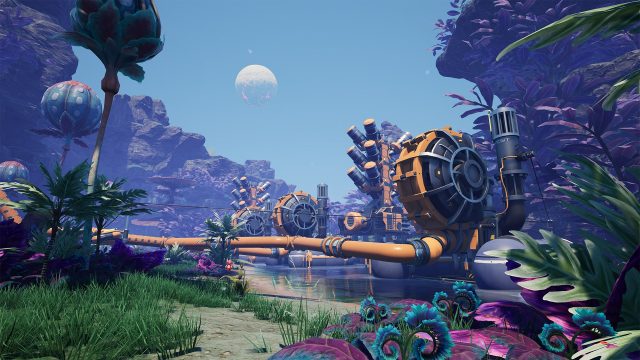
Billed as a factory simulation game, Satisfactory puts players in the shoes of a FICSIT employee sent to an alien world, tasked with the goal of gathering resources and developing a factory network to produce various materials to send back to Earth.

This unnamed employee, simply referred to as Pioneer, starts off with the bare-bones necessities to get started. Dismantling the drop pod she arrived in to get the first resources needed to slowly start building a base of operation. This hub allows for slightly more elaborate crafting, as well as serving as a delivery point for supply drops that can unlock new types and tiers of structures. And after ripping apart some bushes with her bare hands and using a pick to dig away at iron deposits, the Pioneer can slowly start creating new tools and structures to expand the operation.

Satisfactory review 1
It’s time to get building

The Conveyor Belt Puzzle

These tools begin as simple machines that assist in collecting resources and generating power, which need to be loaded and unloaded by hand. But it doesn’t take long before conveyor belts start winding around the landscape, delivering ores and materials to furnaces and fabricators, as resource production becomes automated. From here the landscape continues to transform as foundations can be laid to flatten out areas, walls can be set up to section off areas, and storage containers begin to pile up as production outpaces what a single individual can carry on their own.

And this is when things really begin to scale up. There are several types of resources, each of which serve their own purpose. Preliminary items usually only take one type of ore to produce, but as items become more complex they start requiring different types of resources, and different manufactured items. Several pieces of iron will be needed to make items like rotors and structural frames, and there are several steps of production required to get every item needed.

Because at the end of the day, Satisfactory isn’t a building game, it’s a puzzle game. Finding a way to route every fabricator, smelter, and conveyor belt so that resources are being fed where they need to without bottlenecks or shortages occurring. And it’s not just manufacturing that needs to be managed, but the power supply too.

Managing the Grid

This starts off with biomass burners which the Pioneer will constantly be shoving leaves in, to keep energy production up, but that’s just the start. Soon, hydropower plants are being built, and energy production can be automated as well. But each power plant has its own energy output, and overloading a power grid will cause it to shut down. This can be remedied by disconnecting structures or by increasing the energy capacity of the grid.

When multiple generators are connected to the supply grid, if one runs out of fuel it will shut down. If this causes the other generators to become massively overloaded, then a fuse may trip even if they still have fuel. Refueling every generator before resetting the fuse will allow it to start back up. Later on, energy storage can be incorporated into the power grid to keep the energy grid from failing during an energy spike.

Satisfactory review 2Satisfactory review 2
Go deep with Satisfactory

Massive Scale, Seamless Building

All of this production is intended to provide resources back to Earth, as it’s implied that overproduction and short-sighted goals back home led to ultimately destructive practices that made searching for resources off-world a necessity. Some people might think there is a lesson in there, but the Pioneer wasn’t hired to philosophize on things like environmentalism. The Pioneer was hired to be efficient.

Satisfactory is the quintessential factory production game. There are so many options for building and harvesting that become available during the course of the game, which are paired with a large map and even some light combat encounters.

It even offers a co-op mode for people that want to play with their friends. But solo players have the option to continually expand their conveyor network, or even incorporate vehicles into a transport system to improve their individual efficiency.

What sets building apart from other games is the removal of a build distance limit. If it’s within viewing distance, it’s within building distance. Most buildings have viewing platforms atop them, and there are even towers that can be easily built to get a bird’s eye view of areas. This makes laying out a building plan significantly easier, and allows for greater scalability than in other building games. It significantly cuts down on the tedium that is normally involved in these kinds of games.

Blueprints and Longevity

Before I knew it, over a dozen hours had passed, and I felt like I was still just scratching the surface of what was possible in Satisfactory. Everything can be automated and structures can be recycled without any loss in resources, so reconfiguring a base doesn’t result in the loss of progress.

Eventually the Pioneer gains access to blueprints which allow the player to configure structures, decorations, and layouts to make building even easier and more streamlined. It also means things can be planned out independently before being incorporated into a main production facility, without the same loss in production that rebuilding from scratch causes.

Satisfactory review 3Satisfactory review 3
Absolutely flawless!

A Flawless Factory Sim Time Sink

During my time with the game, everything ran smoothly, I didn’t deal with frame drops or crashes. Even using Quick Resume after playing other games didn’t lead to any issues, and that’s typically where games fail to optimize.

Satisfactory knows what it wants to be and it executes that near flawlessly. It’s a game that players will easily sink dozens, if not hundreds, of hours into, especially if it gets its hooks into them. Time flies when you’re having fun, after all, and who knew being a foreman of a factory on an alien planet could be this much fun?

Goodbye, Free Time – The Acclaimed Factory-Builder Satisfactory Arrives on Console – https://www.thexboxhub.com/goodbye-free-time-the-acclaimed-factory-builder-satisfactory-arrives-on-console/

Factory-Building Phenomenon Satisfactory Gets a November Xbox Release – https://www.thexboxhub.com/factory-building-phenomenon-satisfactory-gets-a-november-xbox-release/

Buy Satisfactory on Xbox – https://www.xbox.com/en-gb/games/store/satisfactory/9npr2cg6s95q


Source link

Popular Posts

My Favorites