Web3

Home Web3 Page 236

DeFi Risks Unveiled: How to Protect Yourself in Decentralized Finance – Web3oclock

0
DeFi Risks Unveiled: How to Protect Yourself in Decentralized Finance – Web3oclock


Risks and Challenges in DeFi

Common risks associated with DeFi investments 

Regulatory and security challenges

Risks and Challenges in DeFi:

1. Smart Contract Vulnerabilities:

2. Liquidity Issues:

3. Market Volatility:

4. Lack of Consumer Protection:

5. Complexity and Accessibility:

Common Risks Associated with DeFi Investments:
1. Impermanent Loss:

2. Rug Pulls and Scams:

3. Flash Loan Attacks:

4. Oracle Manipulation:

5. Governance Risks:

Regulatory and Security Challenges in DeFi:
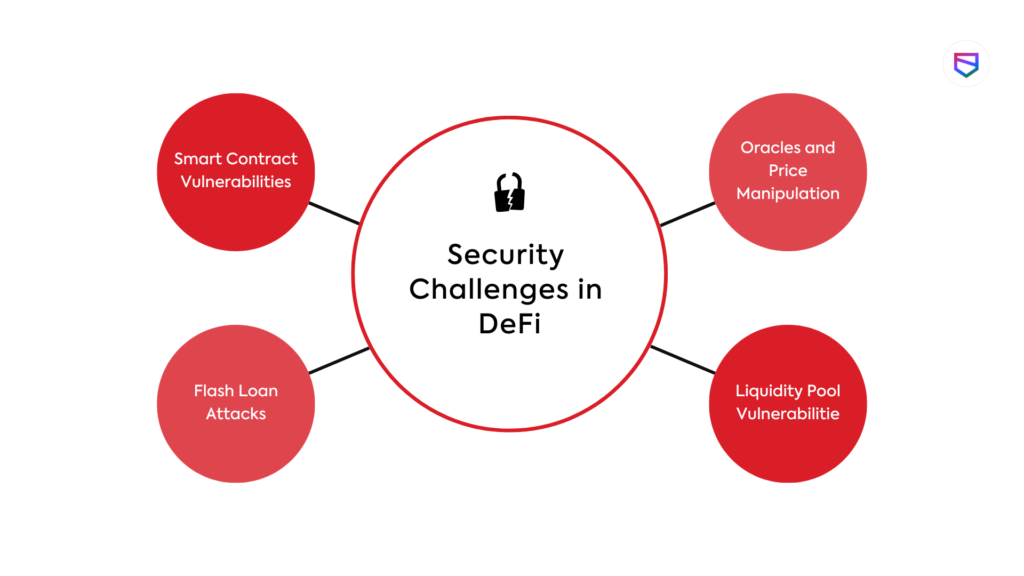
1. Lack of Regulatory Clarity:

2. Security Breaches and Hacks:

3. Cross-Border Regulations:

4. Risk of Centralization in DeFi:

5. KYC and AML Compliance:

Mitigating Risks in DeFi:

1. Do Thorough Research:

2. Diversify Investments:

3. Use Reputable Wallets and Secure Your Private Keys:

4. Start Small and Scale Up Gradually:

5. Stay Updated on Regulations:

Subscribe to our newsletter for the latest updates, trends, and insights—let’s navigate the world of Web3 together!




Source link

Ideogram 2.0: A Revolutionary AI Image Generator Compared to Flux Pro

0
Ideogram 2.0: A Revolutionary AI Image Generator Compared to Flux Pro


AI image generators have been launching at an incredible pace recently, but Ideogram 2.0 stands out as one worth trying. This new version not only excels in photorealism but also offers a seamless user experience, along with API access, which is currently in beta.

Why Ideogram 2.0 is a Game Changer

Ideogram 2.0 has a lot going for it, starting with its free-to-try model, which requires no coding skills. With its user-friendly interface, it’s an excellent choice for both beginners and experienced users. When compared to FLUX Pro, it’s clear that Ideogram 2.0 can match or even surpass other platforms in terms of photorealism.

What is the biggest selling point of Ideogram 2.0? Its ability to provide not just beautiful images but a range of “magic prompts”—suggestions generated by the AI that enhance and diversify your results. Plus, for those serious about scaling their projects, API access is now available in beta.

My First Experience with Ideogram 2.0

For my initial test, I used the following prompt:

Prompt: A still-life photo of a bowl of fruit with oranges, bananas, and grapes. This is for a Pinterest post promoting healthy eating.

The results? Ideogram 2.0 generated four 1:1 images, each beautifully rendered with detail and vibrancy. It didn’t stop there. Ideogram’s “magic prompts” feature offered enhanced suggestions based on my original input. The resulting images were impressive, showing just how well the platform can cater to specific visual needs.

Standout Features of Ideogram 2.0

1. Memes and Deep Fakes

One of the more unique features of Ideogram 2.0 is its ability to create memes and deep fakes, including images of famous personalities. I experimented with a prompt asking for an image of Kamala Harris and Donald Trump shaking hands, and the results were strikingly realistic. However, users are advised to proceed cautiously when creating such content.

2. Design Style — Accurate Fonts and Text on Images

A major issue with some AI generators, like DALL-E3, is poor-quality fonts and frequent spelling errors embedded in generated images. Ideogram 2.0 solves this issue with enhanced text accuracy, making it a fantastic tool for creating professional designs, whether you’re crafting social media posts, greeting cards, or even marketing assets.

Example Prompt:“Ideogram 2.0 is a Game Changer! Show that in bold white letters and create a stylish billboard ad. This should look enticing for a viral Medium post, with AI and robot imagery in the background.”

The result was clean and compelling, showcasing just how well Ideogram handles fonts and overall design aesthetic.

3. Color Palette Control

This feature allows users to create images that adhere to a specific color scheme, offering full control over visual tones. Whether you’re a designer working on brand consistency or an artist looking for a specific mood, this functionality is a massive advantage.

4. AI Upscaling

AI upscaling refers to enhancing an image’s resolution using AI technology. While this feature is only available in the premium version, it’s worth noting for anyone looking to improve low-resolution images or restore older photos. The potential here is huge, especially for those who work with images professionally.

Ideogram 2.0 API — Easy to Use but Requires Deposit

Ideogram 2.0’s API is simple to navigate and packed with code snippets for developers. However, a minimum deposit of $40 is required to access this feature, which might be a drawback for casual users. Still, this investment could be well worth it for businesses looking to integrate Ideogram’s powerful AI capabilities.

Example of Python Script:

import requests

response = requests.post(
“https://api.ideogram.ai/generate”,
headers={
“Api-Key”: “”,
“Content-Type”: “application/json”
},
json={
“image_request”: {
“prompt”: “A serene tropical beach scene…”,
“aspect_ratio”: “ASPECT_10_16”,
“model”: “V_2”,
“magic_prompt_option”: “AUTO”
}
},
)
print(response.json())

Premium Features and Membership Pricing

Ideogram 2.0 offers a free tier with daily credits, making it accessible to a wide range of users. However, premium features—such as image upscaling, more customization, and API usage—come with a cost. If you’re serious about using the platform for professional or commercial purposes, upgrading might be worth considering. The platform’s pricing is clear and competitive.

How to Get Started with Ideogram 2.0

Getting started is easy. Head to Ideogram.ai and sign up for a free account. With daily credits, you can test the waters and explore the platform without spending a dime. If you like what you see, upgrading to a premium plan unlocks even more features.

Final Thoughts: Ideogram 2.0 is a Must-Try for AI Image Generation

In the crowded world of AI image generators, Ideogram 2.0 truly stands out. Its combination of ease of use, rich features, and superior image quality make it a fantastic tool for creatives, marketers, and anyone interested in AI art. Whether you’re generating social media posts, professional designs, or exploring deepfakes and memes, Ideogram 2.0 has you covered.

While the API deposit may be a drawback for some, the overall capabilities of the platform make it a serious contender against other AI tools like Flux Pro and MidJourney. If you’re looking to integrate AI into your visual workflows, Ideogram 2.0 is definitely worth checking out.

FAQs

1. Is Ideogram 2.0 free to use?Yes, Ideogram 2.0 offers a free tier with daily credits that allow users to generate a limited number of images.

2. How does Ideogram 2.0 compare to Flux Pro and MidJourney?In terms of photorealism and ease of use, Ideogram 2.0 is on par with Flux Pro and MidJourney, with the added advantage of its “magic prompts” and improved text accuracy.

3. What is the “magic prompt” feature?The magic prompt feature provides AI-generated suggestions that build on your original prompt, enhancing the variety and quality of images produced.

4. Is the API easy to use?Yes, the API is developer-friendly, but a $40 minimum deposit is required to access it.

5. Can I create deep fakes and memes with Ideogram 2.0?Yes, Ideogram 2.0 allows you to create deep fakes and memes, but users should be mindful of the ethical implications of using such content.


Source link

AI is Boosting Developer Ranks Not Replacing Jobs: GitHub – Decrypt

0
AI is Boosting Developer Ranks Not Replacing Jobs: GitHub – Decrypt


You might think AI is coming for developers’ jobs—after all, AWS CEO Matt Garman predicted most developers won’t be coding within two years, and former Stability AI CEO Emad Mostaque gives programmers just five years.

But GitHub’s latest data tells a strikingly different story.

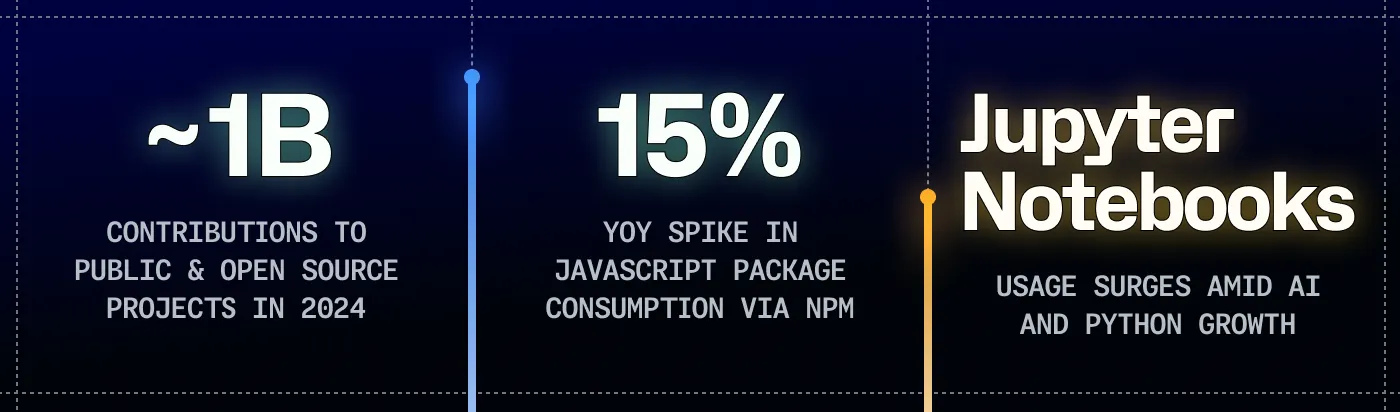
According to a recent report, developer activity hit unprecedented levels in 2024. Total projects on GitHub grew 25% year-over-year to 518 million, while contributions reached 5.2 billion.

More than one million open-source maintainers, students, and teachers now use GitHub Copilot at no cost.

“Our data also shows a lot more people are joining the global developer community,” Github’s report reads. “In the past year, more developers joined GitHub and engaged with open-source and public projects (in some cases, empowered by AI),”

The advent of AI is accelerating, not replacing, development, at least not right now.

The report shows developers created over 70,000 new generative AI projects in 2024, a 98% year-over-year increase. Public generative AI projects like home-assistant/core and Ollama (generative text) are drawing significant contributions, especially from newcomers.

This shift toward open-source AI development, rather than closed proprietary systems, is also critical to the evolution of AI technology.

The trend shows that AI development is becoming more transparent and collaborative rather than concentrated in a few large companies. This matters because open-source AI projects allow for public scrutiny of models, enable faster innovation through community contributions, and democratize access to AI technology—particularly crucial for developers in emerging markets who might otherwise be priced out of working with cutting-edge AI tools.

Python’s rise to the top spot over JavaScript marks a historic shift—the first such change since 2014.

This may not mean a lot by itself, but Python has gained significant traction, especially in fields like data science and machine learning. In contrast, Javascript is essential in areas like web development, so an increase in usage to the point of becoming the most popular language, may point to developers finding AI more profitable or attractive than working on web projects.

Notably, Jupyter Notebooks—open-source computing environments for users to run AI models and other programs—also increased in popularity this year.

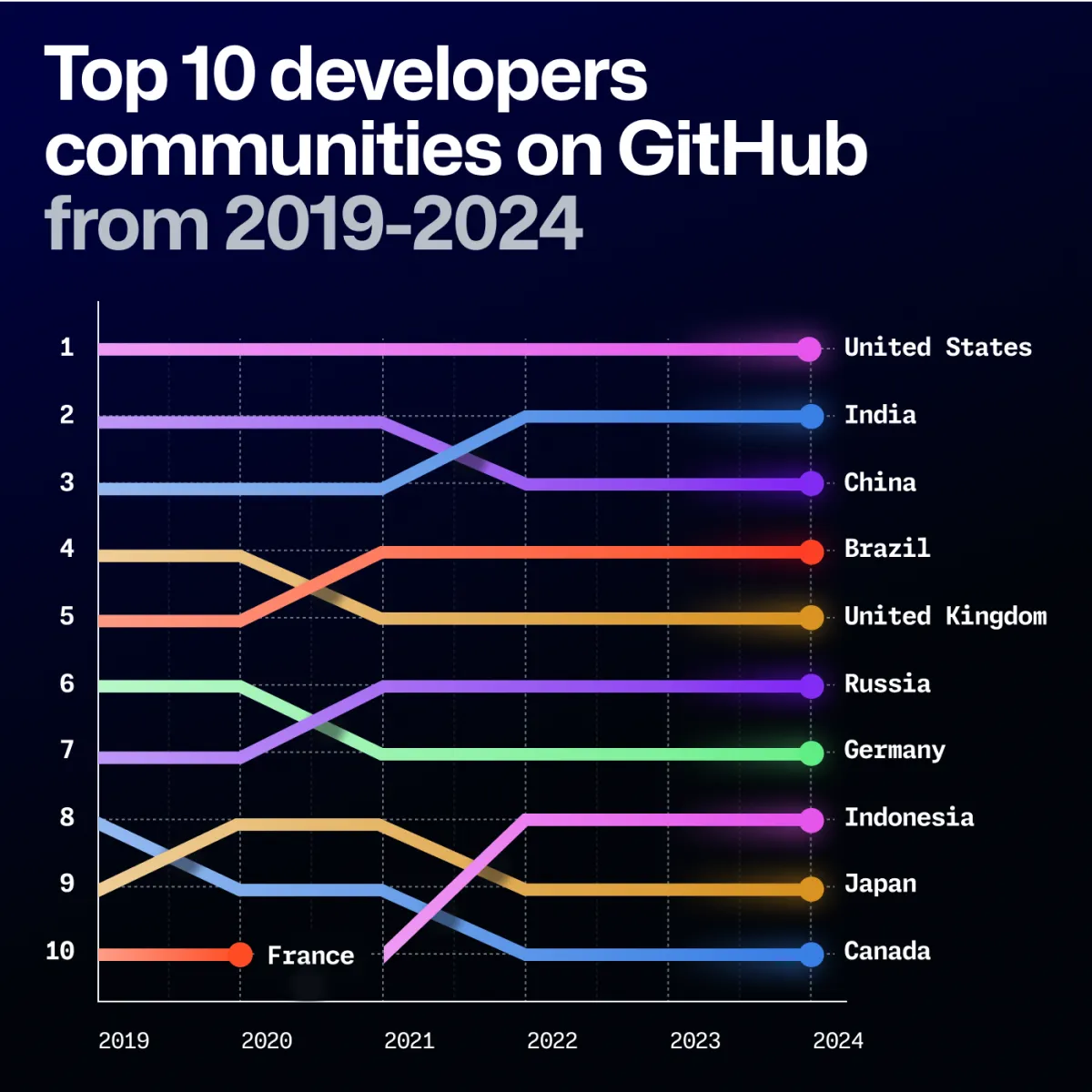
The transformation is global. India’s developer community is snowballing, and it’s projected to overtake the U.S. as the largest on GitHub by 2028. Notable growth occurred in regions outside North America and Europe, with Brazil, India, and Nigeria showing particularly strong momentum.

India saw a 95% increase in year-over-year contributions to generative AI projects, while France experienced a 70% boost. Emerging tech hubs like the Netherlands (291%), Ethiopia (242%), and Costa Rica (171%) showed major growth in AI project contributions.

But, if the report shows an exciting outlook, why are developers and other tech workers still wary about this technology?

The rapid adoption of AI, highlighted by McKinsey’s latest global study reporting a 72% AI adoption rate, may help understand the mixed feelings in the tech community.

Developers are concerned about being edged out by tools that simplify coding and automate repetitive tasks, and seeing how AI projects like those on GitHub’s platform grow; it’s easy to understand how fears of role displacement simmer beneath the excitement.

Elon Musk is also aware of these concerns, predicting an existential “crisis of meaning” as AI becomes capable of performing human jobs “better” than humans.

Speaking at the 2024 All-In Summit, Musk underscored a future where traditional roles may disappear, pushing humanity to redefine purpose in a world where tasks can be performed by AI.

Workers across industries are taking proactive steps to protect themselves as AI reshapes job roles. Many are turning to unions and collective bargaining to ensure safeguards are in place, as seen in the entertainment industry, where unions like SAG-AFTRA have pushed back against unchecked AI use in creative fields.

There’s also a surge in demand for “AI literacy” training programs, which aim to help workers across sectors understand and work alongside AI tools rather than be replaced by them.

While concerns are valid—the World Economic Forum estimates that AI will wipe 85 million jobs out of existence—GitHub’s data suggests that the dystopian AI-powered future is not upon us yet, and instead of replacing developers, AI appears to be empowering them to shape the future of tech on their own terms.

Edited by Sebastian Sinclair and Josh Quittner

Generally Intelligent Newsletter

A weekly AI journey narrated by Gen, a generative AI model.


Source link

Understanding the System 2 Model: OpenAI’s New Approach to LLM Reasoni

0
Understanding the System 2 Model: OpenAI’s New Approach to LLM Reasoni


OpenAI recently launched two new models, OpenAI o1-preview and OpenAI o1-mini, representing a significant step forward in large language models (LLMs). These models are being hailed as the first commercial implementations of “System 2” reasoning models, a concept that contrasts with the traditional “System 1” AI models we’ve been using since the release of ChatGPT in 2022. But what exactly is a System 2 model, and how does it differ from System 1? This article dives into the techniques, concepts, and innovations behind this new wave of reasoning-based AI.

What Is the System 2 Model?

The idea of System 1 and System 2 thinking originates from Daniel Kahneman’s 2011 book Thinking, Fast and Slow. System 1 refers to fast, intuitive thinking, while System 2 involves slower, more deliberate, and analytical thinking. Similarly, in AI, System 1 models respond quickly to prompts based on learned patterns, whereas System 2 models engage in more thoughtful, step-by-step reasoning.

Until now, most of the AI models we have interacted with fall into the System 1 category, offering immediate responses based on previous training. System 2 models, like the new OpenAI o1, are designed to break down complex tasks, analyze different scenarios, and deliver more reasoned responses—mimicking a more human-like reasoning process.

The Shift from System 1 to System 2 in AI

When OpenAI launched ChatGPT in November 2022, it quickly became clear that AI models could handle a wide variety of tasks but often struggled with more complex, multi-step problems. System 1 models are excellent for straightforward queries, but tasks that require deeper analysis have often been challenging.

System 2 models, by contrast, approach problems methodically. They break tasks into smaller steps, assess different approaches, and evaluate outcomes before delivering a final response. This transition from reactive to deliberate problem-solving can revolutionize how AI handles more nuanced, never-before-seen problems.

Key Concepts Behind System 2 Models

1. Chain of Thought (CoT) Reasoning

The foundation of System 2 models lies in their ability to use Chain of Thought (CoT) reasoning. This involves generating intermediate steps before arriving at a final answer, helping the model process complex problems more effectively. This approach, popularized by papers such as Chain-of-Thought Prompting Elicits Reasoning in Large Language Models (2022), allows the model to reason through a problem, much like a human would break down a difficult question.

2. Tree of Thoughts

Another technique integrated into System 2 models is the Tree of Thoughts (2023). This method expands on the CoT approach by exploring multiple paths of reasoning simultaneously. The model can evaluate different strategies in parallel, selecting the most promising path based on logical outcomes.

3. Branch-Solve-Merge (BSM)

A more recent innovation is the Branch-Solve-Merge (2023) technique. This allows the model to branch off into different potential solutions, work through each one, and then merge the best elements to form a final, optimized solution.

4. System 2 Attention

System 2 Attention is another key aspect of these models. While traditional models use attention mechanisms to focus on important words or tokens in a prompt, System 2 models pay attention to the most critical steps in a reasoning process. By weighing certain reasoning paths more heavily, these models can make more informed decisions throughout the problem-solving process.

What Are Reasoning Tokens?

One of the biggest breakthroughs in System 2 models is the introduction of reasoning tokens. These tokens serve as a guide for the AI, directing it through each step of the reasoning process. Rather than simply responding to a prompt, the model uses these tokens to think through a problem more thoroughly.

Types of Reasoning Tokens

There are several types of reasoning tokens used in System 2 models, each designed for a specific purpose:

Self-Reasoning Tokens: These tokens help the model reason about the problem by itself, almost like a self-guided brainstorming session.

Planning Tokens: These tokens help the model plan out its steps in advance, ensuring that it follows a logical path toward solving the problem.

Examples of reasoning tokens might include commands like <Analyze_Problem>, <Generate_Hypothesis>, <Evaluate_Evidence>, and <Draw_Conclusion>. These tokens are invisible to the user but are crucial in guiding the AI through a complex reasoning process.

System 2 models often generate intermediate outputs or temporary conclusions during reasoning. These outputs allow the model to assess its progress before giving a final answer. However, these intermediate steps are removed before the user sees the final output. This behind-the-scenes reasoning process makes System 2 models capable of solving more intricate problems than their System 1 predecessors.

The Role of Reinforcement Learning (RL)

OpenAI has also integrated Reinforcement Learning (RL) into its System 2 models. RL helps the model focus on the most promising reasoning paths while avoiding less fruitful ones. By continuously learning from its mistakes, the model improves over time, improving at solving complex problems with each iteration.

This learning mechanism allows the AI to excel at tasks involving uncertainty or long-term planning—areas where traditional models tend to falter. RL ensures that the model doesn’t waste resources exploring unproductive paths and instead zeroes in on the best solutions faster.

Decision Gates: Ensuring Thoughtful Responses

System 2 models also use Decision Gates, which act as checkpoints during the reasoning process. These gates determine whether the model has engaged in sufficient reasoning before responding. If the reasoning is incomplete, the model continues to process the task until a satisfactory solution is found.

How System 2 Models Excel at Complex Tasks

Thanks to their CoT reasoning, planning tokens, and reinforcement learning techniques, System 2 models are particularly well-suited for complex, never-seen-before tasks. For example, deciphering ancient texts or installing a Wi-Fi network in a large stadium can be broken down into manageable steps by using specialized reasoning tokens.

Example: Deciphering Corrupted Texts

In a scenario where a System 2 model is tasked with deciphering a corrupted text, the reasoning tokens might include:

<analyze_script>: Directs the model to analyze the text’s structure.

<identify_patterns>: Guides the model in looking for recurring themes or patterns.

<cross_reference>: Prompts the model to compare the corrupted text with known texts.

These tokens help the model approach the task step-by-step, just as a human expert would.

System 2 in Action: Complex Wi-Fi Installations

Similarly, when designing a Wi-Fi installation in a complex environment like a stadium, the model could use tokens like:

<Analyze_Environment>: To understand the stadium’s layout.

<Determine_AP_Locations>: To decide the best places to install access points.

<Simulate_Traffic>: To simulate a full stadium and assess Wi-Fi performance.

By simulating different scenarios and solutions, the model ensures that the final outcome is optimized for real-world conditions.

Conclusion: The Future of AI with System 2 Models

System 2 models represent a major leap forward in AI capabilities, offering a new level of reasoning and problem-solving that traditional models couldn’t achieve. These models can tackle more complex, multi-step tasks with greater accuracy by utilizing techniques like Chain of Thought reasoning, reinforcement learning, and planning tokens. Although System 2 AI is still evolving, its potential to reshape industries like engineering, science, and data analysis is undeniable.

FAQs

What is the difference between System 1 and System 2 models?

System 1 models provide immediate, intuitive responses, while System 2 models engage in slower, more deliberate reasoning processes.

What are reasoning tokens in System 2 AI?

Reasoning tokens guide the model through each step of solving complex problems, breaking down tasks into smaller, manageable steps.

How does reinforcement learning improve System 2 models? Reinforcement learning helps the model focus on the most promising reasoning paths, learning from mistakes to improve over time.

What are Decision Gates in System 2 models?

Decision Gates ensure that the model has completed sufficient reasoning before delivering a final response.

How does the Chain of Thought technique help System 2 models?

Chain of Thought allows the model to break down complex tasks into intermediate steps, enabling a more thorough and reasoned approach.


Source link

Hyperledger Web3j: HSM support for AWS KMS

0
Hyperledger Web3j: HSM support for AWS KMS


In the world of digital security, protecting sensitive data with robust encryption is essential. AWS Key Management Service (KMS) plays a crucial role in this space. It serves as a highly secure, fully managed service for creating and controlling cryptographic keys. What many may not realize is that AWS KMS itself operates as a Hardware Security Module (HSM), offering the same level of security you’d expect from dedicated hardware solutions.

An HSM is a physical device designed to securely generate, store, and manage encryption keys, and AWS KMS delivers this functionality in a cloud-native way. Beyond key management, AWS KMS with HSM support can also be used to sign cryptographic transactions. This provides a trusted, hardware-backed way to secure blockchain interactions, digital signatures, and more. This article will cover  how AWS KMS functions as an HSM, the benefits of using it to sign crypto transactions, and how it fits into a broader security strategy.

In Hyperledger Web3j, support for HSM was introduced two years ago, providing users with a secure method for managing cryptographic keys. For more details, you can refer to the official documentation.

However, despite this integration, many users have encountered challenges in adopting and implementing HSM interfaces, particularly when using the AWS KMS module. To address these difficulties, a ready-to-use implementation has been added specifically for AWS KMS HSM support. This simplifies the integration process, making it easier for users to leverage AWS KMS for secure transaction signing without the complexity of manual configurations.

The class, HSMAwsKMSRequestProcessor, is an implementation of the HSMRequestProcessor interface, which is responsible for facilitating interaction with an HSM. This newly implemented class contains all the essential code required to communicate with AWS KMS, enabling the retrieval of data signed with the correct cryptographic signature. It simplifies the process of using AWS KMS as an HSM by handling the intricacies of signature generation and ensuring secure transaction signing without additional development overhead.

Here is a snippet with the most important actions of the callHSM method:


@Override
public Sign.SignatureData callHSM(byte[] dataToSign, HSMPass pass) {

// Create the SignRequest for AWS KMS
var signRequest =
SignRequest.builder()
.keyId(keyID)
.message(SdkBytes.fromByteArray(dataHash))
.messageType(MessageType.DIGEST)
.signingAlgorithm(SigningAlgorithmSpec.ECDSA_SHA_256)
.build();

// Sign the data using AWS KMS
var signResult = kmsClient.sign(signRequest);
var signatureBuffer = signResult.signature().asByteBuffer();

// Convert the signature to byte array
var signBytes = new byte[signatureBuffer.remaining()];
signatureBuffer.get(signBytes);

// Verify signature osn KMS
var verifyRequest =
VerifyRequest.builder()
.keyId(keyID)
.message(SdkBytes.fromByteArray(dataHash))
.messageType(MessageType.DIGEST)
.signingAlgorithm(SigningAlgorithmSpec.ECDSA_SHA_256)
.signature(SdkBytes.fromByteArray(signBytes))
.build();

var verifyRequestResult = kmsClient.verify(verifyRequest);
if (!verifyRequestResult.signatureValid()) {
throw new RuntimeException(“KMS signature is not valid!”);
}

var signature = CryptoUtils.fromDerFormat(signBytes);
return Sign.createSignatureData(signature, pass.getPublicKey(), dataHash);
}

NOTE!

In order to use this properly, the type of key spec created in AWS KMS must be ECC_SECG_P256K1. This is specific to the crypto space, especially to EVM. Using any other key will result in a mismatch error when the  data signature is created.

Example

Here is a short example of how to call the callHSM method from the library:

public static void main(String[] args) throws Exception {
KmsClient client = KmsClient.create();

// extract the KMS key
byte[] derPublicKey = client
.getPublicKey((var builder) -> {
builder.keyId(kmsKeyId);
})
.publicKey()
.asByteArray();
byte[] rawPublicKey = SubjectPublicKeyInfo
.getInstance(derPublicKey)
.getPublicKeyData()
.getBytes();

BigInteger publicKey = new BigInteger(1, Arrays.copyOfRange(rawPublicKey, 1, rawPublicKey.length));

HSMPass pass = new HSMPass(null, publicKey);

HSMRequestProcessor signer = new HSMAwsKMSRequestProcessor(client, kmsKeyId);
signer.callHSM(data, pass);
}

Conclusion

AWS KMS, with its built-in HSM functionality, offers a powerful solution for securely managing and signing cryptographic transactions. Despite initial challenges faced by users in integrating AWS KMS with Hyperledger Web3j, the introduction of the HSMAwsKMSRequestProcessor class has made it easier to adopt and implement. This ready-to-use solution simplifies interactions with AWS KMS, allowing users to securely sign data and transactions with minimal configuration. By leveraging this tool, organizations can enhance their security posture while benefiting from the convenience of AWS’s cloud-native HSM capabilities.


Source link

Mt. Gox Moves $2.2 Billion in Bitcoin Following Repayment Timeline Extension – Decrypt

0
Mt. Gox Moves .2 Billion in Bitcoin Following Repayment Timeline Extension – Decrypt


Mt. Gox moved another $2.2 billion worth of Bitcoin on Monday amid an extended period of volatility that has seen the crypto oscillating between $73,000 and $65,000 over the past few weeks.

The defunct crypto exchange’s recent transfer was identified through wallets tracked by blockchain analytics firm Arkham Intelligence, which disclosed the movement of 32,371 BTC, with the majority—30,371 BTC—directed to wallet address “1FG2C…Rveoy.” 

An additional 2,000 BTC was initially moved to a Mt. Gox cold wallet before being transferred to a separate unmarked wallet, Arkham data shows.

It comes as Bitcoin briefly slid below $68,000 during Asian market trading, recording a 1% decline over 24 hours. The asset has since clawed back losses, trading at $68,700.

Market analysts anticipate heightened volatility this week, projecting potential price swings of up to $8,000 as U.S. election activities add to market uncertainty.

Monday’s significant movement also follows a smaller transfer of 500 BTC to two unidentified wallets in late September, which marked the exchange’s first activity since that period. 

These transfers historically precede distributions to creditors through established crypto exchanges, including Bitstamp and Kraken.

Notably, the timing of this latest transfer coincides with Mt. Gox’s recent announcement that it is extending its repayment deadline by one year

This extension affects thousands of creditors who lost assets during the exchange’s 2014 security breach, which resulted in the theft of approximately 850,000 BTC—valued at over $15 billion at current market prices.

Mt. Gox’s historical significance in the crypto industry ecosystem adds weight to these movements as well. 

Founded in 2010, the exchange once dominated Bitcoin trading, handling over 70% of global transactions before its collapse after a series of hacks between 2011 and 2014. 

The security breach marked one of the industry’s most significant setbacks, leading to years of legal proceedings and recovery efforts.

In any case, the repayment process represents one of the cryptocurrency industry’s longest-running recovery efforts, with implications extending beyond immediate market dynamics. 

While short-term volatility is expected, the market’s maturity since Mt. Gox’s 2014 collapse may help buffer against dramatic price swings, with Bitcoin often displaying resilience against such events.

Edited by Sebastian Sinclair

Daily Debrief Newsletter

Start every day with the top news stories right now, plus original features, a podcast, videos and more.


Source link

Run Language Models Locally with Ollama: A Comprehensive Guide

0
Run Language Models Locally with Ollama: A Comprehensive Guide


Ollama is an open-source platform that simplifies the process of setting up and running large language models (LLMs) on your local machine. With Ollama, you can easily download, install, and interact with LLMs without the usual complexities.

To get started, you can download Ollama from here. Once installed, open a terminal and type:

ollama run phi3

OR

ollama pull phi3
ollama run phi3

This will download the required layers of the model “phi3”. After the model is loaded, Ollama enters a REPL (Read-Eval-Print Loop), which is an interactive environment where you can input commands and see immediate results.

To explore the available commands within the REPL, type:

/?

This will show you a list of commands you can use. For example, to exit the REPL, type /bye. You can also display the models you have installed using:

ollama ls

If you need to remove any model, use:

ollama rm

For a complete list of available models in Ollama, you can visit their model library, which contains details about model sizes, parameters, and more. Additionally, Ollama has specific hardware requirements. For instance, to run a 7B model, you’ll need at least 8 GB of RAM; 16 GB for a 13B model, and 32 GB for a 33B model. If you have a GPU, Ollama supports it—more details can be found on their GitHub page. However, if you’re running on a CPU, expect it to perform slower.

Ollama also allows you to set a custom system prompt. For example, to instruct the system to explain concepts at a basic level, you can use:

/set system Explain concepts as if you are talking to a primary school student.

You can then save and reuse this setup by giving it a name:

/save forstudent

To run this system prompt again:

ollama run forstudent

Integration with LangChain

Ollama can be used with LangChain, a tool that enables complex interactions with LLMs. To get started with LangChain and Ollama, first, pull the required model:

ollama pull llama3

Then, install the necessary packages:

pip install langchain langchain-ollama ollama

You can interact with the model through code, such as invoking a basic conversation:

from langchain_ollama import OllamaLLM
model = OllamaLLM(model=”llama3″)
response = model.invoke(input=”What’s up?”)
print(response)

The model might respond with something like:

“Not much! Just an AI, waiting to chat with you. How about you? What’s new and exciting in your world?”

Building a Simple Chatbot

Using LangChain, you can also build a simple AI chatbot:

from langchain_ollama import OllamaLLM
from langchain_core.prompts import ChatPromptTemplate

template = “””
User will ask you questions. Answer it.

The history of this conversation: {context}

Question: {question}

Answer:
“””

model = OllamaLLM(model=”llama3″)
prompt = ChatPromptTemplate.from_template(template)
chain = prompt | model

def chat():
context = “”
print(“Welcome to the AI Chatbot! Type ‘exit’ to quit.”)
while True:
question = input(“You: “)
if question.lower() == “exit”:
break
response = chain.invoke({“context”:context, “question”: question})
print(f”AI: {response}”)
context += f”\nUser: {question}\nAI: {response}”

chat()

This will create an interactive chatbot session where you can ask the AI questions, and it will respond accordingly. For example:

You: What’s up?
AI: Not much, just getting started on my day. How about you?

Using AnythingLLM with Ollama

AnythingLLM is another useful tool that acts as an AI agent and RAG (retrieval-augmented generation) tool, which can also run locally. To try this out, pull a model, such as:

ollama pull llama3:8b-instruct-q8_0

In AnythingLLM, you can select Ollama in the preferences and assign a name to your workspace. Although running models can be slow, the system works efficiently once set up.

You can also interact with Ollama via a web UI by following the installation instructions provided.

For more details, visit Ollama’s official pages and documentation to explore the full range of features and models available.

Several alternatives and complementary tools to LangChain and AnythingLLM provide capabilities for working with language models (LLMs) and building AI-powered applications. These tools help orchestrate interactions with LLMs, enabling more advanced AI-driven workflows, automating tasks, or integrating AI into various applications. Here are some notable examples:

1. Haystack by Deepset

Haystack is an open-source framework that builds search engines and question-answering systems using LLMs. It enables developers to connect different components, such as retrievers, readers, and generators, to create an information retrieval pipeline.

Key Features:

Offers a pipeline-based approach for search, Q&A, and generative tasks.

Supports integration with models from Hugging Face, OpenAI, and local models. Can combine LLMs with external data sources such as databases, knowledge graphs, and APIs.

Great for production-grade applications with robust scalability and reliability.

Link: Haystack GitHub

2. LlamaIndex (formerly GPT Index)

LlamaIndex (formerly GPT Index) is a data framework that helps you index and retrieve information efficiently from large datasets using LLMs. It’s designed to handle document-based workflows by structuring data, indexing it, and enabling retrieval when interacting with LLMs.

Key Features:

Integrates with external data sources such as PDFs, HTML, CSVs, or custom APIs.

Builds on top of LLMs for more efficient data querying and document summarization. Helps optimize the performance of LLMs by constructing memory-efficient indices.

Provides compatibility with LangChain and other frameworks.

Link: LlamaIndex GitHub

3. Chroma

Chroma is an open-source embedding database designed for LLMs. It helps store and query high-dimensional vector embeddings of data, enabling you to work with semantic search, retrieval-augmented generation (RAG), and more.

Key Features:

Embedding search for documents or large datasets using models like OpenAI or Hugging Face transformers.

Scalable and optimized for efficient retrieval of large datasets with millisecond latency.

Works well for semantic search, content recommendations, or building conversational agents.

Link: Chroma GitHub

4. Hugging Face Transformers

Hugging Face provides a library of pretrained transformers that can be used for various NLP tasks such as text generation, question-answering, and classification. It offers easy integration with LLMs, making it a great tool for working with different models in a unified way.

Key Features:

Supports a wide range of models, including GPT, BERT, T5, and custom models.

Provides pipelines for quick setup of tasks like Q&A, summarization, and translation.

Hugging Face Hub hosts a large variety of pre-trained models ready for deployment.

Link: Hugging Face Transformers

5. Pinecone

Pinecone is a managed vector database that allows you to store, index, and query large-scale vectors produced by LLMs. It is designed for high-speed semantic search, vector search, and machine-learning applications.

Key Features:

Fast, scalable, and reliable vector search for applications requiring high performance.

Integrates seamlessly with LLMs to power retrieval-based models.

Handles large datasets and enables search across millions or billions of vectors.

Link: Pinecone Website

6. OpenAI API

OpenAI’s API gives access to a wide range of LLMs, including the GPT series (like GPT-3.5 and GPT-4). It provides text generation, summarization, translation, and code generation capabilities.

Key Features:

Access to state-of-the-art models like GPT-4 and DALL-E for image generation.

Offers prompt engineering for fine-tuning and controlling model behavior.

Simplifies AI integration into applications without needing to manage infrastructure.

Link: OpenAI API

7. Rasa

Rasa is an open-source framework for building conversational AI assistants and chatbots. It allows for highly customizable AI assistants trained on specific tasks and workflows, making it a good alternative to pre-trained LLM chatbots.

Key Features:

Supports NLU (Natural Language Understanding) and dialogue management.

Highly customizable for domain-specific applications.

Can integrate with LLMs to enhance chatbot capabilities.

Link: Rasa Website

8. Cohere

Cohere offers NLP APIs and large-scale language models similar to OpenAI. It focuses on tasks like classification, text generation, and search, providing a powerful platform for LLM-based applications.

Key Features:

Provides easy access to LLMs through an API, allowing developers to implement NLP tasks quickly.

Offers fine-tuning options for domain-specific applications.

Well-suited for tasks like customer support automation and text classification.

Link: Cohere Website

9. Vercel AI SDK

Vercel AI SDK provides tools for building AI-powered applications using frameworks like Next.js. It simplifies the development process by integrating APIs from OpenAI, Hugging Face, and other AI providers into web applications.

Key Features:

Seamless integration with AI models in serverless environments.

Supports building interactive applications with fast deployments using Vercel’s infrastructure.

Focuses on web-based applications and LLM-powered front-end experiences.

Link: Vercel AI SDK

Conclusion

Beyond LangChain and AnythingLLM, many powerful tools and frameworks cater to different needs when working with LLMs. Whether you want to build conversational agents, semantic search engines, or specialized AI applications, platforms like Haystack, LlamaIndex, Chroma, and others offer flexible and scalable solutions. Depending on your specific use case, you can choose the most suitable tool for integrating LLMs into your projects.


Source link

Where Do Kamala Harris and Donald Trump Stand on Crypto? – Decrypt

0
Where Do Kamala Harris and Donald Trump Stand on Crypto? – Decrypt


Neary 65 million Americans have already cast their votes ahead of next week’s election—and the race between the two candidates is tightening up.

Cryptocurrency has been a significant issue in the presidential race, with former president and Republican nominee Donald Trump pivoting from a skeptic to a self-proclaimed crypto candidate, while current Vice President Kamala Harris—who took over for President Joe Biden as the Democrats’ pick in July—has signaled an intent to break from the anti-crypto policies of the current administration in which she serves.

At Decrypt, we’ve been covering the ins and outs of the role of cryptocurrency in American politics throughout the entire election cycle. But with just three days left until Election Day, here’s a primer on where Trump and Harris stand on crypto, and what you might expect if either secures the win next week.

Donald Trump

Ex-President Donald Trump has been far louder than Harris on the topic of crypto. 

Previously anti-Bitcoin and skeptical of the crypto space, the business and real estate mogul has taken a sharp U-turn on the topic, coming out as an advocate for the industry and picking up ample support and donations along the way.

Fast-forward to 2024 and Trump has released multiple sets of NFT collectibles, called for the Americanization of Bitcoin, and even has backed a decentralized finance (DeFi) project called World Liberty Financial alongside his sons. World Liberty hasn’t gotten off to a great start with prospective investors, though sources tell Decrypt that it plans to issue a stablecoin.

Like some other Republicans, Trump has railed against central bank digital currencies (CBDCs), or digital dollars—effectively government-backed cryptocurrencies that don’t yet exist in the U.S., but frighten the libertarian wing of the GOP and large parts of the digital asset space due to fears of increased government surveillance.

His promise to help Bitcoin mining—a big business formerly dominated by China, but now with a lot of American players—perfectly fits Trump’s fiery protectionist brand. As does his desire to fire crypto bogeyman Gary Gensler, the crypto-targeting U.S. Securities and Exchange Commission chairman.

Top executives in the crypto space have since backed Trump for his apparent passion for the industry, or at least his willingness to publicly engage with an industry that most politicians have avoided.

If elected to a second term, will Trump live up to his promises to protect crypto in the U.S. and advance the industry?

Kamala Harris

Democratic nominee Kamala Harris was initially quiet on the topic, and unlike Trump, certainly hasn’t been seen tossing burgers to Bitcoiners at a BTC-themed New York City bar.

But crypto is a part of the former attorney general’s agenda. 

In October, Harris said she had plans for the space when a part of her “Kamala Harris Will Deliver for Black Men” platform included a commitment for specifically for the African American community. 

A document for the campaign said it was for “supporting a regulatory framework for cryptocurrency and other digital assets so Black men who invest in and own these assets are protected.”

The framing proved controversial, particularly since it was arguably her most specific comments to date about crypto. But a spokesperson later clarified that such plans were intended for all Americans, and wouldn’t be limited by race.

That isn’t the only evidence that the crypto industry will fit into her presidential plans, however. Harris has said that blockchain, AI, and other emerging technologies will be innovated upon in America, and before that told donors at a fundraising event that she would encourage growth for the digital assets space in the country.

Billionaire businessman and crypto enthusiast Mark Cuban previously told Decrypt in July that the Harris campaign reached out to the former Dallas Mavericks owner with questions about digital assets. He later said the Harris camp was “far more open” to the space than the Biden administration—and he’s not the only crypto heavyweight who’s optimistic about Kamala.

Edited by Andrew Hayward

Daily Debrief Newsletter

Start every day with the top news stories right now, plus original features, a podcast, videos and more.


Source link

Meet Recraft V3: The Best AI Image Generator You Never Heard Of – Decrypt

0
Meet Recraft V3: The Best AI Image Generator You Never Heard Of – Decrypt


Stand aside Flux and MidJourney: There’s a new player that just shot to the top of AI image generation rankings. A mystery model formerly known as Red Panda—which had AI watchers scratching their heads on Artificial Analysis’s leaderboards—finally revealed itself as Recraft V3, a fresh release from a little-known London startup.

The model enjoyed the top score on the ELO rating system for image generators, outperforming Flux 1.1 Pro and MidJourney. In terms of efficiency, Recraft V3 matches SDXL’s generation speed of under 10 seconds while delivering what blind tests indicate is unmatched superior image quality.

Artificial Analysis leaderboard. Image: Screenshot

In four days of benchmark testing, Recraft V3 demonstrated superiority in text generation quality, anatomical accuracy, and prompt comprehension. It stands as the sole model capable of generating images with extended text passages, beyond simple word or phrase integration.

In fact, it was so good that even former Stability AI researcher Joe Penna, who worked on the development of SDXL—the undisputed king of open source image generation until Flux appeared—publicly praised the model on the company’s Discord server.

“Wow! Amazing new model, Recraft,” he said, “I’m very impressed.”

Stability AI researcher Joe Penna on Recraft V3. Image: Discord screenshot

You may not have heard about it, unless you are deeply into generative AI or digital design, but London startup Recraft AI was founded in 2022 and started as a niche player focused on AI-powered tools for graphic designers rather than general image generation. Its trajectory shifted after securing $11 million in funding from the likes of Khosla Ventures and former GitHub CEO, Nat Friedman, earlier this year.

Recraft V3 excels in creating realistic images, handling fine details and imperfections with notable precision and operates on a subscription model similar to MidJourney, Leonardo, or Ideogram.

Digital design is at the core of Recraft’s values. This model is also capable of processing text to vector generations, meaning users can prompt a model to generate images that can be upscaled infinitely without losing quality.

SVG Image generated with Recraft V3

Free users receive 50 daily credits which is enough for 50 images. However—and this is a new business model, users don’t retain ownership of their creations. That right is reserved for paid subscribers, with plans starting at $10 monthly for 1,000 credits.

How to use Recraft V3

Users can access Recraft V3 through three channels: a web interface, Discord commands, or mobile apps available on iOS and Android.

Fire up Discord, join Recraft’s server, and you’ll find yourself in familiar territory if you’ve ever used MidJourney. Head to the #image-gen channel, type /recraft, and watch the magic happen.

You can also use different modifiers after the prompt. Want a widescreen masterpiece? Throw in –ar 16:9. Need a portrait? Type –ar 3:4, and it has your back.

Other useful additions are the –style command that lets users choose the specific visuals of their generations whether it is photorealism, 3D, or even kawaii. Got a specific look in mind? The –sref command lets you upload reference images to guide the AI’s artistic vision.

Once the image is generated, users can choose the image they like the most between 2 generations and then they can either save it or upscale it to 4 times its size

Recraft's Discord-based UI
Recraft’s Discord-based UI

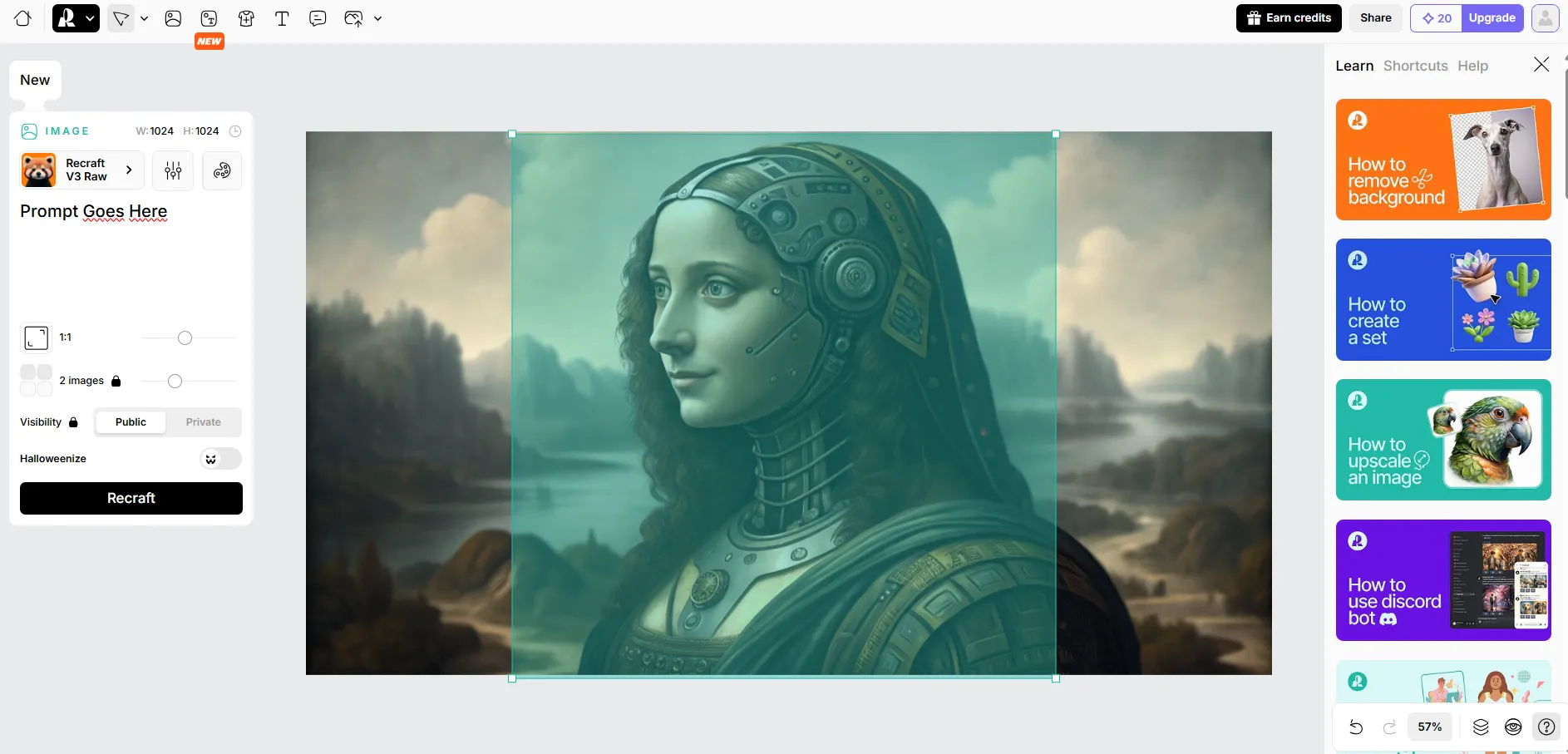
The web interface at recraft.ai flexes some serious muscle. To start, simply go to Recraft.AI and sign in.

Once on the image generation UI, users will just need to place their prompt on the text box on the left size.

They also have sliders to change the aspect ratio and the number of images.

Users can also change the style by clicking on the button with the icon on top of the text box and choosing their preferred option from a popup menu with a lot of examples.

Recraft’s Web-based UI

The interface is a lot more sophisticated than other sites and it is clear just at first glance that it’s aimed at designers. It lets users generate frames, product mockups, sets of images, deal with backgrounds, vectorize images, etc.

Mobile creators haven’t been forgotten. The official apps on iOS and Android are available, offering the same quality generations. Simply download the app, login, click on the top middle button, and generate an image by putting the prompt on on the text box on the lower side of the screen and clicking the generate button

Recraft Mobile UI

Users can choose how detailed the image will be, the aspect ratio, the styles and references on the same interface. It is pretty intuitive.

Testing the model

We tested the model in different areas, both in terms of style and technical capabilities. Here is how it stacked up against its competitors—both open source and close source.

Realism

Prompt: A projection of the word “Emerge” on a woman’s face

Recraft V3:

Emerge image created with Recraft V3

Recraft shows the best understanding of natural skin texture, facial expressions, and environmental lighting. The projection appears well-integrated with the skin, and crucially, there are real imperfectionsvisible pores, slight skin blemishes, and natural hair flyaways. The candid expression and background context add significant authenticity.

Stable Diffusion 3.5:

Emerge image created with Stable Diffusion 3.5

SD 3.5 comes in a close second place. It is a big improvement vs SD3 medium and even the best realistic SDXL finetunes. It shows a strong dramatic presence with the orange-tinted lighting and bold red lipstick. While the facial features are well-defined, there’s a noticeable artificial quality to the skin texture. The projection appears more like a sharp overlay, and the expression feels somewhat posed and synthetic.

MidJourney:

Emerge image created with MidJourney

As always, MidJourney creates a moody, cinematic look with strong technical execution. However, the woman’s skin has a glossy, almost ethereal quality that, while beautiful, feels less natural than Recraft’s attempt. The projection blends well, but the overall perfection of the features and textures—and the clear lack of authenticity in the expressions—reveals its AI origin.

Winner: Recraft

Prompt Adherence and Spatial Awareness

Prompt: A dog standing on top of a TV showing the word “Decrypt” on the screen. On the left there is a woman in a business suit holding a coin, on the right there is a robot standing on top of a first aid box. The overall scenery is surreal

Recraft V3:

Decrypt image created with Recraft V3

The model failed in terms of spatial awareness. However, it managed to achieve the surreal style in the overall composition. This is a departure from other models that exhibited great adherence and spatial awareness in the elements, but the overall mood or style of the scene was questionable.

This can be seen as a good tradeoff for some since it is easier to inpaint and edit elements in a composition than to restyle a whole image. However, it is important to consider this as a major limitation when compared against other models.

Decrypt images created with Flux, Auraflow, and SD3 Medium

Winner: Flux

Illustration and Style:

Prompt: Hand-drawn illustration of a giant spider chasing a woman in the jungle, extremely scary, anguish, dark and creepy scenery, horror, hints of analog photography influence, sketch

The model has a lot of different styles to choose from, but we went with Recraft RAW for this generation. At first we thought the “hand drawn” style was the best option, but… no, it wasn’t.

Image created with Recraft RAW

After trying different preset styles, the good old RAW (the most versatile one) was the best fit for what we were looking for.

Image created with Recraft RAW

Compared to the other models, Recraft generated an interesting composition, and was accurate at showing the key message of the scene: A giant spider chasing a woman. However, the overall art looked more like a digital illustration instead of a hand-drawn illustration.

Aesthetically, the most accurate model for this specific prompt seems to be the latest Stable Diffusion Model, which generated a hand drawn illustration, and was able to convey the anguish of a woman running away from a giant spider.

Images created with SD3, SDXL, MidJourney, and Ideogram

Winner: SD3

Conclusions

It is easy to see why Recraft V3 claims the top spot in the Image Generation Leaderboard. Unlike competitors like MidJourney and Flux, which often fall into predictable, stylized patterns—the smooth “Flux face” or the lifeless “MidJourney look”—Recraft leans into realism. Its outputs are compelling, showing intricate details like natural skin texture, subtle imperfections, and nuanced lighting. This aesthetic balance, favoring authenticity without sacrificing polish, gives Recraft an edge that other models struggle to match.

The pricing strategy is also important to consider. Recraft offers a free tier with generous daily credits, and it’s the only model supporting text-to-SVG generation, a boon for illustrators looking for scalable, professional-quality vectors. It is also priced similarly to MidJourney’s cheapest plan—but unless you are looking for the MidJourney aesthetics, Recraft is a lot more versatile and powerful, so it is the better option.

That said, Recraft isn’t perfect. When it comes to complex scenes with multiple elements, spatial awareness sometimes falters. Prompts requiring precise composition can result in minor misalignments, and users may find themselves inpainting or adjusting positions more than expected. But for those who prioritize realism and versatility, this shortfall is easily overlooked.

Also, free users not owning their creations may be a major flaw to take into consideration.

In general, Recraft V3 does seem to be the best closed-source option, delivering superior value and flexibility at a price point that respects creators’ budgets. For anyone in search of high-quality realistic images without the trademark “AI look,” Recraft is a clear winner.

However, those capable of running AI models locally, may be just fine enough with Flux or SD 3.5.

Generally Intelligent Newsletter

A weekly AI journey narrated by Gen, a generative AI model.


Source link

Starseed AI Partners with Microsoft for Startups, Named AI Company of the Year in Los Angeles, and Expands Operations to Scottsdale, Arizona | Web3Wire

0
Starseed AI Partners with Microsoft for Startups, Named AI Company of the Year in Los Angeles, and Expands Operations to Scottsdale, Arizona | Web3Wire


Starseed AI Partners with Microsoft for Startups, Named AI Company of the Year in Los Angeles, and Expands Operations to Scottsdale, Arizona | Web3Wire

Los Angeles, CA – October 31, 2024 – Starseed AI, a trailblazer in artificial intelligence, proudly announces its recognition as the AI Company of the Year in the Los Angeles area. This award acknowledges the company’s groundbreaking research in hair disease diagnostics and AI-powered counterfeit detection, emphasizing its commitment to solving real-world problems at the intersection of healthcare and commerce.

Founded in 2020, Starseed AI applies graph neural networks (GNNs) and cognitive science-based AI technologies to deliver powerful, scalable solutions. The company’s success is fueled by a strategic partnership with Microsoft for Startups, enabling it to leverage cloud technologies to accelerate development, streamline operations, and expand the reach of its innovative products.

To meet growing market demand, Starseed AI is also excited to announce the expansion of its operations to Scottsdale, Arizona. This new office will support research and development efforts and foster new partnerships, ensuring continued growth.

“Our mission is to create meaningful, practical solutions-whether it’s through diagnostics for hair diseases or protecting brands from counterfeit threats,” said Ariel Rostami, CEO at Starseed AI. “Being recognized as AI Company of the Year and expanding to Scottsdale are significant milestones that reflect our progress and the impact of our work.”

Connecting Healthcare and Commerce through AI

Starseed AI bridges the worlds of healthcare and consumer protection through cutting-edge technologies. Its solutions are designed to work seamlessly together, tackling distinct challenges with a unified approach.

Revolutionizing Hair Disease Diagnostics: Using an advanced knowledge graph platform, Starseed AI predicts disease pathways, identifies symptoms, and recommends treatments in real time. This AI-powered diagnostic tool transforms hair care, equipping healthcare professionals, beauty brands, and consumers with actionable insights to improve outcomes.

Safeguarding Brands with AI-Driven Anti-Counterfeit Solutions: Starseed AI’s computer vision-based counterfeit detection system monitors digital marketplaces, identifying unauthorized sellers and fraudulent products. This solution ensures product integrity, protects brand reputation, and enhances consumer trust by proactively reducing counterfeit risks.

Expanding Impact and Delivering Real-World Solutions

Starseed AI’s dual focus on healthcare and brand protection exemplifies its ability to merge AI research with practical applications. The synergy between these solutions allows the company to address diverse challenges, from identifying complex medical conditions to securing consumer markets from counterfeit goods.

Recognition as AI Company of the Year reflects Starseed AI’s dedication to delivering innovative, impactful solutions. With the opening of its new office in Scottsdale, Arizona, the company is positioned to scale its capabilities further, fostering new partnerships and driving continued success.

For the latest updates, visit http://www.starseed.ai [http://www.starseed.ai/] or follow @StarseedAI on social media

About Starseed AI

Founded in 2023, Starseed AI is a pioneering technology company that develops advanced artificial intelligence solutions for healthcare diagnostics and consumer protection. Through graph neural networks and cognitive AI, Starseed AI offers tools for predictive hair disease diagnosis and counterfeit detection. With the support of Microsoft for Startups, the company continues to expand its capabilities and deliver real-world impact. Now with offices in Scottsdale, Arizona, Starseed AI is poised for further growth, driving innovation at the intersection of healthcare and commerce.

Media ContactCompany Name: Starseed AIContact Person: Brandon LeeEmail:Send Email [https://www.abnewswire.com/email_contact_us.php?pr=starseed-ai-partners-with-microsoft-for-startups-named-ai-company-of-the-year-in-los-angeles-and-expands-operations-to-scottsdale-arizona]Phone: 323-744-0087Country: United StatesWebsite: http://www.starseed.ai

This release was published on openPR.

About Web3Wire Web3Wire – Information, news, press releases, events and research articles about Web3, Metaverse, Blockchain, Artificial Intelligence, Cryptocurrencies, Decentralized Finance, NFTs and Gaming. Visit Web3Wire for Web3 News and Events, Block3Wire for the latest Blockchain news and Meta3Wire to stay updated with Metaverse News.


Source link

Popular Posts

My Favorites