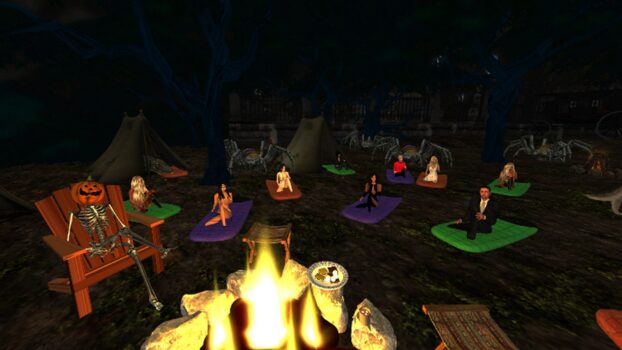
This year’s Storylink Radio’s October celebration is more ambitious than ever before, organizers told Hypergrid Business.
There will be live in-world Halloween storytelling all month long and dozens of YouTube exclusive presentations, including short Halloween tales every night on Storylink Radio’s YouTube channel.
All the videos were filmed in virtual worlds.
The live Halloween stories begin on Thursday, Sep. 26 and run through Nov. 2. There are three different stories every night at 6 p.m., 7 p.m., and 9 p.m. Pacific time in-world and on YouTube.
There will also be a special, live, Halloween Trick or Treat story, and a Dia de Los Muertos storytelling.
“We will be presenting simultaneously at the Storylink Radio estate in Kitely and the Seanchai Library in Second Life, with a live intergrids chat connection,” StoryLink Radio owner Shandon Loring told Hypergrid Business.
In addition, there will be exclusive Edgar Allen Poe presentations on YouTube every Monday, a Frightful Classics full-length novel every Friday, and Short-n-Spooky tales on Saturdays.
For more details, check out the full calendar on the Storylink Radio website.
Hypergrid Business editor and publisher Maria Korolov is a science fiction novelist. During the day, Maria Korolov is an award-winning freelance technology journalist who covers artificial intelligence, cybersecurity and enterprise virtual reality. See her Amazon author page here and follow her on Twitter, Facebook, or LinkedIn, and check out her latest videos on the Maria Korolov YouTube channel. Email her at maria@hypergridbusiness.com. Her first virtual world novella, Krim Times, made the Amazon best-seller list in its category. Her second novella, The Lost King of Krim, is out now. She is also the publisher of MetaStellar, a new online magazine of speculative fiction.
This time of year — in the northern hemisphere, at least — people start spending more time inside as temperatures drop and school starts.
So it’s no surprise that the total number of active users on the public OpenSim grids is going up.
According to their published stats report, there were 44,129 actives this up, up by 1,128 from this time a month ago.
However, the total land area went down, by the equivalent of 738 standard regions. All of that drop — and then some — is accounted for by the fact that a single grid, CandM World, didn’t report its stats this month. Last month, it had over 1,800 regions. Today, the website just shows a security error message, so it could just be a configuration error.
We are now tracking a total of 2,675 public grids, of which 311 are active and 244 published their statistics this month. If you have a stats page that we’re not tracking, please email me at maria@hypergridbusiness.com — that way, your grid will be mentioned in this report every month, for additional visibility with both search engines and users.
This month, OSgrid was the largest grid by land area, with 34,103 standard region equivalents, while Wolf Territories Grid was the most active, with 6,950 unique logins over the past 30 days.
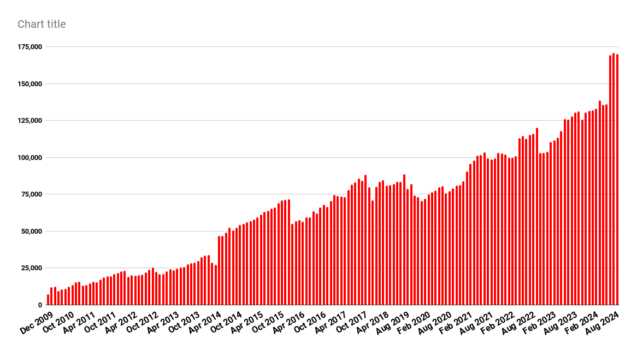
OpenSim land area for Sep. 2024. (Hypergrid Business data.).
Our stats do not include most of the grids running on DreamGrid, a free easy-to-use version OpenSim, since these tend to be private grids.
OpenSim is a free, open-source, virtual world platform, that’s similar to Second Life and allows people with no technical skills to quickly and cheaply create virtual worlds and teleport to other virtual worlds. Those with technical skills can run OpenSim worlds on their servers for free using either DreamGrid, the official OpenSim installer for those who are more technically inclined, or any other distribution, while commercial hosting starts at less than $5 a region.
A list of OpenSim hosting providers is here. Download the recommended Firestorm viewer here and find out where to get content for your OpenSim world or region here.
Hypergrid Business newsletter is now available
Every month on the 15th — right after the stats report comes out — we will be sending out a newsletter with all the OpenSim news from the previous month. You can subscribe here or fill out the form below.
When it comes to general-purpose social grids, especially closed grids, the rule of thumb is the busier the better. People looking to make new friends look for grids that already have the most users. Merchants looking to sell content will go to the grids with the most potential customers. Event organizers looking for the biggest audience — you get the idea.
Top 25 most popular grids this month:
Wolf Territories Grid: 6,950 active users
OSgrid: 4,894 active users
GBG World: 2,422 active users
DigiWorldz: 2,143 active users
Darkheart’s Playground: 2,018 active users
Alternate Metaverse: 1,789 active users
WaterSplash: 1,491 active users
AviWorlds: 1,101 active users
AviVerse AlterEgo: 1,024 active users
Trianon World: 1,004 active users
Neverworld: 953 active users
Moonrose: 861 active users
Littlefield: 858 active users
Party Destination Grid: 792 active users
Craft World: 790 active users
Astralia: 717 active users
AvatarLife: 638 active users
Herederos Grid: 566 active users
Groovy Verse: 564 active users
SunEden Resort: 552 active users
Great Canadian Grid: 550 active users
Gentle Fire Grid: 496 active users
Kitely: 495 active users
Virtual Vista Metaverse: 456 active users
ZetaWorlds: 437 active users
Online marketplaces for OpenSim content
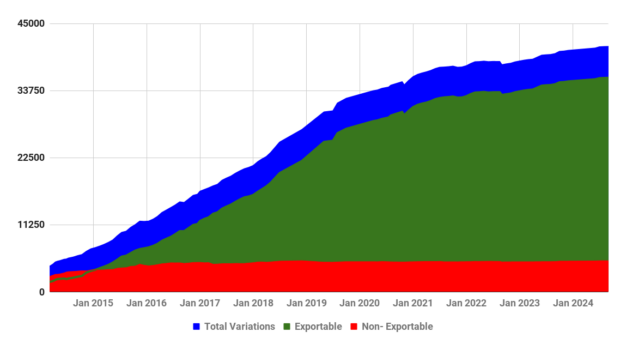
There are currently 21,019 product listings in Kitely Market containing 41,133 product variations, 35,892 of which are exportable.
Kitely Market has delivered orders to 630 OpenSim grids to date.
(Data courtesy Kitely.)
As you can see in the above chart, nearly all the growth in Kitely Market has been in content that can be exported to other grids — that is the green area on the graph. The red area, of non-exportable content, has stayed level for the past eight years.
The Kitely Market is the largest collection of legal content available in OpenSim. It is accessible to both hypergrid-enabled and closed, private grids. The instructions for how to configure the Kitely Market for closed grids are here.
New grids
I didn’t add any new grids to the database this month.
If you know of any public grid that we’re missing, please email me at maria@hypergridbusiness.com.
Suspended grids
The following 12 grids were suspended this month: BachmansWorld One, CatGrid, DigiGrids, German Grid, Legacy, Mathesis, Matrix, NewOffworld, Oczko, SFgrid, Steg, and Trinity’s DreamGrid/
If they don’t reappear online again soon, they will be marked as closed in future reports.
Sometimes, a grid changes its login URI or website address — if that’s the case, email me and let me know and I’ll update my database.
Top 40 grids by land area
All region counts on this list are, whenever available, in terms of standard region equivalents. Active user counts include hypergrid visitors whenever possible.
Many school, company, or personal grids do not publish their numbers.
The raw data for this month’s report is here. A list of all active grids is here. And here is a list of all the hypergrid-enabled grids and their hypergrid addresses, sorted by popularity. This is very useful if you are creating a hyperport.
You can see all the historical OpenSim statistics here, including polls and surveys, dating all the way back to 2009.
OSgrid: 34,103 regions
Wolf Territories Grid: 29,277 regions
Simation Grid: 25,408 regions
Kitely: 18,320 regions
ZetaWorlds: 13,010 regions
Alternate Metaverse: 10,605 regions
Groovy Verse: 8,380 regions
Discovery Grid: 4,919 regions
DigiWorldz: 3,526 regions
Virtual Vista Metaverse: 3,284 regions
Tag Grid: 1,464 regions
Shoalwater Bay: 1,088 regions
Friends Grid: 1,040 regions
ArtDestiny: 961 regions
GBG World: 960 regions
Virtual Worlds Grid: 914 regions
AviWorlds: 839 regions
Craft World: 688 regions
Kinky Haven: 677 regions
AvatarLife: 587 regions
Littlefield: 513 regions
GorGrid: 428 regions
Furry World: 373 regions
Virtual Worlds Zone: 364 regions
Neverworld: 332 regions
Nemesis 3D: 305 regions
EdMondo: 300 regions
Darkheart’s Playground: 276 regions
WestWorld Grid: 270 regions
DreamNation: 264 regions
Open Virtual Worlds: 229 regions
MisFitz Grid: 206 regions
Japan Open Grid: 196 regions
Kater and Friends: 193 regions
Counter Earth: 190 regions
Adreans-World: 170 regions
GerGrid: 141 regions
XTalent: 140 regions
Outworldz: 132 regions
Arcadia Asylum: 123 regions
Do you know of any other grids that are open to the public but that we don’t have in our database? Email me at maria@hypergridbusiness.com.
Hypergrid Business editor and publisher Maria Korolov is a science fiction novelist. During the day, Maria Korolov is an award-winning freelance technology journalist who covers artificial intelligence, cybersecurity and enterprise virtual reality. See her Amazon author page here and follow her on Twitter, Facebook, or LinkedIn, and check out her latest videos on the Maria Korolov YouTube channel. Email her at maria@hypergridbusiness.com. Her first virtual world novella, Krim Times, made the Amazon best-seller list in its category. Her second novella, The Lost King of Krim, is out now. She is also the publisher of MetaStellar, a new online magazine of speculative fiction.
It’s not surprising that holiday sales account for a significant amount of retailers’ annual sales. Brands are continually searching for engaging and entertaining campaigns to capitalize on drive holiday shopping and sales. A 3D virtual store offers a new experiential shopping format and serves as a viable sales channel. With a virtual experience, brands can create an environment that is modeled off of their retail store, a creative concept store or a completely fantastical location.
Virtual holiday stores allow brands to create completely immersive and discovery-driven experiences packed with educational content, primed for the busy gifting season. With 3D content and innovative features such as gamification and gift recommendation quizzes, brands across verticals were able to increase engagement, conversion and reach during the busiest time of year.
Key benefits of virtual holiday stores include:
A new and engaging virtual channel that stands out from other holiday campaigns
Interactive and discovery-driven shopping experience that drives sales and marketing ROI
Engaging features that connect consumers to the brand
A one-stop shop to discover, research and purchase gifts with seamless e-commerce integration
Lower production costs for CGI visuals compared to on-location shoots and brick-and-mortar displays
To learn more about how immersive experiences impact holiday sales, download our e-book comparing industry benchmarks from partner Salesforce to Obsess first-party data.
Examples of Virtual Holiday Stores
Obsess has worked with a number of brands and retailers to create memorable holiday virtual stores and experiences. Each experience featured fantastical displays and larger-than-life decorations, while maintaining core e-commerce functionality for an immersive and enriching online shopping experience that drives virtual holiday shopping. From brands in fashion and beauty to CPG and beyond, these unique e-commerce experiences are able to immerse holiday shoppers into a virtual world unique to the brand.
Here are 5 examples of Obsess-powered virtual holiday experiences:
J.Crew Virtual Ski Chalet
J.Crew launched a digital après-ski retreat to delve into the brand’s essence and seasonal offerings. Full of interactive elements and holiday-inspired ambiance, the innovative ski chalet merchandised the latest men’s and women’s collection in unique ways. Users would navigate to the Snow Lodge for the newest women’s styles, and the Ski Chalet for men’s—a curated selection of seasonal looks and holiday gifts were seamlessly woven into the experience, offering a fully shoppable journey that encouraged virtual holiday shopping.
To add an extra layer of excitement throughout the experience, the brand included dynamic animations and custom gamification that engaged shoppers and deepened consumer connections. Festive gamification included a scavenger hunt game, vintage video game-style Ski Racing Game and a branded quiz that tested shopper’s knowledge on the brand’s long and storied heritage. The scavenger hunt also unlocked a chance at an exclusive luxe cashmere giveaway, which prompted users to explore the entire store. Click to read more about the Holiday World of J.Crew.
Corona Holiday Beach Hut
Constellation Brand’s Corona invited new and longtime fans to Feliz Navi-Drip it like it’s hot with Snoop Dogg in their Holiday Beach Hut experience. The Mexican beer brand revitalized one of their famed holiday commercials into an immersive experience that transported visitors to the same palm tree-filled beach sunset environment. The experience amplified their holiday campaign in VR and enabled consumers to explore products and engage with the brand in new ways.
Fans dived into the holiday spirit with interactive features throughout the experience, such as a custom arcade-style ornament collection game. In the colorful string light laden beach hut, visitors were able to watch the aforementioned commercial and hang with brand ambassador Snoop Dogg. Using AR technology, visitors were able to take a picture with Snoop and create a custom, shareable holiday card. Visitors were also given a chance to match Snoop’s iconic look if they entered the sweepstakes to win a limited-edition Talia Coles robe. Read more about the virtual experiences Obsess has created with Corona, including the Holiday Beach Hut.
Sephora X Cosmopolitan Gifting Suite
Renowned Hearst publication Cosmopolitan collaborated with beauty retailer, Sephora, and released the Gifting Suite. The virtual holiday experience empowered users seeking a scent for personal indulgence or as a sophisticated gift to discover unique scent profiles for their holiday shopping needs. Redefining the fragrance content and online shopping experience, the immersive experience focused around personalized luxury and discovery.
Lined with chic twinkly lights and festive disco ball-covered trees, the suite featured a curated selection of scents directly shoppable in the experience and thoughtfully arranged by notes. Central to the experience was a Cosmo-esque quiz, where shoppers were invited to unravel the nuances of their fragrance preferences. Click to read more about the Sephora X Cosmopolitan Gifting Suite.
H-E-B Grocery Holiday Home
Step into the Holiday Home of beloved Texas-based grocery chain, H-E-B. An immersive wonderland of flavors, recipes and holiday products unfolded through interactive features and cheerful animations. Adorned with festive decorations, the Texas-style home featured multiple rooms ready for the holidays. Users were greeted by virtual chef avatars that guided shoppers through classic recipes, covering appetizers, mains, sides and desserts. Each recipe pop-up was complemented by shoppable links of H-E-B products, offering a seamless buying journey that allowed users to kick-start their holiday cooking.
The virtual experience also provided the brand with a platform to spotlight its philanthropic endeavors and rich history. An interactive scavenger hunt game engaged users through a discovery-driven educational adventure that unveiled facts about the brand and unlocked exclusive holiday deals. Read more about the virtual grocery shopping experience from H-E-B Grocery.
Laneige Virtual World
Korean beauty brand, Laneige, launched a dreamy virtual world that enabled shoppers to explore fan-favorite products and their brand story in a fully immersive context. The experience launched with discovery-driven games and a variety of rooms dedicated to different product lines, and enabled shoppers to interact with products in different ways, including 3D views and multimedia content around ingredients and application. The brand regularly updated the cloudscape to align with their marketing calendar, including a full seasonal refresh that reflected new offerings and product releases for the 2023 holiday season. Festive updates included limited-edition collections, new flavors of the iconic Lip Sleeping Mask and a revamp of the classic scavenger hunt game.
“The virtual store is a powerful customer engagement tool that will allow shoppers to dive into Laneige’s unique scientific expertise and entertaining digital content, while also helping them select the right product for their skin needs, including our bestselling Water Sleeping Mask and Lip Sleeping Mask,” quoted Julien Bouzitat, Chief Marketing and Digital Officer of Laneige parent company Amorepacific U.S. Read more about the Laneige Virtual World, and it’s continued evolution.
These examples only scratch the surface of the limitless possibilities that can go into a digital holiday experience. To find out more on how you can create your own holiday virtual experience, book a demo or email us at contact@obsessvr.com.
Making the metaverse accessible is a group effort. We need representatives from across tech, academia, advocacy and more to solve it – including you!
We generally meet every other Friday at 9am PT / 12pm ET / 4pm UTC via Zoom. Members can access our MSF Portal, participate in meetings, contribute to working documents, and more.
Joining does not come with any formal responsibilities – if you just want to receive email updates or listen in on the meetings, that’s fine. However, we hope that you will help us conduct research, reach out to stakeholders, and do your part to make the metaverse a more inclusive place! If you’d like a one-time invite to see if the group is right for you, email us at [email protected].
In partnership with the IEEE Standards Association, the Council of Europe has issued an extensive report assessing the potential effects of the Metaverse on human rights, democracy, and the rule of law. The report does a deep dive into those virtual opportunities and risks posed by the very immersive technologies that comprise this new frontier, stressing the importance of taking regulatory action to protect and preserve the basic virtual liberties of our global citizenry.
The Metaverse—an immersive, persistent, and interoperable digital environment—contains opportunities for significant advancements across many sectors, including entertainment, education, healthcare, and commerce. However, some experts fear that the Metaverse could bring with it big privacy risks. Indeed, the report analyzes the potential upsides and downsides of the upcoming tech revolution and warns that user data could be at risk in immersive spaces.
One of the main worries centres on the enormous amounts of data that could be collected. The Metaverse depends on technologies like augmented and virtual reality, which gather huge caches of personal information through wearable devices and other sensors.
These technologies have the potential to grab not only the usual sorts of data, like demographic information, but also biometric data—such as the movements of our eyes, the expressions on our faces, and the gestures of our bodies. AR and VR can use this data to make the immersion feel seamless; but in the “what could go wrong” department, there’s so much more potential here for privacy invasion and even identity theft than in most other digital experiences.
The report recommends sturdy privacy frameworks to safeguard users, advocating for both privacy-preserving technologies and transparent data practices. It urges clear user consent and greater user control among companies operating in the Metaverse.
Web3: A Decentralized Future?
The next installment of the internet—Web3—will have its own set of consequences for the Metaverse and for the people who use it, according to the report. Unlike the current internet, which is dominated by a few large platforms, Web3 will be built on decentralized blockchain technologies, which could lead to a greater ability for users to control their data and digital assets.
In contrast to the Web 2.0 platforms that centralized tech companies control, Web 3.0 envisions a more democratic digital ecosystem where users have both ownership and governance over the platforms they inhabit. However, with this decentralization comes a big question mark over governance. Who ensures that our platforms operate effectively, efficiently, and fairly?
Overseeing decentralized platforms is no simple task. And while these platforms seem naturally suited to operate in an unregulated space, it’s important to understand that they could just as easily become lawless as any other unregulated space. The Council of Europe advises that existing legal frameworks be adapted to the new decentralized conditions.
Risks to Democracy and Free Expression
The Council of Europe Metaverse report looks at how the Metaverse can fundamentally alter how people communicate and interact socially, but it’s also a potential threat to free speech and democracy. The distraction-free environments of the Metaverse can be used to good effect, allowing users to have virtual town halls and even virtual elections. However, those same environments can also be used as a blank canvas to control what is seen and heard.
The important problem of content moderation often finds platforms turning to algorithms for assistance. However, the report points out that these algorithms “may lack the nuance to distinguish between legitimate expression and harmful content.” Moreover, users in the Metaverse can become trapped in “filter bubbles,” where they’re shown only content that aligns with their preexisting beliefs and opinions. This isn’t just a phenomenon of the virtual world but a hallmark of our current information ecosystem.
The Council of Europe emphasizes the importance of content moderation in protecting not just the right to expression but also the principles of democracy and good governance. Any content moderation policies should not only achieve these goals but also be transparent and allow for user appeal. Our increasing immersion in digital environments makes this a vital as well as a pressing issue, especially in terms of how persuasive and undetectable false narratives can be.
Safeguarding the Rights of Children
The Metaverse is a particularly vulnerable space for children. The recent report expresses strong concerns about the inability of current systems to provide meaningful age checks and the exposure of children to spaces that could be dangerous.
The European Council demands wants more stringent rules on age-appropriate design and robust age verification systems. It wants the platforms used by our children to converge toward a meaningful level of safety. It also wants us to converge toward an acceptable level of understanding of the augmented and mixed realities our children will experience.
Governance and the Rule of Law
Ensuring proper governance of the Metaverse is no easy task. It is a virtual world operating across real-world borders and raises fundamental questions of jurisdiction, enforcement, and accountability. These are age-old problems of virtuality that our recent online tools have not resolved. Indeed, traditional legal frameworks are likely ill-suited to handle decentralized and borderless virtual environments—especially when it comes to addressing the real crimes that occur in these virtual worlds.
The report highlights the necessity of global teamwork in fashioning the new legal structures that will have to govern the Metaverse. The virtual world is just too vast for any one country to regulate on its own. As the Metaverse continues to expand, it will require not just the investment of governments and tech companies but the collaborative input of people all over the world. In recent months, the Council of Europe has been very active in this effort, and its most recent report is a fine overview of the current state of play and its recommendations for moving forward.
Final Thoughts
The Council of Europe insists on the urgent need for timely governance and regulation of the Metaverse and Web3 technologies. As these still-nascent technologies offer great prospects for innovation and social engagement, they also hold the potential to create newfound and serious threats to privacy and identity, not to mention a whole new frontier for content moderation and governance that will make current debates seem quaint by comparison.
Editor’s note: Written with the assistance of AI – Edited and fact-checked by Jason Newey.
Jason Newey is a seasoned journalist specializing in NFTs, the Metaverse, and Web3 technologies. With a background in digital media and blockchain technology, he adeptly translates complex concepts into engaging, informative articles.
Yes, Microsoft Mesh finally made it to the M365 Roadmap. It’s entries are listed there under Microsoft Teams. So, let’s jump to see what’s in there. To see the live situation, use this URL to jump directly to the Mesh roadmap. There are some pretty big items in the list, that will help to utilize Mesh more and better.
The first one to catch the eye, is the support for Microsoft Whiteboard. This will enable us to collaborate with our whiteboard in Mesh events and very likely in Teams Immersive Spaces as well. It will work on both PC and on Meta Quest devices And it comes also with Whiteboard Copilot! We should be able to get our hands on this at November. Perhaps there is a bit of Ignite -scent in this timing?
The other items in the roadmap have been set to October, so we should have these available during the Ignite time as well. 🤔
I want to raise the first one (just recently added!) that is the Microsoft Mesh app on PC will support guests in Mesh events! This is big, as this expands Mesh from a single organization to wider audience. It will be possible to invite people outside from their organization to join Mesh events. And they can participate fully: join events, engage in discussions, and overall experience the event just like organization’s internal attendees. What’s going to come later is support for guests using Mesh app in Meta Quest devices and also the support for anonymous participants! This means we will have anonymous participants in Mesh events.. which means we can create all new kinds of experiences – from parties to B2B and B2C scenarios with Microsoft Mesh.
What makes the Whiteboard cooler, is that we will be able to use it with Meta Quest 2, 3 and Pro without using our controllers. Mesh is getting hand interactions support – I have been waiting for this one a long time! Whiteboarding will be fun, as we don’t have to use controllers! Don’t worry, you can continue to use controllers and switch between hands and controllers as you need. And of course this has major impact on what you can do in Mesh experiences and interact with objects.
Microsoft Teams Chat support is an another great feature on the list. It will gives us the ability to communicate with all participants, across all rooms, within a Mesh event . It will be possible to chat from Teams desktop directly to Mesh events and vice versa. And of course attendees in Mesh can chat too (with both PC and Meta Quest devices). And in multi-room events, this chat includes all rooms.
We will be also getting a new environment The Project Studio, that we can use in Teams Immersive Spaces and also on Mesh events. It looks like it will be a interesting, space that has been designed for synchronous teamwork and productivity for small groups to collaborate on content and use whiteboards and other tools together Yes, Whiteboard will be embedded in the space! 🤘 And thinking that, how this space can be out October if the Whiteboard support is coming out November.. 🤔 My hunch is, that these will come out quite close to each other, instead of separately.
Whiteboard is really quite essential tool for people to work together in 3D spaces, so I am happy that we will see it in a few months.
And then there are Audio Zones, that Mesh developers can implement to spaces. These spaces can define how sound and audio is traveling to and from the space. It makes possible to create areas where you can talk with each other, without others hearing you, even if they stand just outside the audio zone limit. And vice versa, you can create an area where there isn’t any surrounding noise to make a quiet space in the middle of party to allow conversations. And I would not be surprised, if it would be possible to select between on and off levels how audio can pass through the zone limit.
Then there is one more feature: host and attendee interaction visibility. It is quite close to what Multi-Room User Visualization in the Mesh What’s new does, but it expands the visualization also to attendees, not just hosts. Multi-Room User Visualization just came out, but at the moment is limited to hosts only. We need to wait until they finalize this roadmap item and roll it out October. Multi-Room User visualization is allowing hosts to see attendees who have raised their hand. Additionally, hosts can now see emojis that attendees use in other rooms.
Here are the roadmap items, in a table. You can see the the live situation (if and when updates happen) in M365 Roadmap.
FeatureRollout StartDescriptionMicrosoft Whiteboard can be added to Mesh eventNovember 2024Mesh event participants can now use Microsoft Whiteboard in Mesh 3D environments. This functionality will enable users to collaborate spatially as avatars on a 2D whiteboard present in the virtual space, available on PC and Meta Quest devices. Mesh event attendees can use inking, annotation, and other built-in tools to brainstorm, plan, and share with others on a digital canvas in real time. Copilot integration with Whiteboard helps suggest and organize ideas directly on your canvas while in Mesh.Microsoft Mesh app on PC supports guest access for eventsOctober 2024Attendees can now join Mesh events as a guest in the Microsoft Mesh app on PC. Event organizers can invite guest users outside their organization, providing an opportunity for broader collaboration and networking in Mesh events. Guests can sign in to Mesh app to join events, participate in discussions, and experience the same interactive features as internal users, all while maintaining secure access control. Guest access for events in the Mesh app on Quest and support for anonymous participants will be supported in a future update.Audio zones enable Mesh creators to craft custom audio experiencesOctober 2024Spatial audio in Mesh provides a realistic recreation of how sound moves in the real world, with the volume of people speaking or media playing getting lower of as you move away from the source of the sound. The introduction of audio zones enables creators to craft custom audio experiences for the intended use of a space with features such as extended audio drop off distances for conversations that happen in a large area, or restricting what audio can enter a given area, to allow smaller groups to have lively conversations without disrupting their neighbors.Host and attendee interaction visibility for multi-room Mesh eventsOctober 2024Mesh event attendees can now see raised hands and reactions from attendees in other rooms during large, multi-room Mesh events. This creates a greater sense of audience feedback as a whole across all rooms in a Mesh event and increases total audience engagement.Teams chat support in Mesh eventsOctober 2024Participants in Mesh events on PC and Mac can use Teams chat to communicate with all participants, across all rooms, within a Mesh event. Users can do this in the Microsoft Mesh PC app, the Mesh app in Teams, as well as in the chat message list of the Teams app.Microsoft Mesh app on Meta Quest headsets supports hand interactionsOctober 2024Microsoft Mesh app users on Meta Quest 2, 3, and Pro headsets can now use their hands to use the app, move around in event environments, and interact with objects. Motion controllers continue to be supported, and users can switch between using controllers or their hands while using the app.New collaborative Project Studio environment in Microsoft MeshOctober 2024The Project Studio environment is a new space for immersive meetings and Mesh events. This space has been designed for synchronous teamwork and productivity for small groups to collaborate on content and use whiteboards and other tools together in the virtual environment.
Sharing is Caring! #CommunityRocks
Aiheeseen liittyy
Published by Vesa Nopanen
Vesa “Vesku” Nopanen, Principal Consultant and Microsoft MVP (M365 and AI Platform) working on Future Work at Sulava.
I work, blog and speak about Future Work : AI, Microsoft 365, Copilot, Microsoft Mesh, Metaverse, and other services & platforms in the cloud connecting digital and physical and people together.
I have about 30 years of experience in IT business on multiple industries, domains, and roles.
View all posts by Vesa Nopanen
The tech community is buzzing over Meta’s recent cancellation of a next-gen mixed-reality headset. Was this a necessary move for a swiftly changing market that has yet to establish a viable product, or was it a strategic error that forfeits a chance to compete with Apple’s Vision Pro? The answer appears to be a bit of both as Meta seeks the sweet spot between innovation and market demand.
Meta’s mixed-reality headset will no longer be developed. CEO Mark Zuckerberg and other executives reached this decision after the product review meeting, during which they threw the headset under the bus. Once considered a top contender and a direct competitor to Apple’s Vision Pro, the device’s development was clearly no longer tenable—hence, the decision to stop working on it.
The cancellation of the next-generation Reality Labs headset can mainly be attributed to the high costs associated with advanced OLED display technology. Reality Labs has been a big area of focus for parent company Meta, but the division’s ambitious vision for AR/VR has come at a staggering cost, resulting in billions of dollars in losses.
Zuckerberg is undeterred, though. He continues to believe that the AR/VR field will amount to something tangible over the next decade or so. Still, the decision to cancel the headset seems to suggest he is rethinking his approach.
Impact of Apple’s Vision Pro
Initially seen as a game changing device, Apple’s Vision Pro headset has had trouble catching on. Sales have been disappointing, to the point that we could say the product has not yet found its market. Meta may well have looked to Apple’s struggles when second-guessing its own decision to introduce a pricey mixed-reality headset to a consumer base that seems highly doubtful, at present, about the usefulness of such products.
In general, the virtual reality marketplace seems to be in a state of turbulence. Microsoft’s HoloLens has moved toward niche markets with heavy wallets, and Google’s smart glasses failed to catch the public’s attention. Meta, looking at all this, might have decided that now is not the best time to invest in a premium VR headset.
Shift in Market Focus
Meta’s cancellation of the next-generation headset appears to be part of a larger strategic realignment. Instead of going head-to-head with the high-end hardware competitors, Meta seems to be focusing on its software ecosystem. If the company manages to create a compelling environment for users and developers, it will have accomplished something of value that it can then monetize.
In the long run, Meta’s vision could be in forming partnerships and collaborations with other tech firms and start-ups focused on developing affordable AR/VR solutions. If they do that, it might open the door to innovation in areas where Meta could achieve competitive differentiation, like AI integration or improved connectivity between AR/VR devices and smartphones.
From High-End to Consumer-Friendly Options
That said, the projected growth for the worldwide smart glasses market is nothing short of impressive. Estimates call for the sale of 13 million units by 2030, and the average annual growth rate from 2023 to 2030 is expected to be as high as 53.0%. In 2023, the U.S. market for smart glasses reached approximately 432,300 units, and this value is poised to climb.
While high-end items such as Apple’s Vision Pro might keep making the news, the real expansion should come from cheaper, more consumer-friendly products. Meta looks likely to take the lead in this. Its recent foray into the next big thing in computing—mixed-reality (MR) headsets—seems to have the everyday consumer in mind, and not only the well-heeled VR enthusiast.
Future Implications
The premium mixed-reality headset that Meta promised to build and sell has been canceled, and that may indicate a turnaround in strategy—away from high-end hardware that delivers premium mixed-reality experiences and toward making augmented reality/virtual reality (AR/VR) technology more accessible and practical. Despite cancelling the headset, Meta still plans to offer a range of hardware and software solutions for various AR/VR use cases, and its significant investment in this area still gives the company an edge in the office and education markets.
The future of AR/VR may rely less on cutting-edge devices and more on the kind of affordable, everyday products that consumers can easily make use of.
Editor’s note: This article was written with the assistance of AI. Edited and fact-checked by Owen Skelton.
Owen Skelton is an experienced journalist and editor with a passion for delivering insightful and engaging content. As Editor-in-Chief, he leads a talented team of writers and editors to create compelling stories that inform and inspire.
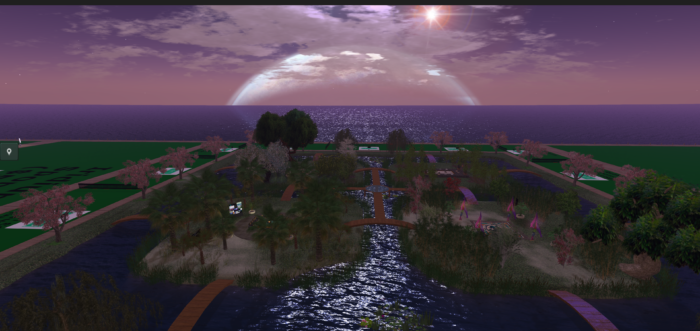
The virtual doors of OSFest 2024 have swung open, welcoming creators, builders, merchants, performers, and sponsors to begin crafting their digital spaces. This annual event, hosted on the OpenSim Fest grid, is set to run from October 4 through October 20, 2024, offering a diverse platform for virtual exhibitions, performances, and commerce.
Lisa Laxton
“The grid is open for participants to build or bring in their creations via the hypergrid,” said Lisa Laxton, OSFest director and founder of the Infinite Metaverse Alliance and Laxton Consulting.
Based on the feedback from previous events, OSFest now has a new mainland layout, she told Hypergrid Business. There are also small sponsor parcels available at US$3 each for other grids or region owners looking to increase their visibility in the hypergrid community and promote their grids.
There is also a limited number of free parcels available for exhibitors and merchants, paid for by sponsors.
OSFest is also looking for volunteers to join the OSFest team and help get everything ready for the event, and to help out during the festival itself.
For more information, check out the event’s home page, or the FAQ page.
The festival will feature 110 hours of performer events and 84 hours dedicated to exhibits, stores, and interactive activities. In a nod to the broader virtual community, OSFest has also allocated eight hours for satellite events on other grids, encouraging cross-platform participation.
OSFest 2024. (Image courtesy Lisa Laxton.)
Most of the 110 hours of performer slots are already booked, Laxton said, and merchant sales event times have been scheduled. There are non-music events and activities on the schedule as well, she added.
“Some participants have started or will soon bring in their builds, and the content infrastructure is ongoing with expected updates on the website, calendar, and Discord server,” she said. “This is the fun and exciting time leading up to opening day.”
This year’s festival breaks new ground by eschewing a unifying theme, a decision made through community vote. This approach promises an eclectic mix of exhibits, stores, and performances, reflecting the diverse interests of the virtual world community. Adding to the fresh feel, the grid layout has been completely redesigned, offering new experiences for both returning participants and first-time visitors.
Participants can access the grid via hypergrid using the address: grid.opensimfest.com:8022:OSF_HGWelcome.
Organizers are encouraging early setup, with a target completion date set for late September.
OSFest 2024 is Gloebit-enabled, allowing for virtual transactions within the grid.
Various sponsorship levels are available for those wishing to support the event financially.
Hypergrid Business editor and publisher Maria Korolov is a science fiction novelist. During the day, Maria Korolov is an award-winning freelance technology journalist who covers artificial intelligence, cybersecurity and enterprise virtual reality. See her Amazon author page here and follow her on Twitter, Facebook, or LinkedIn, and check out her latest videos on the Maria Korolov YouTube channel. Email her at maria@hypergridbusiness.com. Her first virtual world novella, Krim Times, made the Amazon best-seller list in its category. Her second novella, The Lost King of Krim, is out now. She is also the publisher of MetaStellar, a new online magazine of speculative fiction.
In the ever-evolving landscape of digital commerce, the line between physical and virtual continues to blur. As brands navigate this hybrid reality, understanding consumer behavior within these new spaces becomes a critical data point. Enter: AVA Analytics, an innovative tool designed by Obsess to bring a new dimension of insight into 3D virtual experiences.
Imagine walking through an immersive virtual store, with each step and gaze tracked to create a more intuitive and engaging environment for users. Every interaction within these experiences is translated into data and visualized through AVA Analytics. Obsess’s proprietary metrics dashboard doesn’t just display numbers; it reveals patterns, behaviors, and preferences, enabling businesses to optimize their virtual storefronts with the same precision they would in a physical space.
At the core of AVA Analytics is the concept of spatial and behavioral analytics. It operates beyond counting clicks or tracking time spent on a page. It’s about understanding how users move through a 3D environment, what catches their eye, and how they interact with products in a space. The dashboard is foundationally supported by Google Analytics 4, integrating traditional web data with a new layer of spatial intelligence.
Obsess, in partnership with some of the world’s leading brands and retailers, has created over 350 virtual experiences. Through these, AVA Analytics has become a powerful tool, transforming raw data into actionable insights that every team member—from marketers to product designers—can use to make informed decisions.
Consider the engagement data: sessions, visitors, pages viewed, session length, product clicks, and more. This data represents the pulse of your virtual store, telling you who your customers are and what they’re doing. It isn’t static; it’s dynamic, offering insights over any selected time period, allowing businesses to track trends and adjust strategies in real time.
3D Spatial Heatmaps are among the most advanced features of AVA Analytics. They provide a bird’s-eye view of your store, where you can see exactly where visitors are spending their time. It’s akin to having a thermal map of customer interest, showing you the hot zones where products are drawing attention and the cold zones where they’re being ignored. This helps ensure that high-engagement areas are maximized for both customer satisfaction and sales.
Product and content performance metrics go even deeper. AVA Analytics allows you to see how visitors interact with specific hotspots within the virtual store. This means you can identify which products, pieces of content, or navigational arrows are engaging your audience most effectively. It’s about creating a virtual space that isn’t just visually appealing but also intuitively designed to guide visitors to what they want.
Finally, audience demographics and behavior provide a comprehensive view of who your visitors are and where they’re coming from. Detailed insights into geographic location, device distribution, and traffic sources are at your fingertips, offering a level of customer understanding that was previously unattainable in virtual environments.
To learn more about Obsess-powered virtual experiences, email us at contact@obsessvr.com or book a demo.
HTC, a Taiwanese tech firm has launched “Viverse Create,” a new platform that lets people build virtual worlds and games without needing any coding skills. The tool is part of HTC’s Viverse metaverse, and it allows users to create multiplayer experiences that work on VR headsets, mobile phones, and computers.
As a long-standing player in the virtual reality space, HTC’s earlier Vive series headsets and the Viveport platform set the stage for its metaverse efforts. With Viverse Create, HTC is expanding its focus to include easy-to-use tools for anyone interested in creating virtual spaces, even if they have no technical background.
What makes Viverse Create different is its simplicity. Users don’t need any coding knowledge to design their virtual worlds. In addition, they can easily share what they create through a secure link, making it simple for others to access without needing extra software or complicated setups.
Andranik Aslanyan, head of growth at HTC Viverse, highlighted how user-friendly the platform is, saying:
Gone are the days of keeping your creations locked in your own virtual world. With Viverse Create, we’re giving creators the tools to create any world and share it with their friends, parents – even their grandparents – to experience with one simple, secure, joinable link.
Also Read: Sandbox launches ‘Rise of the Memecoins’ VoxEdit Contest