Arts

Home Arts Page 160

Ireland’s National Postal Service Debuts its First-Ever NFT Stamp Series – Cryptoflies News

0
Ireland’s National Postal Service Debuts its First-Ever NFT Stamp Series – Cryptoflies News


24

An Post, the national postal service of Ireland, has introduced its first series of traditional, physical stamps paired with non-fungible token (NFT) versions. 

The stamps were designed by artist Kasia Oźmin using Mid-journey, a generative AI program that creates images based on text prompts. 

Limited to just 10,000 units, the stamps showcase aspects of Irish life under the theme “Imagine Ireland.” Their designs feature elements of the Irish landscape, merging innovation with traditional rural themes.

Among the stamps is the ‘N’ national rate stamp, which covers postage within Ireland. This stamp aims to challenge views on housing and presents a forward-thinking solution. Another stamp, the ‘W’ international rate stamp, focuses on the future of transport for sending mail globally.

The NFT counterparts of the stamps are minted on the Polygon blockchain in partnership with the NFT platform Ciphers.me. Buyers will receive a PIN code that allows them to access the NFT on Ciphers. They can then store it in MetaMask or other compatible wallets.

Des Morley, Chief Digital and Technology Officer at An Post, commented on the launch, stating, “At An Post, we are applying digital innovation across our business – in this case, to one of our most renowned products, stamps. In a spirit of co-operation with International posts we are charting the impact of AI and Crypto by continuing to engage with and learn from emerging technologies.”

With this launch, An Post joins a growing number of postal services that have issued their own NFT stamp collections. In July, Guernsey Post released its own series of NFT stamps. 

Similarly, both Belgian Post Group and Deutsche Post in Germany have introduced their versions of NFT stamps. Earlier in May, Ghana Post also linked commemorative stamps to NFTs, celebrating the 25th coronation anniversary of Otumfuo Osei Tutu II and recognizing his role in Ghana’s progress.


Source link

How to Get a Crypto Wallet in 2024?

0
How to Get a Crypto Wallet in 2024?


Learning how to set up a crypto wallet is key for storing and managing your digital assets. A crypto wallet lets you send, receive, and track your cryptocurrencies securely. With different types available, choosing the right wallet can affect your experience. 

This guide will show you how to get a crypto wallet that meets your needs, ensuring your investment is protected. Let’s look at the types of wallets and how to create one today.

Key Takeaways:

A crypto wallet is a digital tool that allows you to hold, send, and receive cryptocurrencies, serving as the online equivalent of a traditional wallet.There are various types of crypto wallets, including hot wallets, cold wallets, and paper wallets, each offering different levels of security and accessibility.To set up a crypto wallet, choose a provider, download the software, create a new wallet, back up your recovery phrase, and secure it with a strong password.

Cryptocurrency Wallet Explained

A cryptocurrency wallet is a digital tool. It enables you to hold, send, and receive digital assets such as BTC and ETH. Consider it a digital counterpart of your pocket wallet, except instead of keeping cash and cards, it stores your cryptocurrency.

When you hold crypto assets, you actually have a set of private keys. These keys are lengthy sequences of numbers and letters that serve as proof of ownership for your digital currency. A cryptocurrency wallet saves these keys and allows you to utilize them to complete transactions.

Types of Crypto Wallet

Hot Wallets (Software Wallets): Hot wallets link to the internet. They are convenient since you can access your cryptocurrency at any time and from any location. Examples include mobile applications and web-based wallets. However, being online increases their vulnerability to hackers.Cold Wallets: Cold wallets, also known as hardware wallets, are physical devices that store cryptocurrency offline. They resemble USB sticks (like Ledger Nano X) and are regarded as extremely secure. The disadvantage is that they are less suitable for frequent trade.Paper Wallets: Paper wallets are simple pieces of paper that have your public and private keys written on them. It is fully offline, making it secure against hackers, but it is easily lost or destroyed.Desktop Wallets: These are programs you install on your computer. They give you full control over your wallet but are only accessible from that specific computer.Mobile Wallets: Mobile wallets are smartphone apps. They’re very convenient for everyday use and can often scan QR codes for quick payments.Web Wallets: Web wallets are accessed through a browser. They’re easy to use but rely on a third-party to keep your keys safe.

How to Get a Crypto Wallet – Steps and Guide

How to Get a Crypto Wallet - Steps and Guide

How to Create a Software Wallet

Software wallets are the most common and easiest to set up. Here’s a general guide:

Step 1: Select a wallet provider

Exodus, Trust Wallet, and Coinbase Wallet are a few well-liked choices. Find one with strong security features and support for the cryptocurrency you wish to use by doing some research.

Step 2: Download and Install the Wallet: 

Once you’ve chosen a wallet, visit the official website or app store (for mobile wallets) and download the software. Be cautious about downloading from legitimate sources to avoid phishing attacks or malicious software.

For mobile wallets, go to Google Play (Android) or the Apple App Store (iOS).For desktop wallets, download the application directly from the wallet’s official website.

Step 3: Create a New Wallet

Open the wallet app when the program has been installed. Generally, you’ll find an option to “Create a New Wallet”. After you click on this, adhere to the given directions.

Step 4: Make a copy of your recovery phrase

During the wallet creation process, the software will generate a recovery phrase (also known as a seed phrase). This is usually consisting of 12 or 24 random words. This is an important phrase because, if your gadget is lost, stolen, or compromised, it serves as a backup that lets you recover your wallet.

Important: Copy this recovery phrase onto a piece of paper and keep it somewhere safe. To minimize the possibility of hacking, do not save anything digitally.

Step 5: Set Up a Password

After you’ve backed up your recovery phrase, the next step is to set a strong password for your wallet. This password will be required every time you want to access your funds or send cryptocurrency. Make sure it’s a password you can remember but hard for others to guess.

Step 6: Get Your Wallet Working

You will now receive a public key, which is also your wallet address, after setting up your wallet. You can receive cryptocurrency by giving this address to other people. To transfer funds, you will need both the recipient’s address and access to your private key, which is safely held within the wallet.

Note: The security of a software wallet largely depends on the security of the device it’s installed on. Always keep your device updated and be cautious about downloading unknown apps or clicking suspicious links.

How to Create a Hardware Wallet

Step 1: Purchase a Hardware Wallet

The first step is to buy a reputable hardware wallet from a trusted vendor. Avoid purchasing used wallets or buying from third-party sellers to minimize the risk of tampering. Buy directly from manufacturers such as Ledger or Trezor.

Step 2: Unbox and Connect the Wallet

After your hardware wallet is delivered, open it up and carefully read the included instructions. Generally, you will need to use a USB cable or Bluetooth (for devices like the Ledger Nano X) to connect the hardware wallet to your computer or mobile device.

Step 3: Install the Wallet Software

You’ll need to install companion software on your computer or smartphone to interface with your hardware wallet. Users of Trezor will install Trezor Bridge or utilize the Trezor Suite, whereas users of Ledger will install Ledger Live. To prevent vulnerabilities, make sure your device is constantly running the most recent firmware.

Step 4: Set Up Your Wallet

After installing the software, you’ll be guided through the process of setting up your wallet. You will be prompted to:

Create a PIN: Choose a secure PIN that you’ll use to unlock your wallet. This is your first line of defense if your hardware wallet falls into the wrong hands.Backup Recovery Phrase: Just like with software wallets, your hardware wallet will generate a recovery phrase (usually 24 words). Write it down on paper and store it in a secure place.

Step 5: View and Manage Your Wallet Balance

You can use your hardware wallet to transact and receive cryptocurrency when the setup is complete. To transfer money, you must first link the wallet to your PC, then input your PIN and validate the transaction on the actual wallet. 

This additional security measure makes sure that hackers cannot take your money without physical access to your wallet, even if your computer is hacked.

How to Create a Paper Wallet

Your public and private keys are physically stored on a paper wallet, which is often in the form of QR codes.

Step 1: Visit a Paper Wallet Generator

You must use a reliable wallet generator, like BitAddress, to build a paper wallet. You can easily generate a public and private key pair with these tools.

Important: To make sure your keys are safe, it is advised that you generate your paper wallet offline. This may be accomplished by downloading and unzipping the generator and then executing it on a machine that isn’t connected to the internet.

Step 2: Generate the Keys

To generate entropy and make sure the keys are as random as possible, this often entails dragging the mouse around or inputting random letters.

Step 3: Print the Wallet

After the keys have been generated, the next step is to print the paper wallet. This printout will include your public key (wallet address) and private key, often in both alphanumeric form and as QR codes. The public key can be shared with others to receive cryptocurrency, but the private key must remain confidential.

Step 4: Safely Store the Paper Wallet

Although paper wallets are quite safe in terms of digital security, they are susceptible to physical risks like theft, fire, and water damage. If required, think about keeping your paper wallet in a safe with waterproof or fireproof protection.

Best Cryptocurrency Wallets for Different Use Cases

Best Software Crypto Wallets

The best cryptocurrency software wallets to look for are:

MetaMask ranks among the top choices for managing crypto, particularly Ethereum and ERC-20 tokens. It functions as both a browser extension and mobile app, making it accessible for storing, sending, and receiving assets. The wallet is also known for its ease of use and its ability to connect with decentralized applications (dApps). MetaMask serves over 30 million users globally.Trust Wallet, endorsed by Binance, supports over 70 blockchains and millions of tokens. It also enables staking, offering users an opportunity to earn rewards. Trust Wallet is mobile-friendly and praised for its intuitive interface.Coinbase Wallet is a non-custodial wallet, separate from the centralized Coinbase exchange, giving users control over their private keys. It supports various assets like Bitcoin, Ethereum, and other ERC-20 tokens. Designed with simplicity in mind, it’s a great choice for beginners. Plus, it seamlessly integrates with dApps, providing an easy way to manage and interact with different cryptocurrencies. 

Best Hardware Crypto Wallets

The best cryptocurrency hardware wallets for beginners to get are:

Ledger is a leading hardware wallet, trusted by more than 6 million users globally. It offers support for over 5,500 cryptocurrencies, including Bitcoin, Ethereum, and ERC-20 tokens. The Ledger Nano X and Nano S Plus models provide secure offline storage, safeguarding private keys from potential online threats. Through the Ledger Live app, users can easily manage their assets, stake tokens, and interact with decentralized apps. Ledger has earned its reputation by maintaining top-tier security for crypto storage.Trezor, recognized as the first-ever hardware wallet, supports over 1,000 coins. Models such as Trezor Safe 3 and Trezor Safe 5 are designed to keep private keys offline, offering high-level protection from hacks. The wallet also connects with various third-party apps and exchanges for added functionality. It includes features like passphrase protection and two-factor authentication (2FA), making Trezor a highly secure and trusted solution for managing crypto assets.The ELLIPAL Titan is a cold wallet that works on air-gapped technology. It ensures that the user’s assets are completely isolated from any internet network. The gadget has a complete metal case that provides great security against physical manipulation. 

Considerations When Choosing a Crypto Wallet

Here are the factors to consider for choosing the best crypto wallet:

Security: This should be your top priority. Look for wallets with strong encryption. This includes two-factor authentication and a good track record of protecting users’ funds. For large amounts, consider using a hardware wallet for enhanced security.Supported cryptocurrencies: Make sure the wallet supports the specific cryptocurrencies you plan to use. Some wallets only work with a few high market cap coins like BTC and ETH, while others support many new projects.User interface: The wallet should be easy for you to use and navigate. If you’re new to crypto, look for wallets with simple, intuitive interfaces. More experienced users might prefer wallets with advanced features.Backup and recovery options: Ensure the wallet has a straightforward process for backing up your keys or seed phrase. This is crucial for recovering your funds if you lose access to your wallet.Development and updates: Choose a hot wallet from a reputable company that regularly updates its software to address security vulnerabilities and add new features.Control over private keys: Some cryptocurrency wallets give you full control over your private keys, while others manage them for you (like custodial wallets). Having control over your keys offers more security but also more responsibility.Transaction fees: Many crypto wallets allow you to customize transaction fees, which can be useful during times of network congestion.Integration with exchanges: If you plan to trade frequently, a wallet that integrates with major crypto exchanges like Binance and Bybit could be convenient.Mobile vs. desktop: Consider whether you need access to your wallet on-the-go (mobile) or prefer to manage your crypto from your computer (desktop).Open-source code: Since it enables the public to confirm the wallet’s security, many people choose wallets with open-source code.Extra features: Some wallets come with integrated staking possibilities, swap services, and interfaces for interacting with decentralized apps (dApps).Community and support: When you’re first starting out, having a robust user community and prompt customer service may be really helpful.

Risks Associated With Crypto Wallet

Crypto wallets come with several risks that you should be aware of:

Security breaches: Wallets can be vulnerable to hacking attempts, especially if proper security measures aren’t in place. This risk is particularly high for software wallets connected to the internet.User error: Simple mistakes like forgetting passwords, losing seed phrases, or sending crypto to incorrect addresses can result in permanent loss of funds. Unlike traditional banking, there’s often no way to reverse transactions or recover lost access.Malware: Malicious software can infect devices and potentially steal wallet information or private keys, leading to the theft of funds.Phishing attacks: To deceive users into disclosing their private keys or seed phrases, con artists may fabricate wallet interfaces or send phony emails.Software bugs: Wallet software may contain undetected bugs that could compromise security or cause malfunctions, potentially leading to loss of funds.Physical theft: For hardware wallets, physical theft of the device poses a risk, though most have security measures to prevent unauthorized use.Outdated software: If wallet software isn’t updated, known vulnerabilities may remain unpatched, raising the possibility of exploitation.Exchange risks: Users utilizing wallets based on crypto exchanges run the danger of the exchange being compromised by hackers or going bankrupt (like FTX insolvency).

Conclusion

Learning how to get a crypto wallet is critical for safely handling your Bitcoin and altcoins. A cryptocurrency wallet can be a software, hardware, or paper wallet. Each kind provides a different level of security and convenience.

Choosing the correct wallet is determined by your requirements, such as ease of access or increased security. Understanding the setup procedure and safety considerations allows you to confidently handle your digital money. Also, to prevent losing access to your crypto assets, never forget to back up your recovery phrase and secure your private keys.

FAQs

Are crypto wallets free?

Yes, most software crypto wallets are free to download and use. Examples include Trust Wallet, MetaMask, and Coinbase Wallet. However, hardware wallets, like Ledger and Trezor, come with a cost since they offer enhanced security by storing your crypto offline. While using a wallet is usually free, keep in mind that transaction fees might apply when sending or receiving cryptocurrency.

What are public and private keys?

A public key is similar to your bank account number; it is safe to share so that people can transfer you Bitcoin. A private key, like a password, must be kept hidden. It provides you with control over your crypto assets. These keys operate together to approve transactions, guaranteeing that only the private key holder has the ability to move or spend digital assets.

Is it safe to make a crypto wallet?

Yes, creating a cryptocurrency wallet is secure as long as you take the right security precautions. When creating a wallet, always generate your recovery phrase offline and keep it secure. Do not share your private key with anybody, and use secure passwords. Keep your software up to date to avoid any vulnerabilities or hacker attempts.

How to get a crypto web or extension wallet?

To get a crypto web or extension wallet, choose a trusted provider like MetaMask or Coinbase Wallet. Visit the official website and install the browser extension. After installation, create a new wallet by setting up a password and backing up your recovery phrase. Once complete, you can manage your crypto directly from your browser.

How to get a crypto mobile wallet?

To get a crypto mobile wallet, download a reputable software wallet app like Coinbase Wallet or MetaMask from the Apple App Store or Google Play Store. Most apps are available for both Android and iOS devices. Once installed, open the app and create a new wallet by following the prompts. Secure your wallet by backing up your recovery phrase and setting a strong password. Now, you can store, send, and receive crypto on your phone.



Source link

Meta Introduces “Orion” AR Glasses, Upgraded AI, and Quest 3S Mixed Reality Headset – Cryptoflies News

0
Meta Introduces “Orion” AR Glasses, Upgraded AI, and Quest 3S Mixed Reality Headset – Cryptoflies News


33

At its recent Connect conference, Meta announced several updates, including advancements in its Ray-Ban Meta glasses, Meta Quest devices, AI products, and the unveiling of its first augmented reality (AR) glasses.

Meta AR Glasses “Orion”

One of the event’s key highlights was Meta’s introduction of “Orion,” described as “the most advanced pair of AR glasses ever made.” These glasses, which look like regular sunglasses with transparent lenses, allow users to interact with 2D and 3D content within their physical surroundings. 

Orion comes equipped with the Meta AI assistant, which can interpret what users are seeing in real-time. For example, Meta explained, “You can open up your refrigerator and ask for a recipe based on what’s inside.”

Meta Orion AR Glasses – Image source: Meta

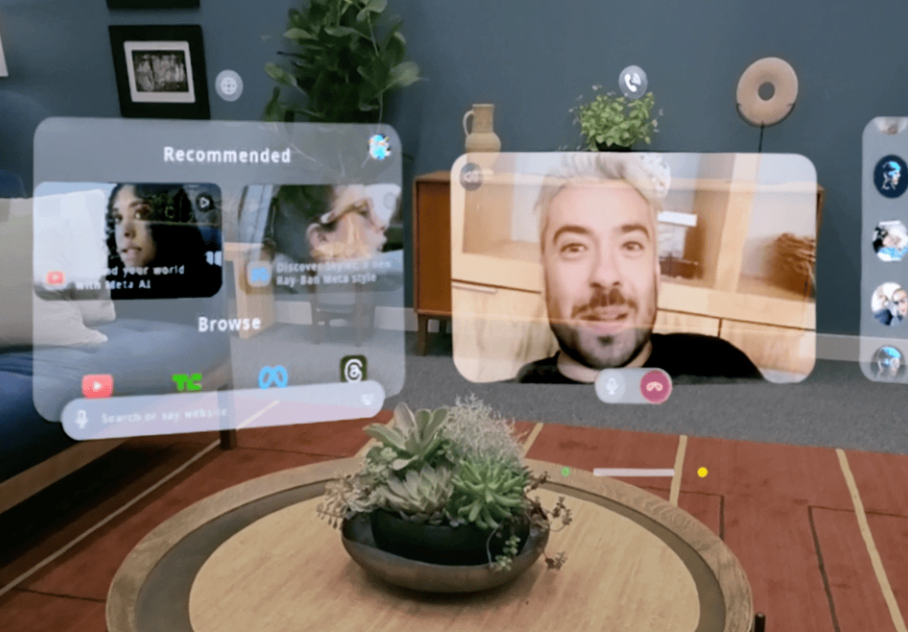
 Orion also integrates with WhatsApp and Messenger, enabling users to make video calls and send messages without needing to hold their phones.

meta Orion AR glasses calls
Meta Orion AR Glasses – Image source: Meta

Ray-Ban Meta Glasses Add AI Features

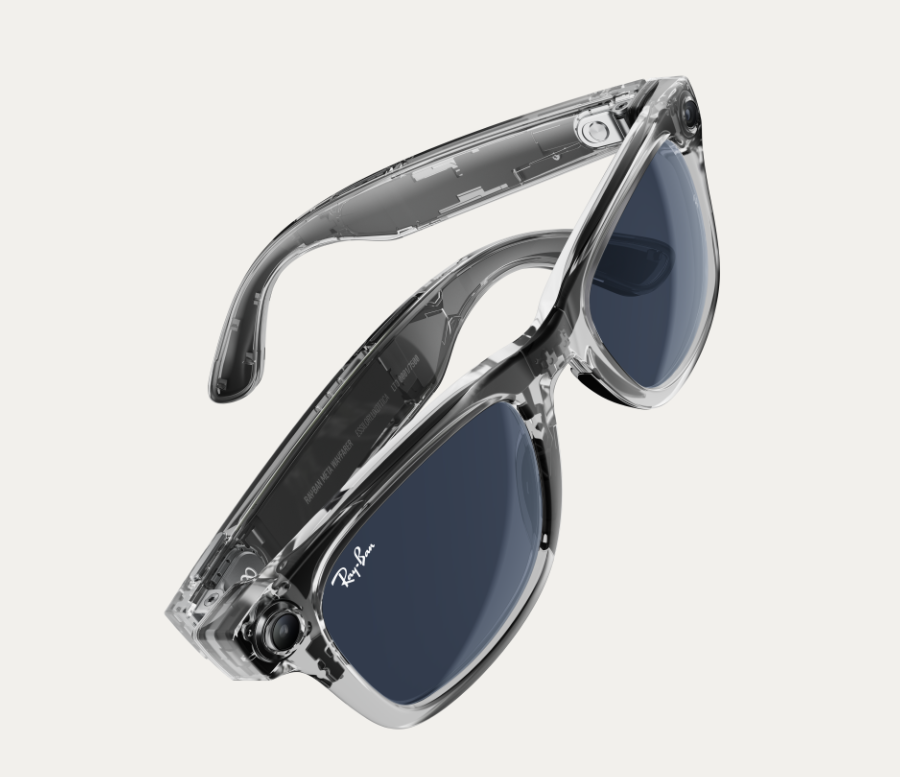
Meta also shared updates for its Ray-Ban Meta glasses, which allow hands-free calls and photo-taking. A notable enhancement is the integration of new AI features, which improve the glasses’ interaction with Meta AI. Users can now initiate conversations with Meta AI simply by saying “Hey Meta.”

new Ray Ban meta glasses
New RayBan Meta Glasses – Image source: Meta

In addition to voice commands, the glasses now support setting reminders. For instance, Meta stated, “You can use your voice to set a reminder to text your mom in three hours when you land safely.” The glasses also now let users send voice messages on WhatsApp and Messenger via Meta AI.

Users can also ask Meta AI for help in real time while exploring new locations. As they walk through a city, they can ask Meta AI for information about landmarks or suggestions on what to see next.

Introduction of Meta Quest 3S Mixed Reality Headset

Meta Quest 3S
Meta Quest 3S – Image source: Meta

Another announcement was the release of “Meta Quest 3S,” a lower-cost version of its Meta Quest 3 mixed reality headset. 

Priced at $299.99, the Meta Quest 3S is positioned as an entry-level device for users who are new to immersive experiences or seeking a more affordable upgrade from previous versions like the Quest and Quest 2.

Meta shared that with the Quest 3S, users can enjoy various entertainment options, including watching TV on a cinema-sized screen, playing games, and attending virtual concerts.

Updates to Meta AI Products

Meta also revealed improvements to its AI offerings. Meta AI now supports voice interaction, allowing users to speak with the assistant across multiple platforms, including Messenger, Facebook, WhatsApp, and Instagram Direct Messages. The AI can respond verbally, providing a more natural interaction experience.

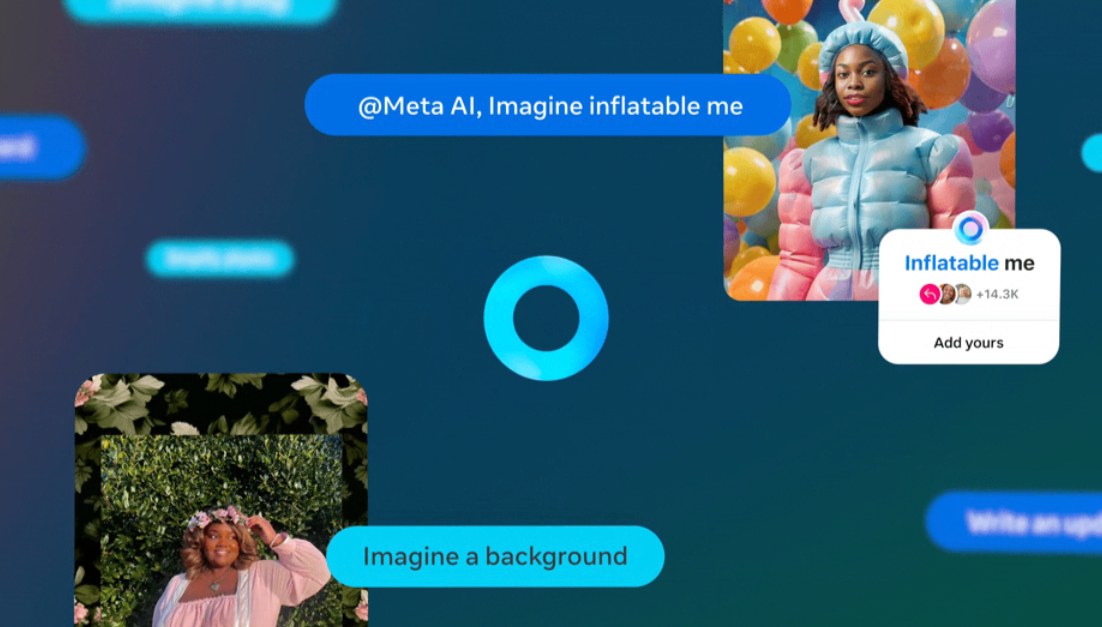
Another addition is the AI’s ability to interpret photos. As Meta explained, users can share a picture of a flower and ask Meta AI to identify the species. The assistant can also perform quick photo edits, such as removing objects, changing the background, or even altering the subject’s outfit.

Meta AI assistant new features
New Meta AI Features – Image source: Meta

Meta has also extended AI functionalities to help businesses automate customer support and commerce tasks. Business AIs can now engage in conversations with customers, provide support, and help complete transactions. 


Source link

Slimesunday Unveils “The Mixtape” at Pellas Gallery in Boston: A Nostalgic and Bold Fusion of Art and Censorship | NFT CULTURE | NFT News | Web3 Culture | NFTs & Crypto Art

0
Slimesunday Unveils “The Mixtape” at Pellas Gallery in Boston: A Nostalgic and Bold Fusion of Art and Censorship | NFT CULTURE | NFT News | Web3 Culture | NFTs & Crypto Art


Get ready for an exciting new chapter in the world of digital art as Slimesunday, the Boston-based artist, unveils his latest solo show, “The Mixtape.” The exhibition will take place at Pellas Gallery on Thursday, October 3rd, 2024, from 6:30 PM to 9:00 PM, promising an immersive experience that pushes boundaries with its innovative blending of nostalgia, censorship, and deeply personal expression.

A Deeper Dive into Slimesunday’s Artistic Vision

Slimesunday, known for his controversial and thought-provoking digital collages, has become one of the most prominent creators in the NFT and digital art space. His work often explores themes of censorship, technology, and the relationship between digital and physical reality. “The Mixtape” represents his most expansive body of work to date, reflecting years of exploration into visual storytelling through fragments of culture.

By blending elements of nostalgia—a longing for the past—and censorship—the control of what can or cannot be shown—Slimesunday captures a duality that resonates with both the digital-native and art-world audiences. His work often draws on the chaotic yet beautiful interplay between freedom and restriction, with bold visual narratives that challenge societal norms.

The Mixtape: A Masterpiece of Personal Expression

In “The Mixtape,” Slimesunday takes a deeply personal approach. He uses this series as a way to channel emotions and memories, creating a mosaic of images that reflect both individual and collective experience. Expect to see art that plays with familiar, yet distorted, imagery from popular culture, all set against the backdrop of his signature surrealist, avant-garde style. Each piece is a visual mixtape, echoing the way music mixtapes were used to convey personal expression in an analog era.

This collection is not just a reflection of personal history but also a commentary on how art and expression are controlled in the digital age. Slimesunday has often faced censorship challenges on platforms like Instagram, where his provocative imagery is frequently flagged. “The Mixtape” is, in many ways, a response to these limitations—a bold and unapologetic statement of artistic freedom.

Join the NFT and Art Community for This Must-See Event

If you’re a fan of digital art, NFTs, or Slimesunday’s work, this is an event you won’t want to miss. The opening will take place at Pellas Gallery, located at 73 Newbury St., 2nd Floor, Boston, MA, and it promises to be one of the most talked-about exhibitions of the year. “The Mixtape” showcases not just the evolution of Slimesunday’s artistic journey but also the evolving conversation around censorship, technology, and personal expression in today’s digital landscape.

Whether you’re a collector, artist, or enthusiast, this exhibition is the perfect opportunity to experience cutting-edge digital art in a gallery setting, bringing the digital and physical worlds together in an engaging and provocative display.

When: Thursday, October 3rd, 2024, 6:30 PM to 9:00 PMWhere: Pellas Gallery, 73 Newbury St., 2nd Floor, Boston, MA

We can’t wait to see you there!

TL;DR:

Slimesunday is unveiling his latest solo show, “The Mixtape,” at Pellas Gallery in Boston on October 3rd, 2024. This expansive collection blends nostalgia and censorship, offering bold personal expressions through provocative digital art. The event will take place from 6:30 PM to 9:00 PM, showcasing his most extensive body of work to date.


Source link

Dookey Dash: Unclogged is BACK! | NFT CULTURE | NFT News | Web3 Culture | NFTs & Crypto Art

0
Dookey Dash: Unclogged is BACK! | NFT CULTURE | NFT News | Web3 Culture | NFTs & Crypto Art


If you’re a fan of endless runner games with a twist, you’ve likely come across Dookey Dash: Unclogged. This quirky, viral sensation from the creators of Bored Ape Yacht Club is back for Season 1, and the stakes are higher than ever, with a prize pool exceeding a staggering $1 million. From plunging through the chaotic sewers to dodging bizarre obstacles, this game combines humor, fast-paced racing, and Web3 customization like never before. Here’s everything you need to know about the game and its creators.

From the Minds Behind Bored Ape Yacht Club: Yuga Labs

Dookey Dash is the brainchild of Yuga Labs, the company famous for iconic NFT collections like Bored Ape Yacht Club (BAYC), Mutant Ape Yacht Club (MAYC), and CryptoPunks. Yuga Labs isn’t just building NFT collections—they’re revolutionizing the Web3 space by crafting stories, experiences, and community-driven projects. With Dookey Dash, they’ve ventured into gaming, merging NFTs with immersive, open-economy gaming.

Yuga Labs is creating what they call the “Yugaverse,” a place where players can enjoy true ownership of their in-game assets, trade them across platforms, and use them in various experiences. This interoperability is at the core of what makes Dookey Dash stand out in the growing NFT gaming ecosystem.

https://x.com/CryptoGarga/status/1836770037962588329

What Makes Dookey Dash: Unclogged Unique?

So, why should you dive into this endless runner game? Beyond its ridiculous yet entertaining theme of dodging dookey in the sewers, Dookey Dash: Unclogged brings in several elements that make it stand out from the rest:

Seasonal Prize Pool: Players compete for their share of a $1 million prize pool by climbing the leaderboard in Season 1. From Golden Plungers to coins and boosters, there’s a ton to win.
Customization: Far from being just a typical runner, Dookey Dash lets you personalize your driver and vehicle. The real innovation here is the Web3 twist—you can create, sell, and use your own 3D models. Thanks to Faraway Inc., the game studio behind the title, these models can be utilized in thousands of other experiences, driving deeper player engagement.
Play-to-Earn (P2E) & True Ownership: The game integrates a play-to-earn model where players can earn valuable assets and then use the Faraway shop to trade or sell them. It empowers players by giving them ownership of their digital creations, whether it’s unique vehicles or character outfits.
Faraway Integration: With an account connected to Faraway, you can not only sell models but potentially expand their use to other games, marking an important step toward the much-hyped concept of interoperability in the gaming and metaverse space.

Faraway Inc. and the Future of Web3 Gaming

The developers behind Dookey Dash, Faraway Inc., are pushing boundaries by focusing on open-economy games where players have true ownership of their digital assets. Known for titles like Serum City, Legends of the Mara, and Shatterline, Faraway is driving innovation by allowing players to not just participate but also create and sell assets. This represents the future of gaming—one where players are not just consumers, but creators and stakeholders in the in-game economy.

A Race Through the Sewers – What’s New?

With the latest update (Version 1.0.20), Dookey Dash has introduced exciting features like preseason leaderboards and a Season Pass that allows players to collect boosters, new riders, and vehicles. As the game evolves, so do the opportunities for customization and competition, keeping players engaged as they race through the sewers.

If you’re someone who enjoys chaotic, fast-paced gaming with a side of Web3 innovation, Dookey Dash: Unclogged is worth your attention. It’s more than just an endless runner; it’s a wild ride into the future of gaming.

TL;DR

Dookey Dash: Unclogged is a viral endless runner from Yuga Labs with a $1 million prize pool in Season 1. Players race through the sewers while dodging obstacles, earning prizes, and customizing their drivers and vehicles. The game features Web3 integration via Faraway Inc., allowing players to create, sell, and use 3D models in various games, pushing forward the future of open-economy gaming.


Source link

SoulKeeper: Safeguarding Your NFT Art with Ease | NFT CULTURE | NFT News | Web3 Culture | NFTs & Crypto Art

0
SoulKeeper: Safeguarding Your NFT Art with Ease | NFT CULTURE | NFT News | Web3 Culture | NFTs & Crypto Art


The NFT space is constantly evolving, but with this evolution comes a set of technical challenges that can leave many collectors and artists scratching their heads. Recently, Ani from NFTRebels highlighted a critical issue with NFTs—particularly with KnownOrigin (KO) art tokens on Etherscan. The main concern? The art files associated with these tokens aren’t as secure as many believe, and navigating the technology can be daunting for those who aren’t tech-savvy.

The Problem: Where’s the Art?

When you look up a KO unsold art KODA token on Etherscan, what you see is just the tip of the iceberg. There’s no art, no artist’s name, no image—just the token data and a link that points to your art files stored on IPFS (InterPlanetary File System). But even with this link, the journey is far from straightforward. As Ani pointed out, the actual art, metadata, and cover image are stored in these IPFS files, but accessing them requires a bit of digging.

Understanding IPFS and the Importance of Pinning

IPFS is a decentralized file storage system, reminiscent of Napster for those who remember. It’s decentralized, meaning your files are stored across a network of nodes rather than in a single location. While this means your art isn’t stored directly on the blockchain, it can still “live forever” on IPFS—as long as the files are pinned.

Pinning is the process that keeps a file accessible on the IPFS network. If a file isn’t pinned and isn’t frequently accessed, it could eventually disappear. This is a big issue for NFTs; if the associated files vanish, your NFT could lose its art and metadata, leading to broken links and a lot of confusion for collectors and panic for artists.

Enter SoulKeeper: A Simple Solution for Artists and Collectors

To address this issue, Ani and Rick developed SoulKeeper. This tool is specifically designed for KO artists and collectors to ensure their art files remain accessible and safe. You don’t need to be a tech expert to use it; all you need is your KO wallet address. SoulKeeper will find all the KnownOrigin art files linked to your KODA tokens and help you either download them for manual pinning or automatically pin them using Pinata, a popular pinning service.

The best part? SoulKeeper is free to use. Ani and Rick created this tool out of a genuine desire to help the community preserve their art. It’s an easy-to-use solution that could save a lot of headaches down the road.

Why This Matters

The launch of SoulKeeper is more than just a new tool; it’s a reminder of the importance of understanding the technology behind NFTs. As the space grows, so too does the need for tools that make it easier for artists and collectors to protect their investments. With SoulKeeper, you can ensure that your art remains secure, even in the decentralized and sometimes unpredictable world of IPFS.

TL;DR:

SoulKeeper is a new tool designed to help KnownOrigin artists and collectors easily pin their NFT art files on IPFS, ensuring they remain accessible and safe. It’s free to use and simplifies the technical process, making it a must-have for anyone in the KO community.


Source link

Popular Posts

My Favorites

Taylor Frankie Paul: Photos of Injuries Allegedly Sustained In Dakota Mortensen...

0
Reading Time: 3 minutes In the weeks since video of Taylor Frankie Paul assaulting Dakota Mortensen was made public, Paul has maintained...