


June has been very busy. A lot is happening with Microsoft 365 and Copilot and June hasn’t been an exception.Claude went generally available in Microsoft Foundry, Teams new features, Copilot Notebooks opened up to a much wider audience, Planner agent hit GA, and the Learning Agent did too. And one thing you really shouldn’t sleep on: from tomorrow, Copilot Cowork starts counting credits.
So let’s take a closer look.
Claude is now GA in Microsoft FoundryCowork starts counting credits tomorrow — get your spending policy ready todayTeams Facilitator gets proactiveTeams meetings, events and RoomsCopilot in your apps — brand kits, Notebooks, curated prompts and morePlanner agent grows upLearning Agent is generally availableService plan and governance changes admins must not missMeanwhile, in the wider AI worldClosing thoughts
This is the headline for me. Claude in Microsoft Foundry is now generally available — and I of course had to go and read the fine print so you don’t have to.
The part that matters most: Foundry offers Claude in two flavours. The Hosted on Azure version runs on Azure infrastructure end-to-end and is fully GA. The other version runs on Anthropic’s own infrastructure. For most enterprise scenarios the Hosted-on-Azure option is the one you want, because your requests stay on Azure the whole way through. At GA the Hosted-on-Azure models are Claude Opus 4.8 and Claude Haiku 4.5.
Why this is exciting for (Future) Work: you can now build agents on Claude models inside the same Foundry you already use for everything else — same deployment story, same governance, and you can wire them up with the Microsoft Agent Framework. And here’s the bit a Finn like me appreciates — Hosted-on-Azure Claude is available as Global Standard in East US 2 and Sweden Central, with a US Data Zone option for Opus 4.8. Sweden Central means a real European datacenter, but you can not choose EU Data Zone option – only Global Standard deployment.
Now the honest caveat, and it’s worth a moment of your attention: to use Claude in Foundry you need a paid Azure subscription with a billing account in a supported country, and billing runs through Azure Marketplace (Claude Consumption Units). A few subscription types simply aren’t supported — CSP subscriptions, free trials, student or startup-credit accounts, and Enterprise Accounts in South Korea. And here’s the one that quietly trips people up: if you’re on a sponsored Azure subscription that runs on Azure credits, Claude usage won’t be billed against those credits — it goes straight to the credit card on file. So before you let your team loose on Claude in Foundry, check which subscription is behind it. ( You don’t want to discover that one on a statement!). This is sadly keeping me from personally experimenting with Claude models at Foundry, as I do not want those costs to my credit card.
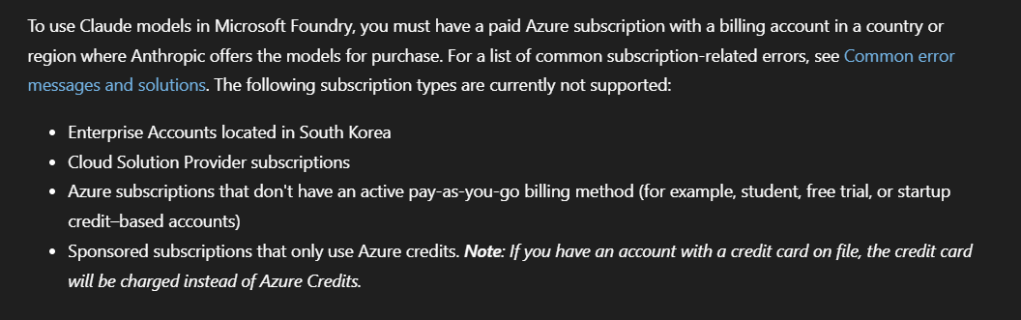
Perhaps Microsoft Azure Claude subscription requirements haven’t been updated yet, but at the moment it looks like that Azure hosted Claude models follow above limits.
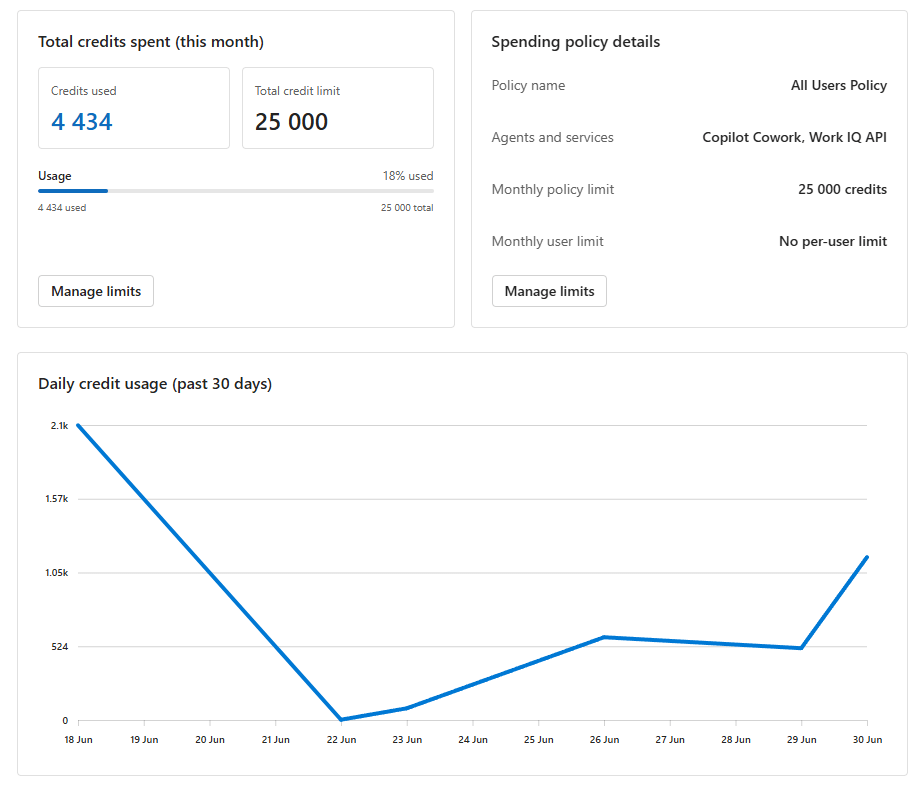
If you read my last post, New in Cowork – the UI refresh and the cost question everyone’s asking, you knew this day was coming. Well — it’s here. From tomorrow, Copilot Cowork usage is metered and consumes Copilot credits, and every bit of it is tracked. Make sure you have a spending policy, with budgets, in place by the end of today. The Microsoft 365 admin center now has a Cost Management Dashboard for exactly this, and there’s a new Viva Copilot usage and cost insights capability rolling out, enabled by default, that gives you visibility into credit usage across services like Cowork and the Work IQ API. Turn them on. Set your budgets. Today.
Here’s my take, and I want to be clear because I genuinely like Cowork: steer, don’t hit the handbrake. Cowork is very useful. The mistake would be to panic and switch it off — that’s leaving real value on the table.
But the mindset has to change. Playtime is over. Now you use Cowork for effect:
Reach for Cowork when the job spans several apps and needs multi-step instructions. That’s where it shines — pulling across your inbox, calendar, Teams and files and actually doing the work end to end.
Use the tools that are already included in your Copilot price for everything else. Copilot Chat, Create, Copilot inside the Microsoft 365 apps, and agents like Researcher and Analyst — plus your own custom agents — are part of the deal. Use each one to its strength.
Do the value math, out loud. At work the right question isn’t “did this cost me $10?” — it’s “did this $10 save me two hours?” If it did, it was absolutely worth it. Be mindful of cost every time you press go, and you’ll spend in the right places.
That’s the whole philosophy: be deliberate, not fearful.
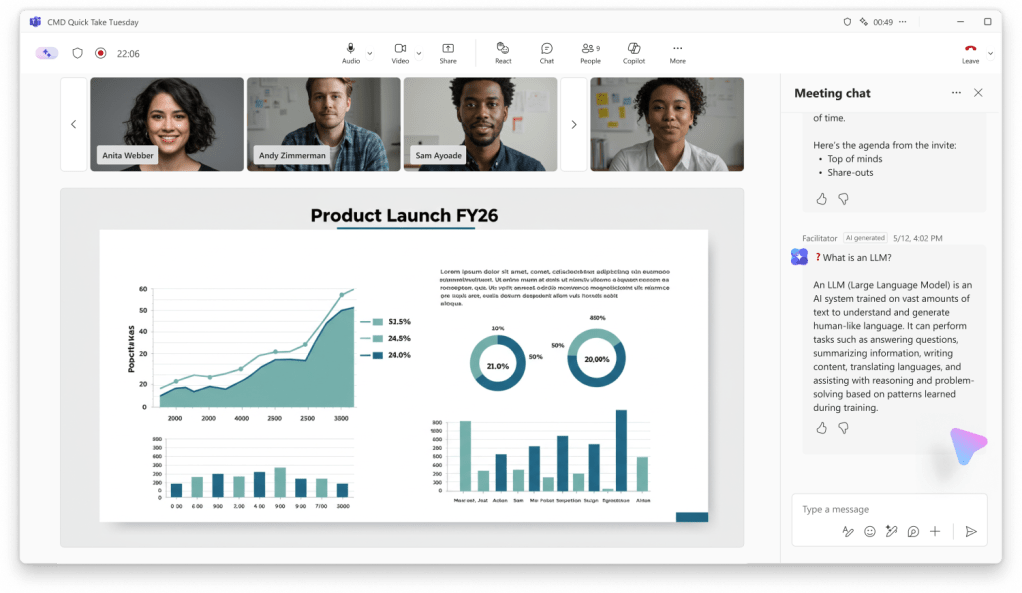
This one made me smile. Teams Facilitator can now proactively detect knowledge gaps in a meeting and answer them in the meeting chat using web search (MC1409304). So when there’s an implicit or explicit “wait, what’s the number for…?” moment, Facilitator can quietly drop the answer into chat — no one has to break their flow to go look it up.
Microsoft is careful to say it’s infrequent — typically less than once per meeting — so it’s a helpful nudge, not a chatterbox. It needs Microsoft 365 Copilot (Premium) and lights up where Facilitator is enabled. Targeted Release starts early July 2026, with GA rolling through August. I can already think of a dozen meetings where this would have saved a tangent. Smart — like, really smart.
Teams got a lot of love in June. A few ones:
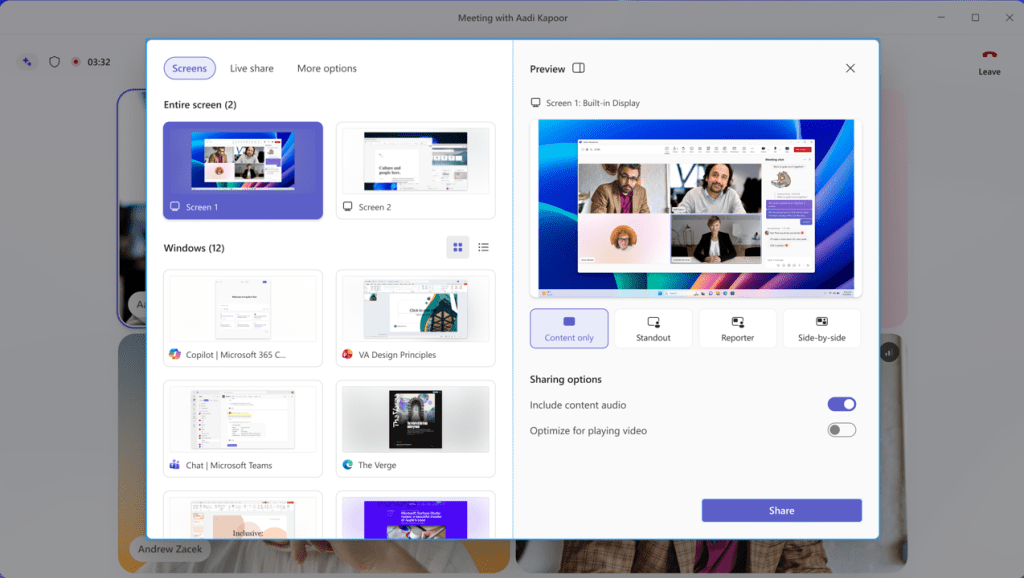
A refreshed in-meeting experience — simpler controls and a smarter share panel (MC1317197). The meeting controls get center-aligned with mic, camera and share grouped together, Leave is pulled away so you stop hitting it by accident ( hopefully never again!), and the share panel gets live previews of your screens and windows, a tabbed layout (Screens , Live share (interactive files), More options) and a two-step share confirmation to prevent those heart-stopping wrong-window shares. You can even pin and rearrange your controls. Enabled by default (can’t be turned off tenant-wide), with a temporary user opt-out during rollout. Windows, Mac and web; Targeted Release early July, GA Worldwide through late August 2026.
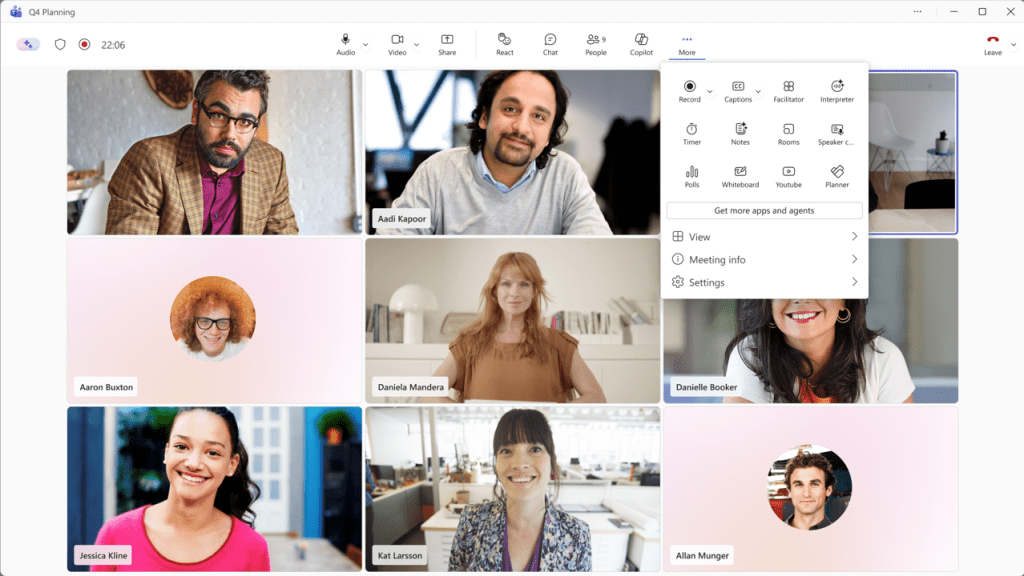
I have been able to try this new experience for some time, and it took a few moments to get used to but after that – I would not want to go back to the old version. I recommend to have courage and get started using with the new one once it comes, and go through the change. This is much more useful, compared to the old way. If you are looking for your PowerPoint and Excel files to share with Teams Live ( PowerPoint Live, Excel Live) look onto tab Live share ( in message center mentioned as Interactive files but image shows Live share).
Enhanced recap sharing (MC1289724, Roadmap 559606). Organizers can now grant access to the meeting recording, transcript, AI summary and notes right from the Share menu on a recap — and choose exactly who gets it — when sharing the recap link. Non-organizers can still pass the link along, and anyone who wasn’t in the meeting gets prompted to request access. This is the missing piece for sharing a recap with someone who couldn’t attend. Available by default; GA Worldwide completed through late June 2026.
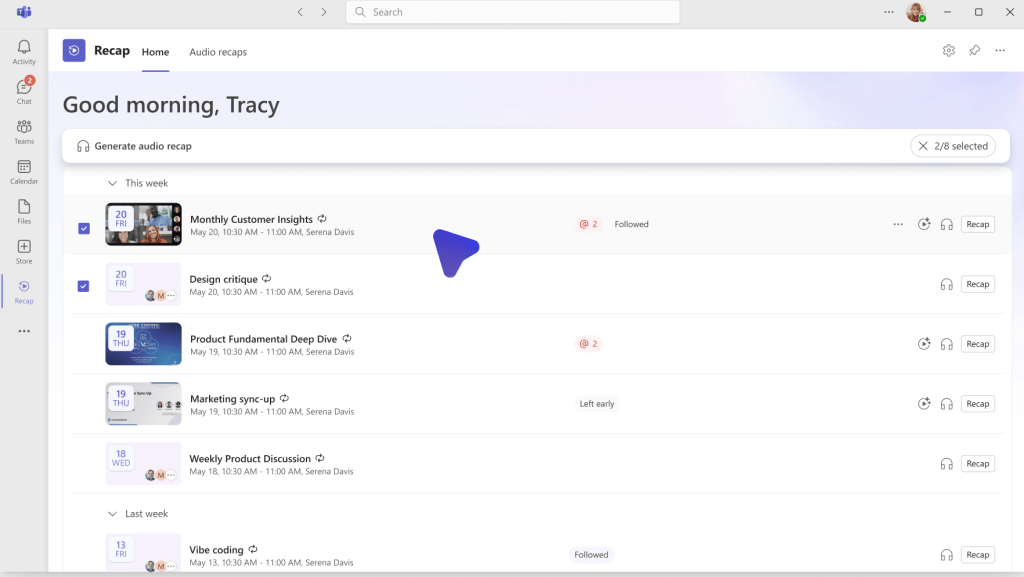
The new Recap app brings every recap into one place (MC1404322, Roadmap 564614). A first-party Teams core app that consolidates your recaps — recordings, transcripts and AI summaries — so you can catch up across meetings without digging through chat threads. Browse the last 30 days, filter by date, participants or keywords, watch a video recap or listen to an audio one — and here’s my favourite touch, generate a combined audio recap across several meetings, podcast-style, for the commute. It’s pre-installed but not pinned by default (you’ll find it in the app store on the left rail). The AI bits — audio recap, video recap, intelligent summaries — need a Microsoft 365 Copilot licence; without one you can still get to recordings and transcripts per your existing permissions. Enabled by default on Windows, Mac and web, mobile coming soon; rolling out across July 2026
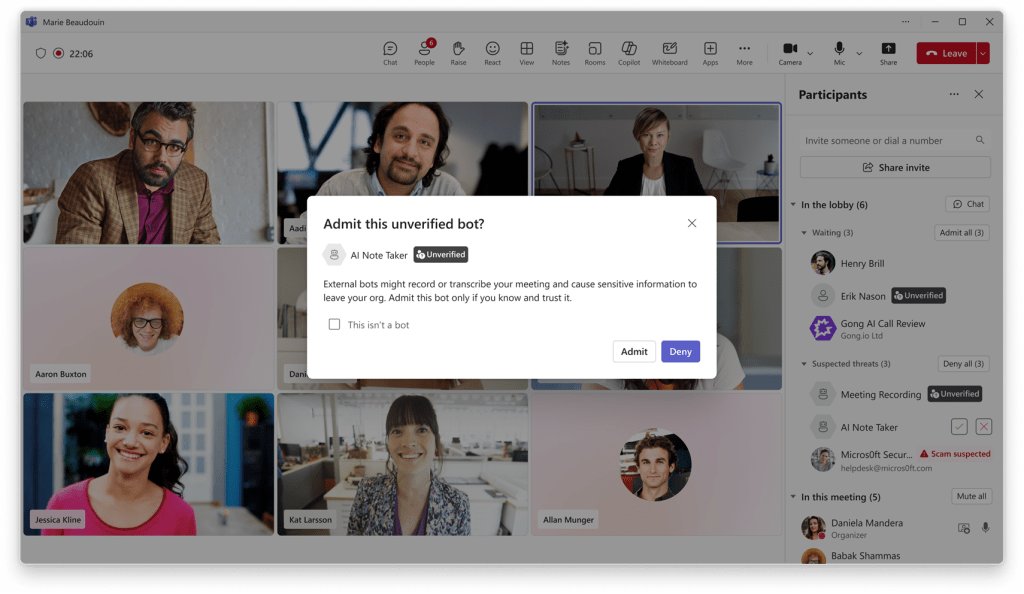
External meeting bots — first detect, then block (MC1251206, Roadmap 558107; plus Roadmap 566201). Teams now detects external meeting-assistant bots as they try to join and labels them clearly in the lobby, so organizers can approve, deny or remove them, and admins get a meeting policy (do not detect / require approval) in the Teams admin center. Detection is enabled by default; GA Worldwide rolling through mid-July 2026. Building on that, a separate update adds the one-switch option to automatically block all identified bots (Roadmap 566201, GA targeted August 2026). As uninvited note-takers become the norm, this combo is genuinely reassuring.
Automatic recording and transcription for Call Queues (MC1401299). Admins can switch on recording and/or transcription per queue (admin center or PowerShell), recordings land in SharePoint, and they’re reachable from the Queues app call history. Big for support and service desks.
Events: “Optimize for large audience” (MC1401303) — auto-enabled for events over 1,000 attendees, switching to the town hall experience (pause/rewind, attendee cameras/mics off, eCDN where applicable) — plus new sharing layouts for events (Roadmap 564613): Speaker focused, Content focused and Content only.
Teams Rooms keeps getting better: IntelliFrame people labels on Windows (Roadmap 566700), live transcription on Android Rooms (Roadmap 555234), user-selectable meeting language on Android up to 69 languages (Roadmap 565425), and proximity join for presenters in events (MC1319213).
So much landed here. The highlights:
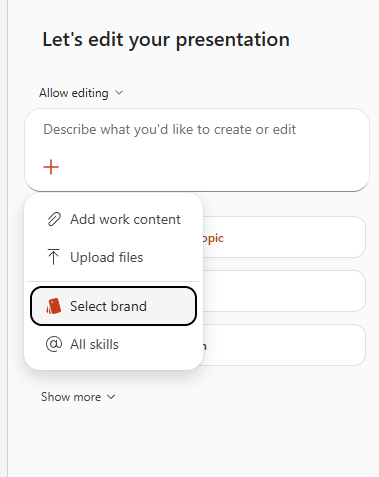
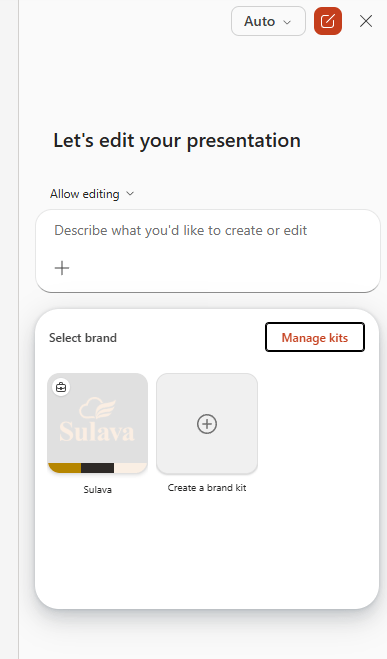
Brand assets in PowerPoint (MC1405505). Copilot now gives you native access to your brand kit — colours, logos, icons and approved images — through a dedicated brand pane, and Copilot in PowerPoint can build on-brand decks by pulling from it (MC1400828). Official kits roll out tenant-wide; if you don’t have one, you can make a personal kit. For anyone who’s spent their life re-applying corporate colours by hand, this is a gift. Targeted Release mid-to-late July, GA through early August.
Copilot Notebooks opened up — this is where it gets good. As of mid-June, Copilot Notebooks is no longer just for Microsoft 365 Copilot licensees — Copilot Chat users can now create and collaborate in Notebooks too (see What’s New in Notebooks | June 2026 on the Microsoft 365 Copilot Blog), broadly across the Microsoft 365 Copilot app and OneNote (you need a SharePoint or OneDrive service plan to create one). Full Copilot licence holders keep the premium sources, richer creation and higher reference limits; Chat users get standard access with lower limits. On top of that:
Outlook emails as a Notebook source (MC1392569, Roadmap 564910) — ground Copilot in the email threads where decisions actually happen, alongside your files. Up to 300 sources per notebook; Copilot Premium; GA Worldwide through late July 2026.
Multimodal capture in Copilot Notebooks on Windows (MC1405506, Roadmap 566322) — capture audio, images and notes in one go and let Copilot turn them into summaries, decisions and action items.
A Copilot Notebook in OneNote on Mac (MC1409042).
Notebooks is quietly becoming the place where a project starts — a project folder with an AI built into the lid. I really like that direction.
Curated prompts, published by your org (MC1396361, Roadmap 486695). Admins can now create, publish and pin organization-specific prompts straight from the Microsoft 365 admin center, so users land in Copilot Chat with high-value, on-brand starting points instead of a blank box — with built-in analytics to see what’s actually being used. One catch worth knowing: nothing appears to users until an admin publishes at least one prompt. GA Worldwide through late July 2026. This is a genuinely underrated adoption lever — pair it with the Learning Agent below.
A quick round of the rest worth knowing:
Copilot Vision (Roadmap 561037) — analyse what’s shared on your desktop screen, or point your phone camera at something during a voice session and ask about it.
Copilot Chat now reads embedded images in Word, PowerPoint and PDFs (Roadmap 560540).
Work IQ APIs now support remote MCP servers (Roadmap 559020) so agents can call external tools securely, and a refreshed, simplified design for the Microsoft 365 Copilot app (Roadmap 561488).
First, Planner agent in Microsoft 365 Copilot went generally available on June 15, 2026 (MC1323264, Roadmap 516576). It’s now preinstalled for everyone with a Microsoft 365 Copilot licence — just like Researcher and Analyst, there’s no pinning it to a pilot group anymore (admins can still block it tenant-wide). You create, update and manage personal tasks and shared basic plans without leaving Copilot, and the GA build added real polish, not just a date stamp: a new plan picker to search and filter your plans, a goals bucket to organise tasks around objectives, and — my favourite — everything the agent generates now lands in draft mode, so you review, edit and approve before anything is applied (this is the bit I always want from an agent). It even autoroutes to deeper reasoning for the hard stuff — like spinning up a whole plan from a Word, Excel or PowerPoint file — and it ties straight into Teams, Loop and SharePoint. You’ll want a Planner Plan 1 / Project Plan 3 or 5 licence on top of Copilot for the premium pieces.
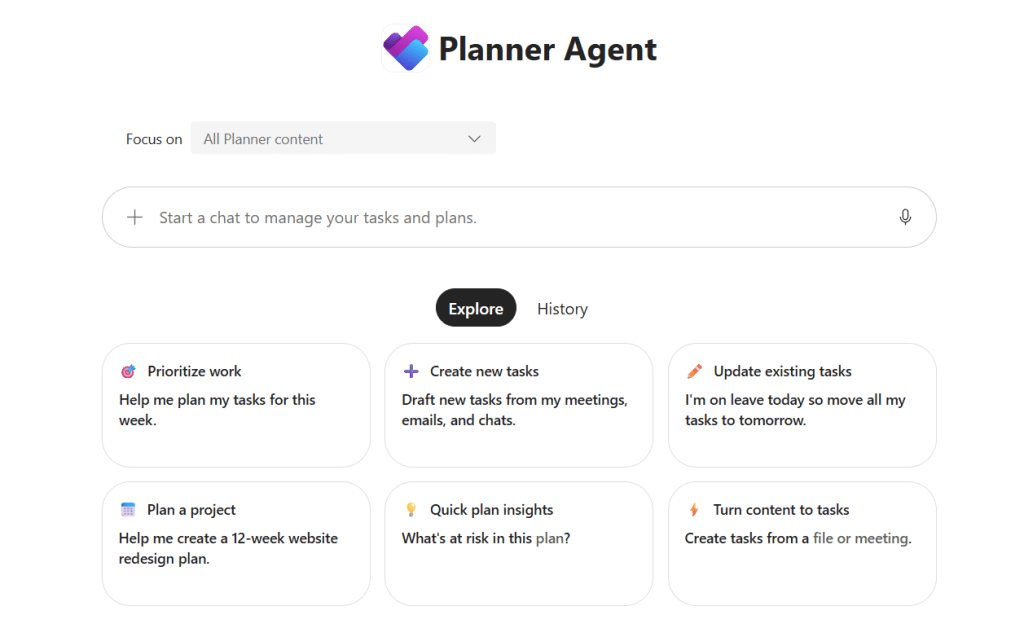
Second, for Frontier tenants, Planner Agent chat now lives inside Planner itself (MC1387810, Roadmap 560532) — the same agent, embedded as a chat panel in basic plans on the web, so you can ask “show my top tasks for today” right where the work lives. Targeted Release from mid-June.
Third — and this one fixes a real everyday annoyance — you will be able to connect a Teams meeting to an existing Planner plan (MC1392571, Roadmap 561490). Today, meetings spin up a separate plan for their tasks, so the same initiative ends up scattered across a pile of little plans. Now you can point a meeting at an existing plan and keep everything in one place — and Facilitator will create its meeting tasks straight into that selected plan (or you do it by hand if Facilitator is off). Don’t pick a plan and it behaves as before, creating a fresh one. You’ll need Teams, Planner and Loop enabled. Targeted Release early July, GA Worldwide through late August 2026.
Bringing the agent — and now meeting tasks — to where the work already lives is exactly the right instinct: Facilitator surfaces answers during the meeting and now drops the resulting tasks into the right plan after it. 🎯
I’m genuinely happy about this one. The Learning Agent in Microsoft 365 Copilot is now GA, graduating out of the Frontier program. Think personalised, just-in-time upskilling in the flow of work: daily AI tips tuned to your role, task-based guidance, AI-powered role-play for practising those tricky workplace conversations, skill assessments, structured learning plans and bite-size microlearning — plus an AI Skills Navigator (in preview) that pulls Microsoft’s skilling content, sessions and credentials into one place.
Licensing in plain terms: you need a Microsoft 365 Copilot licence; a Viva Premium licence (Viva Learning standalone or Viva Suite) unlocks more than 1,000 learning objects, and a LinkedIn Learning Premium subscription is needed for the role-play coaching scenarios. It’s rolling out across Copilot on web and desktop, Teams, and the Office apps. ( One note for admins — in Agent 365 it still shows up under the Frontier name, so don’t go looking for “Learning” and panic when you can’t find it.)
This is exactly the kind of “learning meets you where you already work” experience I’ve been hoping for. Adoption lives and dies on skilling — and this puts skilling right in the tools people use all day.
A few items here are less shiny but more important, so don’t skim:
Updated Copilot service plan behaviour (MC1405498). The “Microsoft Copilot with Graph-grounded chat” service plan becomes the primary control for whether licensed users get Copilot (Premium), Copilot Chat (Basic) or Copilot (Basic), and Personal Content Mode no longer activates when the plan is disabled. GA late July to early August.
Purview DLP for external web search (Roadmap 565870). A new real-time control stops Copilot and agents from sending sensitive data into external web searches (GA July).
Edge enforces “Do Not Allow Screen Capture” for labeled PDFs in OneDrive and SharePoint (MC1409303), closing a gap where browser-rendered PDFs ignored that label (Targeted Release early-to-mid August, GA mid-to-late August, Edge first).
DLP user-based alert aggregation (MC1409307) and group support for Copilot release preferences (MC1409102) — small but handy for admins managing rollout and alert noise.
None of these are flashy, but each one can generate a helpdesk ticket — or prevent one. Read the Message Center posts.
I keep an eye on the model layer too, because it shapes everything we build on top of it — and June closed with a big one. On June 26, OpenAI previewed its next-generation GPT-5.6 family, and the interesting part is the structure: three permanent tiers instead of a single flagship. Sol is the top-end model for the heavy reasoning, agentic coding, science and cybersecurity work; Terra is the balanced everyday tier, aimed at strong quality at a lower cost; and Luna is the fast, low-cost option for high-volume jobs. From here on the version number marks the generation and the name marks the capability tier — a clean way to think about picking a model for the task in front of you.
Worth setting expectations: GPT-5.6 is still an early preview, and it isn’t available in Microsoft 365 Copilot or in Microsoft Foundry yet — so for now it’s one to understand, not one you can wire into your Microsoft stack. Still, that intelligence / speed / cost split is the same decision you already make every day inside Microsoft 365 — “Sol or Terra or Luna” is just “which model for which task,” the very habit I keep nudging people toward with Copilot, Cowork and the agents. And one habit for the week: whenever a new model lands in your tenant, re-run your three most-used Copilot prompts and note what changed. Make re-baselining a reflex, not a project.
What a month. Claude GA in Foundry, a proactive Facilitator, Notebooks for everyone, Planner and Learning Agents maturing — and a real cost conversation arriving with Cowork credits tomorrow. The tools are getting more capable and more accountable at the same time, and honestly that’s the healthy direction. Use the included Copilot tools generously, use Cowork deliberately, set your budgets, and keep steering.
Have you already tried any of features that rolled out already? I’d love to hear what’s working for you — drop a comment. And as always, thank you for reading and sharing this journey with me. Hat on, mind open! 🎩


